What's new in Dynatrace SaaS 1.349
- Release notes
- 15-min read
- Rollout start on Oct 27, 2026
This page showcases new features, changes, and bug fixes in Dynatrace SaaS version 1.349. It contains:
Platform | Dynatrace Intelligence
Agentic Operations & SRE agent: delegate tasks to autonomous agents in your workflows
You can now delegate SRE tasks to autonomous agents for automated, reliable, and trustworthy execution.
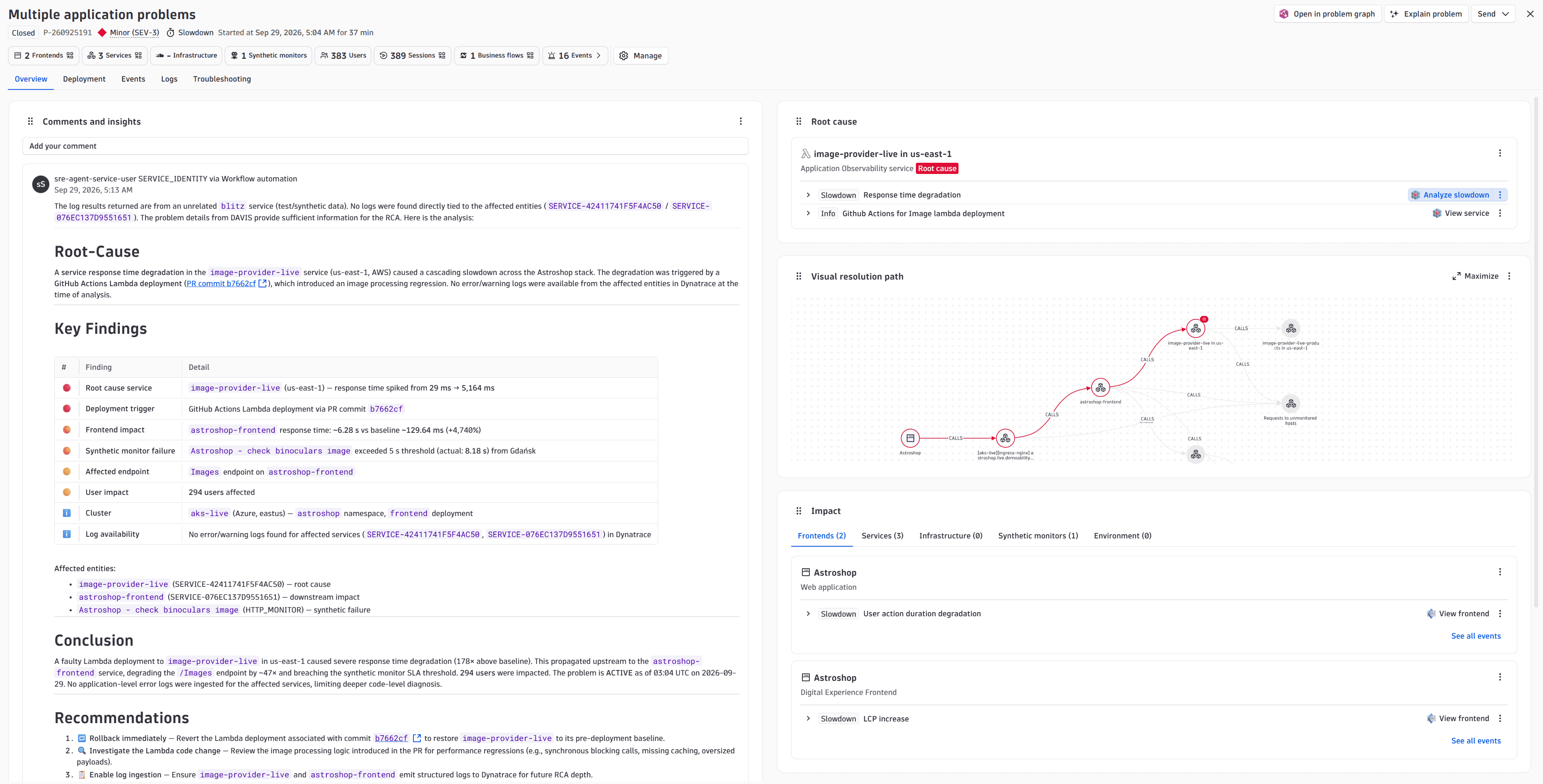
- SRE Agents conclude a problem investigation even before a human looks at it. The investigation report includes root cause, key findings, and a proposed fix written onto the problem.
- Agentic workflows can run scheduled work—such as right-sizing, cost cleanup, or a weekly report—and provide the owning team a ready-to-use result that nobody had to assemble by hand.
The agents use only the tools you allow, and stay within the permissions that you set. You decide where a person approves before a change lands, and the execution log records every step.
To get started, go to  Workflows to find the new actions and ready-made templates:
- Dynatrace Intelligence Actions:
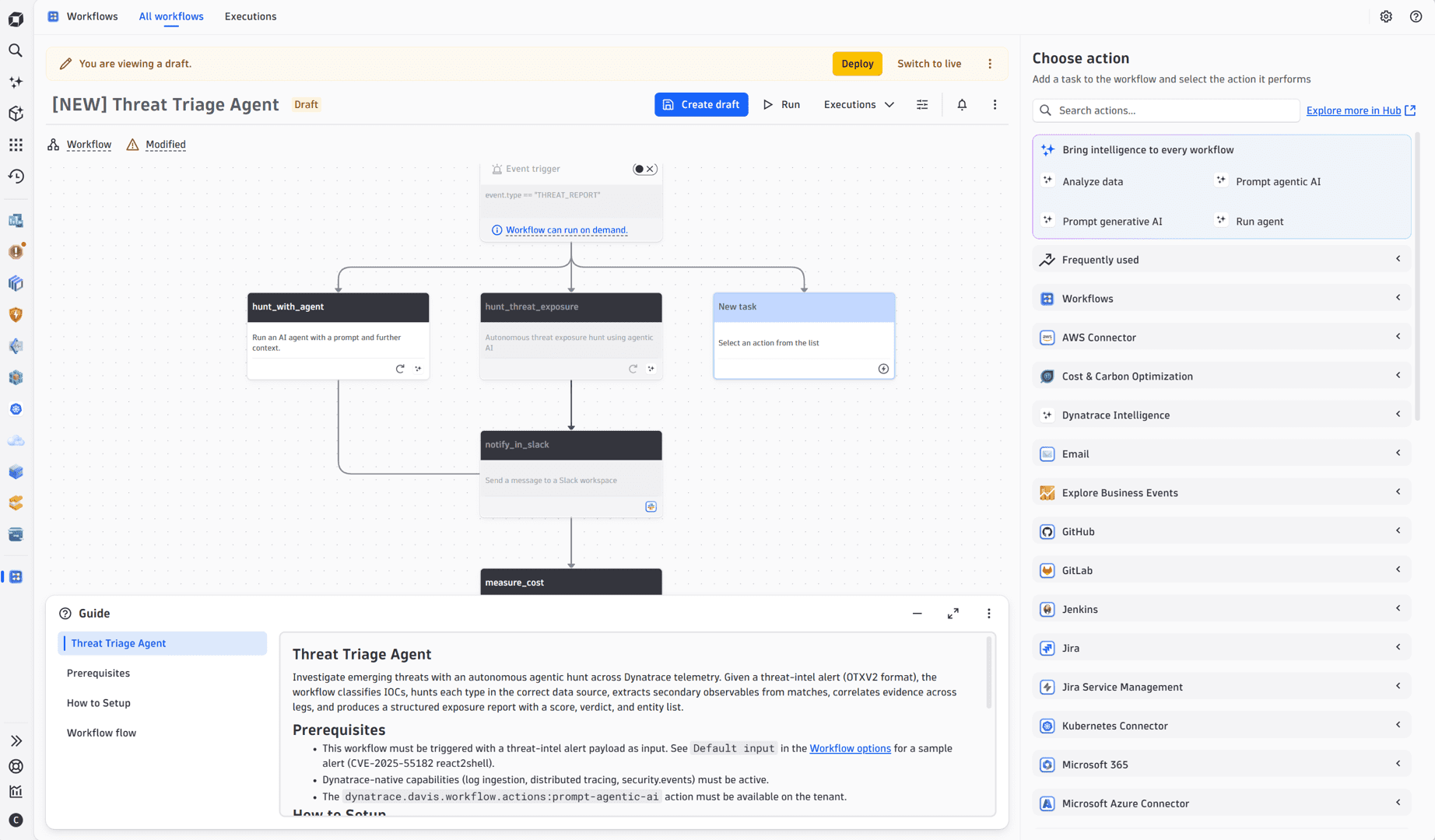
- Run agent: run a ready-made agent as a workflow step, with no prompt to write. The first is the SRE Agent, pre-configured by Dynatrace with its instructions and tool selection. Triggered by a problem, it investigates with its own queries and writes the root cause, key findings, and recommendations onto the problem. More agents will follow.
- Prompt agentic AI: define the prompt, additional context, and instructions, the tools that the agent may use, and an output schema. The agent decides which tools to call, runs its own queries, and returns a structured result that later steps read field-by-field. Combine it with DQL queries and code actions where a fixed sequence of steps would not fully cover the case.
- Prompt generative AI: summarize events and activity in any language, suggest fixes for open problems and code changes, and optionally ground the answer in Dynatrace Documentation, Community and Developer Portal content.
- Agentic workflow templates: start from a working workflow (for example, a workflow for SRE Agent, Alert Reduction, Kubernetes Troubleshooting, Database Operations, Infrastructure Optimization, and more), then adapt it to your environment.
Application Observability
Causal AI pinpoints the root cause across OpenTelemetry services, frontends, and databases
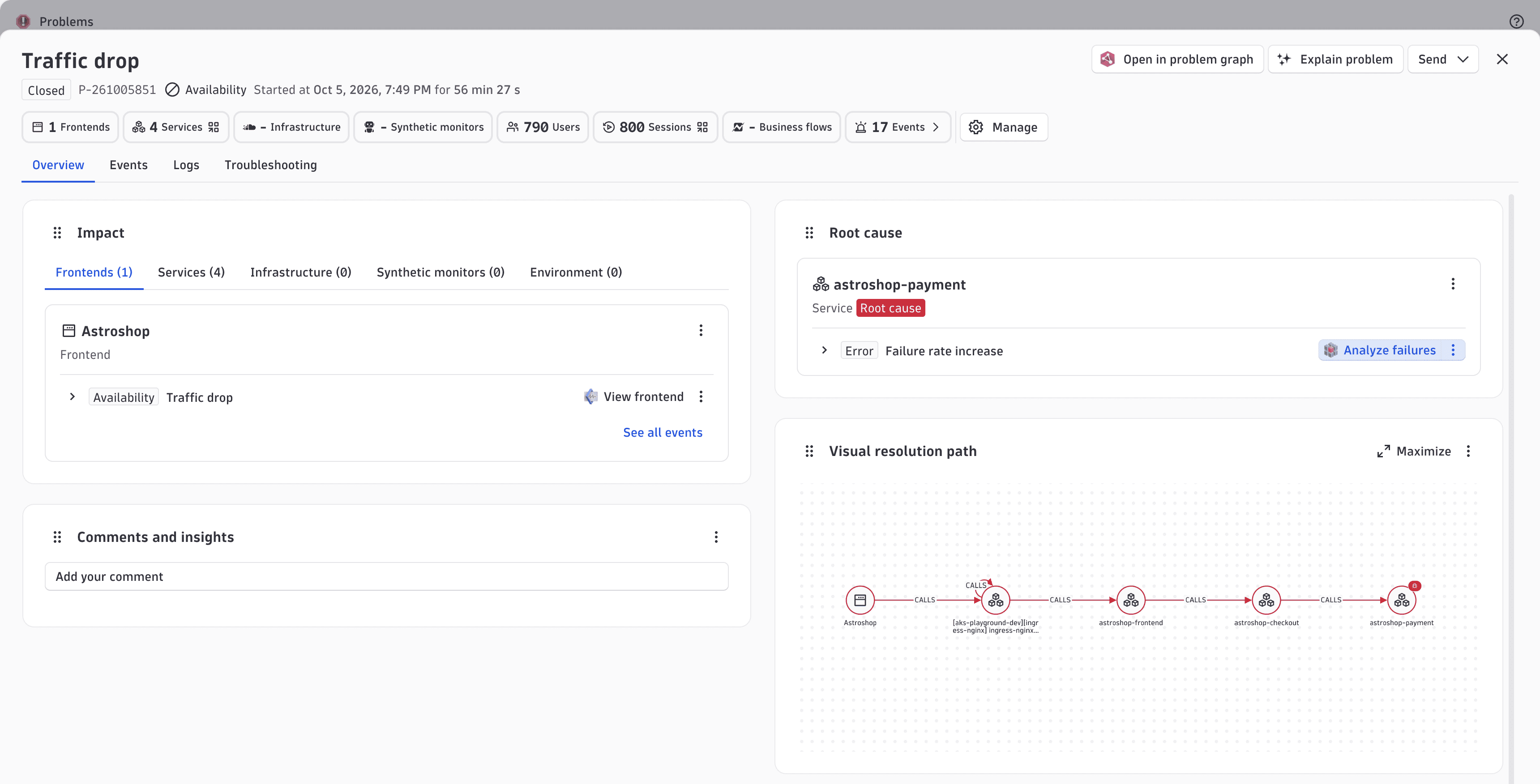
Dynatrace root cause analysis now covers OpenTelemetry services. When several services in a chain degrade together, their anomalies are merged into one problem with a causal explanation that names the root cause service, instead of one alert per affected service.
This behavior works:
- From a monitored web or mobile frontend down into an OpenTelemetry backend.
- From a service to the databases it calls, including cloud databases and databases monitored with a Dynatrace extension.
Causal AI follows the Smartscape topology on Grail data, so there are no tags or correlation rules to maintain. Your team gets less noise, finds the root cause faster, and spends its time fixing instead of triaging.
Platform | Platform Services
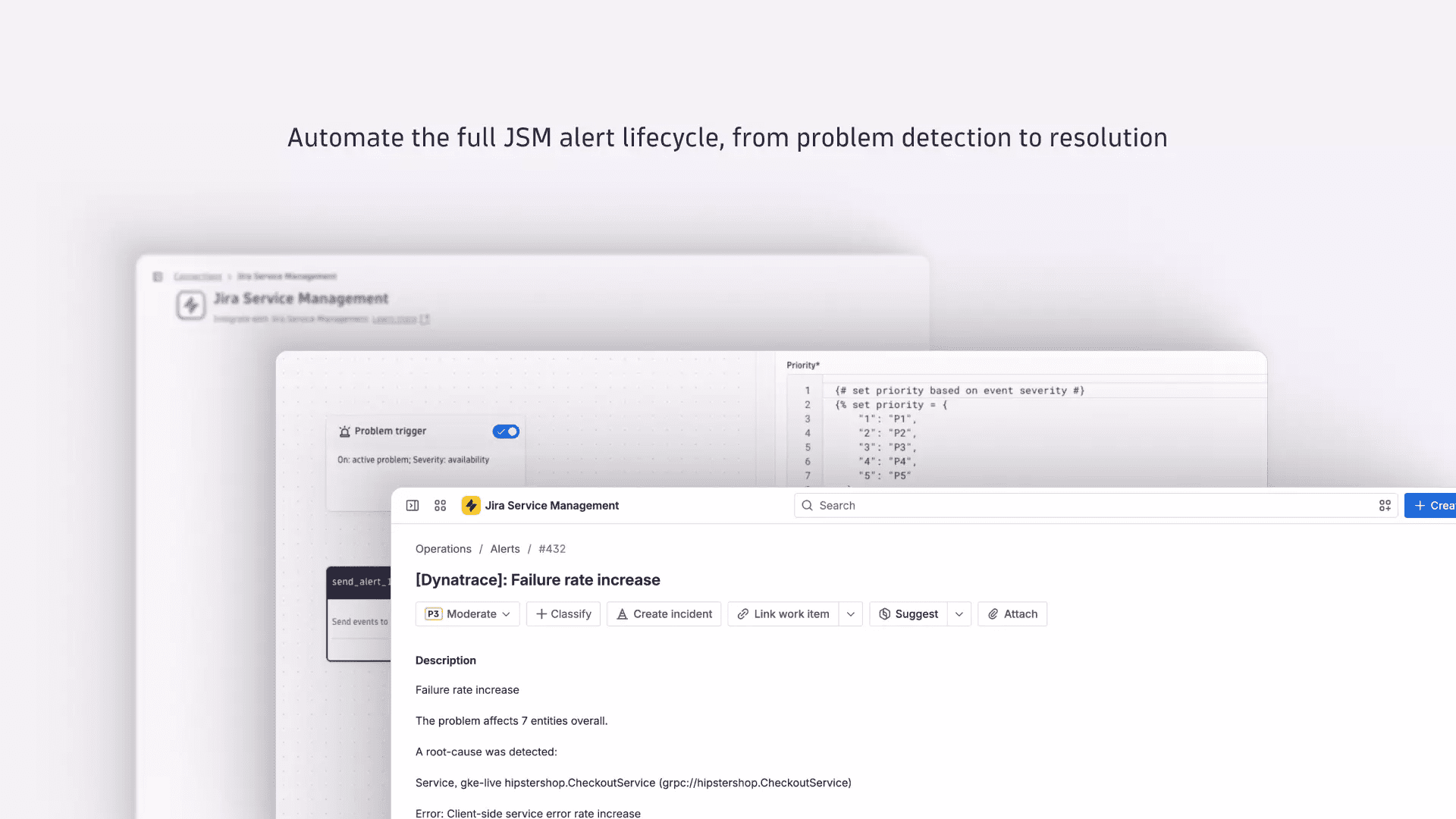
New Jira Service Management (JSM) Connector
Connect Dynatrace to your Atlassian Jira Service Management (JSM) connector for Workflows. Whenever a problem, security vulnerability, or attack is detected by Dynatrace, a workflow using this connector automatically creates, updates, or closes a JSM alert. No manual handoff is required.
This connector tracks the Dynatrace problem through its entire lifecycle: react to a JSM alert when a problem opens, update it as conditions change, and acknowledge and close it automatically when Dynatrace resolves the problem. A stable alias ties all three actions to the same JSM alert, keeping your on-call view clean and free from duplicate notifications.
By using the JSM connector you get to:
- Keep the JSM alert lifecycle aligned with the Dynatrace problem lifecycle.
- Reduce duplicate alerts and manual coordination for on-call teams.
- Give responders root-cause and impact context in every alert.
- Configure alert mapping and routing directly in Workflows.
Feature updates
Account Management
New group management experience
We've redesigned group management to make policy assignment faster and more efficient.
- Streamlined group creation: Create user groups and invite members in a single flow.
- Effective policy preview: See the effective policies that apply to a group directly within the creation and edit/view modes, before you save.
- Full configuration overview: The new View mode gives you complete oversight into how a group is configured.
Account Management | Identity Access Management
Control access to request naming with IAM policies
Request naming permissions now follow your IAM policies, like the rest of the latest Dynatrace, instead of management zones. The security context sets which services each policy covers. For more information, see Grant access to entities with security context.
To opt in, assign the policies and then turn on IAM permission for request naming in  Settings > Process and contextualize > Services > Try Services in the latest Dynatrace. Users without a matching policy lose access.
Application Observability | Distributed Tracing
Distributed Tracing: control Adaptive Traffic Management per scope in Settings
You can now control Adaptive Traffic Management (ATM) for specific scopes directly in Settings.
In Settings > Collect and capture > Distributed tracing > Trace ingest control, you can:
- Increase or decrease the adaptive trace capture rate for a scope, such as an environment, host group, Kubernetes cluster, namespace, workload, or process group.
- Set the share of usable adaptive trace volume that ATM may use for your environment.
Previously, these controls were available only through the Settings API.
To learn more, see Adaptive Traffic Management with Dynatrace Platform Subscription (DPS).
Business Analytics | Business Analytics
Cloud cost management for Azure
 Cost & Carbon Optimization now supports ingestion of Azure cloud cost and usage data, bringing FinOps-grade cost visibility into Dynatrace across Azure and AWS. Cost data is imported daily from Azure Cost and Usage data exports using the FOCUS 1.2 specification, an open billing standard from the FinOps Foundation that normalizes cost and usage data across cloud providers. By building on FOCUS, this integration establishes a foundation aligned with the FinOps Framework—covering capabilities across cost understanding, allocation, anomaly management, and optimization—that Dynatrace will continue to build on as this feature evolves.
Ingested cost data is stored as business events in Grail, making it queryable alongside your existing observability data using DQL and giving you the flexibility to build dashboards and notebooks shaped around your organization's cost allocation model, team hierarchy, and reporting requirements. To help you get started, the preview community page provides sample notebooks and dashboards aligned to common FinOps use cases.
You can further enrich ingested cost data using OpenPipeline processors, which allow you to extract, transform, and route cost information. For example, you can map Azure tags to Dynatrace entities, normalize team or environment labels, or join cost signals with infrastructure and application telemetry already in your environment.
The Azure cost ingestion capability provides the following features:
- The Cost ingestion UI within Cost & Carbon Optimization has been extended to guide you through the setup process in Dynatrace, providing an Azure template to establish a trusted connection with your Azure account to retrieve cost and usage data that you export using the Azure data export feature.
- Cost data is ingested daily into Grail, and up to 12 months of historical data can also be ingested into Dynatrace to support longer-term cost analysis and trend reporting.
- The ingested FOCUS data is stored as documented in the Dynatrace Semantic Dictionary. For more information, see Semantic Dictionary Business Analytics. This combines cost data from Azure with AWS and structured entity information from Dynatrace
- The Cost Explorer UI has been extended to support the viewing of both Azure and AWS data, with simple on-screen options to select either or both providers as dimensions, and extending the dimensions with the Azure semantic dictionary. Because the solution uses the FOCUS data sets, data can be queried and analyzed using the same queries for both Azure and AWS without the need to learn an entirely new data set.
Business Analytics | Business Analytics
QuickStart charts and findings are now split by technology
The data streams within  QuickStart can now be viewed and split by technologies such as Kubernetes, AWS, and hosts.
Cost Intelligence
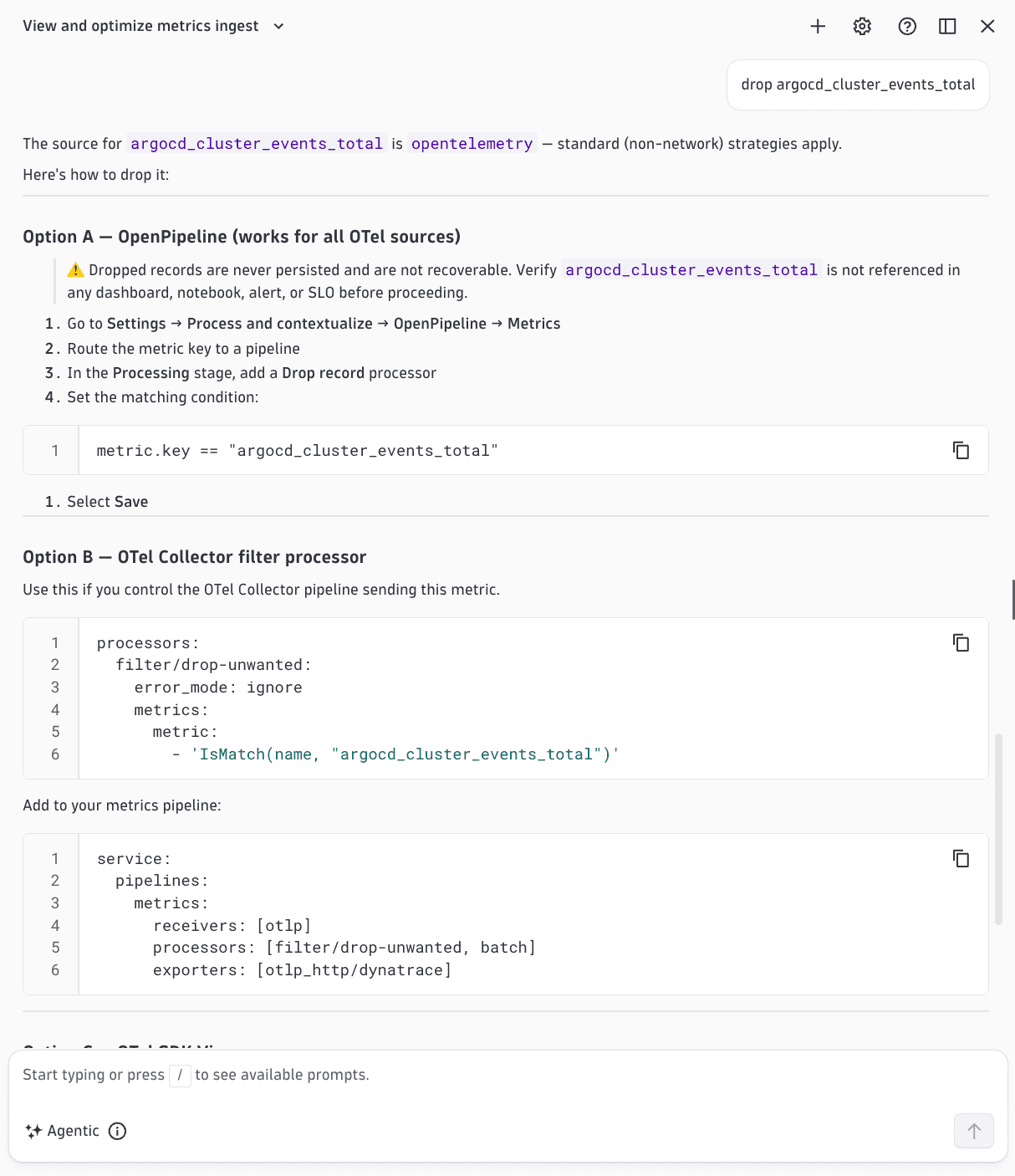
New metrics cost optimization guidance in Dynatrace Assist
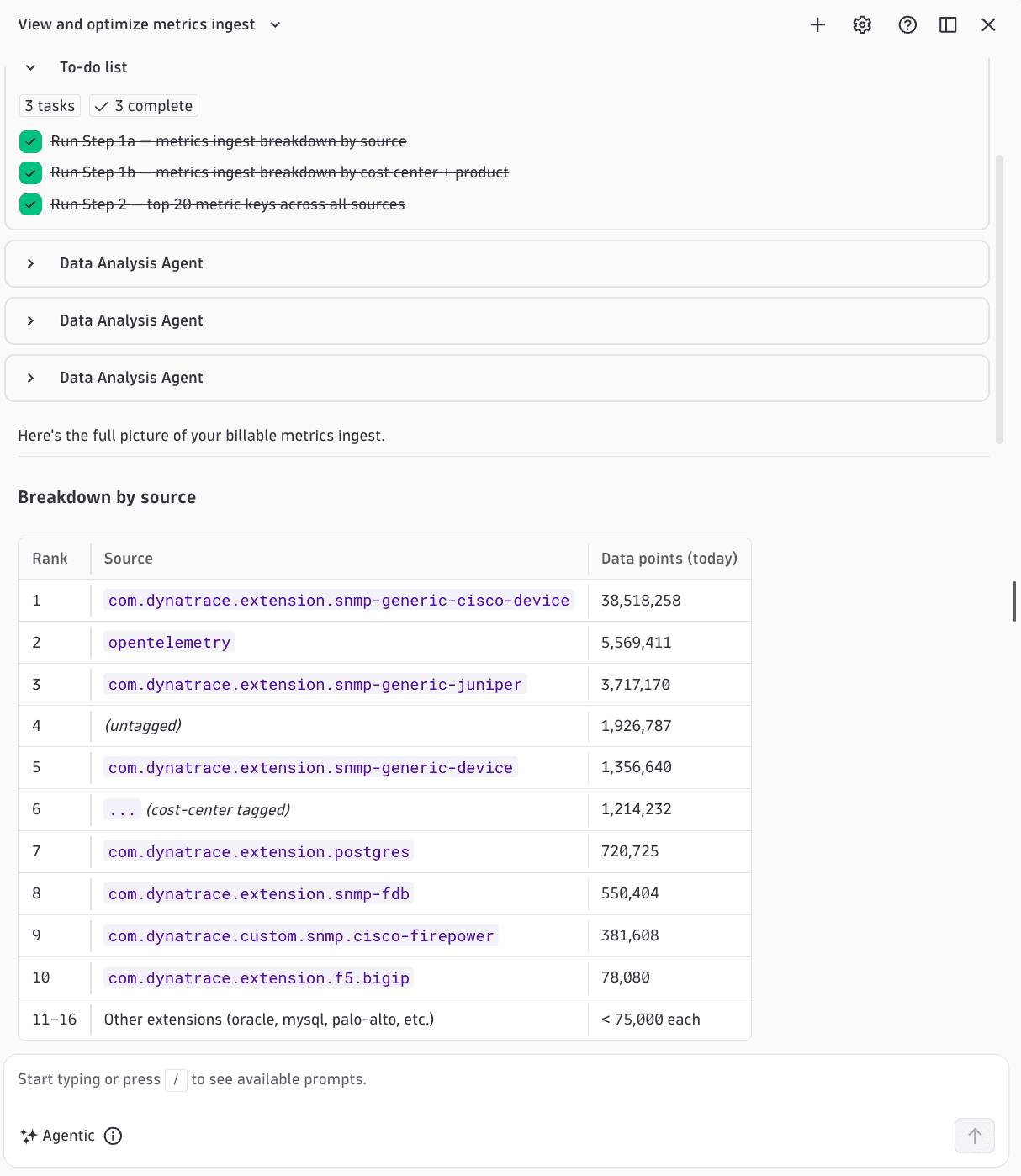
View and optimize your metrics usage across the platform with the new metrics cost optimization skill in Dynatrace Assist. This will help you better:
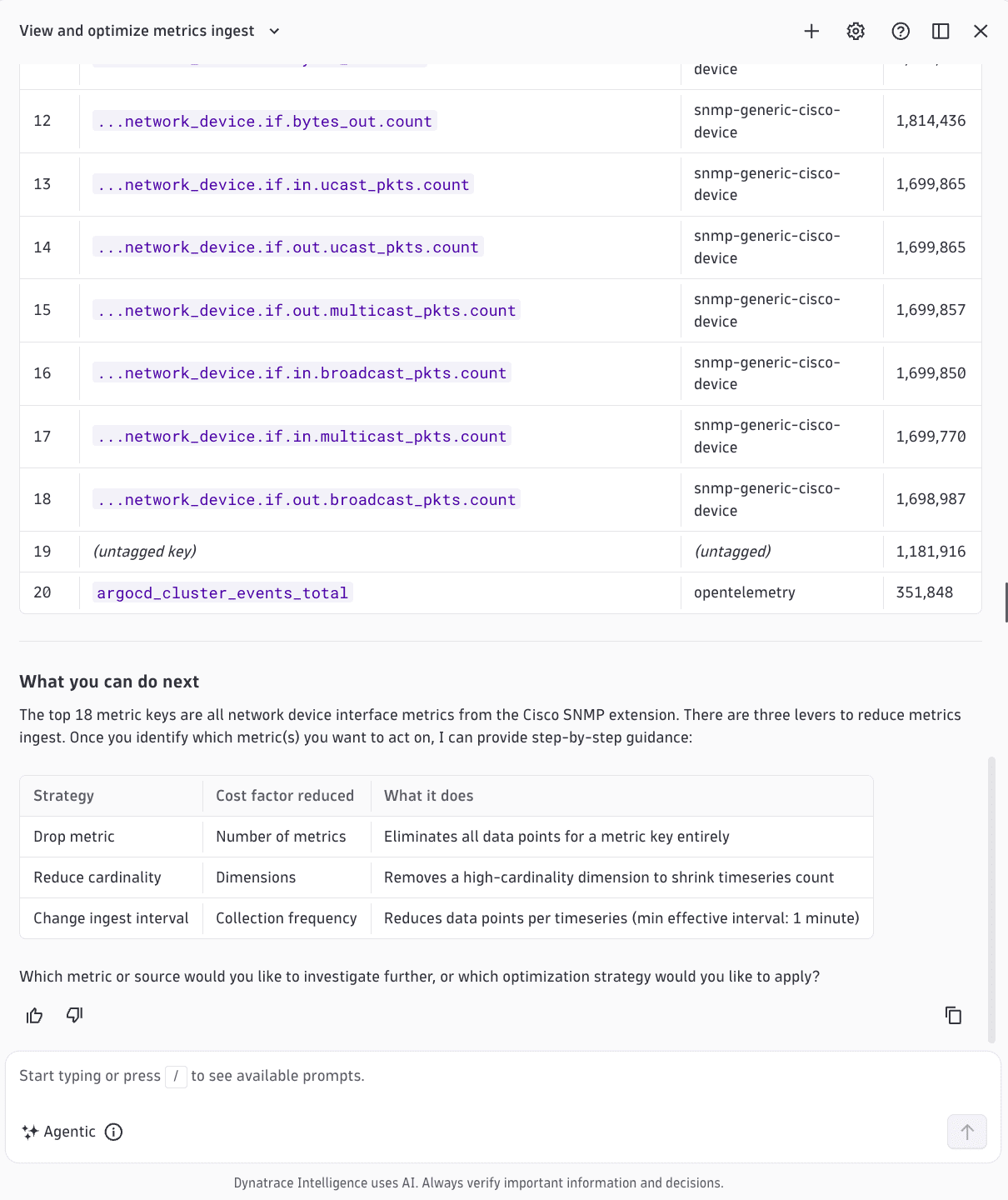
- See exactly where your metrics spend comes from. Drill down by metric source and cost allocation all the way to the individual metric key, with the same breakdown you get in the ready-made Usage - Metrics dashboard.
- Choose the optimization strategy that fits your setup and get step-by-step guidance tailored to the metric's source (for example, OpenTelemetry or network), based on best practices for optimizing metrics cost.
- Act on the guidance and optimize at the metric source, or in Dynatrace OpenPipeline, depending on what works best for you.
To get started, ask Dynatrace Assist: "What is contributing the most to my metrics usage and how can I optimize it?"
Data Observability
OpenLineage pipeline telemetry
Connect OpenLineage-compatible applications—such as Airflow, dbt, and Databricks—to Dynatrace. Pipeline failures surface as Problems with job name and error context, and every run appears as a correlated record in Grail alongside application telemetry. A lineage explorer view lets engineers navigate upstream and downstream pipeline neighbors directly from a problem, with health rings on every node and run-comparison for blast-radius assessment.
Data Observability
Connect Snowflake to Dynatrace for better data observability
Connect Snowflake to Dynatrace with a guided configuration wizard in  Data Observability. You get out-of-the-box warehouse health, query performance, and credit consumption dashboards. This functionality replaces the existing Snowflake extension which will be deprecated in the near future.
Digital Experience
Browser Monitor scheduling now requires ActiveGate version 1.347 or later for Group 3 environments
For environments belonging to Group 3 (Enhanced), Dynatrace requires ActiveGate version 1.347+ for scheduling and executing Browser monitors. This requirement is also visible in the Migration dashboard.
Environments in Groups 1 and 2 (Standard and New environment baseline, respectively) are not affected.
Digital Experience | Synthetic
Synthetic Browser Monitor duration metrics calculated from the new RUM JavaScript data
For Group 3 (Enhanced) Dynatrace environments, the {{dt.synthetic.browser(.step).duration}} metrics are now calculated using data from RUM JavaScript. For environments that are in Group 1 or Group 2 (Standard and New environment baseline), {{dt.synthetic.browser(.step).duration}} metrics continue to be calculated using data from RUM Classic JavaScript.
Infrastructure Observability | AWS
Topology and metrics for newly supported AWS services
With the New Cloud Platform Monitoring for AWS, Dynatrace now collects topology information and metrics for more AWS services and more resources. This gives you immediate visibility into services that previously may have required custom configuration with the Ingest any AWS metrics toggle.
Newly supported resource types: AWS CloudSearch domains (AWS::CloudSearch::Domain), Amazon EC2 Spot Fleet requests (AWS::EC2::SpotFleetRequest), Amazon Kinesis Video Streams streams (AWS::KinesisVideo::Stream), AWS Elemental MediaConvert queues (AWS::MediaConvert::Queue), AWS WAF rules (AWS::WAF::Rule), AWS WAF rule groups (AWS::WAF::RuleGroup), AWS WAF web ACLs (AWS::WAF::WebACL), and Amazon WorkMail organizations (AWS::WorkMail::Organization).
Newly supported AWS Services: AWS Chatbot (AWS/Chatbot), Amazon CloudSearch (AWS/CloudSearch), Amazon EC2 Spot (AWS/EC2Spot), AWS IoT (AWS/IoT), Amazon Kinesis Video Streams (AWS/KinesisVideo), AWS Elemental MediaConvert (AWS/MediaConvert), Amazon SageMaker Ground Truth labeling jobs (AWS/SageMaker/LabelingJobs), Amazon SageMaker processing jobs (/aws/sagemaker/ProcessingJobs), Amazon SageMaker training jobs (/aws/sagemaker/TrainingJobs), Amazon SageMaker transform jobs (/aws/sagemaker/TransformJobs), AWS Service Catalog (AWS/ServiceCatalog), Amazon SWF (AWS/SWF), Amazon Translate (AWS/Translate), AWS WAF (AWS/WAF), and Amazon WorkMail (AWS/WorkMail).
For more information, see Integrated AWS cloud services.
To receive topology data and metrics for the newly supported services and resources, update your existing AWS connections. For details, see Update AWS connections.
Infrastructure Observability | Extensions
SAP Cloud ALM support now in preview
Dynatrace can now ingest signals from SAP Cloud ALM using a Dynatrace extension. Sign up for the preview to see it in action in your environment.
Infrastructure Observability | Extensions
Multi-value security context in SQL data sources
SQL data sources now support multi-value security context at the endpoint level.
Infrastructure Observability | Infrastructure & Operations
Navigate from  Infrastructure & Operations to related data in other apps
Infrastructure & Operations now includes navigation options to related data in other apps, including  Logs,
Logs,  Clouds, Kubernetes, and Services. Your active filters, timeframe, and segments carry over automatically, so you land in the target app with your context already applied.
Infrastructure Observability | Kubernetes
Expand Kubernetes tagging with workload and pod annotations and labels
In addition to namespace annotations and labels, the ingest enrichment configuration now supports workload and pod annotations and labels as sources for primary tags and Kubernetes tags.
For details, see Enrich Kubernetes telemetry with primary Grail fields and tags.
Infrastructure Observability | Network
Improved support for log metrics from network devices in Smartscape
We’ve updated the Logs tab in Infrastructure & Operations > Network Devices for Smartscape on Grail. Logs are now linked to a network device (an EXT_NETWORK_DEVICE Smartscape node) by its IP address.
Platform
Multi-environment deployment for ActiveGate deprecation
Multi-environment deployment for ActiveGate is deprecated and has reached the end of its active development. Existing deployments will continue to function, but no new features or enhancements will be added and feature requests will not be accepted going forward. We will announce an end-of-life date with adequate lead time in the ActiveGate release notes and in the Multi-environment ActiveGate documentation, which also covers the deprecation in detail.
Platform
Return to recent views in one click from the dock
The dock now shows your recent views so you can return to any screen you've visited without searching or navigating from scratch.
-
The new Recents entry, at the top of the dock, opens a panel that lists every screen you've visited, sorted from newest to oldest visit. To narrow down your visits, you can also search within the list.
-
Each app in the dock also shows up to three of your most recent visits in its hover menu. Select any entry to jump directly back to the exact state you left.
Recent views are saved per user and environment, across browser sessions. You can pin any recent view to your dock to keep it permanently accessible.
Platform | Dashboards
Top list visualization integrated into Dashboards and Notebooks
Top list visualizations are now integrated into  Dashboards and
  Notebooks, closing one of the most-cited gaps in the Dynatrace Classic to Latest Dynatrace migration path. Users can now build compact, ranked visualizations with visible labels and values directly from the tile or section configuration panel.
The configuration covers
- Data mapping (category and value supports
String,numeric,Duration, andsmartscapeId fields) - Bar orientation
- In-bar category/value display
- Label truncation
- Legend behavior
Additional features include:
- A single-palette coloring, consistent with the units & thresholds concept.
- Standard interactions are wired end-to-end: context menus, Open with… drill-downs, variable binding, custom links, full-label tooltips, and CSV export.
- Tiles scroll internally at small sizes rather than shrinking bars below readable thickness.
- Classic dashboard Top list tiles now migrate into this visualization automatically.
Platform | Grail
Query login and logout audit events in Grail
You can now find login and logout audit events in Grail, alongside your other platform audit events. Previously these events were available only through the classic audit logs API. Now they're forwarded to Grail as system events, so you can query your full authentication history from a single source with DQL.
This makes it easier to build complete audit coverage and to move off the Dynatrace Classic audit logs API. Note that signing in to a classic app can produce two audit events—one from the API gateway and one from the cluster—which reflects the two systems involved in the login. You can differentiate them by their event provider.
Platform | Grail
Custom buckets for metrics
Metrics now supports custom buckets.
By default, metrics are stored in the system default bucket (default_metrics) for 462 days. You can optionally route subsets of metrics into custom buckets using configuration rules. With custom buckets, you can control how your metrics are stored:
- Assign specific metrics to dedicated buckets.
- Configure custom retention per bucket.
- Separate data for cost control, compliance, or access control.
Platform | Platform Services
The Jira Connector in Workflows now supports scoped tokens
For Jira Cloud, the Jira Connector in Workflows now supports scoped tokens as an alternative to personal access tokens (PAT). To use scoped tokens, go to the connector settings and select the Scoped Token type.
Platform | Platform Services
Dynatrace Intelligence Analyzer now supports percentile queries
Dynatrace Intelligence Analyzer now supports percentile queries in the Auto‑Adaptive Threshold and Seasonal Baseline analyzers. Percentile-based queries can now be used in Notebooks, Dashboards visualizations (AI analysis), and custom alerts. This lets you define baselines and detect anomalies using percentiles (for example, P95 or P99).
Platform | Smartscape
Core entities now forwarded via SmartScape events
Dynatrace core entities (such as HOST, PROCESS) are now forwarded to Grail via SmartScape events.
Threat Observability | Security events
Prioritize Microsoft Defender XDR detections by impact on your infrastructure
Dynatrace now ingests Microsoft Defender XDR alerts, including those from Defender for Endpoint, Identity, Office 365, and Cloud Apps, and enriches them with the entities it monitors, so you can prioritize threats that affect your production infrastructure. For setup, see Ingest Microsoft Defender XDR detection findings.
Threat Observability | Security events
Prioritize Palo Alto Cortex XDR detections by impact on your infrastructure
Dynatrace now ingests Palo Alto Cortex XDR detection findings and enriches them with the entities it monitors, so you can prioritize threats that affect your production infrastructure. Optional audit log ingestion helps you identify anomalous activity on Cortex XDR itself. For setup, see Ingest Palo Alto Cortex XDR detection findings and audit logs.
Threat Observability | Security events
Manage security integrations from  Security Operations
Security Operations now gives you one place to install, configure, monitor, and uninstall push-based integrations with clear onboarding instructions throughout setup.
It also centralizes ready-made dashboards and workflow templates across security integrations, including AWS Security Hub, Amazon GuardDuty, Amazon ECR, OCSF, Microsoft Defender for Cloud, Microsoft Sentinel, and Google Artifact Registry.
For details, see Security Operations app.
Breaking changes
Data Observability
Dynatrace Classic metric limits alerts rules are now disabled for all SaaS environments
The four built-in metric limits alert rules under builtin:internal.metric.limits-alerts have been deactivated for all SaaS environments. Any rule that was previously active has been automatically deactivated.
The relevant rules monitored usage against Dynatrace Classic platform limits for metrics: dsfm:server.metrics.builtin_dimensions_usage, dsfm:server.metrics.custom_dimensions_usage, dsfm:server.metrics.custom_metrics_usage, and dsfm:server.metrics.metric_dimensions_usage.
Action plan: If you’re still using Dynatrace Classic, use standard Metric events (builtin:anomaly-detection.metric-events) to create equivalent rules. Alternatively, upgrade to Latest Dynatrace and take advantage of Metrics on Grail, which is not subject to fixed platform limits.
Data Observability
Log record ordinal can now be set explicitly via the ordinal attribute
You can set log record ordinals explicitly via the ordinal attribute. Dynatrace reads the ordinal attribute from the log payload and uses it as the record ordinal.
Action plan:
- If you send
ordinalas an integer (for example,"ordinal": 15): No action is needed. Your value now explicitly sets the record ordinal. - If you send
ordinalas a non-integer (for example,"ordinal": "15"): Your value is moved tooverwrittenN.ordinal. If you read this field in pipeline processors, queries, dashboards, or alerts, either update those references or rename the field before ingest to avoid theoverwrittenNindirection because the index is unpredictable at ingest time.
For the full attribute specification, see Ingest JSON and TXT logs and Ingest OTLP logs.
Infrastructure Observability
Deprecation of host-scoped ingest enrichment rules
The Ingest Enrichment Configuration (builtin:ingest.enrichment.config) no longer allows the creation of new rules on host scopes. Existing rules on host scopes can still be edited, and stay in effect until further notice. No other scopes are affected.
Action plan: If you have configured enrichment rules on host scopes, we recommend moving them to a different scope, such as a host-group. We plan to remove host-scoped rules in a future release.
Infrastructure Observability | Kubernetes
Rules in builtin:ingest.enrichment.config must be unique
Ingest enrichment rules created in the builtin:ingest.enrichment.config settings schema must now be unique within the respective scope.
Starting with Dynatrace version 1.349, duplicated rules are rejected. This might affect your automations that use the Settings API.
Action plan: Check all automations that use the Settings API and make sure the ingest enrichment rules are unique within the respective scope.
Platform | Settings
Changes to how setting objects are scoped to monitoring entities
As part of the planned Smartscape transition, we are changing the way settings objects are scoped to monitored entities. These changes affect how settings objects are addressed on the classic environment API and how Identity and Access Management (IAM) policies grant or deny access to scoped settings.
This update affects only environments belonging to Group 3 (Enhanced). Environments in Group 1 and Group 2 (Standard and New environment baseline, respectively) are not affected.
-
Some IAM conditions that rely on management zones or on entity-based scope identifiers stop matching settings objects. This includes:
-
Conditions on management zones (
environment:management-zone). Because management zones no longer exist, these conditions never match. -
Security context conditions that are derived from management zones.
-
-
settings:scopeconditions that reference an entity-based scope identifier. -
Host groups can no longer be addressed by their entity ID. They must be addressed by their string-based identifier on both the environment API and in IAM policies.
-
Security context enrichment is initially available only for values set at the edge (for example, on the OneAgent). Enrichment for all Smartscape nodes is planned for a later phase.
Action plan: Review your IAM policies and any automation that reads or writes scoped settings objects before this change reaches your environment.
-
Audit every policy that uses these conditions and migrate it to a condition that remains valid after the transition (for example,
settings:schemaIdor the string-based host group identifier).-
ALLOW statements stop granting access. Users who previously had access through a management-zone or entity-scope condition lose that access.
-
DENY statements stop blocking access. Restrictions that relied on these conditions no longer take effect, which can unintentionally widen access.
-
-
Update any IAM policy condition and any environment API call that references a host group by its entity ID so it uses the string-based identifier instead.
Host groups can no longer be addressed by their entity ID (for example,
HOST_GROUP-8555E20A1152D99E). They must be addressed by their string-based identifier (for example,mygroup) on both the environment API and in IAM policy conditions. -
Security context enrichment is initially available only for values that are set at the edge, for example on the OneAgent. Settings objects whose security context is expected to be derived elsewhere are not enriched in this phase.
Until enrichment is extended to all Smartscape nodes, do not rely on security-context conditions as the sole grant or restriction for settings objects whose security context is not set at the edge.
For details, see IAM policy statement syntax and IAM policy statements.
Platform | SSO
New payload limit for Account Management permission endpoints
Dynatrace now has a limit of 250 permissions per request to the permission endpoints of the Account Management API. POST and PUT requests to /iam/v1/accounts/{accountUuid}/groups/{groupUuid}/permissions that exceed the limit are rejected with a 400 error.
Action plan: If your integrations send larger payloads, you need to split them into multiple requests. Integrations using a PUT request that would exceed the limit should be replaced by PUT and POST requests.
Fixes and maintenance
Resolved issues in this release (SaaS)
- Fixed an issue where WebLogic was not included when no process type restriction was configured. WebLogic is now correctly included, consistent with all other Java application server types. (PS-50686)
- Improved the action widget host error handling. (PS-49295)
- In pod connections screen, added user-facing message when process lookup query fails due to excessively long timeframe. (INFOBS-14730)
- Fixed DQL queries in all dashboards to reflect proper Primary Tags filtering behavior. (INFOBS-14499)
- Fixed an issue affecting Kubernetes entity ingestion in Smartscape. The
id_classicfield property was missing from the new Smartscape event ingest path for Kubernetes entities. This field is now correctly populated for allK8S_*entity types in the OpenPipeline-based ingest path. (INFOBS-14299) - Fixed an issue in
 Upgrade Assistant that occurred when users selected Resolved for an already-resolved solution area. (INFOBS-11897)
 - Fixed an issue where Log module validation errors were not shown when editing rule matchers. (ICP-9863)
- Fixed a bug where Log module settings widget would crash when editing settings. (ICP-9605)
- Fixed an issue where ActiveGate for Synthetic couldn’t be installed via the Install ActiveGate wizard. (ICP-9544)
- Fixed an issue in Settings where users could create a rule but not actually save the new configuration. (ICP-9374)
- Fixed an issue where the
dt.smartscape_source.idproperty wasn’t considered during Davis Event correlation ID calculation for some classic sources like the classic Events V2 REST API. Existing Davis Events are not affected; they keep the old correlation ID updated while the event is open. When the event is closed, the new correlation ID (based on thedt.smartscape_source.idproperty) is used. (DI-33503) - Fixed an issue with a catch-all exception that logged an error and reduced the log level of a user error. Now, the log level is set to
INFOand information is provided in a popup window. Genuine operator/system faults are treated as errors. (DI-32278) - Fixed an issue where the Prompt agentic AI and Run agent actions returned an empty result, when the agent emitted a trailing empty response after the answer. The response parser now skips empty trailing
agent_responsemessages and also reads the answer from anarrationcontent item on the next-to-last response. (DI-32276) - Fixed an issue where failed messages appeared on long prompts at the recommender endpoint. The prompt character counter now reserves space for formatting instructions the enricher appends before sending, so prompts that fit within the displayed limit will no longer be rejected at the backend. (DI-32252)
- Fixed an issue where recording could be interrupted during rapid user actions. Recordings and screenshots are now handled more reliably, improving both recording and playback stability. (DEM-32936)
- Fixed a rendering bug where the visual viewport was positioned incorrectly during replay when the recorded session contained zoom or pan interactions. The replayed content would appear at the wrong offset due to the translation and page scroll not being correctly coordinated. (DEM-32904)
- The Synthetic entity ID
dt.source_entityis now deprecated. Usedt.smartscape_source.idinstead. (DEM-32802) - Fixed an issue where, for Latest Dynatrace environments,
 Problems did not properly show the potentially affected users, sessions, and impact analysis. (DEM-32685)
 - Cloud connections are now migrated to the central enrichment configuration when the environment switches to the final migration stage. (DAQ-30205)
- Enrichment migration no longer fails for cloud connections whose existing settings do not pass current validation. (DAQ-30045)
- Cloud connections that still use legacy enrichment now keep their tags and security context until they are migrated to the central enrichment configuration. (DAQ-30012)
- Fixed an issue where existing cloud activation schemas could still reference a now-deleted validator, resulting in
HTTP 400errors. (DAQ-29701) - Fixed an issue where cloud activation schemas could still reference a now-deleted validator, causing
HTTP 400errors. (DAQ-28947) - Fixed an issue in EEC memory usage calculations that caused SNMP trap tasks to be counted multiple times. With a large number of tasks, EEC would close them long before reaching the RAM or CPU limit. (DAQ-28463)
- Fixed an issue where the
dt.rum.session.idof thefrontend.linkdidn’t work correctly for RUM trace states in Latest Dynatrace. (APPOBS-39676) - Fixed an issue where build failures caused the development spinner to run indefinitely. (APPDEV-19909)
- Fixed an issue where functions were served even after being deleted while dt-app dev is running. (APPDEV-19882)
- Fixed an issue where datapoints outside the visible viewport still appeared in an XY Chart’s tooltip. (APPDEV-19860)