Implement Log module self-monitoring

  • Latest Dynatrace
  • How-to guide
  • 14-min read
  • Published Mar 10, 2026
  • Early Access

OneAgent version 1.333+

The Log module features a built-in self-monitoring and troubleshooting functionality. The functionality is called Log module self-monitoring events (SFM events).

The Log module self-monitoring events functionality is currently available as an Early Access release.

The full functionality is planned to be available by default for all Dynatace envrionments starting with OneAgent version 1.339.

The Log module provides the list of monitored log sources along with their statuses and metadata. The log source status shows whether a log source is detected correctly and is configured to be ingested, as well as informs about the source type (for example, whether a log source was detected automatically or provided by a user).

The functionality also warns about suspicious issues and malfunctions. In case such an issue appears, the context (for example, the log source name or host ID) is provided along with the information on where to find more help and how to examine and solve the issue. Each type of a malfunction is communicated using a specific SFM event type.

Availability and state

  • In the Early Access release, the opt-in version of this functionality is available in OneAgent version 1.333+.

  • The General Availability release of this functionality is planned to be released in OneAgent version 1.339. The functionality will be turned on by default.

  • The additional performance footprint of the functionality is negligible.

Prerequisites

Configure SFM events via API

SFM events are disabled by default during the Early Access release. To activate this functionality, update your configuration via the Settings API. Use the builtin:logmonitoring.log-sfm-settings schema ID. If you are familiar with configuring log ingest rules, the same workflow applies here.

Prerequisites for SFM event activation

  • An access token with settings.write and settings.read permissions.
  • An API client of your choice (the examples below use cURL).

Configuration scopes

You can configure SFM event rules for the following scopes:

  • tenant: The configuration object affects all hosts in a given environment.
  • host_group: The configuration object affects all hosts assigned to a given host group.
  • kubernetes_cluster: The configuration object only affects the given Kubernetes cluster.
  • host: The configuration object only affects the given host.

We recommend configuring the SFM event rules at the highest appropriate scope for easier management. Use fewer, broader rules instead of many small, overlapping rules.

Enable SFM events

To enable SFM events

  1. Use the GET a schema endpoint to learn the JSON format required to post your SFM event configuration.

    curl -X GET \
    "<environment_url>/api/v2/settings/schemas/builtin:logmonitoring.log-sfm-settings" \
    -H "Authorization: Api-Token <token>"

    You can also use the GET objects endpoint to get all SFM event rules available on the specified scope.

    curl -X GET \
    "<environment_url>/api/v2/settings/objects?schemaIds=builtin:logmonitoring.log-sfm-settings&scopes=<tenant/entityId>" \
    -H "Authorization: Api-Token <token>"
  2. Build a payload.json file using the acquired schema as a reference.
    If you want to enable all types of SFM events, you can use the example payload below.

    [
    {
    "schemaId": "builtin:logmonitoring.log-sfm-settings",
    "scope": "tenant",
    "value": {
    "enabled": true,
    "config-item-title": "Enable all SFMs",
    "send-to-storage": true,
    "matchers": []
    }
    }
    ]
  3. Optional To validate the created payload.json payload, use the POST an object endpoint and set validateOnly to true.

    curl -X POST \
    "<environment_url>/api/v2/settings/objects?validateOnly=true" \
    -H "Authorization: Api-Token <token>" \
    -H "Content-Type: application/json" \
    --data @payload.json
  4. Create an SFM event rule using the POST an object endpoint.

    curl -X POST \
    "<environment_url>/api/v2/settings/objects" \
    -H "Authorization: Api-Token <token>" \
    -H "Content-Type: application/json" \
    --data @payload.json
  5. Verify that the rule has been created using the GET objects endpoint.

    curl -X GET \
    "<environment_url>/api/v2/settings/objects?schemaIds=builtin:logmonitoring.log-sfm-settings&scopes=<scope>" \
    -H "Authorization: Api-Token <token>"

Exclude a particular SFM event type

If you've enabled all SFM events but need to exclude a particular SFM event type, create an additional exclusion SFM event rule.

This exclusion rule must have a higher priority than the rule that enables all SFM events. To add the exclusion rule at the top of the rule list, set insertAfter to an empty value in the payload. If you don't include the insertAfter parameter, the rule is placed at the bottom of the rule list and can be overridden by all other rules within the given configuration scope. See the POST an object parameters for more information.

Follow the instructions in Enable SFM events, but use the following example payload.

[
{
"schemaId": "builtin:logmonitoring.log-sfm-settings",
"scope": "tenant",
"insertAfter": "",
"value": {
"enabled": true,
"config-item-title": "Suppress warning about the absence of timestamp pattern",
"send-to-storage": false,
"matchers": [{ "attribute": "event.type", "operator": "MATCHES", "values": ["timestamp.no_pattern"]}]
}
}
]

By creating this additional rule, you exclude the timestamp.no_pattern SFM event type on the tenant configuration scope.

Delete all types of SFM events

To delete all SFM event types, use the DELETE an object endpoint. This operation doesn't require a JSON payload.

curl -X DELETE \
"<environment_url>/api/v2/settings/objects/<objectId>" \
-H "Authorization: Api-Token <token>"

To get the required object ID, use the GET objects endpoint.

Log module self-monitoring dashboard

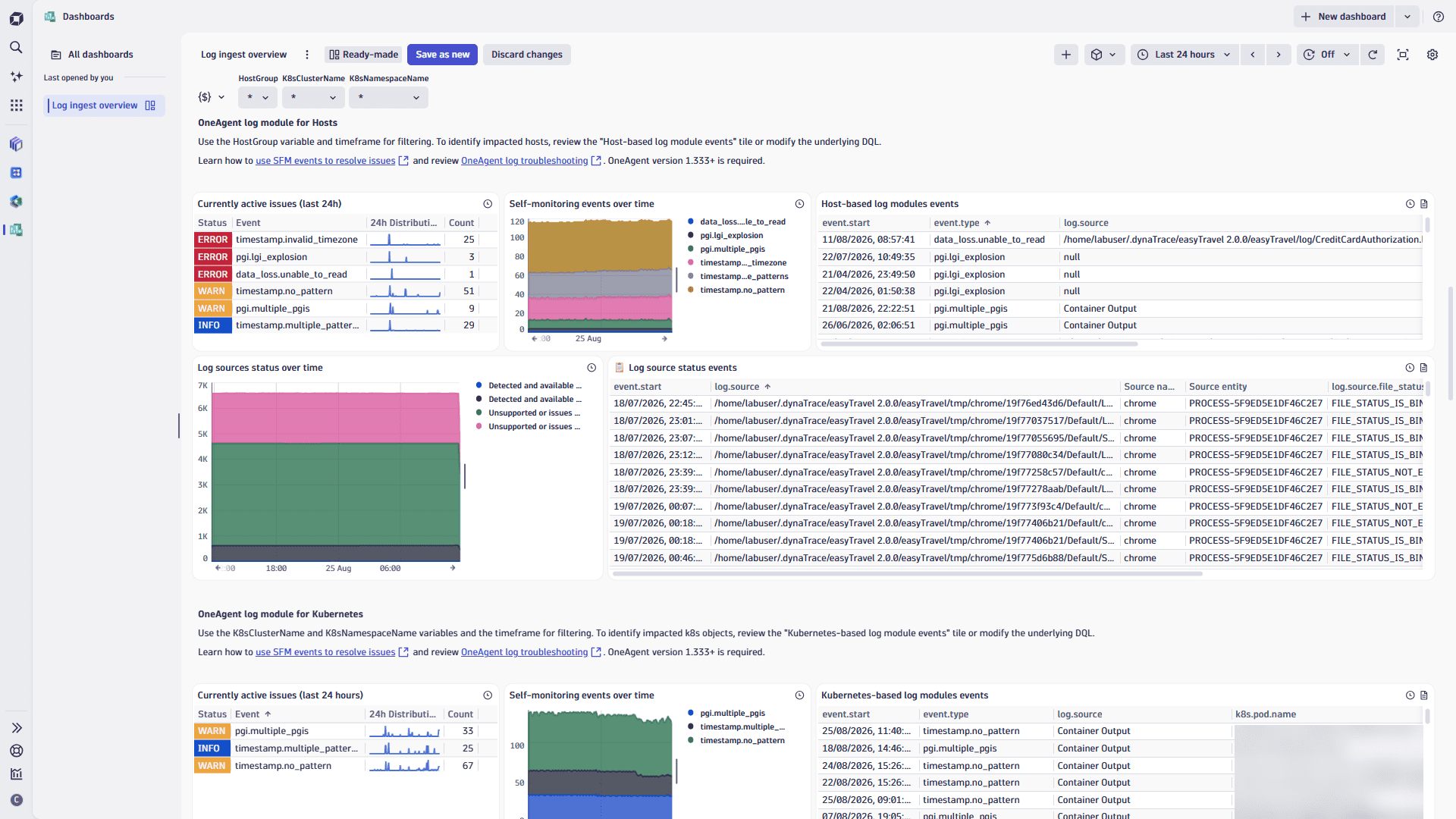
The Log module self-monitoring dashboard provides an end-to-end view of the Log module health in Dynatrace. It focuses on log ingestion quality, active self-monitoring events, and log source coverage across hosts and Kubernetes environments. You can use it to quickly detect gaps in log collection, troubleshoot parsing and timestamp issues, and verify that all required log sources are monitored.

At the top of the dashboard, the global filters help you narrow the view to specific environments or entities. Each filter applies only to related tiles. For example, the file status and ingest status apply only to log source tiles.

The following global filters are available:

  • Timeframe
  • Event type
  • Host
  • Host group
  • Process group
  • Log source
  • File status
  • Ingest status
  • Kubernetes cluster
  • Namespace
  • Pod

Import the dashboard

To import the Log module self-monitoring dashboard into your Dynatrace environment

  1. Expand the Log module SFM dashboard JSON section below, copy the provided code, and create the Log module self-monitoring.json file with the provided dashboard JSON definition below:

    Log module SFM dashboard JSON
    {
    "version": 21,
    "variables": [
    {
    "version": 2,
    "key": "EventType",
    "type": "query",
    "visible": true,
    "editable": true,
    "input": "fetch dt.system.events, from: now() - 24h\n| filter event.provider == \"Log Module\"\n| fields event.type\n| dedup event.type\n| summarize entries = array(\"*\", collectArray(event.type))\n| expand entries\n",
    "multiple": false,
    "defaultValue": "*"
    },
    {
    "version": 2,
    "key": "Host",
    "type": "query",
    "visible": true,
    "editable": true,
    "input": "fetch dt.entity.host, from: now() - 24h\n| fields entity.name\n| sort entity.name asc\n| limit 999\n// if no clusters, add * placeholder to avoid errors\n| summarize entries = array(\"*\", collectArray(entity.name))\n| dedup entries\n| expand entries",
    "multiple": false,
    "defaultValue": "*"
    },
    {
    "version": 2,
    "key": "HostGroup",
    "type": "query",
    "visible": true,
    "editable": true,
    "input": "fetch dt.entity.host_group, from: now() - 24h\n| fields entity.name\n| limit 999\n// if no clusters, add * placeholder to avoid errors\n| summarize entries = array(\"*\", collectArray(entity.name))\n| dedup entries",
    "multiple": false,
    "defaultValue": "*"
    },
    {
    "version": 2,
    "key": "ProcessGroup",
    "type": "query",
    "visible": true,
    "editable": true,
    "input": "fetch dt.entity.process_group, from: now() - 24h\n| fields entity.name\n| limit 999\n// if no clusters, add * placeholder to avoid errors\n| summarize entries = array(\"*\", collectArray(entity.name))\n| dedup entries",
    "multiple": false,
    "defaultValue": "*"
    },
    {
    "version": 2,
    "key": "LogSource",
    "type": "query",
    "visible": true,
    "editable": true,
    "input": "fetch dt.system.events, from: now() - 24h\n| filter event.provider == \"Log Module\" and isNotNull(log.source)\n| limit 999\n| dedup log.source\n| summarize entries = array(\"*\", collectArray(log.source))\n| expand entries",
    "multiple": false,
    "defaultValue": "*"
    },
    {
    "version": 2,
    "key": "FileStatus",
    "type": "query",
    "visible": true,
    "editable": true,
    "input": "fetch dt.system.events, from: now() - 24h\n| filter event.provider == \"Log Module\" and isNotNull(log.source.file_status)\n| limit 999\n| dedup log.source.file_status\n| summarize entries = array(\"*\", collectArray(log.source.file_status))\n| expand entries",
    "multiple": false,
    "defaultValue": "*"
    },
    {
    "version": 2,
    "key": "IngestStatus",
    "type": "query",
    "visible": true,
    "editable": true,
    "input": "fetch dt.system.events, from: now() - 24h\n| filter event.provider == \"Log Module\" and isNotNull(log.source.ingest_status)\n| limit 999\n| dedup log.source.ingest_status\n| summarize entries = array(\"*\", collectArray(log.source.ingest_status))\n| expand entries",
    "multiple": false,
    "defaultValue": "*"
    },
    {
    "version": 2,
    "key": "K8sClusterName",
    "type": "query",
    "visible": true,
    "editable": true,
    "input": "fetch dt.system.events, from: now() - 24h\n| filter event.provider == \"Log Module\" and isNotNull(k8s.cluster.name)\n| limit 999\n| dedup k8s.cluster.name\n| summarize entries = array(\"*\", collectArray(k8s.cluster.name))\n| expand entries",
    "multiple": false,
    "defaultValue": "*"
    },
    {
    "version": 2,
    "key": "K8sPodName",
    "type": "query",
    "visible": true,
    "editable": true,
    "input": "fetch dt.system.events, from: now() - 24h\n| filter event.provider == \"Log Module\" and isNotNull(k8s.pod.name)\n| limit 999\n| dedup k8s.pod.name\n| summarize entries = array(\"*\", collectArray(k8s.pod.name))\n| expand entries",
    "multiple": false,
    "defaultValue": "*"
    },
    {
    "version": 2,
    "key": "K8sNamespaceName",
    "type": "query",
    "visible": true,
    "editable": true,
    "input": "fetch dt.system.events, from: now() - 24h\n| filter event.provider == \"Log Module\" and isNotNull(k8s.namespace.name)\n| limit 999\n| dedup k8s.namespace.name\n| summarize entries = array(\"*\", collectArray(k8s.namespace.name))\n| expand entries",
    "multiple": false,
    "defaultValue": "*"
    }
    ],
    "tiles": {
    "0": {
    "title": "Active issues - Kubernetes log modules",
    "description": "\n",
    "type": "data",
    "query": "fetch dt.system.events, from: toTimestamp($dt_timeframe_from) - 24h, to: toTimestamp($dt_timeframe_to)\n| filter event.provider == \"Log Module\" and event.type != \"log_source.status\" \n| filter exists(k8s.node.name)\n| filter $EventType == \"*\" or in(event.type, $EventType)\n| filter $Host == \"*\" or in(host.name, $Host)\n| filter $HostGroup == \"*\" or in(dt.host_group.id, $HostGroup)\n| filter $ProcessGroup == \"*\" or in(dt.process_group.detected_name, $ProcessGroup)\n| filter $LogSource == \"*\" or in(log.source, $LogSource)\n| filter $K8sClusterName == \"*\" or in(k8s.cluster.name, $K8sClusterName)\n| filter $K8sPodName == \"*\" or in(k8s.pod.name, $K8sPodName)\n| filter $K8sNamespaceName == \"*\" or in(k8s.namespace.name, $K8sNamespaceName)\n| dedup event.id, sort: { timestamp desc }\n| filter event.status == \"Active\"\n| filter toTimestamp($dt_timeframe_to) - timestamp <= 24h\n| fieldsAdd logsQuery = concat(\n \"fetch logs, from:\\\"\", toString($dt_timeframe_from), \"\\\", to:\\\"\", toString($dt_timeframe_to), \"\\\"\\n\",\n \"| filter dt.smartscape_source.id == \\\"\", dt.smartscape_source.id, \"\\\"\\n\",\n if(isNotNull(log.source), concat(\"| filter log.source == \\\"\", escape(log.source),\"\\\"\\n\")),\n \"| sort timestamp asc\")\n| fieldsAdd logsJson = concat(\"{\\\"dt.query\\\":\\\"\", escape(logsQuery),\"\\\"}\")\n| fieldsAdd linkEncoded = replaceString(escape(encodeUrl(logsJson)), \"+\", \"%20\")\n| fieldsAdd `Source entity` = if(isNotNull(dt.entity.process_group_instance), dt.entity.process_group_instance, \n else: if(isNotNull(dt.entity.host), dt.entity.host,\n else: if(isNotNull(k8s.pod.name), k8s.pod.name)))\n| fields event.start, event.type, log.source, dt.entity.kubernetes_cluster, k8s.pod.name, linkEncoded\n| limit 1000\n\n// If you want to create a query yourself use this:\n// fetch dt.system.events\n// | filter event.provider == \"Log Module\" and event.type == \"Log Source status\"",
    "visualization": "table",
    "visualizationSettings": {
    "table": {
    "hiddenColumns": [
    ["dt.kubernetes.node.system_uuid"],
    ["dt.source_entity"],
    ["gcp.region"],
    ["gcp.project.id"],
    ["k8s.cluster.name"],
    ["dt.smartscape.container"],
    ["process.technology"],
    ["dt.smartscape.process"],
    ["dt.process_group.detected_name"],
    ["app"],
    ["other"],
    ["container.image.name"],
    ["container.id"],
    ["container.name"],
    ["link"],
    ["on-prem"],
    ["dt.security_context"],
    ["timestamp"],
    ["dt.smartscape_source.type"],
    ["loglevel"],
    ["event.status"],
    ["status"],
    ["dt.openpipeline.pipelines"],
    ["event.provider"],
    ["event.status_transition"],
    ["dt.openpipeline.source"],
    ["event.kind"],
    ["event.id"],
    ["dt.smartscape.host"],
    ["dt.entity.host_group"],
    ["dt.host_group.id"],
    ["owner"],
    ["logsQuery"],
    ["logsJson"],
    ["linkEncoded"]
    ],
    "hideColumnsForLargeResults": false,
    "sortBy": [{ "columnId": "[\"timestamp\"]", "direction": "descending" }],
    "columnWidths": { "[\"content\"]": 730 },
    "columnTypeOverrides": [
    {
    "fields": ["content"],
    "id": 1768304842632,
    "value": "log-content"
    }
    ],
    "columnOrder": [
    "[\"event.start\"]",
    "[\"event.type\"]",
    "[\"linkEncoded\"]",
    "[\"log.source\"]",
    "[\"dt.entity.kubernetes_cluster\"]",
    "[\"k8s.pod.name\"]"
    ]
    },
    "autoSelectVisualization": true
    },
    "querySettings": {
    "maxResultRecords": 1000,
    "defaultScanLimitGbytes": 500,
    "maxResultMegaBytes": 1,
    "defaultSamplingRatio": 10,
    "enableSampling": false
    },
    "customLinkSettings": {
    "version": 1,
    "customLinks": [
    {
    "name": "Go to pod/host logs",
    "icon": "LogsIcon",
    "urlPattern": "/ui/apps/dynatrace.logs/#{{linkEncoded}}",
    "added": 1768909366996
    }
    ]
    },
    "davis": {
    "enabled": false,
    "davisVisualization": { "isAvailable": true }
    },
    "timeframe": {
    "tileTimeframeEnabled": true,
    "tileTimeframe": { "from": "now()-24h", "to": "now()" }
    }
    },
    "3": {
    "type": "markdown",
    "content": "# 🪵 Log module log sources status\nThe Dynatrace log module delivers insights into available log sources and their status. Automatically detected log sources and custom log sources are included.\n\nExamine the log monitoring coverage to identify gaps and investigate issues in the log collection process.\n\nFor focused analysis, apply filtering or select the menu icon (ellipsis) next to the row or entity to navigate to affected entities or logs. The filters above affect dashboard's tiles with event lists. (Filtering lists limits apply: 1000 items, including wildcard.)\n\n"
    },
    "5": {
    "title": "📋 Log source status events",
    "description": "\n",
    "type": "data",
    "query": "fetch dt.system.events, from: toTimestamp($dt_timeframe_from)-24h, to: toTimestamp($dt_timeframe_to)\n| filter event.provider == \"Log Module\" and event.type == \"log_source.status\" \n| filter $EventType == \"*\" or in(event.type, $EventType)\n| filter $Host == \"*\" or in(host.name, $Host)\n| filter $HostGroup == \"*\" or in(dt.host_group.id, $HostGroup)\n| filter $ProcessGroup == \"*\" or in(dt.process_group.detected_name, $ProcessGroup)\n| filter isNotNull(log.source) and ($LogSource == \"*\" or in(log.source, $LogSource))\n| filter $FileStatus == \"*\" or in(log.source.file_status, $FileStatus)\n| filter $IngestStatus == \"*\" or in(log.source.ingest_status, $IngestStatus)\n| filter $K8sClusterName == \"*\" or in(k8s.cluster.name, $K8sClusterName)\n| filter $K8sPodName == \"*\" or in(k8s.pod.name, $K8sPodName)\n| filter $K8sNamespaceName == \"*\" or in(k8s.namespace.name, $K8sNamespaceName)\n| dedup event.id, sort: { timestamp desc }\n| filter event.status == \"Active\"\n| filter toTimestamp($dt_timeframe_to) - timestamp <= 24h\n| fieldsAdd logsQuery = concat(\n \"fetch logs, from:\\\"\", toString($dt_timeframe_from), \"\\\", to:\\\"\", toString($dt_timeframe_to), \"\\\"\\n\",\n \"| filter dt.smartscape_source.id == \\\"\", dt.smartscape_source.id, \"\\\"\\n\",\n if(isNotNull(log.source), concat(\"| filter log.source == \\\"\", escape(log.source),\"\\\"\\n\")),\n \"| sort timestamp asc\")\n| fieldsAdd logsJson = concat(\"{\\\"dt.query\\\":\\\"\", escape(logsQuery),\"\\\"}\")\n| fieldsAdd linkEncoded = replaceString(escape(encodeUrl(logsJson)), \"+\", \"%20\")\n| fieldsAdd `Source entity` = if(isNotNull(dt.entity.process_group_instance), dt.entity.process_group_instance, \n else: if(isNotNull(dt.entity.host), dt.entity.host,\n else: if(isNotNull(k8s.pod.name), k8s.pod.name)))\n| fields event.start, log.source, `Source entity`, log.source.file_status, log.source.ingest_status, log.source.origin, linkEncoded\n| limit 1000\n\n// If you want to create a query yourself use this:\n// fetch dt.system.events\n// | filter event.provider == \"Log Module\" and event.type == \"Log Source status\"\n\n",
    "visualization": "table",
    "visualizationSettings": {
    "table": {
    "hiddenColumns": [
    ["on-prem"],
    ["dt.kubernetes.node.system_uuid"],
    ["container.image.name"],
    ["container.id"],
    ["container.name"],
    ["link"],
    ["timestamp"],
    ["event.type"],
    ["content"],
    ["loglevel"],
    ["dt.smartscape_source.type"],
    ["event.status"],
    ["status"],
    ["dt.openpipeline.pipelines"],
    ["event.provider"],
    ["event.status_transition"],
    ["dt.openpipeline.source"],
    ["event.kind"],
    ["dt.smartscape_source.id"],
    ["dt.smartscape.process"],
    ["dt.source_entity"],
    ["dt.smartscape.host"],
    ["dt.process_group.detected_name"],
    ["process.technology"],
    ["dt.entity.host_group"],
    ["dt.host_group.id"],
    ["owner"],
    ["dt.smartscape.container"],
    ["gcp.project.id"],
    ["gcp.region"],
    ["k8s.cluster.name"],
    ["k8s.node.name"],
    ["dt.security_context"],
    ["app"],
    ["other"],
    ["logsQuery"],
    ["logsJson"],
    ["linkEncoded"]
    ],
    "hideColumnsForLargeResults": false,
    "columnWidths": {
    "[\"log.source.file_status\"]": 178.39,
    "[\"log.source\"]": 342
    },
    "sortBy": [
    {
    "columnId": "[\"log.source.file_status\"]",
    "direction": "descending"
    }
    ],
    "columnTypeOverrides": [
    {
    "fields": ["content"],
    "id": 1768304842632,
    "value": "log-content"
    }
    ],
    "columnOrder": [
    "[\"event.start\"]",
    "[\"log.source\"]",
    "[\"Source entity\"]",
    "[\"log.source.file_status\"]",
    "[\"log.source.ingest_status\"]",
    "[\"linkEncoded\"]",
    "[\"log.source.origin\"]"
    ]
    },
    "autoSelectVisualization": false
    },
    "querySettings": {
    "maxResultRecords": 1000,
    "defaultScanLimitGbytes": 500,
    "maxResultMegaBytes": 100,
    "defaultSamplingRatio": 10,
    "enableSampling": false
    },
    "customLinkSettings": {
    "version": 1,
    "customLinks": [
    {
    "name": "Open Host",
    "icon": "ZoomToSelectionIcon",
    "urlPattern": "/ui/apps/dynatrace.infraops/explorer/Hosts?fullPageId={{dt.entity.host}}",
    "added": 1768580290502
    },
    {
    "name": "Open Kubernetes Cluster",
    "icon": "ZoomToSelectionIcon",
    "urlPattern": "/ui/intent/dynatrace.kubernetes/view-entity-dt.entity.kubernetes_cluster/#{\"id\":\"{{dt.entity.kubernetes_cluster}}\"}",
    "added": 1768580315895
    },
    {
    "name": "Go to pod/host logs",
    "icon": "LogsIcon",
    "urlPattern": "/ui/apps/dynatrace.logs/#{{linkEncoded}}",
    "added": 1768909408216
    }
    ]
    },
    "davis": {
    "enabled": false,
    "davisVisualization": { "isAvailable": true }
    },
    "timeframe": {
    "tileTimeframeEnabled": true,
    "tileTimeframe": { "from": "now()-24h", "to": "now()" }
    }
    },
    "6": {
    "title": "Currently active issues (24 hours)",
    "type": "data",
    "query": "fetch dt.system.events, from: now() - 24h\n| filter event.provider == \"Log Module\" and event.type != \"log_source.status\"\n| dedup event.id, sort: {timestamp desc}\n| filter event.status == \"Active\"\n| makeTimeseries {count = count(default:0)}, by: {loglevel, event.type}\n| fieldsAdd severity = if(loglevel == \"ERROR\", 0, else: if(loglevel == \"WARN\", 1, else: if(loglevel == \"NONE\", 2, else: 3))), `Count` = arraySum(count)\n| sort severity, `Count` desc\n| fieldsRename Event=event.type, `24h Distribution`=count, Status=loglevel",
    "visualization": "table",
    "visualizationSettings": {
    "table": {
    "colorThresholdTarget": "background",
    "hiddenColumns": [["timeframe"], ["interval"], ["severity"]],
    "hideColumnsForLargeResults": false,
    "linewrapEnabled": true,
    "monospacedFontEnabled": true,
    "selectedColumnForRowThreshold": "Status",
    "columnWidths": { "[\"Event\"]": 175.69, "[\"Count\"]": 49.59 },
    "columnTypeOverrides": [
    {
    "fields": ["24h Distribution"],
    "value": "sparkline",
    "id": 1769429484606,
    "disableRemoval": false
    },
    {
    "id": 403279.40000000014,
    "fields": ["Count"],
    "value": "text",
    "disableRemoval": false
    }
    ],
    "columnOrder": [
    "[\"timeframe\",\"start\"]",
    "[\"timeframe\",\"end\"]",
    "[\"interval\"]",
    "[\"Status\"]",
    "[\"Event\"]",
    "[\"Count\"]",
    "[\"24h Distribution\"]",
    "[\"severity\"]"
    ]
    },
    "autoSelectVisualization": false,
    "unitsOverrides": [
    {
    "identifier": "Active count",
    "unitCategory": "unspecified",
    "baseUnit": "count",
    "displayUnit": null,
    "decimals": 0,
    "suffix": "",
    "delimiter": false,
    "added": 1768392932496
    }
    ],
    "coloring": {
    "colorRules": [
    {
    "value": "INFO",
    "comparator": "=",
    "field": "Status",
    "colorMode": "custom-color",
    "customColor": {
    "Default": "var(--dt-colors-charts-categorical-themed-blue-steel-color-05-default, #134fc9)"
    },
    "type": "string"
    },
    {
    "value": "WARN",
    "comparator": "=",
    "field": "Status",
    "colorMode": "custom-color",
    "customColor": {
    "Default": "var(--dt-colors-charts-status-warning-default, #eea53c)"
    },
    "type": "string"
    },
    {
    "value": "ERROR",
    "comparator": "=",
    "field": "Status",
    "colorMode": "custom-color",
    "customColor": {
    "Default": "var(--dt-colors-charts-apdex-unacceptable-default, #cd3741)"
    },
    "type": "string"
    },
    {
    "value": "NONE",
    "comparator": "=",
    "field": "Status",
    "colorMode": "custom-color",
    "customColor": {
    "Default": "var(--dt-colors-charts-categorical-themed-blue-steel-color-05-default, #134fc9)"
    },
    "type": "string"
    }
    ]
    }
    },
    "querySettings": {
    "maxResultRecords": 1000,
    "defaultScanLimitGbytes": 500,
    "maxResultMegaBytes": 1,
    "defaultSamplingRatio": 10,
    "enableSampling": false
    },
    "davis": {
    "enabled": false,
    "davisVisualization": { "isAvailable": true }
    },
    "timeframe": {
    "tileTimeframe": { "from": "now()-24h", "to": "now()" },
    "tileTimeframeEnabled": false
    }
    },
    "7": {
    "title": "Self-monitoring events over time",
    "type": "data",
    "query": "fetch dt.system.events, from: toTimestamp($dt_timeframe_from) - 24h, to: toTimestamp($dt_timeframe_to)\n| filter event.provider == \"Log Module\" and not event.type == \"log_source.status\"\n| sort timestamp asc\n| summarize {\n start = takeFirst(if(event.status_transition == \"Created\", timestamp)),\n closed_at = takeLast(if(event.status == \"Closed\", timestamp)),\n last_refresh = takeLast(timestamp),\n type = takeLast(event.type)\n },\n by: { event.id }\n| fieldsAdd inferred_end = coalesce(\n closed_at,\n if((toTimestamp($dt_timeframe_to) - last_refresh) >= 24h, last_refresh + 24h, else: null))\n| makeTimeseries activeProblems = count(),\n from: toTimestamp($dt_timeframe_from),\n to: toTimestamp($dt_timeframe_to),\n spread: timeframe(\n from: coalesce(start, toTimestamp($dt_timeframe_from)-24h),\n to: coalesce(inferred_end, toTimestamp($dt_timeframe_to))),\n nonempty:true,\n by: { type }",
    "visualization": "areaChart",
    "visualizationSettings": {
    "chartSettings": { "xAxisScaling": "auto" },
    "legend": { "ratio": 42 },
    "autoSelectVisualization": false,
    "unitsOverrides": [
    {
    "identifier": "activeProblems",
    "unitCategory": "unspecified",
    "baseUnit": "count",
    "displayUnit": null,
    "decimals": null,
    "suffix": "",
    "delimiter": false,
    "added": 1768576240503
    }
    ]
    },
    "querySettings": {
    "maxResultRecords": 1000,
    "defaultScanLimitGbytes": 500,
    "maxResultMegaBytes": 1,
    "defaultSamplingRatio": 10,
    "enableSampling": false
    },
    "davis": {
    "enabled": false,
    "davisVisualization": { "isAvailable": true }
    },
    "timeframe": {
    "tileTimeframe": { "from": "now()-24h", "to": "now()" },
    "tileTimeframeEnabled": false
    }
    },
    "9": {
    "title": "Log sources status over time",
    "type": "data",
    "query": "fetch dt.system.events, from: toTimestamp($dt_timeframe_from) - 24h, to: $dt_timeframe_to\n| filter event.provider == \"Log Module\"\n and event.type == \"log_source.status\"\n| fieldsAdd category =\n if(log.source.file_status == \"FILE_STATUS_OK\" and log.source.ingest_status == \"Ingested\", \"Detected and available | Ingestion configured\", else:\n if(log.source.file_status == \"FILE_STATUS_OK\" and log.source.ingest_status == \"Not ingested\", \"Detected and available | Ingestion NOT configured\", else:\n if(log.source.file_status != \"FILE_STATUS_OK\" and log.source.ingest_status == \"Ingested\", \"Unsupported or issues | Ingestion configured\", else:\n if(log.source.file_status != \"FILE_STATUS_OK\" and log.source.ingest_status == \"Not ingested\", \"Unsupported or issues | Ingestion NOT configured\", else:\n if(log.source.file_status != \"FILE_STATUS_OK\" and log.source.ingest_status == \"Partially ingested\", \"Unsupported or issues | Partial ingestion configured\", else:\n if(log.source.file_status == \"FILE_STATUS_OK\" and log.source.ingest_status == \"Partially ingested\", \"Detected and available | Partial ingestion configured\",\n else: \"Other\"))))))\n| sort timestamp asc\n| summarize {\n start = takeFirst(if(event.status == \"Active\", timestamp)),\n closed_at = takeLast(if(event.status == \"Closed\", timestamp)),\n last_refresh = takeLast(timestamp),\n category = takeLast(category)\n },\n by: { event.id }\n| fieldsAdd inferred_end = coalesce(\n closed_at,\n if((toTimestamp($dt_timeframe_to) - last_refresh) >= 24h, toTimestamp(last_refresh) + 24h, else: null))\n| makeTimeseries activeProblems = count(),\n from: toTimestamp($dt_timeframe_from),\n to: toTimestamp($dt_timeframe_to),\n spread: timeframe(\n from: coalesce(start, toTimestamp($dt_timeframe_from) - 24h),\n to: coalesce(inferred_end, $dt_timeframe_to)),\n nonempty: true,\n by: { category }",
    "visualization": "lineChart",
    "visualizationSettings": {
    "legend": { "ratio": 32 },
    "autoSelectVisualization": false
    },
    "querySettings": {
    "maxResultRecords": 1000,
    "defaultScanLimitGbytes": 500,
    "maxResultMegaBytes": 1,
    "defaultSamplingRatio": 10,
    "enableSampling": false
    },
    "davis": {
    "enabled": false,
    "davisVisualization": { "isAvailable": true }
    },
    "timeframe": {
    "tileTimeframe": { "from": "now()-24h", "to": "now()" },
    "tileTimeframeEnabled": false
    }
    },
    "10": {
    "type": "markdown",
    "content": "# 📊 Log module self-monitoring events overview\nLog module self-monitoring events allow you to review log ingestion issues, event types, and affected entities. \nThere are two event categories: issues for logs linked to the log source (ingested but issues detected) and not linked to the log source (not ingested).\n\nFor focused analysis, apply filtering or select the menu icon (ellipsis) next to the row or entity to navigate to affected entities or logs. The filters above affect dashboard's tiles with event lists. (Filtering lists limits apply: 1000 items, including wildcard.) Follow [Troubleshooting guides](https://docs.dynatrace.com/docs) to resolve issues.\n\n\n"
    },
    "12": {
    "title": "Active issues - host based log modules",
    "description": "\n",
    "type": "data",
    "query": "fetch dt.system.events, from: toTimestamp($dt_timeframe_from) - 24h, to: toTimestamp($dt_timeframe_to)\n| filter event.provider == \"Log Module\" and event.type != \"log_source.status\"\n| filter exists(dt.entity.host) and isNull(k8s.node.name)\n| filter $EventType == \"*\" or in(event.type, $EventType)\n| filter $Host == \"*\" or in(host.name, $Host)\n| filter $HostGroup == \"*\" or in(dt.host_group.id, $HostGroup)\n| filter $ProcessGroup == \"*\" or in(dt.process_group.detected_name, $ProcessGroup)\n| filter $LogSource == \"*\" or in(log.source, $LogSource)\n| filter $K8sClusterName == \"*\" or in(k8s.cluster.name, $K8sClusterName)\n| filter $K8sPodName == \"*\" or in(k8s.pod.name, $K8sPodName)\n| filter $K8sNamespaceName == \"*\" or in(k8s.namespace.name, $K8sNamespaceName)\n| dedup event.id, sort: { timestamp desc }\n| filter event.status == \"Active\"\n| filter toTimestamp($dt_timeframe_to) - timestamp <= 24h\n| fieldsAdd logsQuery = concat(\n \"fetch logs, from:\\\"\", toString($dt_timeframe_from), \"\\\", to:\\\"\", toString($dt_timeframe_to), \"\\\"\\n\",\n \"| filter dt.smartscape_source.id == \\\"\", dt.smartscape_source.id, \"\\\"\\n\",\n if(isNotNull(log.source), concat(\"| filter log.source == \\\"\", escape(log.source),\"\\\"\\n\")),\n \"| sort timestamp asc\")\n| fieldsAdd logsJson = concat(\"{\\\"dt.query\\\":\\\"\", escape(logsQuery),\"\\\"}\")\n| fieldsAdd linkEncoded = replaceString(escape(encodeUrl(logsJson)), \"+\", \"%20\")\n| fieldsAdd `Source entity` = if(isNotNull(dt.entity.process_group_instance), dt.entity.process_group_instance, \n else: if(isNotNull(dt.entity.host), dt.entity.host,\n else: if(isNotNull(k8s.pod.name), k8s.pod.name)))\n| fields event.start, event.type, log.source, dt.entity.process_group_instance, dt.entity.host, k8s.pod.name, linkEncoded\n| limit 1000\n\n// If you want to create a query yourself use this:\n// fetch dt.system.events\n// | filter event.provider == \"Log Module\" and event.type == \"Log Source status\"",
    "visualization": "table",
    "visualizationSettings": {
    "table": {
    "hiddenColumns": [
    ["dt.kubernetes.node.system_uuid"],
    ["link"],
    ["timestamp"],
    ["logsQuery"],
    ["logsJson"],
    ["dt.host_group.id"],
    ["dt.smartscape.host"],
    ["dt.smartscape.process"],
    ["dt.smartscape_source.type"],
    ["dt.source_entity"],
    ["event.id"],
    ["event.kind"],
    ["event.provider"],
    ["event.status"],
    ["event.status_transition"],
    ["loglevel"],
    ["owner"],
    ["process.technology"],
    ["status"],
    ["dt.openpipeline.source"],
    ["dt.openpipeline.pipelines"],
    ["gcp.project.id"],
    ["gcp.region"],
    ["k8s.cluster.name"],
    ["dt.smartscape.container"],
    ["k8s.node.name"],
    ["app"],
    ["dt.security_context"],
    ["on-prem"],
    ["other"],
    ["container.id"],
    ["container.image.name"],
    ["container.name"],
    ["linkEncoded"]
    ],
    "hideColumnsForLargeResults": false,
    "sortBy": [{ "columnId": "[\"timestamp\"]", "direction": "descending" }],
    "columnTypeOverrides": [
    {
    "fields": ["content"],
    "id": 1768304842632,
    "value": "log-content"
    }
    ],
    "columnOrder": [
    "[\"event.start\"]",
    "[\"event.type\"]",
    "[\"log.source\"]",
    "[\"linkEncoded\"]",
    "[\"dt.entity.process_group_instance\"]",
    "[\"dt.entity.host\"]",
    "[\"k8s.pod.name\"]"
    ]
    },
    "autoSelectVisualization": true
    },
    "querySettings": {
    "maxResultRecords": 1000,
    "defaultScanLimitGbytes": 500,
    "maxResultMegaBytes": 1,
    "defaultSamplingRatio": 10,
    "enableSampling": false
    },
    "customLinkSettings": {
    "version": 1,
    "customLinks": [
    {
    "name": "Go to pod/host logs",
    "icon": "LogsIcon",
    "urlPattern": "/ui/apps/dynatrace.logs/#{{linkEncoded}}",
    "added": 1768833996854
    }
    ]
    },
    "davis": {
    "enabled": false,
    "davisVisualization": { "isAvailable": true }
    },
    "timeframe": {
    "tileTimeframeEnabled": true,
    "tileTimeframe": { "from": "now()-24h", "to": "now()" }
    }
    },
    "13": {
    "title": "Log module log sources coverage",
    "type": "data",
    "query": "fetch dt.system.events, from: toTimestamp($dt_timeframe_from) - 24h, to: $dt_timeframe_to\n| filter event.provider == \"Log Module\" and event.type == \"log_source.status\"\n| fields category =\n if(log.source.file_status == \"FILE_STATUS_OK\" and log.source.ingest_status == \"Ingested\", \"Detected and available | Ingestion configured\", else:\n if(log.source.file_status == \"FILE_STATUS_OK\" and log.source.ingest_status == \"Not ingested\", \"Detected and available | Ingestion NOT configured\", else:\n if(log.source.file_status != \"FILE_STATUS_OK\" and log.source.ingest_status == \"Ingested\", \"Unsupported or issues | Ingestion configured\", else:\n if(log.source.file_status != \"FILE_STATUS_OK\" and log.source.ingest_status == \"Not ingested\", \"Unsupported or issues | Ingestion NOT configured\", else:\n if(log.source.file_status != \"FILE_STATUS_OK\" and log.source.ingest_status == \"Partially ingested\", \"Unsupported or issues | Partial ingestion configured\", else:\n if(log.source.file_status == \"FILE_STATUS_OK\" and log.source.ingest_status == \"Partially ingested\", \"Detected and available | Partial ingestion configured\",\n else: \"Other\")))))),\n event.id,\n timestamp,\n event.status\n| dedup event.id, sort: { timestamp desc }\n| filter event.status == \"Active\"\n| filter toTimestamp($dt_timeframe_to) - timestamp <= 24h\n| summarize value = count(), by: {category}",
    "visualization": "pieChart",
    "visualizationSettings": {
    "chartSettings": { "circleChartSettings": { "valueType": "relative" } },
    "legend": { "ratio": 35 },
    "autoSelectVisualization": false
    },
    "querySettings": {
    "maxResultRecords": 1000,
    "defaultScanLimitGbytes": 500,
    "maxResultMegaBytes": 1,
    "defaultSamplingRatio": 10,
    "enableSampling": false
    },
    "davis": {
    "enabled": false,
    "davisVisualization": { "isAvailable": true }
    }
    },
    "15": {
    "type": "markdown",
    "content": "ℹ️ This dashboard is available for download from the official Dynatrace documentation during the Early Access phase of log module self-monitoring events. To populate it with data, you need to **[opt in](https://docs.dynatrace.com/docs)** to allow the OneAgent log module to send self-monitoring events to your Dynatrace environment. \n\nDashboard's content will be migrated to the \"Log ingest Overview\" dashboard for Dynatrace versions 1.339+."
    }
    },
    "layouts": {
    "0": { "x": 17, "y": 5, "w": 7, "h": 5 },
    "3": { "x": 0, "y": 10, "w": 24, "h": 3 },
    "5": { "x": 10, "y": 13, "w": 14, "h": 7 },
    "6": { "x": 0, "y": 5, "w": 5, "h": 5 },
    "7": { "x": 5, "y": 5, "w": 5, "h": 5 },
    "9": { "x": 5, "y": 13, "w": 5, "h": 7 },
    "10": { "x": 0, "y": 2, "w": 24, "h": 3 },
    "12": { "x": 10, "y": 5, "w": 7, "h": 5 },
    "13": { "x": 0, "y": 13, "w": 5, "h": 7 },
    "15": { "x": 0, "y": 0, "w": 24, "h": 2 }
    },
    "importedWithCode": false,
    "settings": {},
    "annotations": [
    {
    "version": 0,
    "key": "Annotation1",
    "type": "query",
    "input": "fetch logs",
    "displaySettings": { "referenceIds": [], "pinned": true }
    }
    ]
    }
  2. In Dynatrace, go to Dashboards Dashboards.

  3. In the app header, select Upload.

  4. Open the Log module self-monitoring.json file that you've just created.

Now you can see the Log module self-monitoring dashboard added to your Dynatrace environment.

Dashboard features

Log module self‑monitoring events overview

This section of the dashboard summarizes problems detected by the Log module.

  • Currently active issues (24 hours): A table showing the most recent SFM events, grouped by status (for example, WARN or INFO) and event type (such as timestamp pattern issues). It includes a count and a short 24‑hour distribution so that you can see which problems are most frequent right now.

  • Self‑monitoring events over time: A time series chart displaying the volume of different SFM event types over the selected period. This helps you identify trends, spikes, or recurring issues in log ingestion and parsing.

  • Active issues – host based log modules: A detailed event list for host-based log sources. For each issue, it shows the start time, event type, affected log file or path, and the corresponding host or process entity. Use this list to drill down into problematic log files on traditional or VM-based hosts.

  • Active issues – Kubernetes log modules: A similar event list focused on Kubernetes log sources. It highlights which containers or Kubernetes entities are currently affected by the Log module issues.

Log module log sources status

This section focuses on coverage and lifecycle of log sources themselves.

  • Log module log sources coverage: A pie chart that breaks down all discovered log sources into coverage categories (for example, detected with ingestion configured, detected without ingestion configured, and other states). This gives a quick indication of how complete your log monitoring setup is.

  • Log sources status over time: A time‑based chart that shows how the number of log sources in each status category changes over the selected period. It helps you see when new sources appeared, were configured, or became unavailable.

  • Log source status events: A chronological table of log source–related events (such as creation, configuration changes, or status changes), including the timestamp, log source identifier or path, the related entity (host, container, and more), and the log source type. This is useful for auditing configuration changes and correlating them with coverage changes or incidents.

Table drilldowns and entity navigation

All dashboard tables provide drill-down actions through (Actions menu) in each row or cell.

  1. Select Go to pod/host logs to open logs for the selected issue or log source.
  2. In dt.entity.* columns (for example, dt.entity.host, dt.entity.kubernetes_cluster, and dt.entity.process_group), select (Actions menu) to open the corresponding entity details page.

On the entity details page, you can see the full context about that host, Kubernetes cluster, process group, or other entity (metrics, topology, problems, and related logs).

Every issue detection, issue state change, log source detection, or log source state change is communicated via SFM events with some time delay, due to the fact that SFM event generation is implemented on the Log module side (edge). The time delay is typically up to 90 seconds, though it may increase if network communication between the Log module and your Dynatrace environment is disrupted.

Use SFM events to resolve log-related issues

The SFM event types and required actions are described below.

log_source.status (info)

Explanation

Provides additional information and is generated for each log source known to the Log module. For each log source, provides context metadata (for example, related process group and host), along with additional string properties.

Additional properties:

  • log.source.file_status: Current monitoring state of a log source (for example, “OK” or “File not exists”).
  • log.source.ingest_status: Log content ingestion status (for example, “Fully ingested”, “Partially ingested”, or “Not ingested”).
  • log.source.origin: Indicates where the log derives from (for example, “Automatically detected” or “Custom log source”).

Required actions

No action required.

timestamp.no_pattern (warning)

Explanation

The Log module has not detected a timestamp in log content of a log source. In this case, the Log module sets a timestamp from the metadata (if available) or the timestamp when the Log module acquires the log record from the log source.

Required actions

When there's no timestamp:

  • Rely on the Log module timestamping. However, when multiline log records are present in the log source, review if custom boundary detection configuration is necessary.
  • Reconfigure log producer to change the log source format.

When the timestamp has a non-standard format, configure non-standard timestamp format.

timestamp.multiple_patterns (info)

Explanation

The Log module has detected multiple timestamp patterns being present simultaneously in a single log source.

Required actions

If it's expected, no action is required.

If the Log module incorrectly considers a part of log message as a log record timestamp, configure timestamp format explicitly.

timestamp.invalid_timezone (error)

Explanation

The Log module suspects that the time zone is not properly detected or configured. For example, the Log module is configured to use the local time zone (for example, UTC+1), while the given log source is writing logs in ETC.

Required actions

The log record timestamps are likely incorrect, and you need to configure the time zone manually.

data_loss.unable_to_read (error)

Explanation

The Log module was unable to read a log file or a part of it, as the file has been removed, compressed, or moved to another location. This results in data loss.

Required actions

If the log source comes from a containerized application, turning on the Collect all container logs feature flag might resolve the issue.

Otherwise, the Log module supports typical log rotation patterns, but it expects the first rotated file to remain uncompressed and in the same directory. It also expects log files to stay available for a short time after they are written. If files are removed or compressed before the Log module can read them, adjust your log rotation settings so that files are kept longer than the Log module read interval.

data_loss.network (error)

Explanation

The Log module was unable to send log records to the Dynatrace environment quickly enough. This results in data loss.

Required actions

The issue might be caused by network connectivity issues between the Log module and the Dynatrace environment. Check your network connectivity health.

If the Log module is configured to ingest a large volume of logs, this exceeds the configured ingest limits or the environment's performance. In this case, reduce the number of ingested logs.

ingest.access_flag (warning)

Explanation

The Log module cannot ingest log records because the Log Content Access flag (--set-app-log-content-access) is turned off.

Required actions

Use onagentctl to unblock log ingest.

ingest.masking_timeout (error)

Explanation

The ingestion of a log source stopped because applying sensitive information masking had timed out. See Sensitive data masking in OneAgent for more details.

This issue is also reflected in the log source status SFM event for the log source.

Required actions

Review the masking rules enabled for the log source. There is a high chance the root cause is an improperly written regular expression. The log source is ingested again after you change the configuration, or after you restart the Log module.

pgi.multiple_pgis (warning)

Explanation

This event type occurs when multiple process group instances (PGIs) are assigned to a single log source.

In context of a custom log source, it means that multiple PGIs are configured explicitly. See Custom log source for details.

In context of an automatically detected log source, it can mean one of the following:

  • Scenario A: Multiple processes have written to the same log source, and these processes are grouped to different PGIs.
  • Scenario B: Process group detection is not working as expected because processes that belong to the same application have different PGI IDs assigned.

Required actions

In context of a custom log source, review the custom log source rule.

In context of an automatically detected log source:

pgi.lgi_explosion (error)

Explanation

The Log module automatically detected too many log sources for a single process group instance.

Required actions

If you need to ingest these log sources, do one of the following:

Related tags
Log Analytics