Ingest Wiz security findings and audit logs
- Latest Dynatrace
- Extension
- Preview
Prioritize Wiz security findings with runtime context from production.
Get started
Overview
Dynatrace integration with Wiz allows you to unify and contextualize cloud security posture findings and audit activity across your DevSecOps tools and products, enabling central prioritization, visualization, and automation of security findings.
This integration brings configuration findings from Wiz Cloud, threat reports from Wiz Defend, and Wiz platform audit logs into Dynatrace. Wiz Cloud is a cloud-native application protection platform (CNAPP) that scans your cloud environments and reports misconfigurations as cloud security posture management (CSPM) findings. Wiz Defend detects threats in your environment. Dynatrace enriches the ingested security findings with runtime context to help you focus on the security issues that affect your production workloads. Helping observability teams to gain security insights and additional context from Wiz in the Dynatrace platform.
Use cases
With the ingested data, you can accomplish various use cases, such as
Requirements
See below for the Wiz and Dynatrace requirements.
Wiz requirements
-
A Wiz service account to authenticate with the Wiz API using OAuth2 client credentials. You need the following details from the service account:
- Client ID
- Client secret
- Authentication URL (typically
https://auth.app.wiz.io/oauth/token)
-
The service account must have the following scopes:
- For cloud misconfigurations:
read:cloud_configuration,read:cloud_configuration_finding,read:cloud_configuration_rule, andread:resources. - For threat detections:
read:detections. Threat detections require a Wiz Defend license. - For an initial time window above 1 day:
create:reports,read:reports,update:reports, andread:security_frameworks. These generate the initial misconfiguration backfill through the Wiz Reports API.
- For cloud misconfigurations:
Dynatrace requirements
-
ActiveGate version 1.330+ that needs to be able to
- Run Extensions 2.0 framework
- Reach the Wiz API endpoints
-
Permissions:
- To run
 Extensions: Go to Hub, select Extensions, and display Technical information.
- To query ingested data:
storage:security.events:read.
- To run
-
Tokens:
- Generate an access token with the
openpipeline.events_securityscope and save it for later. For details, see Dynatrace API - Tokens and authentication.
- Generate an access token with the
Activation and setup
-
In Dynatrace, search for Wiz and select Install.
-
Follow the on-screen instructions to configure the extension.
When configuring the monitoring configuration, provide the following:
- Wiz configuration: the Wiz authentication URL, client ID, and client secret (or a credential vault entry).
- Dynatrace configuration: the Dynatrace API access token with the
openpipeline.events_securityscope (or a credential vault entry). - Modules: select Collect cloud misconfigurations, Collect threat detections, and Collect audit logs, as needed. Threat detections and audit logs are off by default.
- Optional Advanced options: adjust the collection frequency, initial time window, page size, whether to include passed configuration findings, and whether to include match-only detections.
-
Verify configuration by running the following queries in
 Notebooks:
-
For audit logs:
fetch logs| filter log.source=="Wiz" -
For compliance finding events:
fetch security.events| filter event.provider == "Wiz"AND event.type == "COMPLIANCE_FINDING" -
For threat detection events:
fetch security.events| filter event.provider == "Wiz"AND event.type == "DETECTION_FINDING"
-
-
After the extension is installed and working, you can access and manage it in Dynatrace via
Extensions. For details, see About Extensions.
Details
How it works
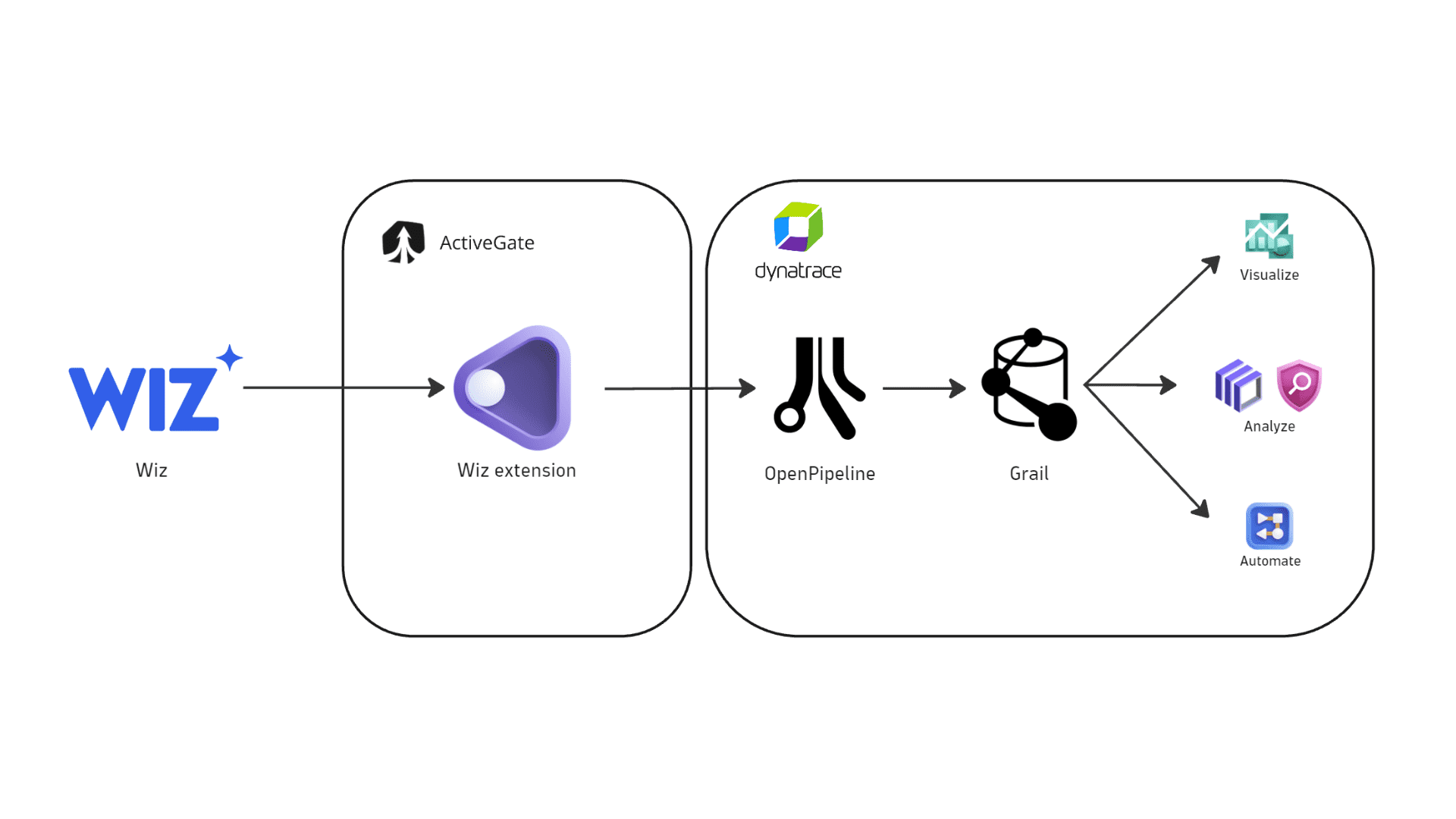
Dynatrace integration with Wiz is an extension running on Dynatrace ActiveGate. After you enable and configure the Dynatrace Wiz extension:
-
It periodically authenticates to the Wiz API using OAuth2 client credentials and fetches cloud configuration (CSPM) findings, threat detections, and audit logs.
-
The fetched data is ingested into Dynatrace and mapped to the Dynatrace Semantic Dictionary.
-
Data is stored in a bucket called
default_securityevents(for details, see Built-in Grail buckets).
Analyze
Open Notebooks or  Investigations to query ingested data, using the data format in Semantic Dictionary.
For a list of DQL examples based on compliance events that you can use for further investigation or reporting, see Query compliance events.
For threat detection events, use the data format in Detection finding events.
Automate notifications
Open  Workflows and build a workflow to create notifications for critical Wiz findings. For details, see Automate and orchestrate security findings.
Licensing and costs
For billing information, see Events powered by Grail.
FAQ
Which data model is used for the security logs and events coming from the Wiz integration?
-
Compliance finding events store the individual cloud configuration findings reported by Wiz per affected cloud resource. Dynatrace categorizes these events as
COMPLIANCE_FINDINGwith categoryCOMPLIANCEin the security event schema. -
Detection finding events store the individual threat detections reported by Wiz Defend. Dynatrace categorizes these events as
DETECTION_FINDINGwith categoryDETECTION_FINDINGin the security event schema. -
Audit logs represent user activity logs.
Which Wiz findings are imported into Dynatrace?
-
Wiz cloud configuration (CSPM) findings are reported by default.
-
Wiz Defend threat detections aren't ingested by default. To ingest them, enable Collect threat detections in the modules. Detections require a Wiz Defend license.
-
By default, only detections that Wiz promotes to a threat (
GENERATED_THREAT) are ingested. To also ingestMATCH_ONLYdetections, enable Include match-only detections in the advanced options. This increases volume. -
On the first ingest run, the integration ingests all findings and detections within the configured initial time window (12 days by default).
-
On subsequent runs, the integration ingests findings and detections according to the configured collection frequency.
-
If the extension stops for more than 24 hours, detections created during the outage are skipped, except for the most recent 24 hours. The Health status shows a warning with the skipped time range.
-
By default, findings with a
PASSresult aren't ingested. To also ingest passed configuration findings, enable Include passed configuration findings in the advanced options.
Why isn't my data ingested?
If you installed and configured the extension, but data isn't being ingested, follow the steps below.
- Open the extension and go to Health to check the status of the monitoring configuration.
- If the status isn't
OK, scroll down to Logs and select Run query to see the error information. - If the error information isn't enough, or the status shows
OKbut you're still not getting data, enable theEnable extension debug logsflag in the monitoring configuration and contact Dynatrace Support.
Common causes for missed data ingest include:
-
No connectivity between the ActiveGate and the Wiz API
Suggestion: Attempt to curl the Wiz authentication URL from the ActiveGate to ensure connectivity is working.
-
Wrong client ID and/or client secret
Suggestion: Double-check the credentials configured on the monitoring configuration.
-
Missing permissions on the Wiz service account
Suggestion: Ensure that the service account has the scopes listed in the Wiz requirements for the enabled modules, including
read:detectionswhen threat detections are collected.
How is the risk score for Wiz findings normalized?
Dynatrace normalizes severity and risk scores for all findings ingested through the current integration. This helps you to prioritize findings consistently, regardless of their source. For details on how normalization works, see Severity and score normalization.
The Dynatrace risk levels and scores are mapped from the original Wiz severity.
dt.security.risk.level (mapped from finding.severity) | dt.security.risk.score (mapped from dt.security.risk.level) |
|---|---|
critical → CRITICAL | 10.0 |
high → HIGH | 8.9 |
medium → MEDIUM | 6.9 |
low → LOW | 3.9 |
informational → NONE | 0.0 |