Ingest F5 BIG-IP APM, LTM, and ASM logs
- Latest Dynatrace
- Extension
- Published Nov 16, 2026
Analyze F5 BIG-IP network, application security, and authentication logs in the context of your monitored environment.
Get started
Overview
The Dynatrace integration with F5 BIG-IP products brings network, security, and authentication logs into Dynatrace. With this additional monitoring context, you can better understand the activity in your environment and quickly identify, analyze, and report suspicious or anomalous actions.
The integration ingests:
- Network traffic logs from F5 BIG-IP Local Traffic Manager (LTM)—including HTTP requests and responses, client and server information, and application traffic details. These logs give you centralized visibility into and analysis of network traffic.
- Application security logs from Application Security Manager (ASM), also known as F5 WAF for BIG-IP—including security policy violations, detected attack signatures, and alerted or blocked requests. These logs give you immediate insights into web application threats and application protection activity.
- Authentication and access logs from F5 BIG-IP Access Policy Manager (APM)—including login attempts, authentication failures, user session activity, and access policy events. These logs help you audit user access activity.
You can forward the logs from all three modules to Dynatrace through a syslog forwarding mechanism, such as Dynatrace ActiveGate or a Bindplane agent.
This page extends the F5 BIG-IP extension page, which focuses on monitoring the logs and metrics of F5 devices.
Use cases
With the ingested data, you can address the following use cases
- Analyze HTTP traffic handled by LTM virtual servers in
 Logs and
 Notebooks
- Monitor security policy violations and blocked requests that ASM detects, and investigate them in
 Investigations
- Audit login attempts, authentication failures, and user sessions that APM records
- Visualize F5 BIG-IP traffic, attack, and access trends in
 Dashboards
Requirements
See below for the F5 BIG-IP and Dynatrace requirements.
F5 BIG-IP requirements
An F5 BIG-IP Virtual Edition (VE) or hardware appliance with the licenses and provisioned modules for the capabilities that you use:
- Local Traffic Manager (LTM): To collect HTTP request and response logs, application traffic details, and client and server information.
- Application Security Manager (ASM) or Advanced WAF: To collect application security violations, detected attack signatures, and alerted or blocked requests.
- Access Policy Manager (APM): To collect authentication activity, user sessions, and access policy events.
Administrative access to F5 BIG-IP to configure the following logging components:
- LTM: Request logging profiles, logging pools, and virtual server associations.
- ASM: Security logging profiles with remote logging turned on. Use the Common Event Format (CEF) as the recommended format.
- APM: Remote syslog destinations, log publishers, and access policy logging settings.
Dynatrace requirements
-
ActiveGate version 1.310+ that must:
- Run the Extensions 2.0 framework.
-
Permissions:
- To run
 Extensions: Go to Hub, select Extensions, and display Technical information.
- To query ingested logs:
storage:logs:read.
- To run
Activation and setup
To set up the ingest of F5 BIG-IP logs, follow the steps below.
1. Install the extension
-
In Dynatrace, open Hub.
-
Look for F5 BIG-IP and select Install.
To ingest and process LTM, APM, and ASM logs, you don't need to add a monitoring configuration. Dynatrace deploys the OpenPipeline processors automatically when you install the extension.
2. Create a dynamic route to the pipeline
The extension provides a pipeline that maps the logs to the Semantic Dictionary data models. For details, see Processing in OpenPipeline.
Create a dynamic route to the pipeline with the following settings:
-
Target pipeline:
F5 BIG-IP Extension -
Matching condition:
// Tagged: collector sets product.* and feature(matchesValue(product.vendor, "F5")and matchesValue(product.name, "BIG-IP")and (matchesValue(product.feature, "LTM")or matchesValue(product.feature, "ASM")or matchesValue(product.feature, "APM")))// Legacy, untagged: fixed content markersor matchesValue(content, "*product.feature=\"LTM\"*") // LTM HSL template carries its own product.* keysor matchesValue(content, "*]: 0149*") // APM message idsor matchesValue(content, "*ASM:*") // ASM CEF, CSV and key=value
3. Configure log forwarding in F5 BIG-IP
Configure the logging profile for each module that you want to forward.
To collect HTTP request and response logs, configure a Request Logging profile. For details, see Configuring Request Logging in the F5 documentation.
-
In F5 BIG-IP, go to Local Traffic > Profiles > Other > Request Logging.
-
Turn on request and response logging, select
mds-udp, and configure a dedicated logging pool that points to the ActiveGate syslog receiver (UDP port5513in this example). -
Add the following request and response log templates, and associate the profile with the application virtual server.
Request log template (F5-side metadata):
event_source="request_logging",hostname="$BIGIP_HOSTNAME",client_ip="$CLIENT_IP",server_ip="$SERVER_IP",http_method="$HTTP_METHOD",http_uri="$HTTP_URI",http_host="${host}",virtual_name="$VIRTUAL_NAME",event_timestamp="$DATE_HTTP"Response log template (F5-side metadata):
event_source="response_logging",hostname="$BIGIP_HOSTNAME",client_ip="$CLIENT_IP",server_ip="$SERVER_IP",http_method="$HTTP_METHOD",http_uri="$HTTP_URI",http_host="${host}",virtual_name="$VIRTUAL_NAME",http_statcode="$HTTP_STATCODE",event_timestamp="$DATE_HTTP"
You can add identification fields, such as product.name, directly to the LTM log templates.
-
If you also forward ASM and APM logs, keep the enrichment fields only in the syslog receiver configuration (see the following steps).
-
If you ingest only LTM logs, you can add the fields to the F5 BIG-IP profile and skip the receiver configuration in ActiveGate. Add the following fields to the templates:
product.vendor="F5",product.name="BIG-IP",product.feature="LTM",connection_id="<DYNATRACE_CONNECTION_ID>"Replace
<DYNATRACE_CONNECTION_ID>with theconnection_idthat the Dynatrace platform provides. If noconnection_idis provided, remove it.
4. Turn on syslog ingestion on ActiveGate
Follow the instructions in Turn on syslog ingestion.
5. Check the F5 BIG-IP time zone
-
Connect to the F5 BIG-IP command line and run:
tmsh list sys ntp timezoneExample output:
sys ntp {timezone America/Los_Angeles} -
Note the time zone. Use it as the
locationvalue of the ASM and APM receivers.
6. Add the syslog receivers in ActiveGate
Add one receiver for each F5 BIG-IP module. For details about custom attributes, see Add custom attributes.
Connect to the ActiveGate host and open the syslog configuration file:
sudo nano /var/lib/dynatrace/remotepluginmodule/agent/conf/syslog.yaml
Copy and paste the configurations for the modules that you use into the existing receivers: section. Keep the existing receivers.
This receiver collects HTTP request and response logs over UDP port 5513.
receivers:syslog/f5-big-ip-ltm:udp:listen_address: "0.0.0.0:5513"add_attributes: trueprotocol: noneoperators:- type: syslog_parserprotocol: none- type: addfield: attributes["product.vendor"]value: "F5"- type: addfield: attributes["product.name"]value: "BIG-IP"- type: addfield: attributes["product.feature"]value: "LTM"- type: addfield: attributes["connection_id"]value: "<DYNATRACE_CONNECTION_ID>"
Before you save the file:
- Replace the
<DYNATRACE_CONNECTION_ID>placeholders with theconnection_idthat the Dynatrace platform provides. The ID uniquely identifies the ingest traffic. If noconnection_idis provided, remove this attribute. - Replace
<DEVICE_LOCATION>with the time zone that you noted in the previous step. For example,America/Los_Angeles. - Adjust the ports if needed.
Use three separate receivers with different ports, one for each F5 BIG-IP module. Separate receivers make it easier to identify and monitor the ingested logs.
7. Configure the syslog processing pipelines in ActiveGate
-
In the same
syslog.yamlfile, add the following pipelines to the existingservice.pipelinessection:service:pipelines:logs/f5-big-ip-ltm:receivers: [syslog/f5-big-ip-ltm]processors: [transform, attributes, batch]exporters: [otlphttp/syslog]logs/f5-big-ip-asm:receivers: [syslog/f5-big-ip-asm]processors: [attributes, batch]exporters: [otlphttp/syslog]logs/f5-big-ip-apm:receivers: [syslog/f5-big-ip-apm]processors: [attributes, batch]exporters: [otlphttp/syslog]Keep the existing processor definitions and the Dynatrace exporter configuration unchanged. The LTM pipeline requires the
transformprocessor to preserve the raw KVP log content. -
Save the configuration and apply the changes according to your ActiveGate version.
-
To verify the syslog ingestion configuration, run the following command on ActiveGate:
sudo grep -R "Otel syslog enabled" \/var/lib/dynatrace/remotepluginmodule/log/extensions/ \| tail -n 10Expected output:
Otel syslog enabled: true
8. Verify the logs in Dynatrace
After you configure the log forwarding, and as soon as F5 BIG-IP generates logs, verify that Dynatrace ingested them into Grail. Run the following queries in Notebooks, or explore the logs in Logs.
HTTP traffic logs:
fetch logs| filter log.type == "f5-big-ip-ltm"| sort timestamp desc
After the setup, you can query and analyze the F5 BIG-IP logs in Grail with Notebooks and Dashboards.
For more information, see Syslog ingestion with ActiveGate and OpenPipeline.
Details
How it works
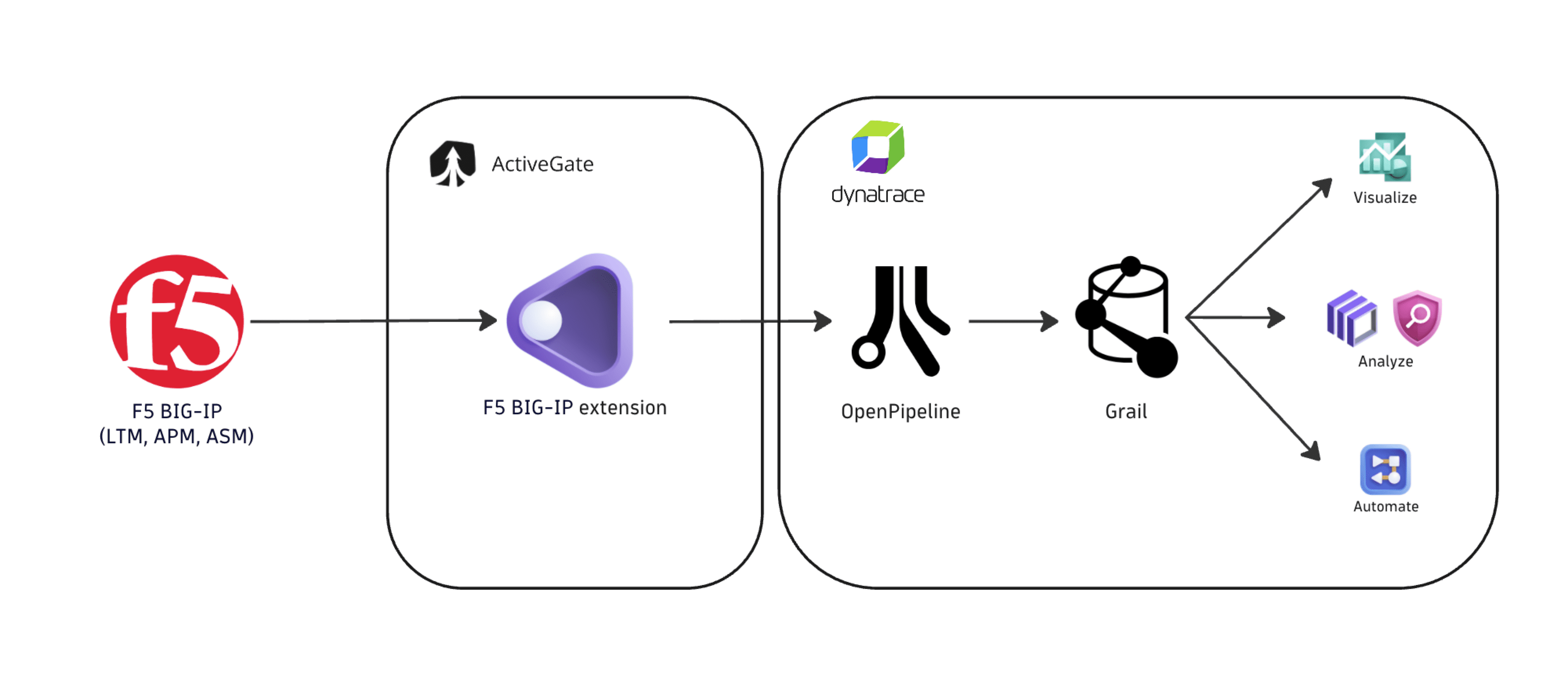
The integration collects logs from F5 BIG-IP LTM, ASM, and APM through syslog forwarding with Dynatrace ActiveGate or a Bindplane agent. After you configure the integration:
- F5 BIG-IP forwards network traffic, application security, and authentication logs to the configured ActiveGate syslog receivers.
- The syslog receivers add recommended attributes that support efficient log matching and processing, and then forward the logs to the OpenPipeline generic logs ingest source (
/api/v2/logs/ingest). For details, see OpenPipeline ingest sources. - OpenPipeline parses and normalizes the incoming logs, and maps the relevant fields to the Dynatrace Semantic Dictionary. OpenPipeline uses the processors that Dynatrace deploys when you install the extension.
- Dynatrace stores the processed logs in Grail. You can query and analyze them with Investigations, Notebooks, Dashboards, and other apps, such as Logs.
Licensing and costs
For billing information, see Log Management and Analytics.
FAQ
Which data models are used for the logs coming from F5 BIG-IP?
- HTTP network logs for LTM and ASM logs Coming soon
- Authentication audit logs for APM logs Coming soon
Can I use a Bindplane agent to forward the logs?
Yes. You can use a Bindplane agent as an alternative to the ActiveGate syslog ingestion.
For log matching and mapping to work, enrich the logs with the following attributes in the Bindplane processing steps:
product.vendorproduct.nameproduct.featureconnection_idOptional