Ingest Qualys vulnerability findings, scan events, and audit logs
- Latest Dynatrace
- Extension
- Preview
Prioritize Qualys vulnerabilities with runtime context from production.
Get started
Overview
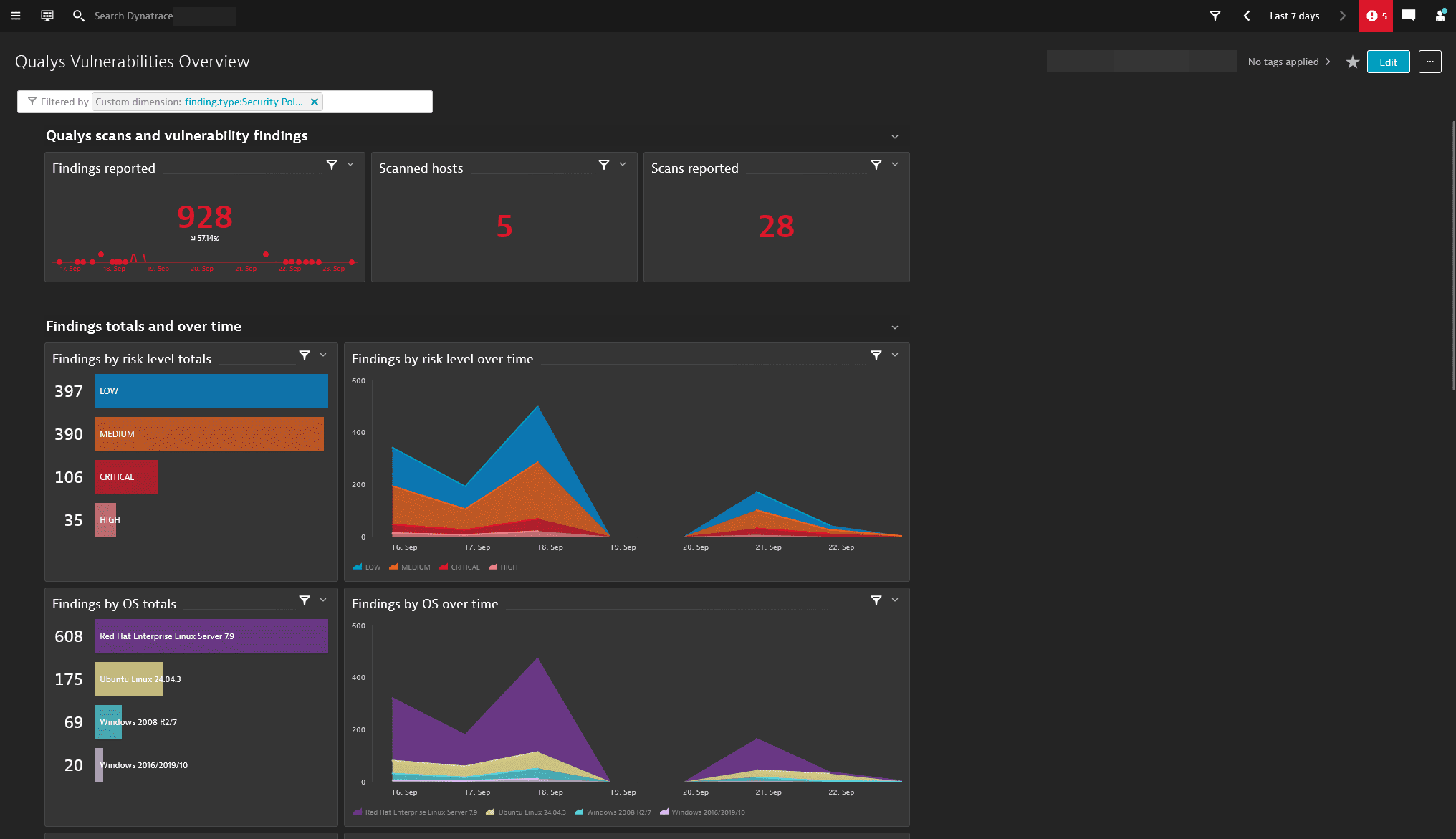
Dynatrace integration with Qualys allows users to unify and contextualize vulnerability findings across DevSecOps tools and products, enabling central prioritization, visualization, and automation of security findings.
Qualys Enterprise TruRisk platform offers a range of products, including Vulnerability Management, Detection, & Response (VMDR), which helps detect and prioritize vulnerabilities for remediation on hosts. The Dynatrace platform observes the corresponding applications and services associated with those hosts. Ingesting and enriching vulnerability findings with runtime context helps users to better focus on the top risks that affect their production applications.
Use cases
With the ingested data, you can accomplish various use cases, such as
Requirements
See below for the Qualys and Dynatrace requirements.
Qualys requirements
To authenticate with a username and password, the user account must have the following permissions:
- Vulnerability Management module
- User Role: Reader with API access enabled
- Asset Groups: access to the relevant asset groups of interest, or to all asset groups
- Administration module (needed for the audit log ingest):
- A Reader-type user role is sufficient.
- To collect activity logs, the role must also include:
- API access enabled
- Access to the Administration module (Action Log Permissions > Action Log Access)
Dynatrace requirements
-
ActiveGate version 1.310+ that needs to be able to
- Run Extensions 2.0 framework
- Reach the Qualys API endpoints
-
Permissions: For a list of permissions required, go to Hub, select
 Extensions, and display Technical information.
 -
Generate an access token with the
openpipeline.events_securityscope and save it for later. For details, see Dynatrace API - Tokens and authentication.
Activation and setup
-
In Dynatrace, search for Qualys and select Install.
-
Follow the on-screen instructions to configure the extension.
-
Verify configuration by running the following queries in
 Notebooks:
-
For audit logs:
fetch logs| filter log.source=="Qualys" -
For finding events:
fetch security.events| filter dt.system.bucket == "default_securityevents"| filter event.provider=="Qualys"AND event.type=="VULNERABILITY_FINDING" -
For scan events:
fetch security.events| filter dt.system.bucket == "default_securityevents"| filter event.provider=="Qualys"AND event.type=="VULNERABILITY_SCAN"
-
-
Once the extension is installed and working, you can access and manage it in Dynatrace via
Extensions. For details, see About Extensions.
Details
How it works
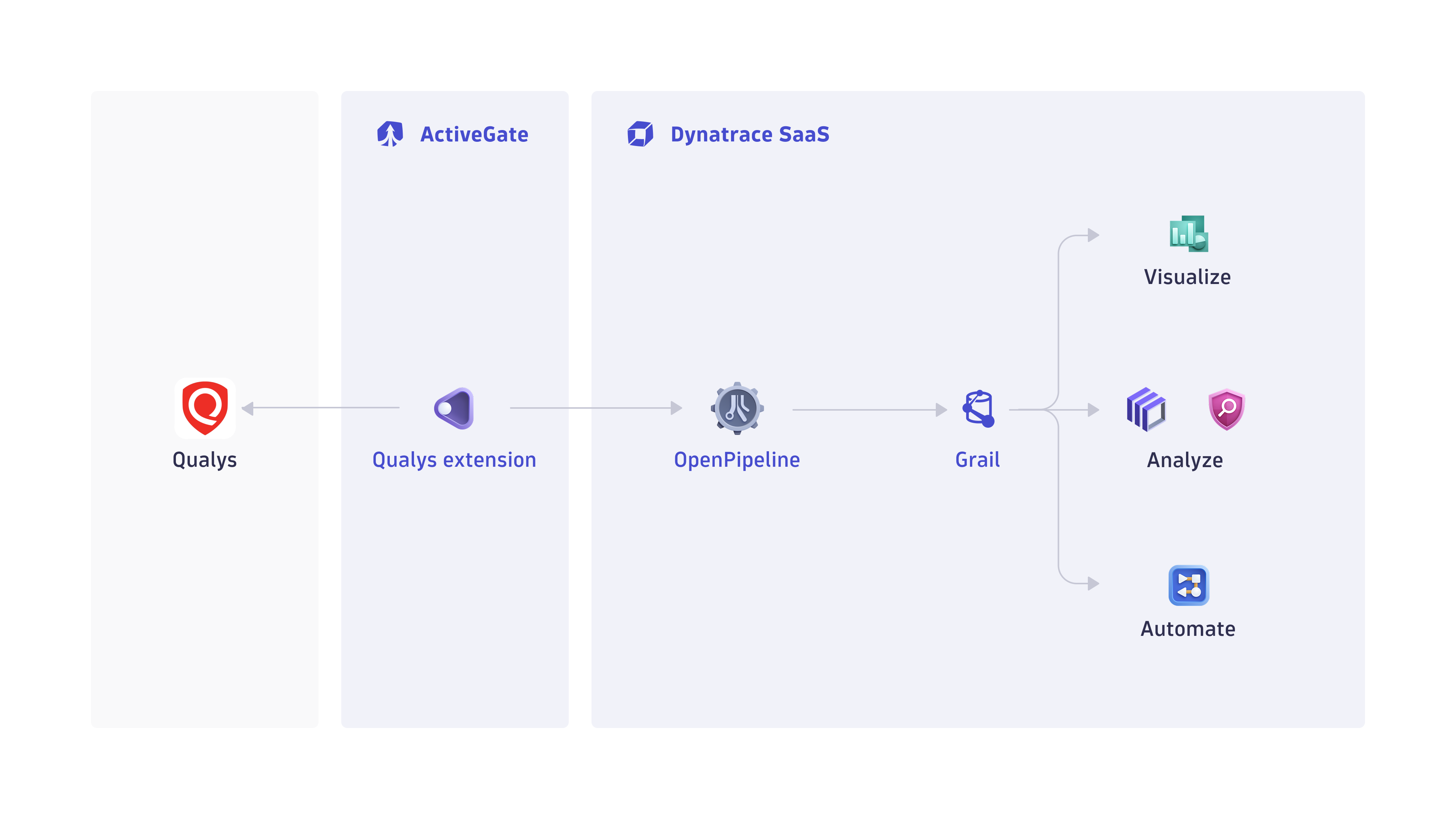
Dynatrace integration with Qualys is an extension running on Dynatrace ActiveGate. Once you enable and configure the Dynatrace Qualys extension
-
It periodically collects security findings and audit logs using Qualys REST API.
-
The fetched data is ingested into Dynatrace and mapped to the Dynatrace Semantic Dictionary.
-
Data is stored in a bucket called
default_securityevents(for details, see Built-in Grail buckets).
Licensing and costs
For billing information, see Events powered by Grail.
FAQ
Which data model is used for the security events and audit logs coming from Qualys integration?
-
Vulnerability finding events store the individual vulnerability findings reported by Qualys per affected artifacts and component.
-
Vulnerability scan events indicate coverage of scans for individual artifacts.
-
Audit logs represent user activity logs in Qualys.
Which Qualys security findings are imported into Dynatrace?
-
The Qualys VMDR findings are reported by default.
-
On the first ingest run, integration ingests all findings updated in the last
mhours, wheremis the first ingest interval configured in the monitoring configuration. -
If the extension is configured to ingest data at an interval of
nhours, then whenever the extension runs, all vulnerability findings updated in the lastnhours will be ingested. -
If no new or updated findings were detected, no findings will be ingested.
Which extension fields are added on top of the core fields of the events ingested from Qualys?
- The
qualysnamespace is added for extracting several Qualys-specific attributes for user convenience on top of the original issue JSON, which is stored inevent.original_contentfield.
Example fields:
-
qualys.host.asset_id: ID assigned to all assets in the subscription that is not exposed in VMDR. -
qualys.host.tracking_method: How the host asset is tracked (for example, Cloud Agent, IP, DNS). -
qualys.detection.first_found: When the detection was first found on the asset. -
qualys.detection.last_found- When the detection was last found on the asset. -
qualys.detection.times_found: How many times this detection has been found. -
qualys.detection.qds_factors: A map with details on what has contributed to the Qualys Detection Score.
What Qualys asset types are supported by Dynatrace for runtime contextualization?
HOST: all the findings from Qualys VMDR generated from assessment of hosts are mapped set with HOST value in object.type field, and host namespaces are added with the corresponding fields:
-
host.name: Hostname of the host asset (if available). -
host.ip: IP address of the host asset. -
host.fqdn: Fully qualified domain name of the host asset (if available).
How do we normalize the risk score for Qualys findings?
The Dynatrace risk levels and scores are mapped from the original Qualys severities.
-
dt.security.risk.scoreis mapped from the Qualys provided severity score to static scores. -
dt.security.risk.levelis mapped from the Qualys severity score and mapped from the original values in finding.score.
The Qualys Detection Score (QDS) has a range from 1 to 100. To map this to the 10 point Dynatrace security risk score we divide the QDS by 10.
dt.security.risk.score (mapped from finding.score) | dt.security.risk.level (mapped from dt.security.risk.score) |
|---|---|
9.0-10.0 | CRITICAL |
7.0-8.9 | HIGH |
4.0-6.9 | MEDIUM |
0.1-3.9 | LOW |
Can this integration run on Dynatrace Classic environments?
By default, the extension ingests vulnerabilities and scans as security events into Grail supported by the Lastest Dynatrace. For the Dynatrace Classic (managed) environments, you can opt in to ingest the data as logs by enabling the Ingest all data as logs instead of events toggle in the configuration.
Additionally, the extension includes a log metric configuration (log.qualys_vulnerability_count) and an accompanying classic dashboard configuration (Qualys Vulnerabilities Overview). For the log metric and dashboard to work, you must first create the following custom log attributes in  Settings > Log Monitoring > Custom attributes:
-
dt.security.risk.level -
host.name -
os.name -
component.name -
scan.id -
scan.name -
finding.type -
vulnerability.title -
vulnerability.remediation.status -
qualys.host.tracking_method -
qualys.asset.tags -
qualys.qid
In case any further customization of the default log.qualys_vulnerability_count metric is needed, duplicate it and edit your copy.