Ingest Docker Scout vulnerability findings and scan events
- Latest Dynatrace
- Extension
Ingest Docker Scout vulnerability findings and scan events into Dynatrace as security events.
Get started
Overview
Dynatrace integration with Docker Scout allows teams to unify and contextualize vulnerability findings from container images hosted on Docker Hub, enabling centralized prioritization, visualization, and automation of security findings.
Docker Scout scans container images on Docker Hub and reports vulnerability findings and software bill of materials (SBOM) data.
Dynatrace observes the runtime entities that use those images. Ingesting and enriching Docker Scout findings with runtime context helps teams focus on high-impact vulnerabilities that affect production applications.
Use cases
With the ingested data, you can accomplish various use cases, such as
Requirements
See below for the Docker Scout and Dynatrace requirements.
Docker Scout requirements
-
Optional Activate Docker Scout on the Docker Hub repositories you want to monitor.
When enabled, Docker Scout automatically scans newly pushed images and updates results when vulnerability data changes. Docker Scout doesn't expose this trigger behavior through API endpoints, so Dynatrace integration triggers scans via Docker CLI on ActiveGate.
Dynatrace requirements
-
ActiveGate version 1.310+ that must:
- Use the
Dedicated limitsoption for Performance profile—see ActiveGate performance profile configuration. - Run the Extensions 2.0 framework.
- Have network reachability to the Docker Hub API endpoints and Docker Scout command line interface.
- Use the
-
Deploy and configure Docker and Docker Scout CLI on ActiveGate:
-
Install Docker Engine/CLI on the ActiveGate host so the
dockercommand is available. -
Create a dedicated home directory for the ActiveGate user:
mkdir -p /home/dtuserag -
Assign ownership to the ActiveGate user:
chown dtuserag:dtuserag /home/dtuserag -
Switch to the ActiveGate user and open a shell:
sudo -u dtuserag -s -
Set
HOMEto the writable directory:export HOME=/home/dtuserag -
Install Docker Scout CLI in the ActiveGate user home (this adds the
docker scoutfunctionality):HOME=/home/dtuserag curl -fsSL https://raw.githubusercontent.com/docker/scout-cli/main/install.sh | sh
-
-
Permissions: For a list of permissions required, go to Hub, select
 Extensions, and display Technical information.
 -
Generate an access token with the
openpipeline.events_securityscope and save it for later. For details, see Dynatrace API - Tokens and authentication.
Activation and setup
-
In Dynatrace, search for Docker Scout and select Install.
-
Follow the on-screen instructions to configure the extension.
-
Verify configuration by running the following queries in
 Notebooks:
-
For finding events:
fetch security.events| filter dt.system.bucket == "default_securityevents"| filter event.provider == "Docker Scout"AND event.type == "VULNERABILITY_FINDING" -
For scan events:
fetch security.events| filter dt.system.bucket == "default_securityevents"| filter event.provider == "Docker Scout"AND event.type == "VULNERABILITY_SCAN"
-
-
Once the extension is installed and working, you can access and manage it in Dynatrace via
Extensions. For details, see About Extensions.
Details
How it works
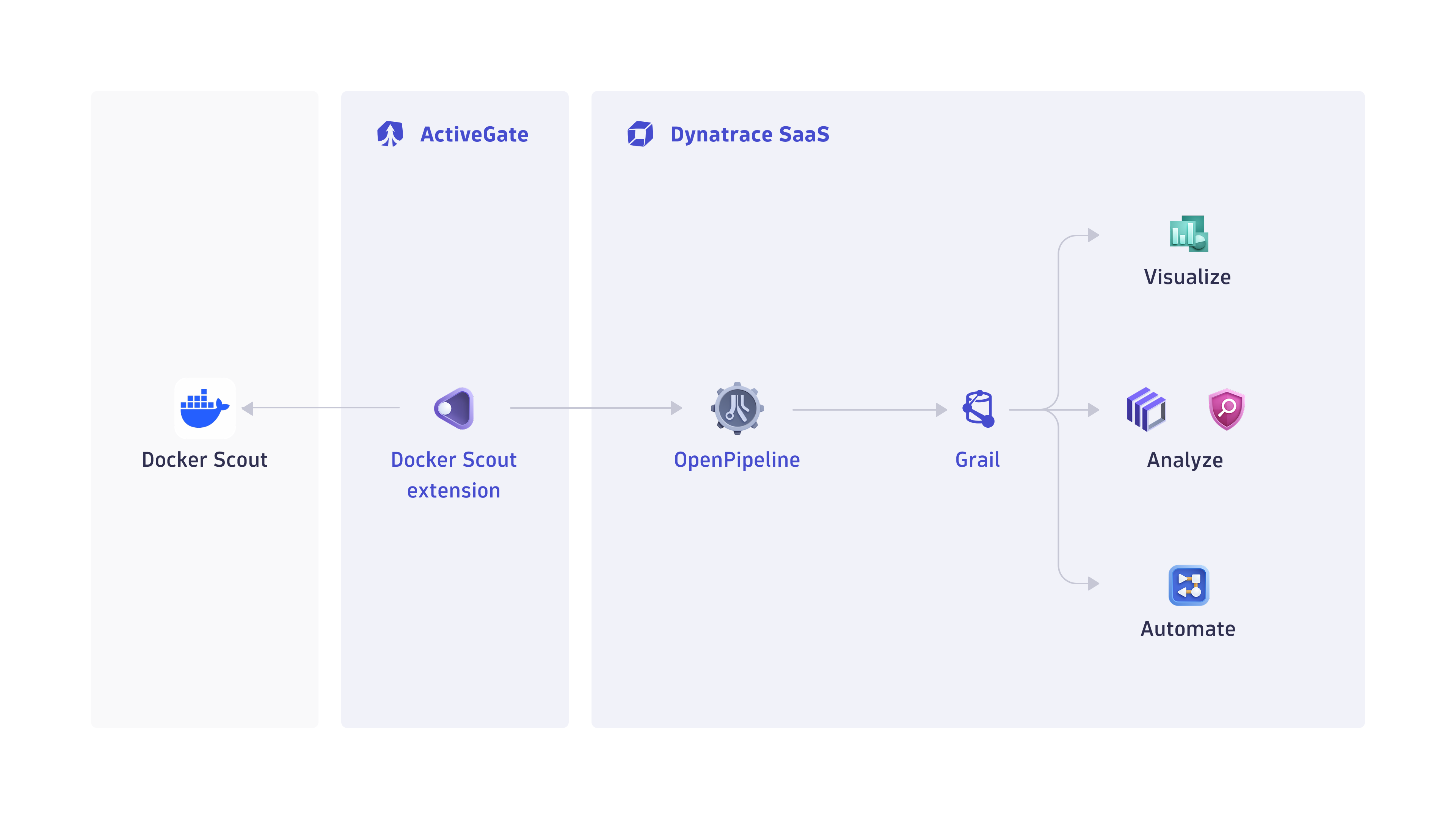
The Docker Scout extension polls Docker Hub for new container images, triggers scans via Docker Scout CLI on ActiveGate, and ingests vulnerability findings into Dynatrace security events.
Dynatrace integration with Docker Scout is an extension running on Dynatrace ActiveGate. Once you enable and configure the extension:
- It periodically discovers new container images from the configured Docker Hub organization and repository scope using a dedicated API.
- It triggers scans for new or relevant images by using Docker Scout CLI.
- The fetched data is ingested into Dynatrace and mapped to the Dynatrace Semantic Dictionary.
- Data is stored in a default bucket called
default_securityevents(for details, see Built-in Grail buckets).
Licensing and costs
For billing information, see Events powered by Grail.
FAQ
Which data model is used for security events coming from Docker Scout integration?
-
Vulnerability finding events store individual vulnerability findings reported by Docker Scout per affected artifacts and components.
-
Vulnerability scan events indicate coverage of scans for individual artifacts.
Which Docker Scout findings are imported into Dynatrace?
-
Docker Scout Common Vulnerabilities and Exposures (CVE) for various Software Bill of Materials (SBOM) components are reported as findings for discovered Docker Hub images based on the organization and repository selection in extension configuration.
-
The extension runs periodically (default: 24 hour interval). On each run, the extension checks for any newly pushed images in Docker Hub within the configured time window and scans them for new findings accordingly. Only the images pushed during that interval are considered for processing.
-
If no new container images are detected, no findings or scan events are ingested.
We recommend setting the security findings ingest frequency to 24 hours, as it allows the system to handle 100+ images on average per day. This estimate is based on an ActiveGate setup running on an EC2 instance with 4 CPUs and 16 GB RAM. Higher resource configurations may process a greater number of images.
Which extension fields are added to the core fields of events ingested from Docker Scout?
The container_image namespace is added for container image-related information with the following fields:
container_image.digestrepresents the container image digest; this value can be used to match runtime containers.container_image.repositoryrepresents the container repository name.container_image.registryrepresents the container registry name.container_image.tagsrepresents the tags associated with a container image in a repository.
What Docker Scout asset types are supported by Dynatrace for runtime contextualization?
CONTAINER_IMAGE: Findings from Docker Scout are generated by vulnerability assessments of container images and are mapped with CONTAINER_IMAGE in object.type. The container_image namespace is added, and container_image.digest is used to match ingested findings to runtime containers monitored by Dynatrace.
How is risk score normalized for Docker Scout findings?
Dynatrace normalizes severity and risk scores for all findings ingested through this integration. This helps you prioritize findings consistently, regardless of their source. For details, see Severity and score normalization.
-
dt.security.risk.scoreis taken from the severity score reported by Docker Scout infinding.score. -
dt.security.risk.levelis mapped to fixed values based ondt.security.risk.score.
dt.security.risk.score (mapped from finding.score) | dt.security.risk.level (mapped from dt.security.risk.score) |
|---|---|
9.0-10.0 | CRITICAL |
7.0-8.9 | HIGH |
4.0-6.9 | MEDIUM |
0.1-3.9 | LOW |