RUM data model
- Latest Dynatrace
- Explanation
RUM provides deep visibility into how end users interact with the frontends of your applications. It delivers insights into user behavior and experience, along with performance metrics and error details. This page outlines the underlying data model and how the captured data is organized in Grail.
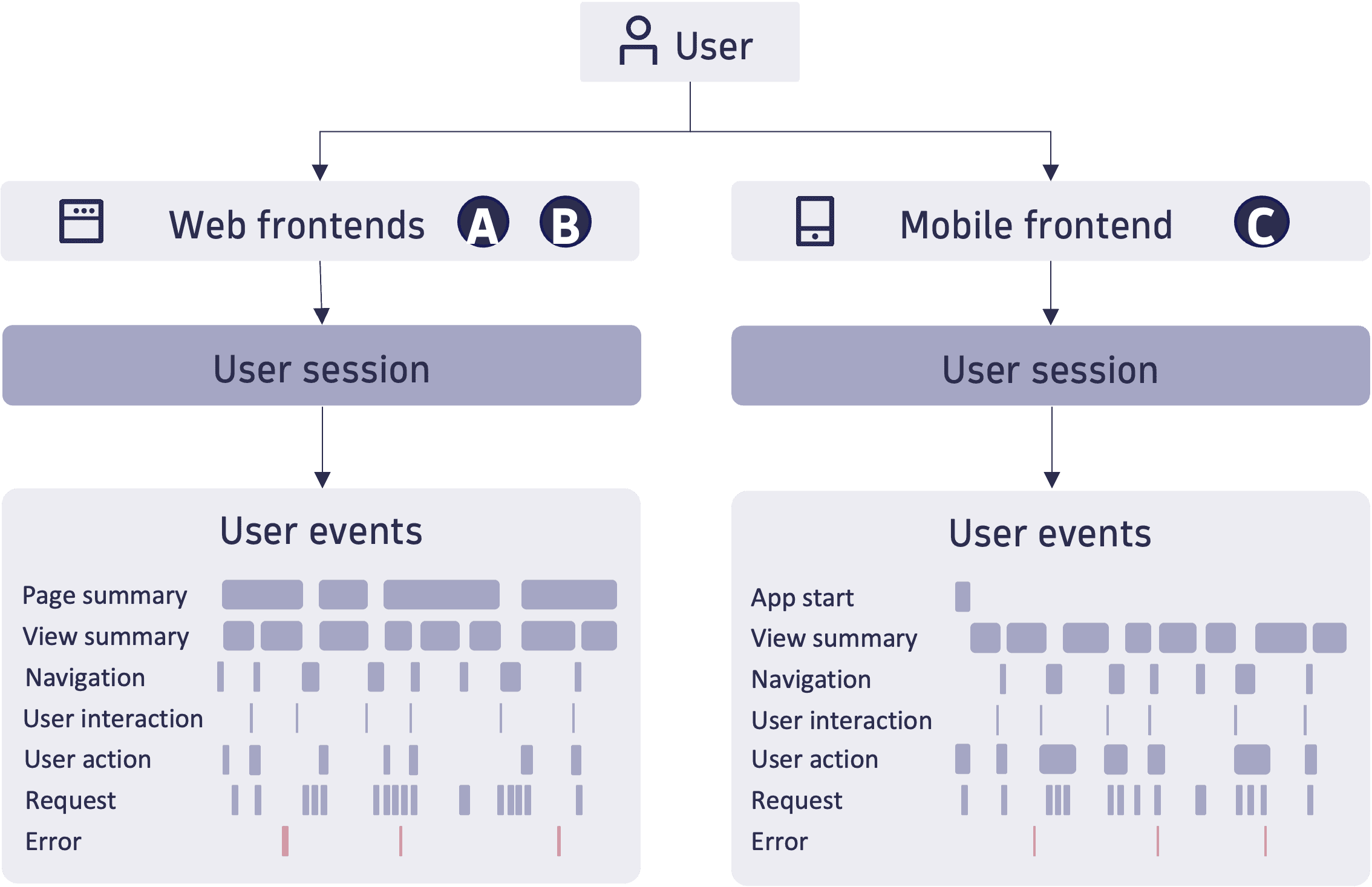
User Events
RUM captures all end-user data as user events, which are stored in the user.events table. For details, see User events in the Semantic Dictionary.
Each event includes the following attributes:
- Basic attributes such as an ID, start and end time, and duration.
- Contextual details such as operating system, geolocation, device, and browser.
- At least one characteristic that describes the event's nature—for example, navigations, errors, requests, or user interactions.
- Attributes specific to the event's characteristics.
The following sections outline some important user event characteristics.
Page summaries, view summaries, and navigations
The concept of pages applies only to web frontends, where it represents an HTML page loaded through a full page load.
Views, on the other hand, refer to the content displayed to the user at any time. Views are supported on both web and mobile frontends:
- On web, unlike pages, switching to a new view does not require a full page load.
- On mobile, a view represents a specific screen presented to the user.
Data collected for a page or view—such as performance metrics and error counts—is aggregated in page summary or view summary events.
Navigations describe the transitions from one view to another or from one page to another.
To learn more about pages, views, and navigations in web frontends, see Pages, views, and navigations. To learn more about views and navigations in mobile frontends, refer to Concepts for mobile frontends.
User interactions
Early Access
User interactions represent activities performed by an end user on the application's frontend. The specific types of interactions depend on the frontend technology:
- For web applications, this includes events such as clicks, scrolls, and mouseover.
- For mobile applications, this includes mobile touches, gestures, and device rotations.
For a complete list of user interactions, see User interactions in the Semantic Dictionary.
Capturing user interactions can be enabled as described in Configure user interaction capturing for web frontends and Configure user interaction capturing for mobile frontends.
In RUM Classic, user interactions were only recorded when they were part of a user action involving a request. In RUM, this restriction does not apply—interactions can be captured independently of any request.
User actions
A user action is a meaningful interaction initiated by an end user that triggers a distinct piece of application behavior and produces an observable outcome, whose frequency and duration can be monitored and optimized.
- It connects related events—user interactions, requests, page navigations, and errors—so you get a full picture of what happened.
- It tracks a duration from the point of interaction until the user-visible result, regardless of how many backend calls, validations, or rendering steps are involved.
- It's grouped via a
user_action.instance_idanduser_action.name, which can be used for monitoring, targeted analysis, and optimization.
Examples include:
click on order on /carttouch on view details on product_list
Dynatrace automatically captures user actions on both web and mobile frontends and provides an API to manually capture them.
- For details about web frontends, see User actions.
- For details about mobile frontends, see User actions.
Requests
Request events capture requests issued by the browser or mobile app, such as HTTP calls. They include details like the URL, HTTP method, and status code for HTTP requests, along with performance metrics—for example, values from the W3C Resource Timing and W3C Navigation Timing APIs in web frontends.
Errors
RUM captures a wide range of error types, including:
- Failed requests
- Uncaught exceptions
- CSP violations in web frontends
- Crashes in mobile frontends
- Application Not Responding (ANR) errors in mobile frontends
For the full specification of errors, see Semantic Dictionary–Global field reference–Error.
User sessions
User sessions summarize all user events from the same end user within a limited time frame. A session ends after a period of inactivity or when the maximum session duration is reached. User sessions are stored in the user.sessions table.
Unlike RUM Classic, there is no limit on the number of user actions per session.
You can populate the user identifier of a session in two ways:
- By calling the RUM JavaScript API or the mobile RUM APIs. If your code already calls the RUM Classic API to identify a user, this call is also effective for RUM.
- By enriching it from an event property using OpenPipeline; see instructions for web and mobile.
To learn more about the user session lifecyle in web frontends, see User sessions in web frontends. For the full specification of user sessions, see User sessions in the Semantic Dictionary.
Event and session properties
Event and session properties are custom key-value pairs you can define to enrich user events and sessions with business or application context—for example, the cart value during checkout, an A/B test variant, or the customer tier of the active user. With this context, you can segment sessions by their properties, or turn numeric properties into custom metrics to track key business indicators over time.
- Event properties apply to individual user events and are stored in the
event_propertiesnamespace. - Session properties are aggregated across user sessions and stored in the
session_propertiesnamespace.
Depending on the scope and the frontend type, properties are collected in one of the following ways:
| Method | Description | Scope | Available for |
|---|---|---|---|
Captured based on predefined rules set in the Dynatrace web UI | Extracted from a web page, without any code changes required. | Event properties | Web frontends |
Reported via the API | Sent from your frontend through the RUM APIs. | Event and session properties | Web and mobile frontends |
Enriched in OpenPipeline | Aggregated from event properties during ingest. | Session properties | Web and mobile frontends |
Config-less via the API Preview | Sent from your frontend through the RUM APIs without prior configuration. | Event and session properties | Web and mobile frontends |
Once collected, these properties surface throughout RUM—in the Users & Sessions app, and on the user.events and user.sessions tables in notebooks and dashboards. For an example of custom metrics based on properties, see Extract a metric from user sessions.
To learn how to collect event and session properties, see Capture event and session properties for web frontends and Capture event and session properties for mobile frontends.