Capture event and session properties for mobile frontends
- Latest Dynatrace
- How-to guide
Use event and session properties to enrich your RUM data with business or application context and tailor monitoring to your goals. You can work with them in the following ways:
- Report properties via the API—send any data available in your application as event or session properties.
- Preview Report config-less properties via the API—send properties without any prior configuration or allowlist.
- Enrich properties in OpenPipeline—aggregate session properties from event properties or set the user identifier during ingest.
Report properties via the API
To prevent unconfigured properties from being dropped during ingest, you must allow each property.
Allow API-reported properties
To allow a reported property
-
Go to
 Experience Vitals > Overview.
 -
Select Mobile to view all mobile frontends.
-
Select the frontend you want to configure.
-
In the Settings tab, select Capture properties.
-
In the Allowed API-reported properties section, select New property.
-
Enter the property key without a prefix, for example,
cart.total_value. -
If you want the property key validation to ignore case, turn on Property key validation should be case-insensitive.
The same steps apply to event and session properties. API-reported properties are defined without the event_properties. or session_properties. prefix. The prefix is required only when you send the property.
Send event and session properties
Event and session properties can be sent via the RUM APIs.
Aggregate session properties from event properties
Session properties can be derived from event properties and aggregated across a session using OpenPipeline. For each session property, you choose how the values reported during the session are aggregated:
- For any property type, you can keep the First or the Last reported value. Last is the default.
- For numeric properties, you can additionally use Min, Max, Avg, or Sum.
To aggregate a session property from event properties
-
Go to
 Settings > Process and contextualize > OpenPipeline > User events > Pipelines.
 -
Select an existing pipeline or create a new one. To create a new pipeline, select Pipeline and enter a name.
-
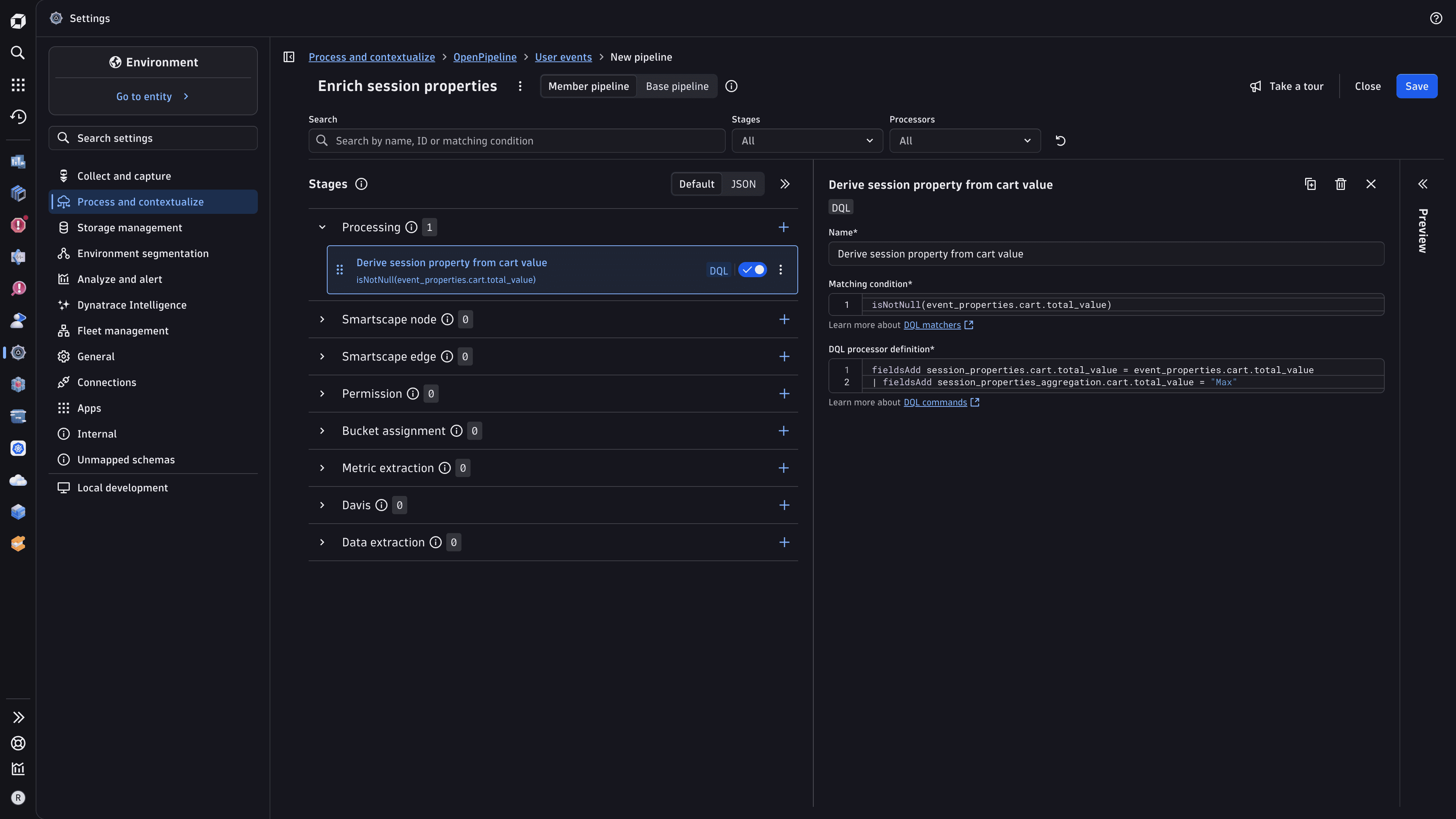
Go to Processing > Add (or if processors are already defined) > DQL and define the processor:
-
A descriptive name—for example,
Derive session property from cart value -
The matching condition—a filter for events that carry the event property, for example:
isNotNull(event_properties.cart.total_value) -
The DQL processor definition—two
fieldsAddstatements: the first writes the event property value into the session property namespace, and the second declares the aggregation method, for example:fieldsAdd session_properties.cart.total_value = event_properties.cart.total_value,session_properties_aggregation.cart.total_value = "Max"The aggregation value is a string. Valid values are
"First","Last","Min","Max","Avg", and"Sum"."Min","Max","Avg", and"Sum"apply only to numeric properties. You can omit the aggregationfieldsAddline to use the default ("Last").
-
Enrich the user identifier from event properties
You can populate the user identifier of a session from a captured or reported event property using OpenPipeline. This lets you set the user identifier from application data, as an alternative to calling the identifyUser API method.
To populate the user identifier from an event property
-
Go to
Settings > Process and contextualize > OpenPipeline > User events > Pipelines. -
Select an existing pipeline or create a new one. To create a new pipeline, select Pipeline and enter a name.
-
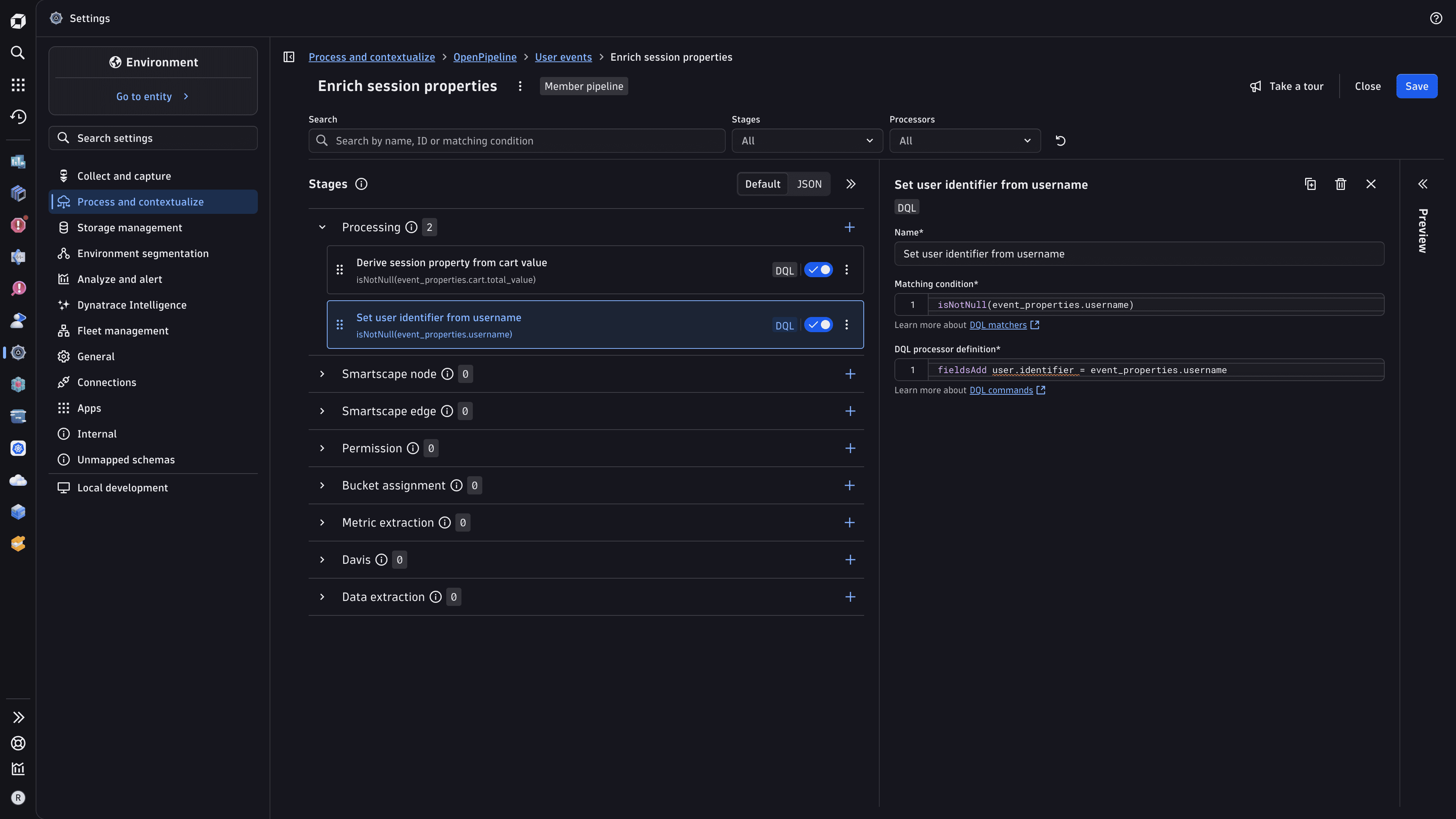
Go to Processing > Add (or if processors are already defined) > DQL and define the processor:
-
A descriptive name—for example,
Set user identifier from username -
The matching condition—a filter for events that carry the event property, for example:
isNotNull(event_properties.username) -
The DQL processor definition:
fieldsAdd user.identifier = event_properties.username
You might see a warning because
user.identifieris part of the predefinedbuiltin-sensitive-user-events-and-sessionsfieldset. You can still use it for enrichment. For details about access control for sensitive fields, see Field permissions. -
Report config-less properties
Config-less properties let you send any event or session property directly from your application, with no prior configuration in Dynatrace. Unlike other API-reported properties, you don't need to add each key to an allowlist before sending it, but the per-event and per-session limits still apply. You can use property keys that change at runtime. Property keys are still validated for format (see Limits), but values are accepted without additional validation beyond character length.
Config-less properties are especially useful when the properties you need vary dynamically. For example, property keys can include a date-based segment, a feature flag name, or any other value that changes over time.
To send a config-less property, use the same API methods as for API-reported properties; see Send event and session properties. The event_properties. and session_properties. prefixes still apply.
To request access to the config-less RUM properties preview, go to Preview program.
Limits
The following limits apply to event and session properties:
- A field name can have a maximum length of 100 characters, including the
event_properties.orsession_properties.prefix. - A field name can contain only letters (
A–Z,a–z), numbers (0–9), underscores (_), and dots (.). For example:event_properties.cart.total_value. - You can allow up to 200 API-reported properties per frontend.
- You can send up to 50 properties per event.
- You can include up to 500 session properties per session.
- Property values must be of a primitive type:
String,Int,Long,Double, orBoolean. - String values can have a maximum length of 1,000 characters.
- Config-less properties are not subject to per-frontend count limits, and the maximum character length is raised to 5,000 characters.