User actions in web frontends
- Latest Dynatrace
- Explanation
A user action represents a significant operation within the frontend. It groups the requests, navigations, and errors that result from a single user interaction, giving you a complete picture of what happened and how long it took. This page explains the concept for web frontends in RUM and how it differs from RUM Classic.
How user actions start
A user action is created when one of the following conditions is met:
-
Hard navigation user actions: If a page loads due to a hard navigation, a user action of type
hard_navigationis created automatically. The navigation event is sent separately and not merged into the user action event. -
Soft navigation user actions: If an action-creating user interaction is followed by a soft navigation and therefore a view change, a user action of type
soft_navigationis created automatically. The navigation event is sent separately and not merged into the user action event. -
Same view user actions: If an action-creating user interaction is followed by an XHR or fetch request, a user action of type
same_viewis created automatically. Requests are sent separately and not merged into the user action event. -
API user actions: You can also create user actions using
dynatrace.userAction.create() in the JavaScript API. There are no prerequisites for triggering a user action this way.
Each event (for example, user interaction, navigation, error, or request) that relates to a user action receives a unique user_action.instance_id that links it to the user action.
Action-creating user interactions
Soft navigation and same view user actions need a triggering user interaction. Only the following interaction types create a user action.
| Interaction type | When it creates a user action |
|---|---|
| Every click |
| Every committed change to a form control, for example an option in a dropdown list or a checkbox |
| Every completed drag-and-drop operation |
| Only if the pressed keys include |
What a user action groups
While a user action is active, the agent links the events that occur during it so you can analyze them together:
- XHR and fetch requests: Every request made while the user action is active is linked to it. These requests determine when the action settles and how long it stays active.
- DOM mutations: Changes to the page structure are tracked and extend the user action's active window.
- Resource timings: Resources tracked by the W3C Resource Timing API extend the active window. Note that resources are counted only after they finish loading.
- View navigation: For soft navigation user actions, the resulting view change is associated with the user action.
- Errors: Errors that occur while the user action is active are linked to it.
- User interactions: Every user interaction captured while the user action is active is linked to it, not only the interaction that triggered it. User interactions don't extend the active window, and an action-creating interaction starts a new user action instead.
For API user actions, you can also attach custom properties. For details on how to capture properties, see Event and session properties.
How user actions end
A user action ends automatically based on certain conditions, or you can close it manually via the API.
Default end behavior
While a user action is active, the RUM JavaScript keeps track of XHR and fetch requests, DOM mutations, and resource timings to determine when the user action ends. A user action ends when one of the following conditions is met:
- The user action reaches a duration of 50 s.
- The user leaves the page.
- A new user action is created. In this case, the current user action is interrupted and associated with the new one through the
user_action.interrupted_by_instance_idattribute. - When all of the following conditions apply during the last 100 ms:
- No XHR or fetch requests occurred.
- No DOM mutations occurred.
- No new request was added to the W3C Resource Timing API. Note that requests are only added once they have finished.
Ending user actions via the API
You can end user actions via the API using UserActionTracker.complete().
By default, API-created user actions do not follow the default end behavior. To enable auto-completion, set UserActionTracker.completeAutomatically to true, or set the completeAutomatically option to true when creating the user action.
Example
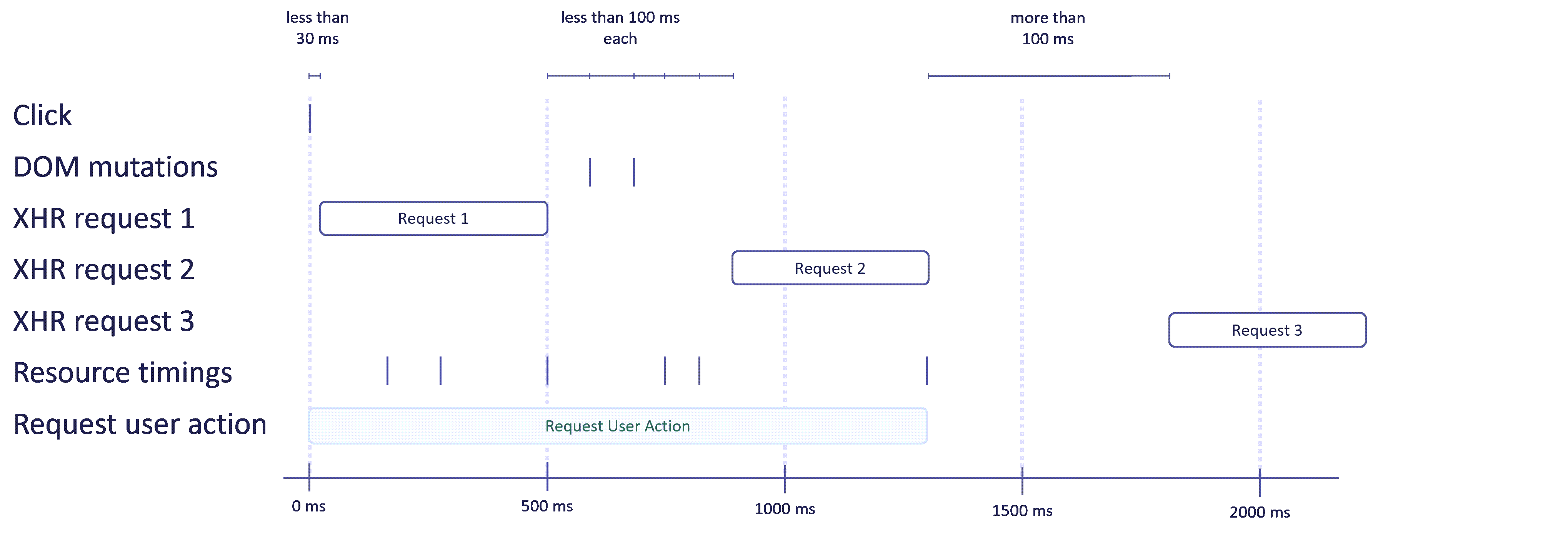
The diagram below illustrates the lifecycle of a user action, using a same view user action as an example.
- The user clicks somewhere on the page.
- If an XHR or fetch request occurs within 30 ms, a new user action starts.
- As long as DOM mutations, XHR or fetch requests, or resource timings are reported within 100 ms of the previous report, the user action is extended.
- If more than 100 ms pass without any report, the user action is closed and sent.
Captured data
Each user action event captures the following information:
- Name: For same view, soft navigation, and hard navigation user actions, the name is derived from the triggering interaction or navigation. For API user actions, the name is the string you provide. For details on how to change user action names, see Customize grouping and naming of user events.
- Type (
user_action.type): One ofsame_view,soft_navigation,hard_navigation, orapi. - Duration: The time from the start of the user action to when it closes.
- Completion reason (
user_action.complete_reason): Why the user action ended: natural inactivity (100 ms idle window), page leave, maximum duration (50 s), or interrupted by another action. - Triggering UI element (
ui_element.name,ui_element.tag_name,ui_element.name_origin): The name, HTML tag, and name source of the element that triggered the user action. - Request count (
user_action.requests.count): Total number of XHR and fetch requests made during the user action. - Error counts (
error.exception_count,error.http_4xx_count,error.http_5xx_count): Exceptions and failed HTTP requests that occurred during the user action. - Mutation count (
user_action.mutation_count): Number of DOM mutations that occurred during the user action. - Web Vitals (
web_vitals.largest_contentful_paint,web_vitals.interaction_to_next_paint,web_vitals.cumulative_layout_shift,web_vitals.first_input_delay): Core Web Vitals observed during the user action. user_action.instance_id: A unique identifier that links all related events (interactions, navigations, errors, requests) to this user action.user_action.interrupted_by_instance_id: If the action was interrupted, the ID of the interrupting user action.
Comparison to user actions in RUM Classic
RUM Classic also provides a user action concept, but it differs in several ways from user actions in RUM. The table below highlights the key differences.
| RUM | RUM Classic | |
|---|---|---|
User action triggers | Click, change, drop, | Click, keypress, scroll, touch, etc. |
Maximum action duration | 50 s | 180 s |
Consideration of requests for default end behavior | Considers XHR, fetch requests, and resource timings | Considers XHR and fetch requests |
Consideration of DOM mutations for default end behavior | Considers all DOM mutations. | Considers only the visible area, and only if the Visually complete and Speed index setting is enabled. |
Support for asynchronous JavaScript executions | Fully supported | Only partially supported, and only if timed action support is enabled. |
API support | Granular control | Basic support |