Ingest CrowdStrike detection findings, threat reports, and audit logs
- Latest Dynatrace
- Extension
This page aligns with the new Grail security events table. For the complete list of updates and actions needed to accomplish the migration, follow the steps in the Grail security table migration guide.
Ingest endpoint detection findings, threat intelligence reports, and audit logs from the CrowdStrike Falcon platform into Dynatrace. Dynatrace enriches each finding with runtime context from the affected hosts, so you can filter and prioritize threats that affect production systems.
Get started
Overview
The integration ingests detection findings from CrowdStrike Endpoint Security (part of the CrowdStrike Falcon platform) into Dynatrace. Findings are stored as security events alongside vulnerabilities and threats from other sources, which lets you analyze and prioritize them in a single place.
In addition, the integration can ingest threat intelligence reports from CrowdStrike Threat Intelligence (part of the CrowdStrike Falcon platform). Reports are stored as security events that include all the associated indicators of compromise (IOCs) to support threat investigation and proactive exposure analysis to emerging threats.
The integration also collects audit logs from CrowdStrike, including user activity, API activity, and authentication activity events. Audit logs are stored in Grail and can be queried alongside security events for unified analysis.
Requirements
CrowdStrike requirements
-
A CrowdStrike Falcon Enterprise subscription (or higher) for the security capabilities used by this integration, including:
-
CrowdStrike API client (OAuth2) credentials for authentication. The API client must be granted the following API scopes:
- Alerts: Read
- Reports (Falcon Intelligence): Read
- Indicators (Falcon Intelligence): Read
- Event streams: Read
Dynatrace requirements
-
ActiveGate version 1.310+ that must
- Run the Extensions 2.0 framework
- Reach the CrowdStrike APIs
-
Permissions: For required permissions, open Hub, select
 Extensions, then open the Technical information tab.
 -
Generate an access token with the
openpipeline.events_securityscope and save it for later. For details, see Dynatrace API - Tokens and authentication.
Activation and setup
-
In Dynatrace, open Hub.
-
Look for CrowdStrike and select Install.
-
Follow the on-screen instructions to configure the extension.
-
To verify the configuration, run the following queries in
 Notebooks:
-
For detection finding events:
fetch security.events| filter event.provider == "CrowdStrike"AND event.type == "DETECTION_FINDING" -
For threat reports:
fetch security.events| filter event.provider == "CrowdStrike"AND event.type == "THREAT_REPORT" -
For audit logs:
fetch logs| filter log.source == "CrowdStrike"
-
-
After installation, you can access and manage the extension in
Extensions. For details, see About Extensions.
Details
How it works
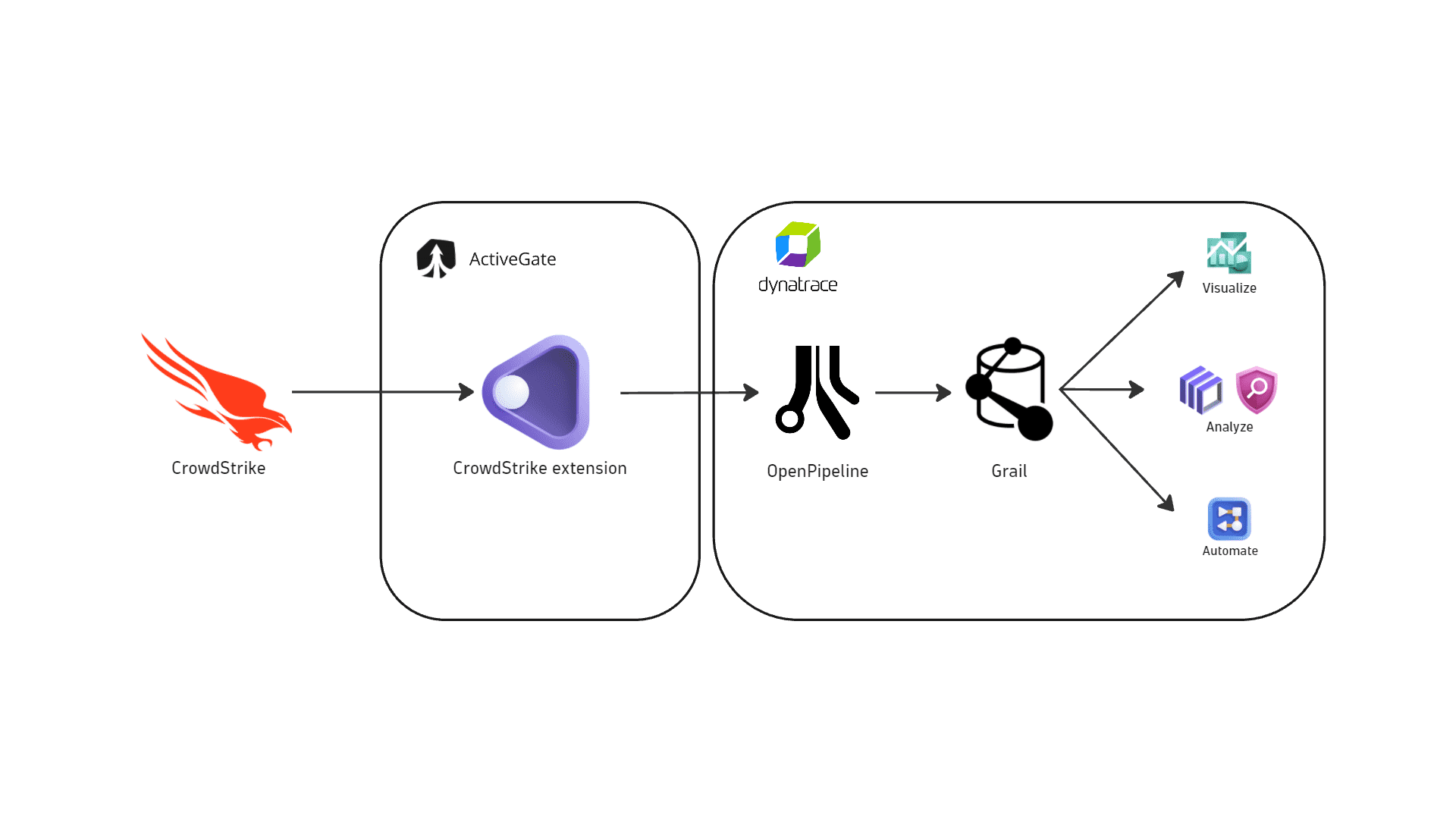
The integration runs as an extension on Dynatrace ActiveGate. After you enable and configure the extension:
- It periodically polls the CrowdStrike APIs for detection findings, threat reports, and audit logs based on the ingestion configuration.
- Dynatrace maps the fetched data to the appropriate Dynatrace Semantic Dictionary data models.
- Dynatrace stores the data in the
default_securityeventsbucket (for details, see Built-in Grail buckets).
Licensing and costs
For billing information, see Events powered by Grail.
FAQ
Which CrowdStrike products does Dynatrace integrate with?
This integration ingests security events from the following products:
Which data model is used for the security events coming from CrowdStrike?
- Detection finding events store the individual detection findings per affected endpoint, represented by a CrowdStrike resource.
- Threat report events store individual threat intelligence reports published in CrowdStrike Falcon, together with the related observables (indicators of compromise, CVEs, TTPs, and more).
- Audit logs represent user activity logs, such as
UserActivityAuditEvents,APIActivityAuditEvents, andAuthActivityAuditEvents.
For a conceptual overview, see Detection finding events and Threat report events.
Which CrowdStrike security findings does Dynatrace import?
The integration ingests endpoint detections from CrowdStrike Endpoint Detection and Response and threat reports from CrowdStrike Threat Intelligence based on the ingestion configuration.
-
On the first ingest, Dynatrace fetches detections and threat reports generated in the last
mdays, wheremis set by the Security events initial fetch time window option in the monitoring configuration. -
On subsequent runs, the extension checks for new detections and threat reports every
nminutes, wherenis set by the Security events ingest frequency option in the monitoring configuration. -
Only new and updated events are ingested.
Which extension fields are added to the core fields of security events ingested from CrowdStrike?
The crowdstrike namespace is added for CrowdStrike-specific attributes on top of the core security event schema. The full upstream payload is stored in event.original_content.
Example fields added to detections:
crowdstrike.agent_id: Unique identifier of the CrowdStrike Falcon agent (sensor) installed on the affected host.crowdstrike.cid: Customer ID (CID) that uniquely identifies the CrowdStrike Falcon tenant/account.crowdstrike.confidence: Confidence level indicating how certain CrowdStrike is that the detected activity is malicious.crowdstrike.prevention_policy_id: Unique identifier of the prevention policy associated with the detection event.crowdstrike.prevention_policy_name: Name of the CrowdStrike prevention policy applied to the endpoint where the detection occurred.crowdstrike.priority_value: Numeric severity or priority score assigned to the detection by CrowdStrike.crowdstrike.type: CrowdStrike-assigned category for the detection (for example, the type of alert or detection event).
Example fields added to threat reports:
crowdstrike.report.type: Type of threat intelligence report.crowdstrike.report.type.name: Name of the report type.crowdstrike.report.type.id: Unique identifier of the report type.crowdstrike.report.slug: Human-readable report identifier used in CrowdStrike URLs and references.
Which types of indicators of compromise (IOCs) are associated with CrowdStrike threat reports?
The integration ingests and maps IOC types that are supported as threat observables in Dynatrace. When these indicators are present in a CrowdStrike threat report, they are extracted and added as observables to enrich the threat context.
| IOC type | Mapped to |
|---|---|
Email addresses |
|
IP addresses |
|
Domain names |
|
URLs |
|
MD5 file hashes |
|
How is risk score normalized for CrowdStrike detections?
Dynatrace normalizes severity and risk scores for all findings ingested through this integration. This helps you prioritize findings consistently, regardless of their source. For details, see Severity and score normalization.
-
dt.security.risk.levelis mapped from the CrowdStrike severity (finding.severity) returned by the detection API. -
dt.security.risk.scoreis normalized from the CrowdStrike detection score (0-100) onto the Dynatrace 10-point risk scale using a weighted severity mapping.
| CrowdStrike score | dt.security.risk.level | dt.security.risk.score |
|---|---|---|
80-100 | Critical -> CRITICAL | 9.0-10.0 |
60-79 | High -> HIGH | 7.0-8.9 |
40-59 | Medium -> MEDIUM | 4.0-6.9 |
20-39 | Low -> LOW | 0.1-3.9 |
0-19 | Informational -> NONE | 0.0 |
What should I do if I use CrowdStrike audit logs with the Falcon SIEM Connector?
If you are using the extension's built-in log ingestion, no additional OpenPipeline configuration is required, as the extension automatically processes the ingested audit logs.
If you are ingesting CrowdStrike audit logs through a Falcon SIEM Connector or another external log ingestion method, you must route them to the extension's pipeline with a custom routing condition for enrichment and mapping.
Create an OpenPipeline router with the following configuration:
- Matching condition:
log.source == "CrowdStrike" - Target pipeline:
CrowdStrike Extension