Cost allocation via OpenPipeline
- Latest Dynatrace
- Explanation
- 5-min read
- Published Jun 01, 2026
This article describes the Cost allocation and Product allocation stages in OpenPipeline and the processors available in each. The stages let you assign record-level DPS usage to a cost center or a product via dt.cost.costcenter and dt.cost.product fields.
Get familiar with OpenPipeline concepts of stage and processors. To learn more, see Processing in OpenPipeline.
Overview
The cost allocation stages are advanced options to assign Dynatrace Platform Subscription (DPS) usage to records.
- Cost allocation allocates the cost to a cost center (
dt.cost.costcenter). - Product allocation allocates the cost to a product or application (
dt.cost.product).
The stages follow the same logic and are independent of each other.
- DPS cost allocation is set via
dt.cost.costcenteranddt.cost.productfields on matching records, either by copying a value from another field or by setting it to a specified static string. - The matching condition identifies which record the processor applies to. The processor is applied to the first record that matches the processor condition; subsequent records are skipped.
- Administrators can enforce consistency by configuring cost allocation via base pipelines in pipeline groups.
Configure cost allocation as early as possible in the process, during deployment via OneAgent, Kubernetes, or your API and OpenTelemetry configuration. Resort to OpenPipeline dynamic attribution only when updating agents or code isn't feasible.
Before you set up OpenPipeline, review the Cost Allocation documentation to choose the best approach.
Cost allocation stage
Use the Cost allocation stage to assign matching records to a cost center—typically a budget owner or business unit—so DPS usage can be cross-charged to the team that generated it. The stage The stage supports a single processor type, the DPS Cost Allocation - Cost Center processor, which sets the dt.cost.costcenter field.
DPS Cost Allocation - Cost Center processor
Use the DPS Cost Allocation - Cost Center processor to set dt.cost.costcenter on records that match the condition.
Parameters
The processor parameters correspond to the costAllocation object in the builtin:openpipeline.<configuration.scope>.pipelines schema of the Settings API.
| Name | API parameter | Description | Required |
|---|---|---|---|
Name |
| Name of the processor. | Required |
Matching condition |
| DQL statement that identifies the records the processor applies to. | Required |
Value |
| Strategy for setting | Required |
Example: Cost center from a field
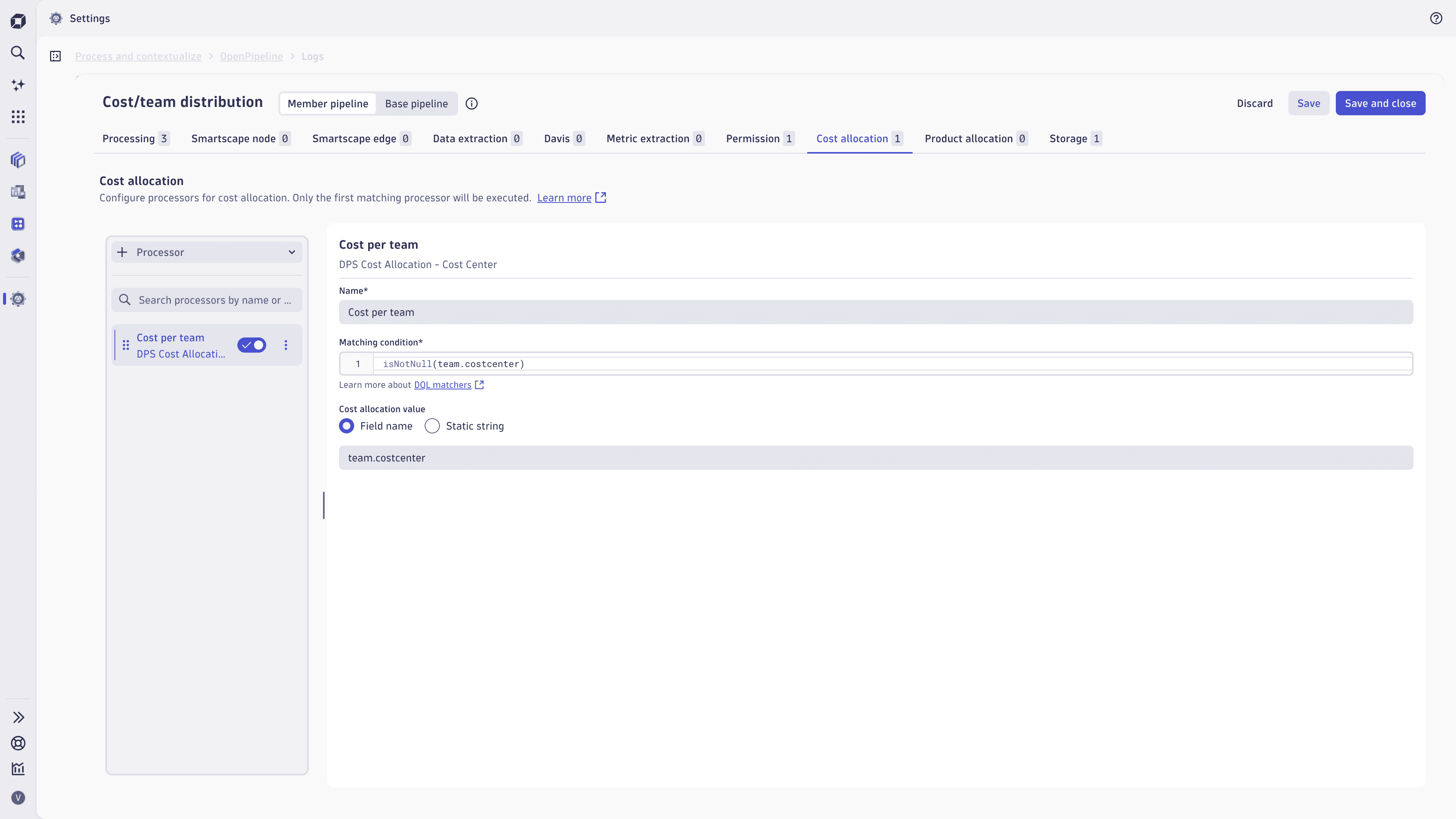
This processor checks for all records that have a value for team.costcenter (which is an OpenTelemetry resource attribute), and sets dt.cost.costcenter to the same value.
The cost allocation value is set to a dynamic field name that is present in the cost center allow list, team.costcenter.
Unprocessed
{"team.costcenter": "cc-4711","content": "Order processed"}
Processed
{"team.costcenter": "cc-4711","content": "Order processed","dt.cost.costcenter": "cc-4711"}
Product allocation stage
Use the Product allocation stage to assign matching records to a product or application—typically a product line or application name—so DPS usage can be attributed to the product that drove it. The stage supports a single processor type, the DPS Cost Allocation - Product processor, which sets the dt.cost.product field.
DPS Cost Allocation - Product processor
Use the DPS Cost Allocation - Product processor to set dt.cost.product on records that match the condition.
Parameters
The processor parameters correspond to the productAllocation object in the builtin:openpipeline.<configuration.scope>.pipelines schema of the Settings API.
| Name | API parameter | Description | Required |
|---|---|---|---|
Name |
| Name of the processor. | Required |
Matching condition |
| DQL statement that identifies the records the processor applies to. | Required |
Value |
| Strategy for setting | Required |
Example: Static product per cloud provider
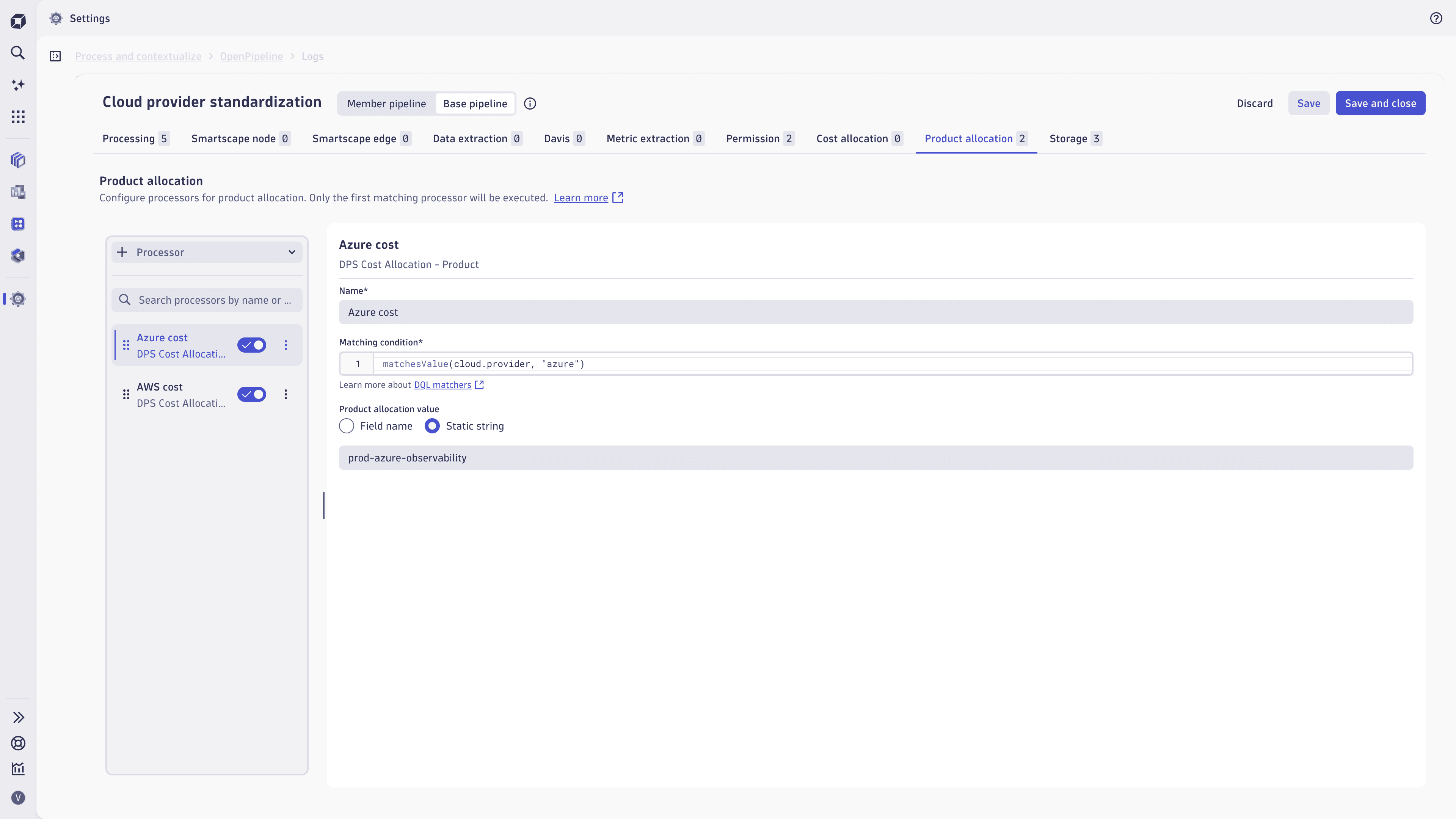
The Product allocation stage contains two DPS Cost allocation - Product processors to assign the product allocation as a static value, depending on the cloud provider.
The processors configuration are
- AWS
- Matching condition:
matchesValue(cloud.provider, "aws") - Static value:
prod-aws-observability
- Matching condition:
- Azure
- Matching condition:
matchesValue(cloud.provider, "azure") - Static value:
prod-azure-observability
- Matching condition:
Unprocessed
{"app.name": "checkout-service","content": "Order processed","cloud.provider": "aws"}
Processed
{"app.name": "checkout-service","content": "Order processed","cloud.provider": "aws","dt.cost.product": "prod-aws-observability`"}
Use cases
Cost allocation stages dynamically attribute DPS usage when source-level tagging isn't feasible or isn't granular enough. Use them to:
- Derive attribution from record content—set the cost center or product from fields on the record (namespace, service name, cloud provider, team attribute) rather than from a static property of the source.
- Split spend across shared infrastructure—divide a shared host, cluster, or gateway usage among the teams or products that consume it, refine or override the cost allocation values inherited from OneAgent using metadata present on the record.
- Add cost metadata to records from third-party sources—attribute usage from ingest channels that don't carry Dynatrace semantic cost labels because they aren't ingested via OneAgent.
- Centralize allocation governance—govern cost attribution at the environment level, independently of how application teams configure their instrumentation, by enforcing a company-wide policy in one auditable place via pipeline groups.
FAQs
Why does my usage show as unallocated?
The value you set with an allocation stage must exist in the Cost center allow list or Product allow list. Records with values not on the allow list are reported as unallocated. Add the value via the Dynatrace web UI (Account Management > Subscription > Cost management > Cost allocation) or API, then redeploy OneAgent. For more information, see Identify allowed cost centers and products.