OpenPipeline pipeline groups
- Latest Dynatrace
- Explanation
- 4-min read
Pipeline groups provide centralized control and compliance in large-scale pipeline ecosystems. Administrators can enforce critical security and operational standards on the global level, such as security and cost allocation, while enabling development teams to build their own pipelines. Pipeline groups prevent misconfiguration, support regulatory requirements, and simplify operational oversight.
To learn how to create and manage pipeline groups using the Settings API, see Configure multi-cloud ingest governance with pipeline groups.
Overview
Pipeline groups let central platform and SRE teams manage ingest configuration for multiple pipelines at once. A pipeline group defines a shared configuration—composition—for a set of pipelines—member pipelines. The configuration can restrict or mandate stages.
- Restrict: Prevent stages of member pipelines from being executed.
- Mandate: Composition stages are executed before or after a certain member stage, improving consistent processing and reusability.
Administrators own and manage the group, as well as its compositions and which stages are enabled or disabled for the member pipelines. Development teams own their member pipelines which operate within the group's boundaries.
- A pipeline belongs to only one pipeline group at a time.
- Pipeline groups can't be nested.
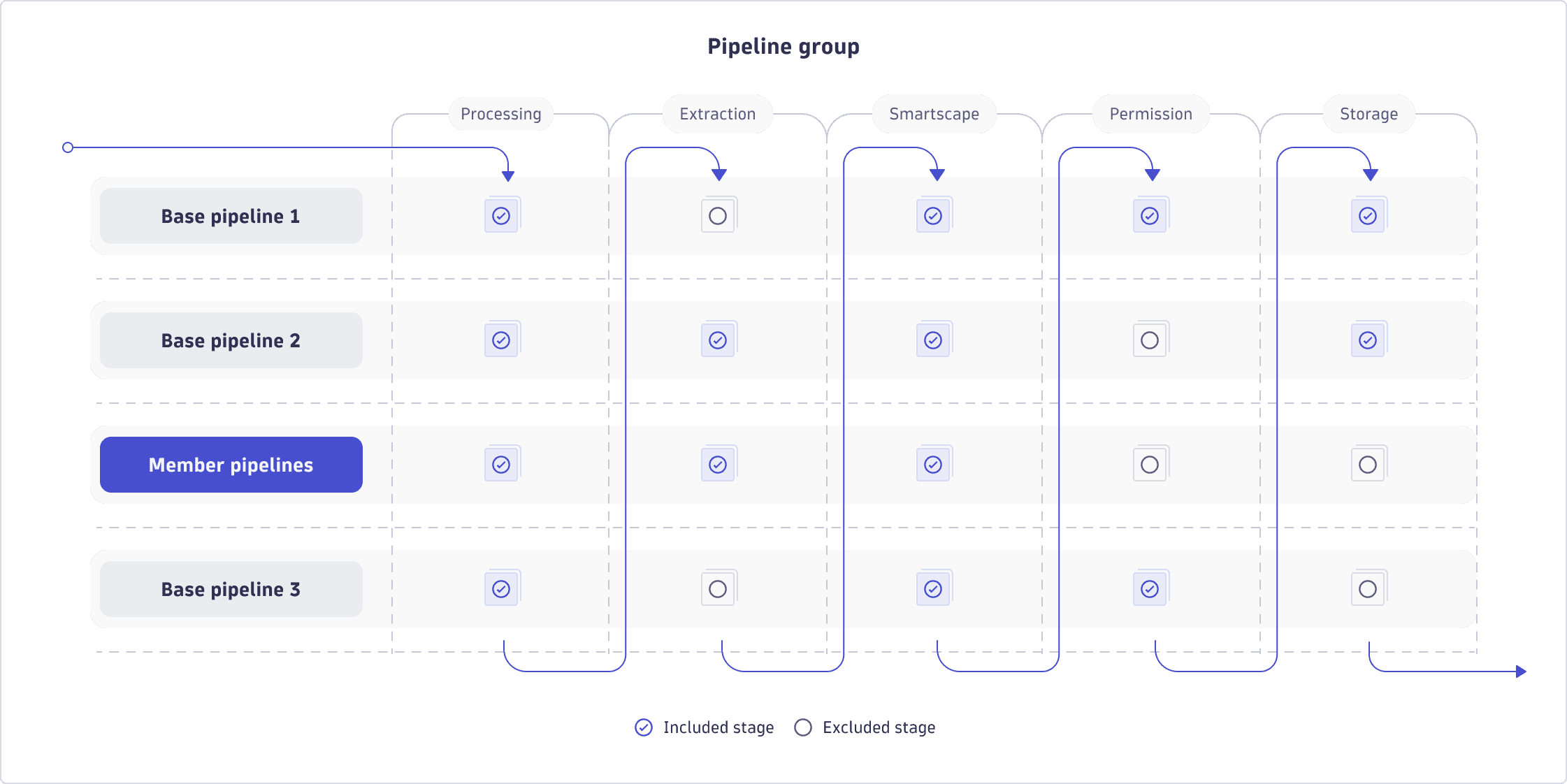
Composition
A composition enables administrators to enforce consistency without blocking team autonomy. It defines what must happen across all pipelines in the group and how execution flows between composition and member stages.
A composition:
- Exists only inside a pipeline group.
- Mandates stages.
- Defines the execution order between composition and member stages.
Compositions specify one or multiple base pipelines, their order, and the position of a member pipeline placeholder, where all member pipelines assigned to the group are evaluated.
The Dynatrace web UI provides a composition preview that shows the execution order and which stages are evaluated for base pipelines and the member pipeline placeholder.
Execution order
Execution order is determined by the position of entries in the composition.
- Base pipelines prior to the member pipeline placeholder run first.
- Any member pipeline associated to the group runs at the placeholder position.
- When a base pipeline and a member pipeline both have the same stage enabled, both run—stages are not mutually exclusive. To prevent a stage from running in the member pipeline, explicitly exclude it via API (
memberStages).
Mandate
Mandating a stage ensures it's executed and in the correct order between composition and member stages. This guarantees data is consistently processed.
Example: An administrator mandates the Permission stage to run before any departmental definition. Global rules are applied first, preventing premature or conflicting permission changes.
To mandate a stage, configure a base pipeline and specify the stages to execute.
The API configuration contains the following elements:
{"isPipelinePlaceholder": false,"pipelineId": "<pipeline-id>","stages": {"type": "include","include": ["securityContext"]}}
Restrict
Restricting a stage prevents modification of critical stages. This is essential to protect sensitive or compliance-relevant configurations, such as permissions or bucket assignment.
It ensures that member pipelines can't override or redefine a stage as restricted stages are unavailable to member pipelines. If the base pipeline contains the stage, records are processed only by the composition stage.
Example: An administrator restricts the Permission stage for all pipelines in the group. Teams can't modify dt.security_context, which ensures consistent access control across the organization.
To restrict a stage, configure which member stages are excluded from execution.
The API configuration includes the following elements:
{"memberStages": {"type": "exclude","exclude": ["securityContext"]}}
Pipeline role
Pipeline groups introduce the pipeline role (groupRole) in your existing pipeline configuration. It identifies whether a pipeline is a member pipeline (memberPipeline) or a base pipeline (basePipeline). It doesn't indicate whether the pipeline is currently part of a group. The group role affects routing; base pipelines are typically not routable (notRoutable), except for standalone ready-made pipelines from extensions.
The following table summarizes which pipelines support routing, depending on their group role and pipeline type.
| Pipeline type | Group role | Is in a pipeline group | Supports routing |
|---|---|---|---|
Custom | Member | No | Yes |
Ready-made | Base | No | Yes |
Custom | Member | Yes | Yes |
Custom | Base | Yes | No |
Ready-made | Base | Yes | No |
Base pipeline
Base pipelines provide the shared configuration that applies to all member pipelines in the group. Administrators own and manage base pipelines.
A base pipeline:
- Can be custom (created by administrators) or ready‑made (provided by extensions).
- Can exist standalone but is inactive unless part of a pipeline group.
- When part of a pipeline group, enforces its configured stages on all member pipelines according to the composition order.
Member pipeline
Member pipelines:
-
Implement team-specific logic within the group boundaries, allowing teams to focus on domain-specific transformations without compromising global standards.
-
Inherit restrictions and mandatory stages from the pipeline group. Teams can add optional stages after mandated ones, but can't override restricted stages.
A member pipeline:
- Can be custom (created by a user) or ready‑made (provided by an extension).
- Can exist standalone or inside a group.
- When it is part of a pipeline group, receives data routed by the first matching route and processes that data through the stages enabled by the group.
For member pipelines assigned to a group, a Member pipeline: <group name> badge appears next to the pipeline name. Only administrators can manage member pipeline assignment to a group.
API parameters
You can configure pipeline groups in the Dynatrace web UI or via the builtin:openpipeline.<configuration.scope>.pipeline-groups schema of the Settings API. The JSON view in the pipeline editor displays the full pipeline configuration as stored in the Settings API. You can copy the JSON from there, but not edit it directly.
Show Settings API schemas for pipeline groups
builtin:openpipeline.events.pipeline-groupsbuiltin:openpipeline.bizevents.pipeline-groupsbuiltin:openpipeline.spans.pipeline-groupsbuiltin:openpipeline.logs.pipeline-groupsbuiltin:openpipeline.davis-problems.pipeline-groupsbuiltin:openpipeline.metrics.pipeline-groupsbuiltin:openpipeline.security-events.pipeline-groupsbuiltin:openpipeline.events-security.pipeline-groupsbuiltin:openpipeline.davis-events.pipeline-groupsbuiltin:openpipeline.events-sdlc.pipeline-groupsbuiltin:openpipeline.system-events.pipeline-groupsbuiltin:openpipeline.usersessions.pipeline-groupsbuiltin:openpipeline.user-events.pipeline-groups
Pipeline group configurations include the following parameters:
| Name | API parameter | Description | Required |
|---|---|---|---|
Group name |
| Identifier for the pipeline group. | Required |
Pipeline arrangement |
| Ordered array of entries that defines the composition. Each entry is either a specified base pipeline ( | Required |
Default member stages |
| Top-level setting that controls which stages of all member pipelines are executed within the group. When Enable all stages ( | Required |
Member pipeline placeholder |
| Marks the position in the composition where member pipelines execute. Via API, set to | Required |
Pipeline |
| Object ID of the base pipeline to execute in the composition. | Required |
Stages |
| Controls which stages of a base pipeline run in the composition. When Enable all stages ( | Required |
Member pipelines |
| Array of object IDs of the member pipelines that belong to the group. To assign a member pipeline to the group via web UI, move it from the Available column to the Assigned one. | Required |
The following example JSON shows a pipeline group with two base pipelines and one member pipeline placeholder. Both base pipelines run before the member pipeline, and only the Processing stage is allowed for member pipelines.
{"schemaId": "builtin:openpipeline.logs.pipeline-groups","value": {"displayName": "My pipeline group","memberPipelines": ["<member-pipeline-object-id>"],"memberStages": {"type": "include","include": ["processing"]},"composition": [{"isPipelinePlaceholder": false,"pipelineId": "<base-pipeline-1-object-id>","stages": {"type": "include","include": ["costAllocation", "storage"]}},{"isPipelinePlaceholder": false,"pipelineId": "<base-pipeline-2-object-id>","stages": {"type": "include","include": ["processing", "metricExtraction"]}},{"isPipelinePlaceholder": true}]}}
Use cases
- Enforce global security, routing, and operational standards across multiple pipelines.
- Provide development teams with autonomy while preventing misconfiguration.
- Centralize governance for large organizations with many pipelines.
- Ensure consistent execution order between global and team-specific stages.
- Extend an immutable extension pipeline by adding a base pipeline to the group that applies custom processing—for example, to drop logs from a ready-made extension pipeline.