Configure multi-cloud ingest governance with pipeline groups
- Latest Dynatrace
- Tutorial
- 18-min read
This tutorial explains how to create and manage pipeline groups using the Settings API, enabling consistent ingest governance in multi‑cloud environments. It demonstrates how to enforce global and cloud‑specific processing logic, restrict sensitive stages—such as permissions—and ensure that each team operates within clearly defined responsibilities.
By structuring pipelines through mandatory and restricted stages, pipeline groups provide a scalable, centralized approach to managing large sets of pipelines across multi‑cloud environments.
Who is this for?
Administrators, SREs, and engineers automating ingest governance at scale.
What will you learn?
In this tutorial, you'll learn how to:
- Create pipeline groups via the Settings API to manage over 30 pipelines for AWS and Azure log processing.
- Add member pipelines for cloud‑ and team-specific workloads.
- Configure base pipelines that enforce the responsibilities of admin, mid‑level, and dev teams.
- Restrict sensitive stages—such as cost allocation, permissions, and storage—which are centrally governed by the admin and mid‑level teams.
- Apply pipeline groups to multi‑cloud deployments where consistent ingest governance is required across AWS and Azure, while enabling teams to manage their respective processing and extraction stages.
Before you begin
Prerequisites
Required permissions: settings:objects:read and settings:objects:write with builtin:openpipeline.<configuration-scope>.pipeline-groups scope.
Show Settings API schemas
- Settings API - Pipeline Groups configuration (events) schema table
- Settings API - Pipeline Groups configuration (bizevents) schema table
- Settings API - Pipeline Groups configuration (spans) schema table
- Settings API - Pipeline Groups configuration (logs) schema table
- Settings API - Pipeline Groups configuration (davis.problems) schema table
- Settings API - Pipeline Groups configuration (metrics) schema table
- Settings API - Pipeline Groups configuration (security.events) schema table
- Settings API - Pipeline Groups configuration (events.security) schema table
- Settings API - Pipeline Groups configuration (davis.events) schema table
- Settings API - Pipeline Groups configuration (events.sdlc) schema table
- Settings API - Pipeline Groups configuration (system.events) schema table
- Settings API - Pipeline Groups configuration (usersessions) schema table
- Settings API - Pipeline Groups configuration (user.events) schema table
Prior knowledge
- You know how to create pipelines via the Settings API.
- You know how to set access control in OpenPipeline.
- You are familiar with pipeline groups and pipeline group limits.
Configure pipeline groups
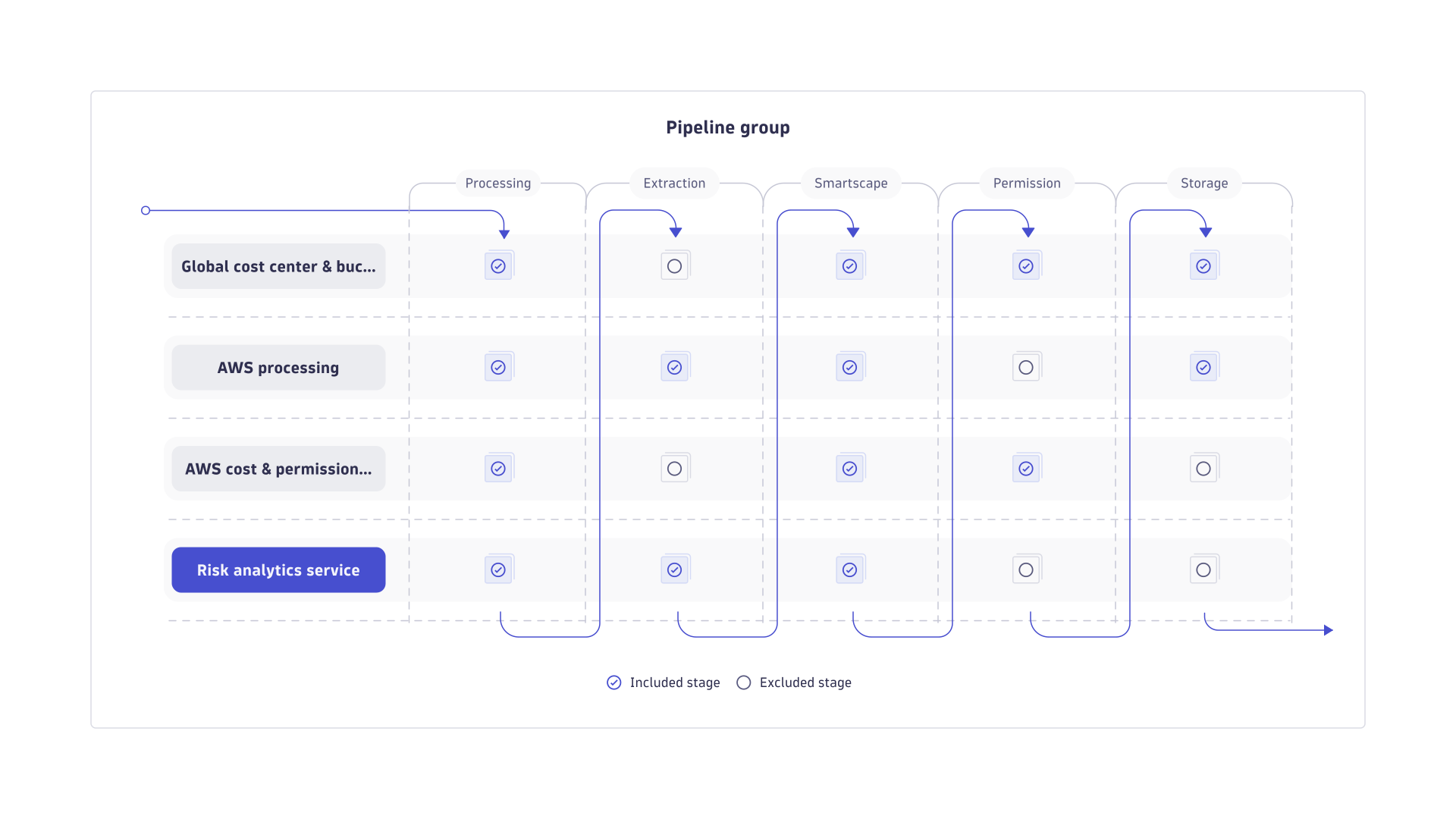
In this tutorial, we'll create two pipeline groups, one per cloud provider. Each group contains base pipelines and member pipelines. A record is processed by base pipelines and a member pipeline, according to the first matching route. The following table illustrates the scenario that the tutorial aims to achieve.
| Pipeline group | Pipelines to execute | Member pipelines |
|---|---|---|
AWS pipelines |
|
|
Azure pipelines |
|
|
1. Create base pipelines
-
Define a custom pipeline with the base role (
"groupRole": "basePipeline"and"routing": "notRoutable") via JSON.The base pipelines in this tutorial are five custom pipelines, defined as follows.
-
A global pipeline called Global cost center and bucket assignment that will be used by both groups (AWS pipelines and Azure pipelines) to assign buckets and
dt.cost.cost_center. It's owned and accessed by the admin team only.JSON example
{"schemaId": "builtin:openpipeline.logs.pipelines","value": {"customId": "global-cost-and-bucket","displayName": "Global cost center and bucket assignment","groupRole": "basePipeline","routing": "notRoutable","costAllocation": {"processors": [{"type": "costAllocation","id": "cost-allocation-global","description": "Assign global dt.cost.cost_center","enabled": true,"matcher": "true","costAllocation": {"value": {"type": "constant","constant": "CC-GLOBAL-0001"}}}]},"storage": {"processors": [{"type": "bucketAssignment","id": "bucket-assignment-logs-aws-global","description": "Assign AWS logs to global AWS bucket","enabled": true,"matcher": "matchesValue(cloud.provider, \"aws\")","sampleData": "{\"cloud.provider\":\"aws\"}","bucketAssignment": {"bucketName": "logs-global-aws-90d"}},{"type": "bucketAssignment","id": "bucket-assignment-logs-azure-global","description": "Assign Azure logs to global Azure bucket","enabled": true,"matcher": "matchesValue(cloud.provider, \"azure\")","sampleData": "{\"cloud.provider\":\"azure\"}","bucketAssignment": {"bucketName": "logs-global-azure-90d"}}]}}} -
Two cloud-specific processing pipelines called AWS processing and Azure processing to normalize incoming logs from the respective cloud provider and extract metrics, Davis events, and business events. They're managed by several people within the business unit; specifically, they're owned by the mid-level team and accessed by some senior dev team leads.
JSON example
{"schemaId": "builtin:openpipeline.logs.pipelines","value": {"customId": "aws-processing","displayName": "AWS processing","groupRole": "basePipeline","routing": "notRoutable","processing": {"processors": [{"type": "fieldsAdd","id": "aws-add-provider","description": "Normalize cloud provider","enabled": true,"matcher": "true","fieldsAdd": {"fields": [{ "name": "cloud.provider", "value": "aws" }]}},{"type": "dql","id": "aws-parse-common","description": "Parse level and requestId from content when present","enabled": true,"matcher": "true","sampleData": "{\"content\":\"2025-10-01T10:00:00Z [ERROR] req=abcd-1234 Something failed\",\"service.name\":\"ordersvc\"}","dql": {"script": "parse content, \"'[' UPPER:loglevel ']' ' req=' LD:aws.request_id\""}},{"type": "drop","id": "aws-drop-elb-health","description": "Drop ELB healthcheck noise","enabled": true,"matcher": "matchesValue(content, \"ELB-HealthChecker*\")","sampleData": "{\"content\":\"ELB-HealthChecker 200\"}"}]},"metricExtraction": {"processors": [{"type": "counterMetric","id": "aws-error-counter","description": "Count ERROR logs by service and account","enabled": true,"matcher": "matchesValue(loglevel, \"ERROR\")","sampleData": "{\"loglevel\":\"ERROR\",\"service.name\":\"ordersvc\",\"aws.account.id\":\"123456789012\"}","counterMetric": {"metricKey": "custom.aws.log.error.count","dimensions": [{"extractionType": "field","sourceFieldName": "service.name","destinationFieldName": "service"},{"extractionType": "field","sourceFieldName": "aws.account.id","destinationFieldName": "account"},{"extractionType": "field","sourceFieldName": "loglevel"}]}}]},"davis": {"processors": [{"type": "davis","id": "aws-davis-event","description": "Create Davis problem for ERROR/FATAL AWS logs","enabled": true,"matcher": "alert.trigger == true","sampleData": "{\"cloud.provider\":\"aws\",\"service.name\":\"ordersvc\",\"aws.account.id\":\"123456789012\",\"aws.request_id\":\"abcd-1234\",\"dt.source_entity\":\"HOST-1234567890\",\"content\":\"[ERROR] req=abcd-1234 Something failed\"}","davis": {"properties": [{ "key": "event.type", "value": "CUSTOM_ALERT" },{ "key": "event.name", "value": "AWS log error in {service.name}" },{ "key": "event.description", "value": "{cloud.provider} error in {service.name} (account:{aws.account.id}, request:{aws.request_id}).{content}" },{ "key": "dt.source_entity", "value": "{dt.source_entity}" }]}}]},"dataExtraction": {"processors": [{"type": "bizevent","id": "aws-bizevent-error","description": "Extract a business event for ERROR/FATAL AWS logs","enabled": true,"matcher": "matchesValue(loglevel, \"ERROR\") OR matchesValue(loglevel, \"FATAL\")","sampleData": "{\"cloud.provider\":\"aws\",\"service.name\":\"ordersvc\",\"aws.account.id\":\"123456789012\",\"aws.request_id\":\"abcd-1234\",\"loglevel\":\"ERROR\",\"content\":\"[ERROR] req=abcd-1234 Checkout failed\"}","bizevent": {"eventProvider": {"type": "constant","constant": "logs"},"eventType": {"type": "constant","constant": "BUSINESS_ERROR"},"fieldExtraction": {"type": "include","include": [{"extractionType": "field","sourceFieldName": "cloud.provider"},{"extractionType": "field","sourceFieldName": "service.name"},{"extractionType": "field","sourceFieldName": "aws.account.id"},{"extractionType": "field","sourceFieldName": "aws.request_id"},{"extractionType": "field","sourceFieldName": "loglevel"},{"extractionType": "field","sourceFieldName": "content"}]}}}]}}}
-
-
Two cloud-specific cost and permission assignment pipelines called AWS cost and permission assignment and Azure cost and permission assignment to set
dt.cost.productand security context for the respective cloud provider. They're owned and accessed by the mid-level team only.JSON example
{"schemaId": "builtin:openpipeline.logs.pipelines","value": {"customId": "aws-cost-and-permissions","displayName": "AWS cost and permission assignment","groupRole": "basePipeline","routing": "notRoutable","productAllocation": {"processors": [{"type": "productAllocation","id": "aws-product-allocation","description": "Set dt.cost.product for AWS","enabled": true,"matcher": "matchesValue(cloud.provider, \"aws\")","sampleData": "{\"cloud.provider\":\"aws\"}","productAllocation": {"value": {"type": "constant","constant": "prod-aws-observability"}}}]},"securityContext": {"processors": [{"type": "securityContext","id": "aws-security-context","description": "Restrict access to mid-level team only (AWS logs)","enabled": true,"matcher": "true","securityContext": {"value": {"type": "constant","constant": "security:mid-level:aws-logs"}}}]}}} -
Use the
POST /api/v2/settings/objectsrequest with the pipeline schema of the configuration scope (builtin:openpipeline.<configuration.scope>.pipelines).
2. Create member pipelines
-
To create a member pipeline, create a custom pipeline with the member role (
"groupRole": "memberPipeline"and"routing": "routable"). Use the OpenPipeline settings Web UI or thePOST /api/v2/settings/objectsrequest with the pipeline schema of the configuration scope (builtin:openpipeline.<configuration.scope>.pipelines).JSON example
The following JSON contains an example of the member pipeline structure.
{"schemaId": "builtin:openpipeline.logs.pipelines","value": {"displayName": "AWS Web Frontend","customId": "aws-web-frontend","groupRole": "memberPipeline","routing": "routable","processing": {"processors": [{"type": "fieldsAdd","id": "web-tags","matcher": "true","description": "Add team and product tags for the web frontend","enabled": true,"fieldsAdd": {"fields": [{ "name": "dt.owner", "value": "team-web" },{ "name": "deployment.release_product", "value": "easytrade" },{ "name": "deployment.release_stage", "value": "prod" }]}},{"type": "dql","id": "web-parse-http","matcher": "true","description": "Parse HTTP logs for the web frontend","enabled": true,"dql": {"script": "parse content, \"TIMESTAMP:timestamp ' ' UPPER:http.method ' ' LD:url.path ' status=' INT:http.status_code ' duration_ms=' INT:duration.ms ' ua=' LD:user_agent\""}},{"type": "drop","id": "drop-health","description": "Drop health and readiness checks for the web frontend","enabled": true,"matcher": "matchesPhrase(url.path, \"/health\") or matchesPhrase(url.path, \"/ready\")"}]}}} -
Create the associated dynamic route. Use the OpenPipeline settings Web UI or the
POST /api/v2/settings/objectsrequest with the route schema of the configuration scope (builtin:openpipeline.<configuration.scope>.routing).Each record is routed to and processed by only one member pipeline, according to the first matching route.
JSON example
The following JSON contains an example of a route structure.
{"schemaId": "builtin:openpipeline.logs.routing","value": {"routingEntries": [{"enabled": true,"pipelineType": "custom","pipelineId": "<aws-web-frontend-object-id>","matcher": "cloud.service.name == \"astroshop-web-frontend\"","description": "Route AstroShop Web Frontend logs to the Web Frontend member pipeline"}]}}
In this tutorial, the following member pipelines exist.
| Member pipeline | Description | Matching condition |
|---|---|---|
Web Frontend | Main trading web application (React/Vue/Angular) |
|
Trade Service | Handles trade executions, order matching, and settlements |
|
Portfolio Service | Manages user portfolios, asset tracking, and valuations |
|
Account Service | Handles user authentication, account management, and KYC |
|
Quote Service | Provides real-time market data and price quotes |
|
Order Service | Processes buy/sell orders and maintains order history |
|
Notification Service | Sends emails, SMS, or push notifications |
|
Risk Analysis Service | Performs risk checks and compliance operations |
|
Analytics Service | Tracks trading statistics and generates reports |
|
Audit Logging Service | Records audit trails and transaction logs |
|
API Gateway | Entry point for all APIs (AWS API Gateway) |
|
S3 Buckets | Object storage for logs, documents, and exports |
|
RDS / Aurora Databases | Relational database backend |
|
DynamoDB Tables | NoSQL data storage |
|
Lambda Functions | Serverless functions for event-driven processing |
|
ECS / EKS Services | Containerized microservices orchestration |
|
Monitoring / Logging Agents | Collects logs, metrics, and traces |
|
3. Create pipeline groups
-
Define two pipeline groups, one for AWS (
AWS pipelines) and one for Azure (Azure pipelines).The groups process logs of the respective cloud provider following the same structure. Each group references the following pipelines:
- Global cost and bucket pipeline: Defines Cost allocation and Storage stages.
- AWS processing and Azure processing pipelines: Define Processing, Metric Extraction, Dynatrace Intelligence, and Data Extraction stages.
- AWS cost and permission assignment and Azure cost and permission assignment pipelines: Define Product allocation and Security context stages.
- Member pipeline (placeholder): Defines Processing stage.
The groups execute first the base pipelines (1, 2, 3). They mandate the Cost allocation, Storage, Processing, Metric Extraction, Dynatrace Intelligence, Data Extraction, Product allocation, and Security context stages in this order. Then, data is routed to a member pipeline according to the first matching route. The member pipeline adds transformations in the Processing stage.
JSON example
{"schemaId": "builtin:openpipeline.logs.pipeline-groups","value": {"displayName": "AWS Pipeline Group","memberPipelines": ["<xx000x-web-frontend-object-id>","<xx000x-trade-service-object-id>","<xx000x-portfolio-service-object-id>","<xx000x-account-service-object-id>","<xx000x-quote-service-object-id>","<xx000x-order-service-object-id>","<xx000x-notification-service-object-id>","<xx000x-risk-analysis-service-object-id>","<xx000x-audit-logging-service-object-id>","<xx000x-api-gateway-object-id>","<xx000x-s3-buckets-object-id>","<xx000x-rds-aurora-databases-object-id>","<xx000x-dynamodb-tables-object-id>","<xx000x-lambda-functions-object-id>","<xx000x-ecs-eks-services-object-id>","<xx000x-monitoring-logging-agents-object-id>"],"memberStages": {"type": "include","include": ["processing"]},"composition": [{"isPipelinePlaceholder": false,"pipelineId": "<xx000x-global-cost-bucket-object-id>","stages": {"type": "include","include": ["costAllocation", "storage"]}},{"isPipelinePlaceholder": false,"pipelineId": "<xx000x-aws-processing-object-id>","stages": {"type": "include","include": ["processing", "metricExtraction", "davis", "dataExtraction"]}},{"isPipelinePlaceholder": false,"pipelineId": "<xx000x-aws-cost-permissions-object-id>","stages": {"type": "include","include": ["productAllocation", "securityContext"]}},{"isPipelinePlaceholder": true}]}}
- Use the
POST /api/v2/settings/objectsrequest with the pipeline group schema of the configuration scope (builtin:openpipeline.<configuration.scope>.pipeline-groups).
Congratulations!
You now have a complete API-based workflow to manage pipeline groups, enforce global governance, and scale pipeline operations across AWS and Azure environments.
You can create new member pipelines and then add them to the group any time. Use the PUT /api/v2/settings/objects/{objectId} request with the pipeline group schema of the configuration scope (builtin:openpipeline.<configuration-scope>.pipeline-groups).
Once the request is successful, the memberPipelines field of the pipeline group lists the member pipeline IDs.