Alerting and notifications
- Latest Dynatrace
- Explanation
- 5-min read
This page explains key features such as alerting and anomaly detection, problem detection, and workflows that help streamline alerting. Dynatrace provides powerful alerting and notification tools to detect issues, identify root causes, and resolve problems.
Dynatrace Intelligence groups related alert instances represented in Grail as Davis events, into a problem, and enriches each problem with impacted components, dependency context, and root cause analysis, so that you can identify the issue. You can trigger workflows on relevant problems to notify teams or run automated remediation.
To minimize notification noise, use the problem trigger to send a notification or trigger an automation for each detected problem. For advanced scenarios, use the Davis event trigger or the event trigger to notify or automate on specific events or conditions.
Use agentic workflows when you want Dynatrace Intelligence to assess a situation and act for you, whether that means summarizing a problem, computing a score, or automatically triggering remediation based on that score.
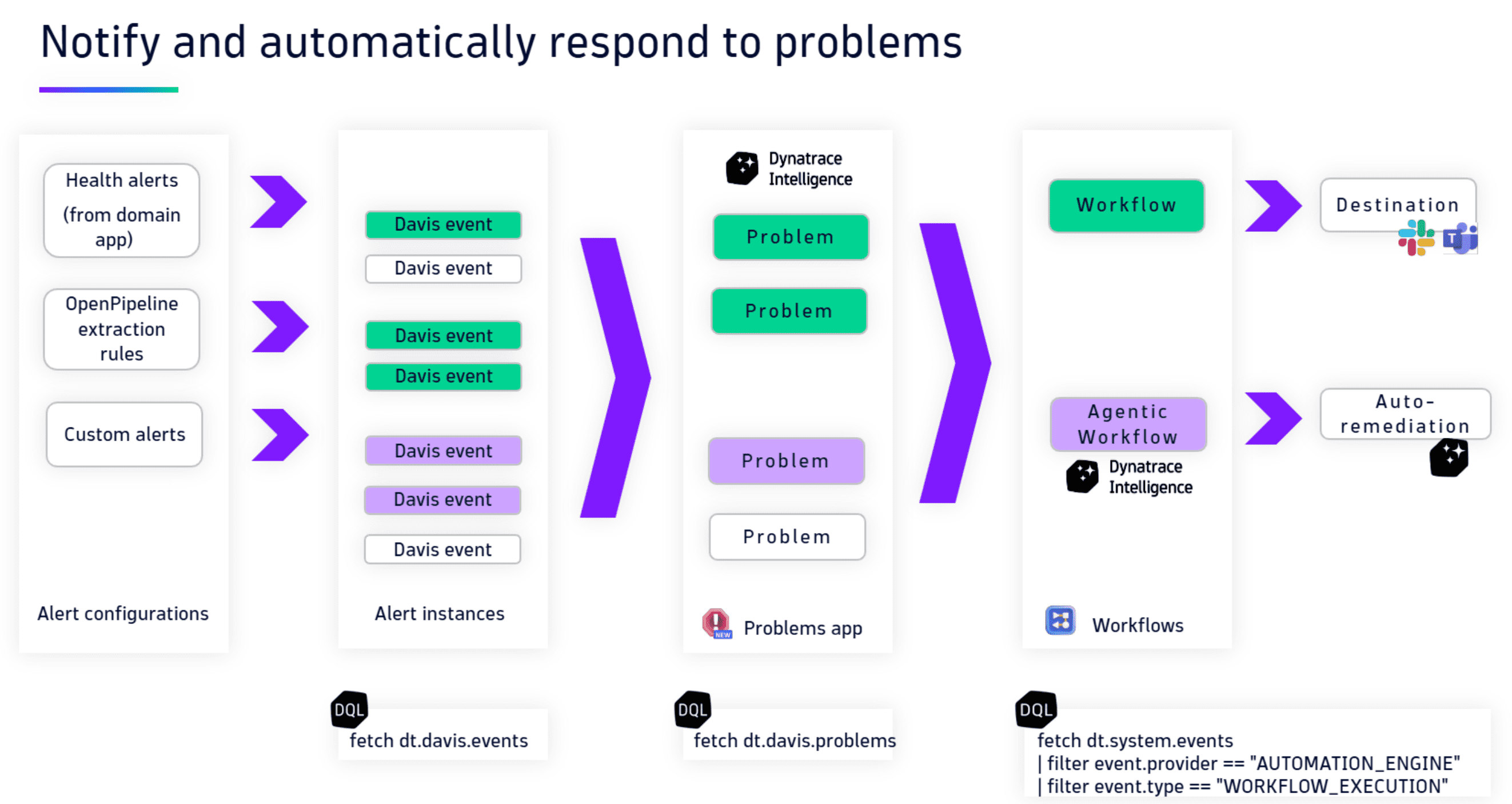
The diagram illustrates how Dynatrace Intelligence detects and creates alerts, such as health alerts, OpenPipeline extraction rules, or custom alerts in your environment. It then groups them into problems. The problem triggers two workflows when it meets the criteria.
For example, the triggers for a problem's severity or impact are these workflows:
- An agentic workflow that enables auto-remediation or problem remediation to resolve issues.
- A workflow to send a notification via email or Slack message.
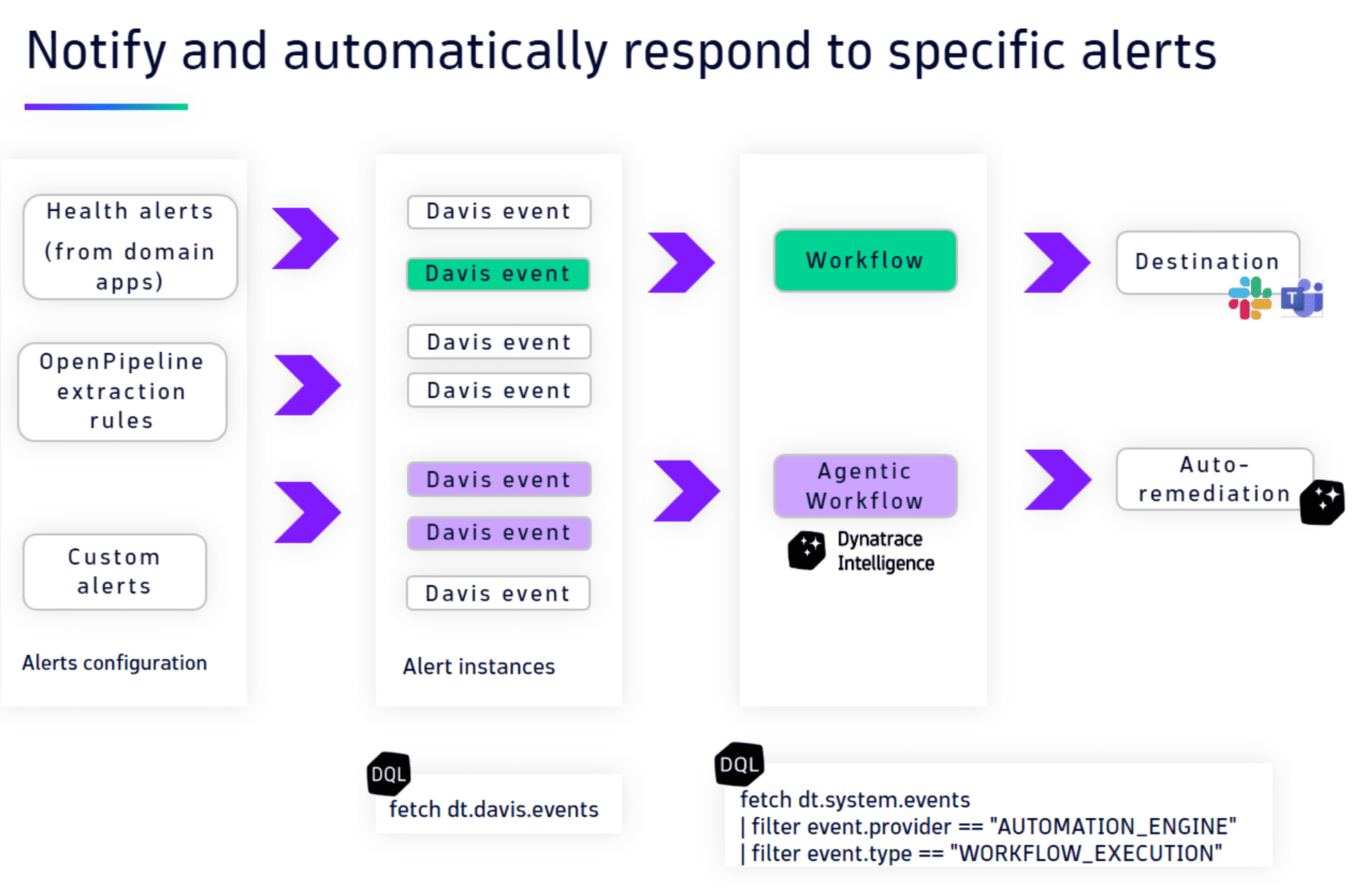
The diagram shows how you can react to alerts, such as health alerts, OpenPipeline extraction rules, or custom alerts. In this example, two workflows are configured to trigger when an alert meets the criteria.
For example, the triggers for alert name or configuration ID are:
- A workflow to send an email or a Slack message.
- An agentic workflow that enables auto-remediation or problem remediation to resolve issues.
Alerting
Dynatrace Intelligence automatically detects anomalies in your environment, generates Davis events for individual issues, and groups them into problems. These problems provide a clear, contextual overview that allows faster root cause analysis and resolution.
Automatic detection
Dynatrace uses AI-powered anomaly detection to continuously monitor your environment for deviations from normal behavior. This functionality helps identify issues such as:
- Performance bottlenecks
- Service downtime
- Unusual metric patterns or behaviors
You can adjust the sensitivity of anomaly detection to match your environment and reduce false positives or missed anomalies. For details, see Adjust the sensitivity of anomaly detection.
Custom alerts
Custom alerts allow you to define conditions for monitoring specific metrics or thresholds. This flexibility lets you tailor notifications to your business needs.
Typical use cases include:
- Monitoring application-specific metrics that are critical to business operations
- Detecting log patterns or conditions that indicate potential risks
- Defining thresholds for metrics or events
You can configure custom alerts in the  Anomaly Detection app, which gives you control over when and how alerts are triggered.
Problem detection
Dynatrace correlates Davis events with contextual data to identify the root cause of issues. Detected problems are enriched with detailed information, including impacted services, dependency mappings, and root cause analysis.
This approach helps you:
- Quickly understand the scope and impact of an issue
- Prioritize problems based on severity and business impact
- Accelerate resolution by focusing on the critical root cause
The  Problems app provides a centralized view of all detected problems and supports efficient triage and investigation.
Workflows for external notifications
Dynatrace uses workflows to send notifications to external tools. Workflows allow flexible configurations that ensure alerts are delivered to the right channels or trigger automated actions.
Workflow trigger
The trigger defines when a workflow runs and sends a notification, for example, when a problem is detected.
-
To minimize noise, use the problem trigger to send one notification for each detected problem.
-
For advanced scenarios, use the Davis event trigger or the generic event trigger to notify on specific events.
You can configure trigger conditions to control which problems or events generate notifications. We recommend filtering based on the following attributes:
- Primary Grail fields
- Security context
- Custom attributes
This approach ensures that you receive only relevant notifications.
Integration with external systems via Workflows connectors
After configuring the trigger, define the workflow action that specifies where notifications are sent.
Dynatrace supports a wide range of integrations, including:
- Slack
- Microsoft Teams
- ServiceNow
For a complete list, see Workflows Connectors and actions.
Simple workflows vs standard workflows
Dynatrace provides two workflow types to support different use cases: simple workflows and standard workflows.
Simple workflows
Simple workflows are designed for basic, single-task operations such as sending notifications. They're lightweight and don't consume workflow hours.
Examples include:
- Notifying on-call engineers about critical issues.
- Alerting teams to service downtime or performance problems.
Standard workflows
Standard workflows support advanced scenarios with multiple tasks, task conditions, and escalation rules. They're suited for complex environments and multi-step automation.
Examples include:
- Routing alerts to specific teams based on severity or issue type.
- Escalating unresolved issues to higher-level teams.
- Automating problem remediation processes.