Calculate your consumption of Data Egress (DPS)
- Latest Dynatrace
- Explanation
- 5-min read
- Published Jun 12, 2026
Data Egress is a Dynatrace Platform capability that allows you to send data (such as logs, metrics, or events) from Dynatrace to external systems. Currently, Dynatrace supports forwarding data to AWS S3, GCP, and Azure.
This page explains how billing for this capability is calculated and how you can manage your Data Egress spend in Dynatrace.
How consumption is calculated: GiB egressed
Data Egress consumption is measured in gibibytes (GiB) of data egressed, using the Data Egress rate card item.
Counting rules and exceptions
- GiB of data egressed is measured as the total uncompressed volume of data that is forwarded out of Dynatrace.
- Processing within Dynatrace may affect the volume of exported data when compared to the ingest volumes.
- If data is sent to multiple destinations, each GiB of data egressed is counted once per destination.
Estimate your cost
The following example demonstrates how costs are calculated for Data Egress.
For simplicity, this example assumes that:
- Calculations are based on a list price of $0.15 per GiB of data egressed. This may differ from your rate card price.
- One year is equivalent to 365 days.
- 1 TiB = 1024 GiB
If you ingest 10 TiB/day of logs, and forwards 25% of that data, your costs would be:
- (10 TiB/day × 25%) × $0.15 = $384 per day.
- Annualized, this is equal to $140,000 per year.
Track your consumption
Dynatrace provides various options to help you understand and analyze your organization's consumption of Data Egress.
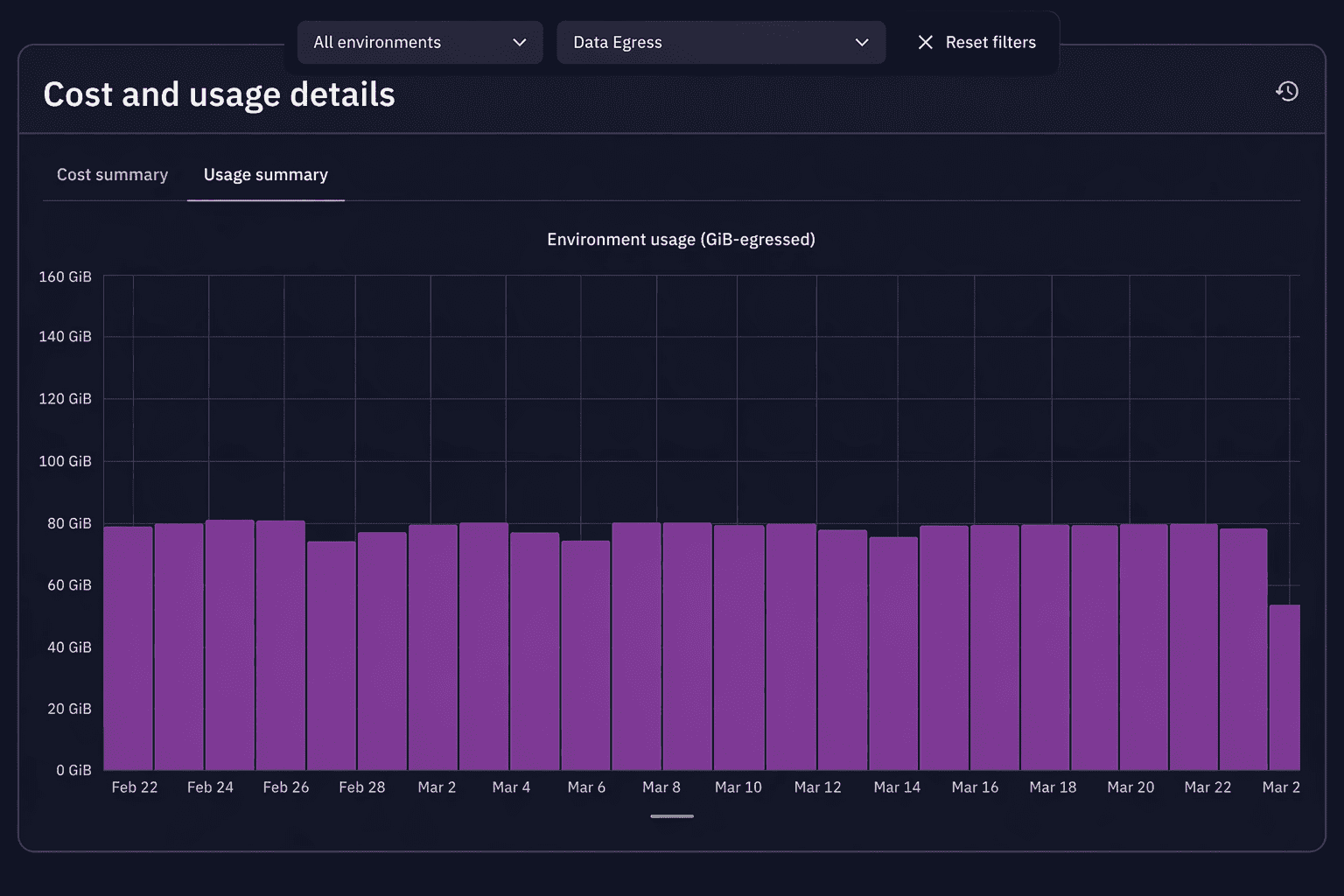
Insights via Account Management
License managers can view usage and costs in Account Management.
-
Go to Account Management > Subscription > Overview > Cost and usage details > Usage summary.
-
Select the Data Egress capability.
-
From this screen, you can also drill down into usage detail on the capability and environment level.
-
Capability level: Select View Details next to the capability you want to explore.
-
Environment level: In the Environments table, select … > Open details with Notebooks.
-
For more information, see Cost and usage.
Insights via billing usage events
Billing usage events (billing_usage_event, BUE) are system events emitted by Dynatrace that capture already-calculated, billable usage for DPS capabilities.
They are the most reliable source for building cost dashboards and allocation reports.
For Data Egress, each event records the GiB of data egressed (as billed_bytes) for a given destination and time window.
All counting rules are already applied, including per-destination counting and uncompressed volume.
Use the following DQL query to view your total Data Egress over time.
fetch dt.system.events| filter event.kind == "BILLING_USAGE_EVENT"and event.type == "Data Egress"| dedup event.id| summarize totalGiB = sum(billed_bytes) / 1073741824, by:{bin(timestamp, 1d)}
Insights via the Account Management API
Query Data Egress consumption programmatically via the Account Management API (GET /subscriptions/{subscriptionId}/usage) to integrate into external reporting or automate cost allocation.
For more information about the API, see Dynatrace Platform Subscription API - GET usage
Insights via Dynatrace Assist
Use Dynatrace Assist to surface usage trends and recommendations.
For example, you can ask the following questions in real language.
- "How has my Data Egress consumption trended over the last 30 days, and which data types are driving that consumption?"
- "Where am I spending the most on Data Egress, and what can I do to reduce it?"
Attribute costs
Use Cost Allocation to allocate specific Data Egress costs to your organization's cost centers or products.
- Tag resources: Apply cost-center, team, or application tags to host entities. Tags flow to Account Management reporting.
- Chargeback / showback: Use Account Management > Subscription > Cost management > Cost allocation to add business units, cost centers, and products.
For more information about Cost Allocation, see Allocate.
Optimize your consumption
You can reduce Data Egress consumption by optimizing what you forward:
- Filter data before forwarding. Only send the data required by your SIEM, regulatory retention system, or other external tool.
- Apply routing rules. Use rules to forward just specific log sources or event types to certain destinations, instead of sending all data everywhere.
- Use summarized or aggregated data when possible. Summarized or aggregated data is more cost-effective for downstream analytics that don't require visibility into the individual log sources or events.
- Leverage existing Dynatrace data retention options. You may be able to achieve long-term observability use cases entirely within Dynatrace, without needing to forward log data to external destinations.
- Forward to fewer destinations. Since forwarding is counted per destination, routing the same data to multiple tools increases consumption proportionally.
Frequently asked questions (FAQs)
Why is Data Egress billed separately from data ingest?
Dynatrace follows a platform pricing principle: customers pay only for the capabilities they use. Because not all customers forward data out of the platform, Data Egress is priced separately. This way, we don't have to raise ingest prices for everyone.
Is forwarded data compressed or uncompressed for billing?
Data Egress is billed based on the uncompressed size of the data forwarded out of Dynatrace.