Compliance Assistant
- Latest Dynatrace
- App
- 3-min read
 Compliance Assistant supports and helps you to:
- Track, manage, and automate compliance across your IT and business landscape.
- Gain real-time visibility into compliance risks with regulations and certifications out-of-the-box.
- Monitor compliance health across critical business processes to ensure continuous monitoring and automating incident classification.
Prerequisites
Installation
Make sure the app is installed in your environment.
Permissions
The following table describes the required permissions.
Set up sources and applications
Compliance Assistant uses data sources from across Dynatrace capabilities to monitor compliance risks.
The specific configuration steps required or recommended to maximize the value of compliance insights depend on the framework you want to configure. See the prerequisites section for your framework:
Get started
Compliance Assistant offers monitoring and automation capabilities streamlined to specific compliance frameworks. To start managing compliance, set up a compliance framework applicable to your organization.
Set up a compliance framework
- In Dynatrace, go to Compliance Assistant.
- Select Set up framework.
- To choose the compliance framework you want to monitor, select the relevant framework.
- Select Next.
- Select all compliance-critical business processes relevant to your compliance framework, such as CIFs for DORA. If no relevant processes are available, create a new business process with configuration as an entity in
 Business Flow.
 - Select Next.
- To take full advantage of the risk management capabilities, verify whether data sources for security events are properly configured in your environment.
If vulnerabilities aren't enabled
- Select Set up RVA to go to Vulnerability Analytics: General settings and enable Runtime Vulnerabilities Analytics. There are two tabs: Third-party Vulnerability Analytics and Code-level Vulnerability Analytics. You can enable one or more options there.
- To monitor third-party vulnerabilities, enable third-party vulnerability detection.
- To monitor code-level vulnerabilities, enable code-level vulnerability detection.
- To integrate external security data into Grail, you can ingest vulnerability events from third-party products. For a list of supported integrations, see Security integrations.
- Select Done.
If security detection findings aren't enabled
- Select Set up RAP to go to
 Settings > Analyze and alert > Application security > Application protection and enable Runtime Application Protection.
 - To integrate external security data into Grail, you can ingest detection finding events from third-party products. For a list of supported integrations, see Security integrations.
- Select Done.
If compliance findings aren't enabled
- Select Set up KSPM to go to Security Posture Management: Kubernetes and enable Security Posture Management.
- To get started with Security Posture Management and configure the assessment scope, see Get started with Security Posture Management. To include your compliance framework as a supported compliance standard in the assessment scope, go to Settings > Analyze and alert > Application security > Security Posture Management and enable the compliance framework of your choice. For example, DORA.
- To integrate with external security data to ingest compliance findings, see Security integrations.
- Select Done.
Remove a compliance framework
- Go to Settings > Apps > Compliance Assistant.
- Under the relevant compliance framework, such as DORA, select Remove framework.
- Select Remove to confirm. Be aware that removing a compliance framework impacts all Compliance Assistant users.
Concepts
Compliance framework
A compliance framework is a structured set of requirements, guidelines, and best practices to support organizations in meeting regulatory and industry-specific standards.
Compliance Assistant consolidates insights and functionalities tailored to a specific compliance framework. Compliance Assistant currently offers monitoring and automation capabilities supporting compliance with the EU DORA Regulation and APRA CPS 230 Operational Risk Management.
Dynatrace score in compliance snapshot
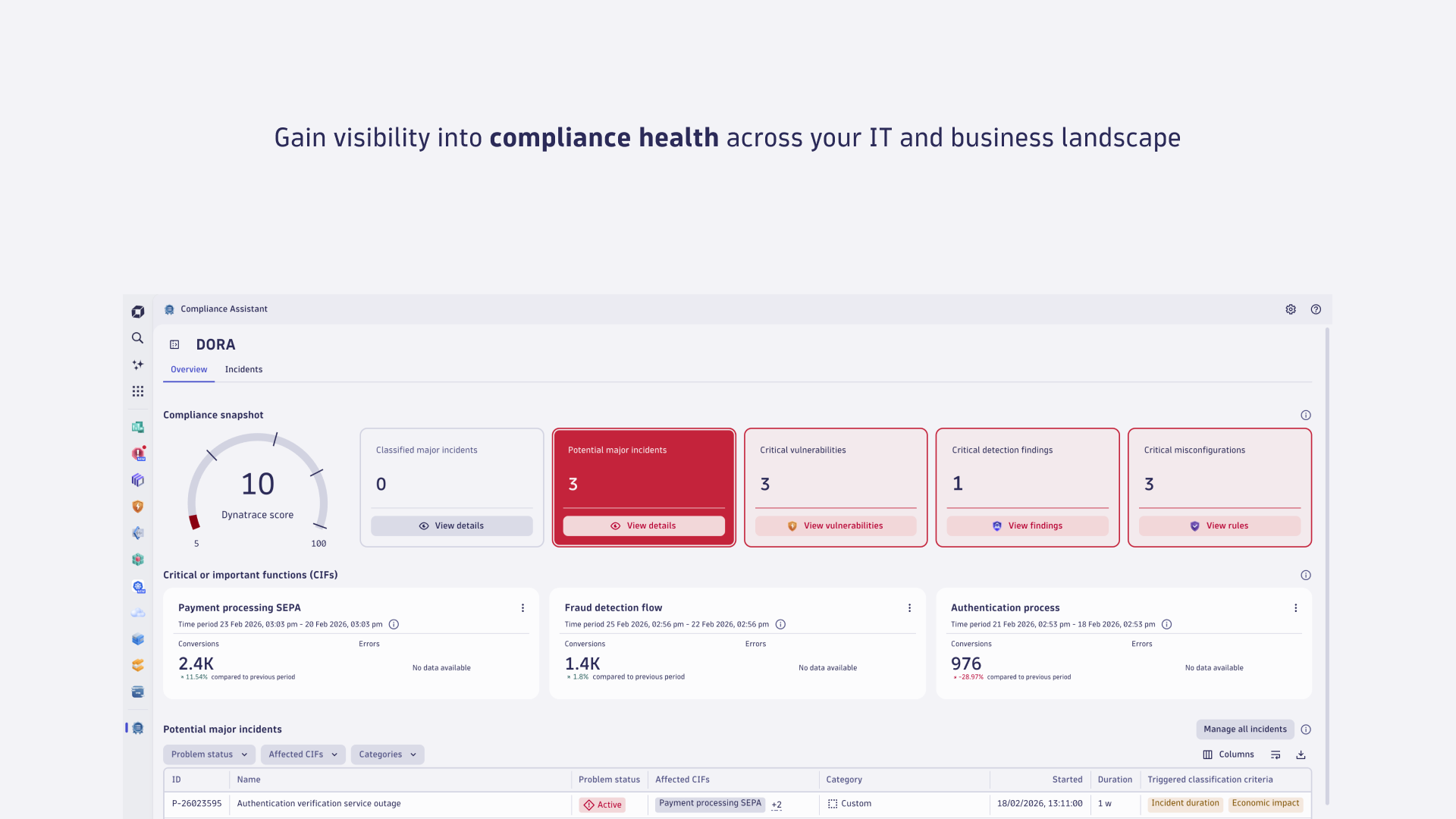
A real-time, tiered score summarizing your current ICT risk posture across potential incidents, security detection findings, vulnerabilities, and misconfigurations. This score is an indicative metric based on current data and tier logic. This score is a high-level indicator based on real-time observability and automated systems. It does not replace comprehensive or formal compliance assessments.
Compliance-critical business process
Compliance Assistant allows you to map compliance-relevant IT assets to end-to-end business processes. By integrating with Business Flow, you can identify compliance-critical business processes, leveraging Smartscape entities for enhanced visibility and context.
Depending on the compliance framework, these include:
-
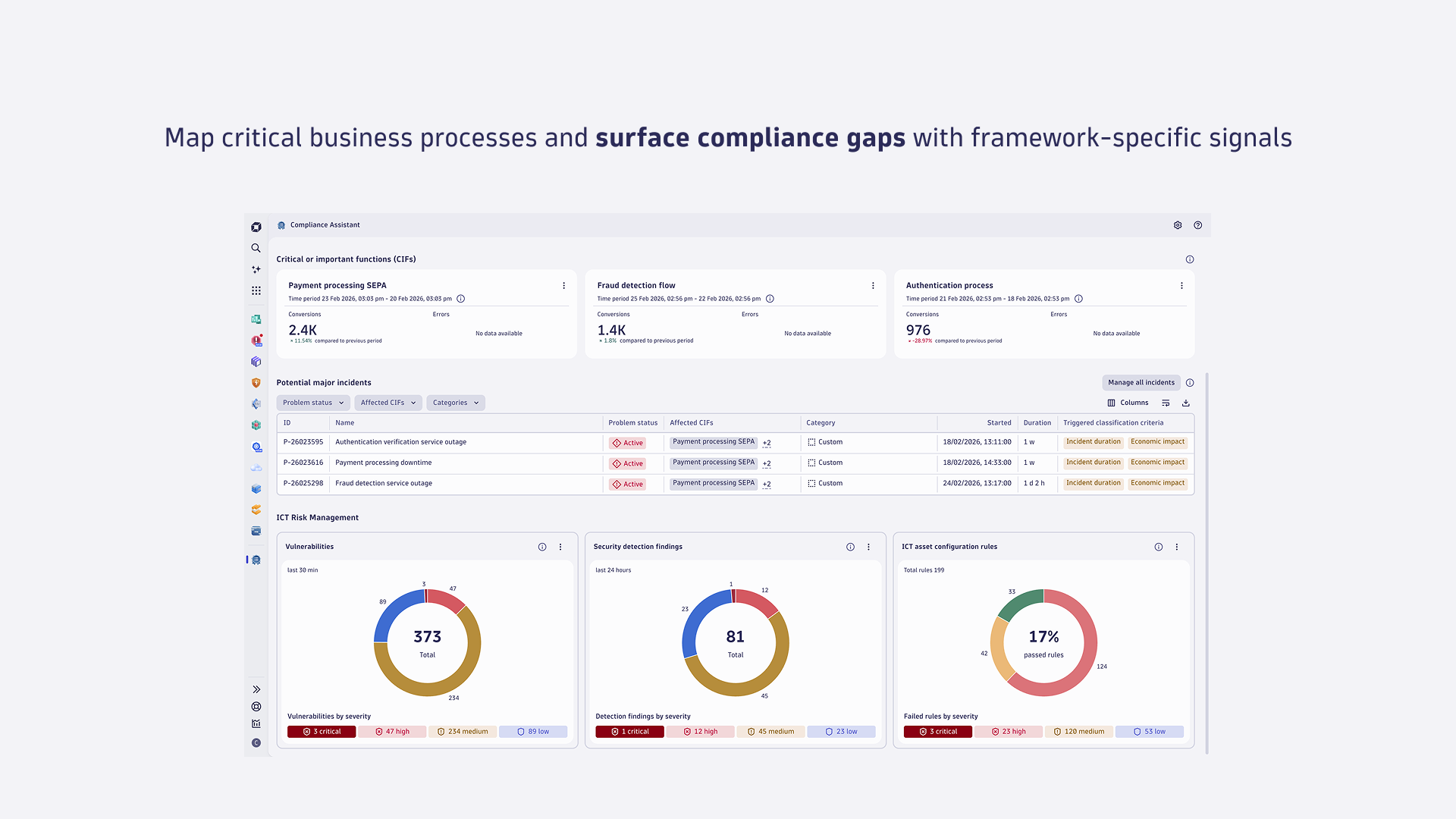
Critical or important functions (CIFs): EU DORA Regulation, financial entities must identify, classify, and document ICT-supported business functions and their supporting assets. CIFs are processes that, if disrupted, could significantly impact financial performance or service continuity.
-
Critical operations: According to APRA CPS 230, regulated entities must identify and document the processes and resources needed to deliver critical operations, along with their interdependencies, risks, and controls. Critical operations are processes that, if disrupted beyond tolerance levels, would have a material adverse impact on depositors, policyholders, beneficiaries, or other customers, or on the entity's role in the financial system.
Vulnerabilities
Compliance Assistant relies on vulnerability findings to proactively mitigate risks before they escalate into incidents. A vulnerability finding is a security event that highlights a detected weakness in a system, software component, or environment.
Security detection findings
Compliance Assistant relies on detection finding events to support in prioritizing cyber risks. A detection finding event is generated when suspicious activity is observed around an object.
Compliance findings
Compliance Assistant relies on compliance events to detect potential misconfigurations. Compliance events represent the assessment of a resource in the context of the rule specified in the compliance standard.
Use cases
Compliance Assistant enables you to achieve and manage compliance across supported frameworks:
- Identify and map compliance-relevant IT assets by analyzing critical end-to-end business processes, promoting cross-functional alignment between IT, security, and business teams.
- Continuously track compliance status against a selected framework and detect risks using real-time data on vulnerabilities, detection findings, and misconfigurations.
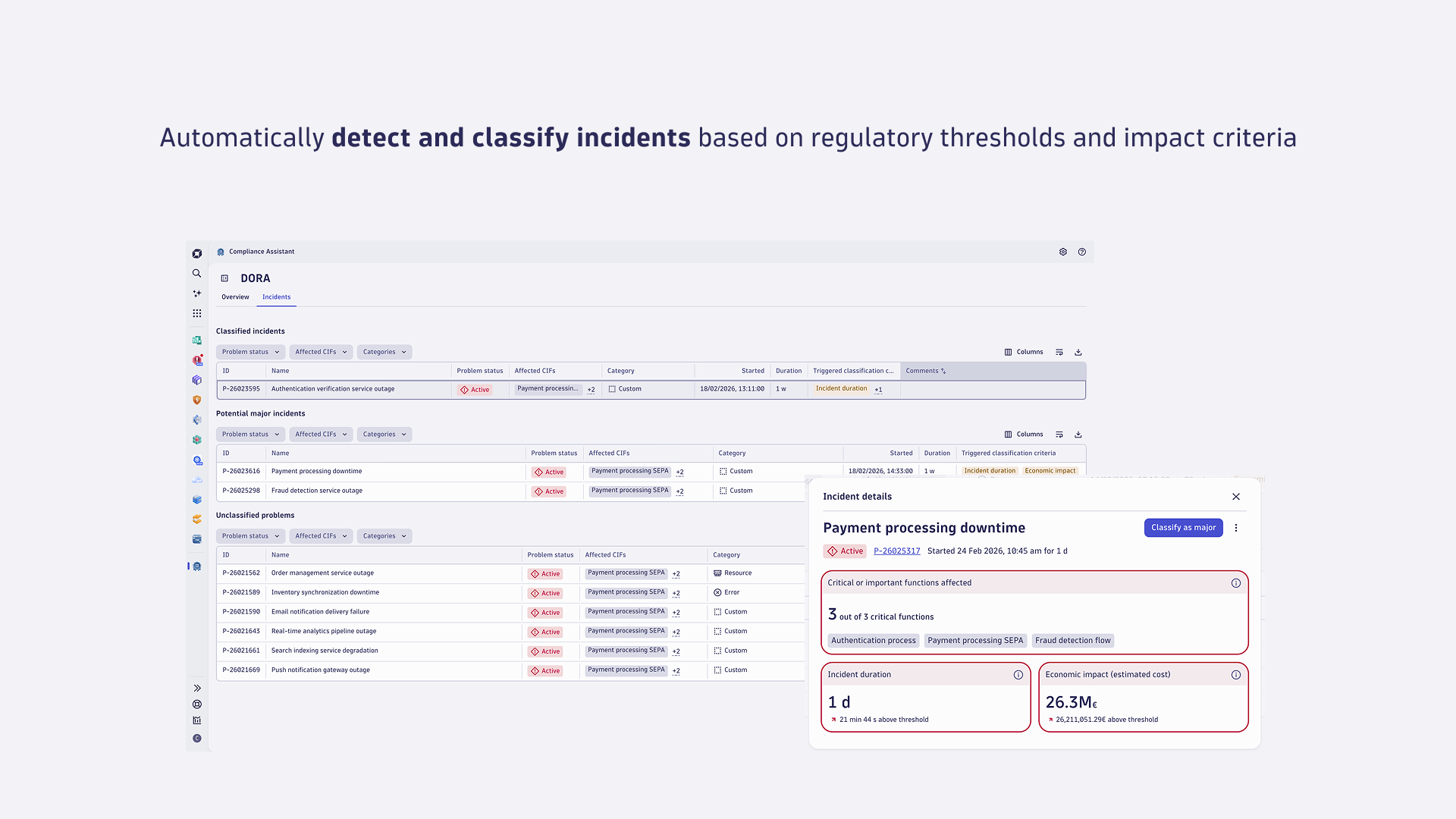
- Detect, classify, and accelerate reporting of incidents that meet regulatory thresholds, automating the steps needed to comply with tight regulatory deadlines.
FAQ
How can I improve the Dynatrace score in the compliance snapshot?
The Dynatrace score is a real-time indicator based on your current ICT risk posture and impacted by the severity of findings. To improve your score:
- Address potential major incidents and unclassified problems promptly.
- Remediate security detection findings and vulnerabilities. To review security detection findings and initiate deeper analysis, see Gain insights. To learn more on how to fix detected vulnerabilities, see How do I fix detected vulnerabilities?.
- Fix ICT asset misconfigurations identified by Security Posture Management. For guidelines on how to fix findings, see Stay compliant with Security Posture Management.
- Ensure proper monitoring and real-time protection are enabled across your critical or important functions (CIFs).
How often are insights on critical or important functions (CIFs) updated in Compliance Assistant?
Insights on conversions and errors KPIs on CIFs are updated on the basis of the configured generation frequency of the KPI monitoring in Business Flow. The evaluation timeframe for the monitored KPIs of critical or important functions (CIFs) is also defined in setting up a business configuration as an entity.
To ensure reliable KPI evaluation and avoid missing data from long‑running processes, set the evaluation timeframe to at least three to four times the process's average duration (for example, if the average duration of the CIF is 5 minutes, set the window to at least 15–20 minutes).
Why are the configured critical or important functions (CIFs) not updating?
If you have recently edited or added business processes configured as entity and selected any of those as a CIF in Compliance Assistant, it may take up to the maximum defined frequency for the monitoring KPIs of those business processes to be updated in Compliance Assistant. You can adjust the monitoring frequency in the business flow configuration.