Enrich AWS telemetry with primary Grail fields and tags
- Latest Dynatrace
- How-to guide
- 8-min read
Dynatrace version 1.348+
If you're currently using Dynatrace Classic auto-tagging, see Dynatrace Classic versus Latest Dynatrace to understand how your existing setup maps to the new model, or go straight to the upgrade guide for step-by-step instructions.
This page applies to new cloud connections only. If you're still running classic AWS connections, plan your primary Grail tag enrichment alongside upgrading to new cloud connections.
Primary Grail fields and tags are the basis for segments, pipeline routing, bucket assignment, Grail permissions, and cost allocation, applied consistently across logs, metrics, spans, events, and Smartscape entities.
This page covers enriching telemetry from AWS Cloud Platform monitoring, as well as AWS compute services monitored with OneAgent. For general OneAgent enrichment beyond AWS, see OneAgent.
Enrichment guidance
Dynatrace automatically populates the following primary Grail fields on all telemetry from your AWS connection, with no additional configuration:
aws.account.id(permission-relevant)aws.region
If filtering, routing, and access control at the account or region level cover your use case, there's nothing else to do. For all other cases, Dynatrace offers the following options to promote your AWS tags as primary Grail fields and tags.
- Option 1: Recommended Promote AWS tags with central configuration. Covers most use cases.
- Option 2: OneAgent for AWS services. Use for AWS compute services monitored with OneAgent.
- Option 3: OpenPipeline for ingest-time enrichment. Fall back to this when the previous options don't fit.
The following options are alternatives, not sequential steps.
1. Promote AWS tags with central configuration
If your AWS resources already carry tags that represent the context you want, such as team ownership, environment, cost center, or a security boundary, promote them with central configuration. No changes to your AWS resources are required.
Select your AWS tags for enrichment in central configuration
Create rules to select existing AWS tags (source) and map them to one of the following targets:
- Primary Grail fields like
dt.security_context,dt.cost.costcenter, anddt.cost.product - Cloud tags to ensure those tags get enriched on all cloud telemetry ingested via the new AWS connection (AWS Cloud Platform Monitoring). This forwards the AWS tag onto telemetry as the standard field
aws.tags.<key>. - Primary Grail tags (coming soon): This option is not yet directly available as Target and will be added in one of the next releases. Meanwhile, you can use OpenPipeline to promote cloud tags to primary tags.
To create a rule:
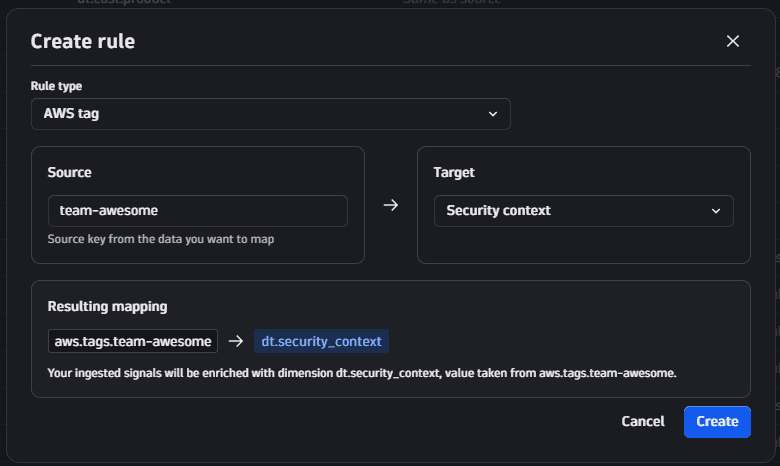
- Go to Settings > Collect and capture > Ingest enrichment configuration and select Rule.
- For Rule type, select AWS tag.
- Under Source, enter the AWS tag Key you want to map, for example,
team. - Under Target, select how you want to use the AWS tag.
- For a primary field, select Cost product, Security context, or Cost center.
- To enrich the tag on all telemetry signals and/or forward the tag for later promotion to a primary tag, select Cloud tag.
- Review the Resulting mapping preview. It shows how the AWS tag is mapped on all telemetry, for example,
aws.tags.team->dt.security_contextwhen you select Security context as the target. - Select Create.
AWS tag key names are transformed when forwarded: lowercased, whitespace converted to underscores, and characters that aren't digits, ASCII letters, dots, or underscores stripped. For example, My TEAM becomes aws.tags.my_team. Tag values are stored as originally set.
Note: In the central configuration you can also add a Custom rule which enables you to enrich a static string literal on all telemetry. The static literal can be used as Security context, Cost center, or Cost product, or directly as a Primary tag.
Then, promote any forwarded tags to primary tags in OpenPipeline.
Promote forwarded cloud tags to primary tags in OpenPipeline
Forwarded AWS tags arrive in OpenPipeline as aws.tags.<key>, which is not yet a primary tag. To make it a primary_tags.* tag that you can use uniformly across Dynatrace, review your OpenPipeline primary Grail tag rules.
Define the target primary_tags.<key> once and list the source fields to read from, in order. The first source with a non-null value is used to set the target.
AWS tags land under different field names on telemetry data, for example, aws.tags.team, and on Smartscape nodes, for example, `tags:aws`[team]. This is why we recommend defining two source entries for the AWS tag:
aws.tags.team: covers telemetry like logs, metrics, spans, and events.`tags:aws`[team]: covers AWS Smartscape nodes. Dynatrace version 1.343+
Listing both under the same primary_tags.team target covers all data types with one rule. You can also add the equivalent fields from other cloud providers to the same rule, so a single primary_tags.team definition works across AWS, Azure, Google Cloud, and Kubernetes.
For the full setup, see Set primary Grail tag rules in OpenPipeline.
2. OneAgent for AWS services
OneAgent version 1.343+
If you monitor AWS services with OneAgent, you can create a rule in the central enrichment configuration with the Host/process property rule type and select the AWS tag that you want to use as source. OneAgent reads those tags from the AWS instance metadata and enriches them as Security context, Cost center, or Cost product, or directly as a Primary tag on all telemetry.
3. OpenPipeline for ingest-time enrichment
As a last resort, use the general OpenPipeline processing feature set to influence how ingested signals (metrics, logs, spans, events, and Smartscape nodes) are enriched. Among other things, you can add a primary_tags.* field to records with a processing step. Use this only when the other options don't cover your use case.
Scopes and precedence
Central configuration rules can be defined at different deployment scopes in Dynatrace settings:
- AWS account: The rules apply only to telemetry from that account.
- Azure subscription: The rules apply only to telemetry from that subscription.
- GCP project: The rules apply only to telemetry from that project.
- Kubernetes cluster: The rules apply only to telemetry from that Kubernetes cluster.
- Host group: The rules apply only to telemetry from that host group.
- Environment: The rules apply to all telemetry.
Environment-wide rules are appended after the account-specific ones. Rules are evaluated in order, and the first rule for a given target wins. For example, if three rules set dt.security_context, the first match is used.
The cloud scopes AWS account, Azure subscription, and GCP project will only be available for Cloud Platform monitoring connections. Other Dynatrace components, such as OneAgent, Dynatrace Operator, and ActiveGate, don't use those.
Host group scope is used with OneAgent (Host/process property rules and Custom rule type).
Kubernetes cluster scope is used by Dynatrace Operator and ActiveGate (Kubernetes and Custom rule types).
Migrate to central enrichment settings
For now, you can configure tag enrichment either on the AWS connection or through central enrichment configuration. Connection-based tag enrichment will be phased out in the future.
To access the toggle, go to Settings > Collect and capture > Cloud and virtualization > AWS, select a connection from the Accounts tab, and select Manage.
Connections with connection-based tag enrichment have a Tag enrichment section with a Use new unified enrichment settings toggle:
- On: the connection uses the centrally managed tag enrichment rules from central configuration.
- Off: you configure tag enrichment individually for this connection.
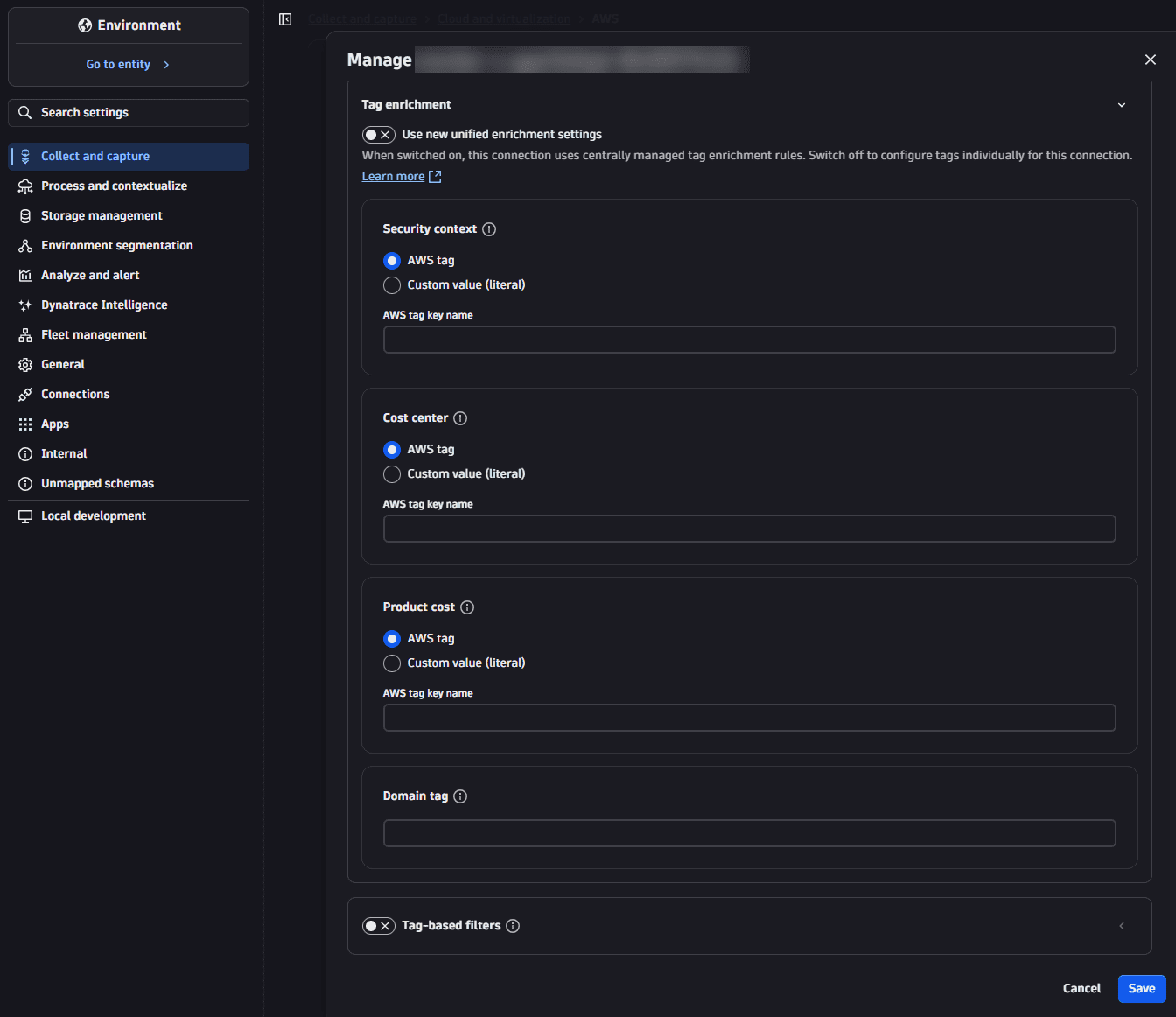
The first time you turn on the toggle, your existing connection-based tag enrichment is migrated to central configuration in the background. This one-time migration happens automatically, with no separate migration step.
In Dynatrace version 1.348, the toggle is only available when creating a new connection. The toggle for existing connections is available starting with Dynatrace version 1.349.
Select Ingest enrichment configuration to open the central enrichment configuration.
For connection settings details, see AWS connection settings.
Query enriched data in Grail
Primary Grail fields and tags appear as top-level fields and can be queried with DQL.
Filter logs by account and team
fetch logs| filter aws.account.id == "123456789012" AND primary_tags.team == "payments"
Cost allocation aggregation
fetch bizevents| filter dt.cost.costcenter == "it_services"| summarize sum(value), by: {dt.cost.product}
Security context filtering
fetch logs| filter dt.security_context == "confidential"| filter aws.region == "us-east-1"
Limitations
- Changes in central enrichment configuration
builtin:ingest.enrichment.configor OpenPipeline primary Grail tag rulesbuiltin:openpipeline.primary-grail-tagcan take up to 10 minutes to propagate. - A newly enriched primary tag key can take up to 24 hours to appear in the filter dropdowns of Dynatrace apps. This is temporary. The data is correctly enriched and can be queried and filtered with DQL.
- Dynatrace Classic (for example, classic cloud connection) is not supported.
Related topics
- Primary Grail fields and tags
- Organize your data with primary Grail fields and tags
- Enrich OneAgent telemetry with primary Grail fields and tags
- Enrich Kubernetes telemetry with primary Grail fields and tags
- Set primary Grail tag rules in OpenPipeline
- Manage your AWS connections Settings app
- Primary Grail fields
- Plan your tagging strategy
- Best practices for enriching primary Grail fields and tags