Understand and manage your consumption of Full-Stack Monitoring (DPS)
- Latest Dynatrace
- Explanation
- 5-min read
Full-Stack Monitoring for hosts and containers offers comprehensive application performance monitoring. Application performance monitoring includes: distributed tracing, code-level visibility, CPU profiling, memory profiling, and deep process monitoring for hosts and containers.
-
Host-based Full-Stack Monitoring:
-
Consumption is based on host memory, see GiB-hours.
-
Additionally offers all features of Infrastructure Monitoring.
-
Additionally offers all features of Kubernetes Platform Monitoring1 2.
-
Dynatrace Extensions can be enabled on hosts with host-based Full-Stack Monitoring and may consume Full-Stack custom metric data points and Log Analytics.
-
-
Container-based application-only Full-Stack Monitoring: Consumption is based on container memory, see GiB-hour calculation for application-only container monitoring3.
To learn more about supported platforms, see OneAgent platform and capability support matrix.
Host-based Full-Stack monitoring includes Kubernetes Platform Monitoring for all pods running on Full-Stack monitored hosts. Pods running on non-Full-Stack monitored hosts and pods stuck in Pending are not included in host-based Full-Stack monitoring. These two types of pods are charged per pod-hour as described in Kubernetes Platform Monitoring.
For Kubernetes Platform Monitoring to be included with host-based Full-Stack monitoring, you must have OneAgent version 1.301+. If you have OneAgent version 1.300 or earlier, Kubernetes Platform Monitoring will still be available, but pod-hour charges will apply as described in Kubernetes Platform Monitoring.
Container-based application-only Full-Stack Monitoring does not include Infrastructure Monitoring or Kubernetes Platform Monitoring.
GiB-hours
Dynatrace uses GiB-hours (referred to as "memory-gibibyte-hours" in your rate card) as the unit of measure for calculating your organization's consumption of host monitoring in Full-Stack Monitoring mode. The more memory that a host has, and the longer that the host is monitored, the higher the number of GiB-hours that the host consumes.
The advantage of the GiB-hour approach to monitoring consumption is its simplicity and transparency. Technology-specific factors (for example, the number of JVMs or the number of microservices hosted on a server) don't affect consumption. It doesn't matter if a host runs Kubernetes or other containerized applications, .NET-based applications, Java-based applications, or something else. You can have 10 or 1,000 JVMs; such factors don't affect an environment's monitoring consumption.
Billing granularity for GiB-hour consumption
Dynatrace is built for dynamic cloud-native environments where hosts and services are rapidly spun up and destroyed. Therefore, billing granularity for GiB-hour consumption is calculated in 15-minute intervals. When a host or container is monitored for fewer than 15 minutes in an interval, GiB-hour consumption is rounded up to 15 minutes before consumption is calculated.
GiB-hour calculation for physical hosts and virtual machines (VMs)
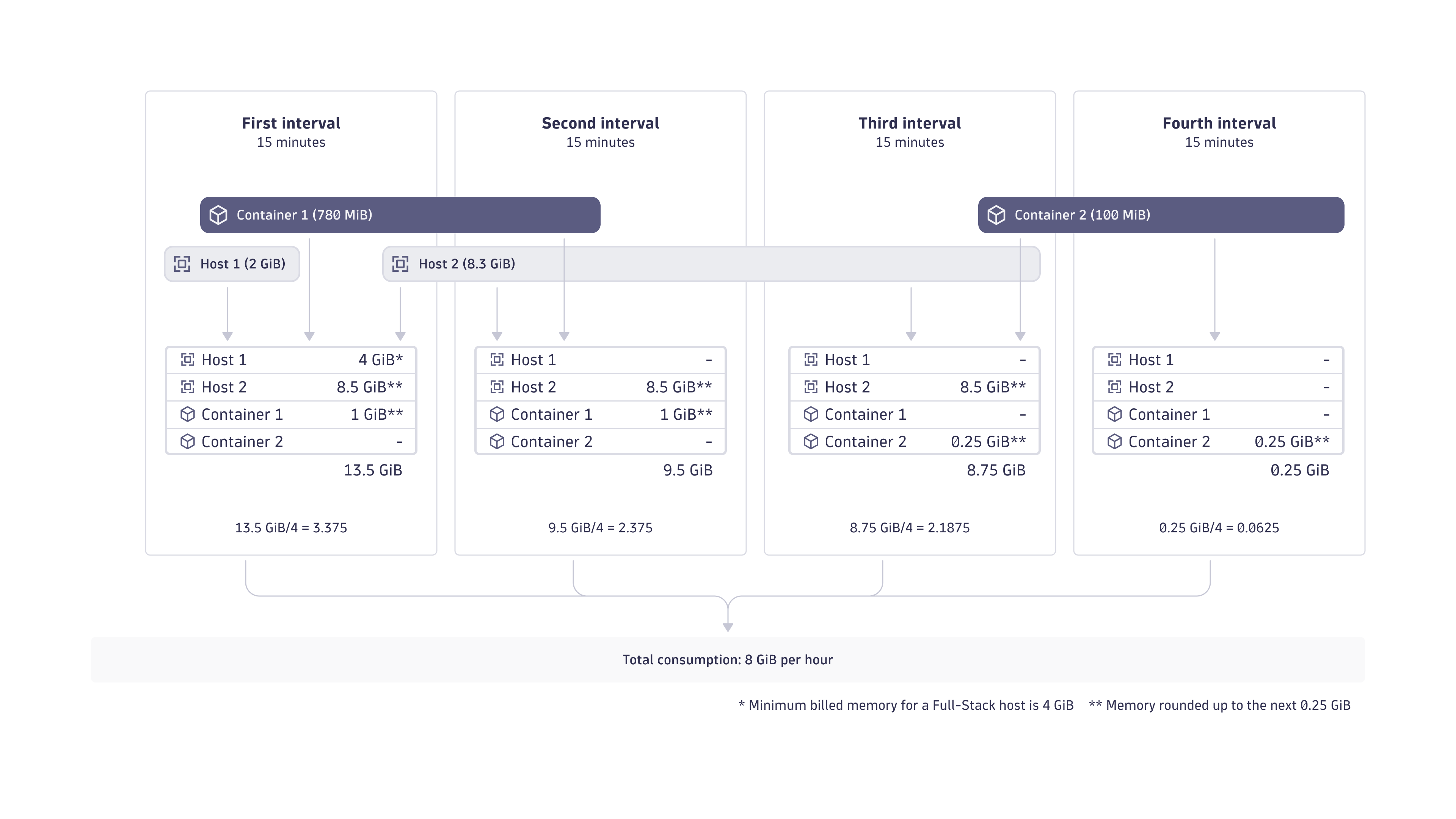
Each installed instance of Dynatrace OneAgent running on an operating system instance (deployed on, for example, a physical or virtual machine) in Full-Stack Monitoring mode consumes GiB-hours based on the monitored host's physical or virtual RAM, calculated in 15-minute intervals (see the diagram example below).
The RAM of each VM or host is rounded up to the next multiple of 0.25 GiB (which equates to 256 MiB) before monitoring consumption is calculated. A 4 GiB minimum is applied to GiB-hour consumption for physical and virtual hosts. For example, a host with 8.3 GiB memory is counted as an 8.5 GiB host, being the next multiple of 0.25 GiB, while a host with 2 GiB memory is counted as a 4 GiB host (no rounding needed, but application of the 4 GiB minimum).
GiB-hour calculation for application-only container monitoring
In cloud-native environments, services and hosts are often short-lived. Therefore, calculating monitoring consumption in 15-minute time intervals, rather than full hours, better reflects actual usage. Containers, which are an essential mechanism in cloud-native environments, typically use less memory than hosts. Therefore, the minimum memory threshold for containers is 256 MiB, rather than 4 GiB, the minimum memory threshold for hosts.
The same rounding as for hosts, to the next multiple of 0.25 GiB, also applies to containers. For example, a container with 780 MiB memory is counted as a 1 GiB container (780 MiB, which equals 0.78 GiB, being rounded up to the next multiple of 0.25 GiB).
The figure below illustrates how memory is counted for GiB-hour consumption calculations at 15-minute intervals. Each interval is divided by four in order to reach the GiB-hour consumption unit of measure.
Memory-size calculations
Memory-size calculations for containers monitored in an application-only approach are based on either:
-
The container's used memory.
- OneAgent version 1.275+ (for Kubernetes containers)
- OneAgent version 1.297+ (for serverless containers)
-
Container-defined memory limits. If no memory limit is set, the memory of the underlying virtual machine is used instead.
- OneAgent version <1.275 (for Kubernetes containers)
- OneAgent version <1.297 (for serverless containers)
Automatic container detection needs to be enabled for existing tenants.
Certain monitoring scenarios have their own calculations for GiB-hour consumption, as described in the table below.
| Scenario | Description |
|---|---|
Azure App Services (running on the App Service (dedicated) plan for Windows) | Consumption is based on the number and memory of the plan's instances. It does not matter how many applications run on the instances.The minimum billed memory is 256 MiB (instead of 4 GiB). |
Azure App Service (running on Linux OS or Linux containers) OneAgent version 1.297+ | If automatic container detection is enabled: consumption is based on the used memory of the container.If automatic container detection is not enabled: consumption is based on the memory of the plan's instance, multiplied by the number of running containers. |
Azure App Service (running on Linux OS or Linux containers) OneAgent version <1.297 | Consumption is based on the memory of the plan's instance, multiplied by the number of running containers, regardless if automatic container detection is enabled or not. |
Oracle Solaris Zones | Solaris Zones are counted as hosts. |
Monitored containers that are not detected as containers | These containers are counted as hosts. |
Metrics
This section assumes that you have followed the Dynatrace-recommended deployment options, especially regarding telemetry enrichment. If you implement a custom deployment, the charging of included metrics may still work as described—but this is not guaranteed by Dynatrace.
For more information, see Supported deployment options.
Full-Stack Monitoring includes all Infrastructure Monitoring metrics, application performance monitoring metrics, and other built-in metrics. These metrics are included and never produce any charge.
Full-Stack Monitoring also includes a defined amount of custom metric data points. Every contributing GiB of host or application memory adds 900 custom metric data points in each 15-minute interval. Included metric data points that are not consumed within the 15-minute interval in which they are granted do not roll over to subsequent intervals. Your environment's included metric data points are applied automatically to metrics that originate at hosts and containers that are monitored by OneAgent in Full-Stack Monitoring mode.
All metric keys starting with dt.service.* are for service monitoring and consume included Full-Stack metric data points if the span data itself originate at hosts and containers that are monitored by OneAgent in Full-Stack Monitoring mode.
If the span data originates at any other source, these metrics are charged as Metrics powered by Grail.
Such metric keys include, for example:
dt.service.request.countdt.service.request.failure_countdt.service.request.response_timedt.service.request.service_mesh.countdt.service.request.service_mesh.failure_countdt.service.request.service_mesh.response_timedt.service.messaging.process.countdt.service.messaging.process.failure_countdt.service.messaging.publish.countdt.service.messaging.receive.count
Metric data points that exceed your included volume are charged as:
- If Metrics powered by Grail exists on your rate card, these are charged as Metrics powered by Grail.
- If Metrics powered by Grail does not exist on your rate card, these are charged as Custom Metrics Classic.
Your environment's included metric data points are applied automatically to metrics that originate at hosts and containers that are monitored by OneAgent in Full-Stack Monitoring mode. This applies to custom metrics as described in the table below.
| Origin | Examples (including but not limited to) |
|---|---|
A Full-Stack monitored host sending metrics via the OneAgent metric API |
|
An application monitored with Container-based application-only Full-Stack Monitoring via the OneAgent code module |
|
A Full-Stack monitored Kubernetes node or container, either via Cloud Native Full-Stack, Classic Full-Stack, or Application Observability 1 |
|
Service monitoring from a Full-Stack monitored application either via Cloud Native Full-Stack, Classic Full-Stack, or Application Observability 1 |
|
Metric data points originating from Application Observability are included only if Metrics powered by Grail overview (DPS) exists on your rate card.
Metric data points sent via the Dynatrace Collector are included only if Metrics powered by Grail overview (DPS) exists on your rate card.
Metric data points sent via the OpenTelemetry Collector are included only if Metrics powered by Grail overview (DPS) exists on your rate card and the OpenTelemetry Collector has been configured as described in Enrich OTLP requests with Kubernetes data.
Included metric data point calculation example
Considering the example shown in Figure 1, here are the calculations for the included metric data point volumes for each of the four 15-minute intervals, assuming a volume of 900 included metric data points for each 15-minute interval.
- First 15-minute interval:
900 (included metric data points) × 13.5 (GiB memory) = 12,150 included metric data points - Second 15-minute interval:
900 (included metric data points) × 9.5 (GiB memory) = 8,550 included metric data points - Third 15-minute interval:
900 (included metric data points) × 8.75 (GiB memory) = 7,875 included metric data points - Fourth 15-minute interval:
900 (included metric data points) × 0.25 (GiB memory) = 225 included metric data points
How metric data points are consumed in Full-Stack Monitoring mode
Metric data point consumption takes many forms. An equal number of data points can be consumed:
- By a few high-resolution metrics or numerous low-resolution metrics.
- Equally across multiple 15-minute intervals or all at once in a single minute.
- By all monitored hosts, a subset of all Full-Stack monitored hosts, or a single host.
Distributed traces
Full-Stack Monitoring includes a defined amount of trace data volume. Every contributing GiB of host or application memory adds 200 KiB of trace data per minute, for a total of 3000 KiB of trace data in each 15-minute interval of the Monitoring environment. This volume addresses the majority of customer use cases. If necessary, customers can explicitly extend the trace ingest.
Included trace data volume that is not consumed within the 15-minute interval in which it is granted does not roll over to subsequent intervals.
Environments that have less than 320 memory GiB contributing to the included trace volume will receive a fixed minimum peak volume of 64,000 KiB/minute, which is equivalent to 937.5 MiB in a single 15-minute interval.
Full-Stack Monitoring trace data comes from two sources and takes one of two forms.
-
Trace data from the Dynatrace OneAgent: OneAgent automatically manages the volume of captured trace data via Adaptive Traffic Management. It automatically and continuously adjusts the sampling rate in an intelligent way and keeps the ingested trace data volume roughly within your included trace-data volume, which prevents any unexpected costs.
-
The second data source is trace data sent via the OneAgent Trace API or, more generally, OpenTelemetry traces that originate at a Full-Stack Monitoring host or application and are sent via the OTLP API. Trace data sent this way may be sampled by an OpenTelemetry agent, the SDK, or Collector at a fixed rate. These mechanisms are generally not controlled by Dynatrace or by Adaptive Traffic Management. This means this trace data is not automatically kept below the included trace data volume. An exception is Envoy traces configured with the Dynatrace sampler; these are controlled by Adaptive Traffic Management. OpenTelemetry traces that are sent this way count against the included trace data volume (200 KiB per minute per contributing GiB, for a total of 3,000 KiB per contributing GiB in each 15-minute interval), and any trace data that exceeds the included trace data volume is charged as Traces - Ingest & Process.
Note that traces sent via the Custom Trace API and not coming from a Full-Stack Monitoring host or application are always charged as Traces - Ingest & Process.
For OpenTelemetry traces, this section assumes that you have followed the Dynatrace-recommended deployment options, especially regarding telemetry enrichment. If you implement a custom deployment, the charging of included traces from OpenTelemetry sources may still work as described—but this is not guaranteed by Dynatrace.
For more information, see Supported deployment options.
What about the included trace volume in DPS prior to Traces powered by Grail
While the uncompressed amount of spans and traces has not changed, the way Dynatrace measures this has changed with the release of Traces powered by Grail. Due to this the stated included trace volume and the stated peak trace volume for DPS subscriptions prior the enablement of traces powered by Grail is different.
For non-Grail enabled DPS:
- Every contributing GiB of host or application memory adds a peak trace volume of 45 KiB/min.
- Each environment has a minimum trace peak volume of 14 MiB/min.
Peak trace volume calculation example
The following example shows the average rate target (200 KiB per contributing GiB per minute) and the total included volume for each 15-minute interval. Adaptive Traffic Management evaluates compliance per interval, not as a hard per-minute cap, and recalculates the target every 15 minutes based on the average contributing GiB in the previous interval.
- First 15-minute interval:
200 KiB × 1350 GiB = 263.67 MiB/minute average rate target(total: 3,955 MiB per interval) - Second 15-minute interval:
200 KiB × 950 GiB = 185.55 MiB/minute average rate target(total: 2,783 MiB per interval) - Third 15-minute interval:
200 KiB × 875 GiB = 170.9 MiB/minute average rate target(total: 2,563 MiB per interval) - Fourth 15-minute interval:
200 KiB × 25 GiB = 58.6 MiB/minute average rate target(total: 879 MiB per interval)
(In the fourth 15-minute interval the actually ingested amount would be below the minimum trace volume, hence the actual applied limit is equal to this minimum.)
Included and extended Trace retention
Dynatrace retains all traces ingested from your environment for 10 days.
Dynatrace provides the ability to extend trace retention on a selective basis for up to 10 years, regardless of the ingest method or volume. This is achieved by creating custom buckets in Grail. The first 10 days of retention are always included. Any trace data retained longer than 10 days is charged on a per-gibibyte basis as Traces - Retain.
Extended Trace ingest for Full-Stack Monitoring
Full-Stack Monitoring includes a defined amount of trace data volume. Every contributing GiB of host or application memory adds 200 KiB of trace data per minute, for a total of 3000 KiB of trace data in each 15-minute interval of the Monitoring environment.
Dynatrace provides the ability to extend the amount of trace data ingested with OneAgent. To do this you can request an increased Trace ingest limit beyond the 200 KiB of trace data included per memory-gibibyte. Adaptive Traffic Management keeps your trace ingestion within the requested volume, which prevents any unexpected costs. (For an explanation of Adaptive Traffic Management, see Distributed traces). The trace data ingested that exceeds the included volume of 3000 KiB in a given 15-minute interval is charged as Traces - Ingest & Process.
The Full-Stack Adaptive Traffic Management and trace capture dashboard contains a calculator that helps you estimate how much data this will be based on your desired trace ingest volume. To request Extended trace ingest for Full-Stack Monitoring, please contact your Dynatrace account team.
For example, your current trace capture rate is 100% most of times, but drops to 50% during peak times for 2 hours a day. You can request a 2x Trace ingest volume limit, which would raise it to 400 KiB per contributing gibibyte in each 15-minute interval. For those 2 hours per day you now ingest twice the amount of trace volume. As a result your trace capture rate is now at 100% also during peak hours. It does not charge anything for the 22 hours a day that you are already at 100% before the change. During the 2 peak hours per day though about half the trace ingest volume will be charged as Traces - Ingest & Process.
CPU, memory, and thread profiling
Full-Stack Monitoring includes CPU, memory, and thread profiling for technologies like Java, .NET, Go, Node.js, and PHP. OneAgent uses an intelligent patented mechanism to manage the volume of profiling data. Dynatrace retains the total amount of ingested profiling data from your environment for 10 days.
Supported deployment options
To ensure that your OpenTelemetry traces and custom metrics benefit from the included trace and metric volumes, you need to enable telemetry enrichment according to the Dynatrace-recommended deployment options.
Automatic telemetry enrichment is enabled for:
-
Custom metrics and OpenTelemetry spans that originate from any:
- Full-Stack monitored host or container, when you use OneAgent or follow the steps described in Enrich ingested data with Dynatrace-specific fields.
- Full-Stack monitored Kubernetes container, when you use Dynatrace Operator and metadata enrichment is enabled.
- Cloud-native Full-Stack monitored Kubernetes node, when you use Dynatrace Operator and metadata enrichment is enabled. This includes any containers running on the monitored Kubernetes node.
-
Custom metrics that are sent from any Full-Stack monitored host via the OneAgent local metric API. For more information, see OneAgent metric API.
-
OpenTelemetry traces that are sent from any Full-Stack monitored host via the OneAgent local trace API. For more information, see Send OpenTelemetry traces to the OTLP endpoint exposed by OneAgent.
If you implement a custom deployment, the charging of traces and metrics may still work as described—but this is not guaranteed by Dynatrace.
Consumption details: Full-Stack
Dynatrace provides built-in usage metrics that help you understand and analyze your organization's consumption of Full-Stack Monitoring.
To use these metrics, in  Data Explorer, enter
 DPS in the Search field.
These metrics are also available via the Environment API and in Account Management (Usage summary > Full-Stack Monitoring > Actions > View details).
Here are the metrics you can use to monitor the consumption of Dynatrace Full-Stack Monitoring.
- (DPS) Full-Stack Monitoring billing usage
Key:
builtin:billing.full_stack_monitoring.usageDimension: count
Resolution: 15 min
Description: Total GiB memory of all hosts monitored in Full-Stack Monitoring mode counted in 15-min intervals.
- (DPS) Full-Stack Monitoring billing usage per host
Key:
builtin:billing.full_stack_monitoring.usage_per_hostDimension: Host (
dt.entity.host)Resolution: 15 min
Description: GiB memory per host monitored in Full-Stack Monitoring mode counted in 15-min intervals.
- (DPS) Full-stack usage by container type
Key:
builtin:billing.full_stack_monitoring.usage_per_containerDimension: application_only_type; k8s.cluster.uid; k8s.namespace.name
Resolution: 15 min
Description: GiB memory per container monitored in Full-Stack application-only Monitoring mode counted in 15-min intervals.
- (DPS) Total metric data points reported by Full-Stack monitored hosts
Key:
builtin:billing.full_stack_monitoring.metric_data_points.ingestedDimension: Count
Resolution: 15 min
Description: Number of reported metric data points aggregated over all Full-Stack monitored hosts.
- (DPS) Metric data points reported and split by Full-Stack monitored hosts
Key:
builtin:billing.full_stack_monitoring.metric_data_points.ingested_by_hostDimension: Host (
dt.entity.host)Resolution: 15 min
Description: Number of reported metric data points split by Full-Stack monitored hosts.
- (DPS) Available included metric data points for Full-Stack monitored hosts
Key:
builtin:billing.full_stack_monitoring.metric_data_points.includedDimension: Count
Resolution: 15 min
Description: Total number of included metric data points that can be deducted from the consumed metric data points reported by Full-Stack monitored hosts.
- (DPS) Used included metric data points for Full-Stack monitored hosts
Key:
builtin:billing.full_stack_monitoring.metric_data_points.included_usedDimension: Count
Resolution: 15 min
Description: Number of consumed included metric data points for Full-Stack monitored hosts.
Monitor memory-GiB-hour consumption for Full-Stack monitored hosts
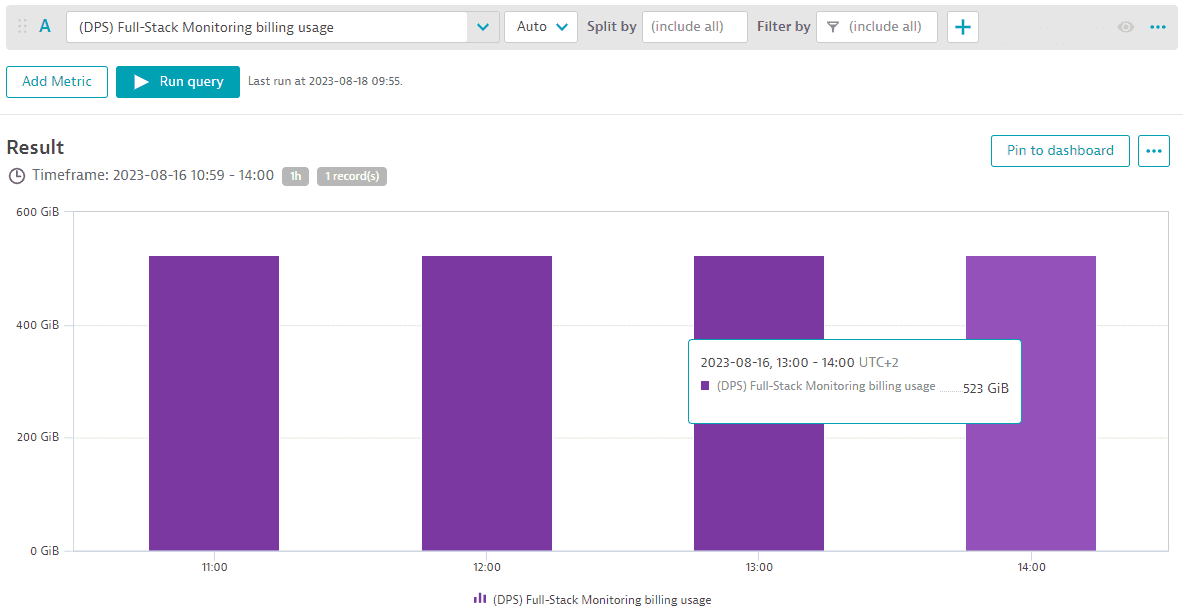
You can monitor the total memory-GiB-hour consumption aggregated across all Full-Stack monitored hosts for different intervals (15 min, hour, day, or week) for any selected timeframe using the "(DPS) Full-Stack Monitoring billing usage" metric. The example below shows memory GiB monitored in 1-hour intervals. Between 11:00 and 14:00, 523 memory-GiB were monitored each 1 hour. This results in 523 memory-GiB-hours consumed.
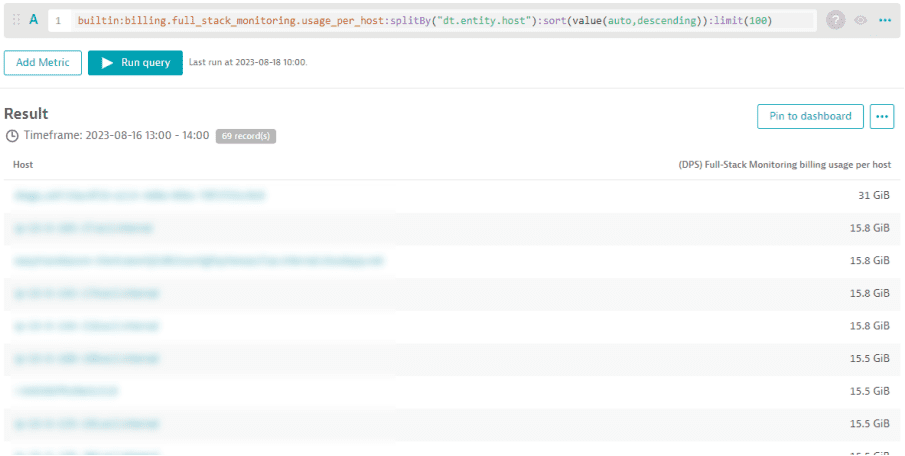
You can break down the total memory-GiB-hour consumption using the "(DPS) Full-Stack Monitoring billing usage per host" metric. The example below shows the list of all hosts that contributed to the 523 memory-GiB-hour consumption between 13:00 and 14:00. The respective number of memory-GiB-hours per host is displayed as well.
Monitor memory-GiB-hour consumption for Full-Stack monitored containers
Platform and cluster owners can monitor their Kubernetes clusters using Kubernetes Platform Monitoring.
Application owners can leverage container-based Full-Stack Monitoring to monitor applications running within Kubernetes clusters.
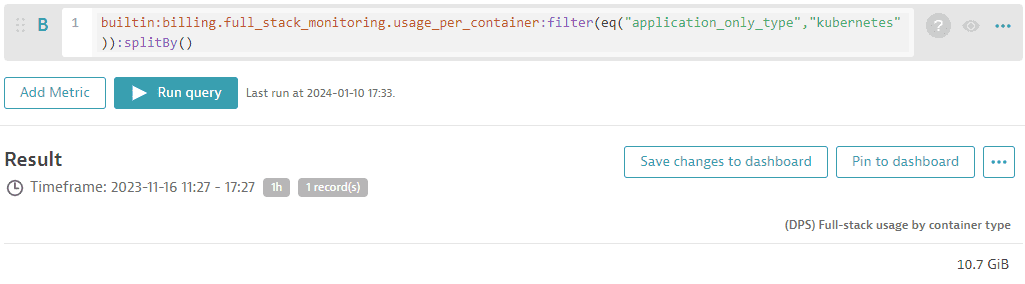
To get consumption insights for monitored Kubernetes clusters or namespaces, you can query memory-GiB-hour consumption by leveraging the "(DPS) Full-Stack Monitoring billing usage per container" metric, as shown in the following query:
builtin:billing.full_stack_monitoring.usage_per_container:filter(eq("application_only_type","kubernetes")):splitBy()
In the example below, 1.58 TiB of memory was consumed by the Kubernetes cluster within the past 30 days.
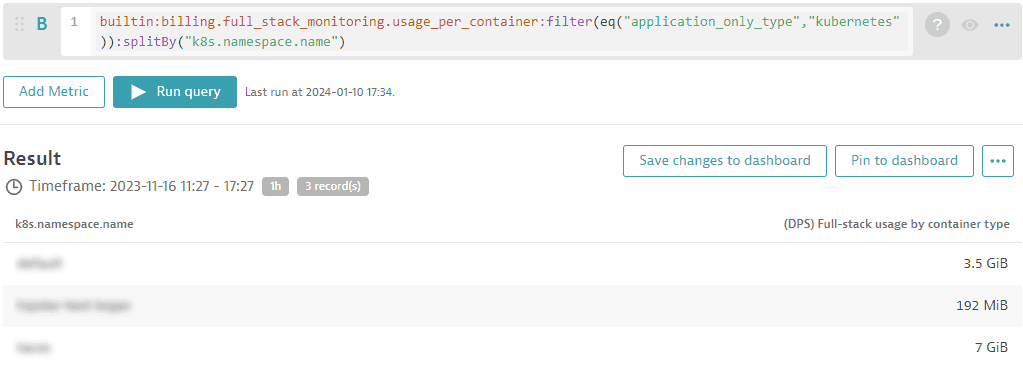
Of course, you can filter your analysis for deeper insights (for example, add a split for Kubernetes namespaces).
Monitor metric consumption for Full-Stack monitored hosts
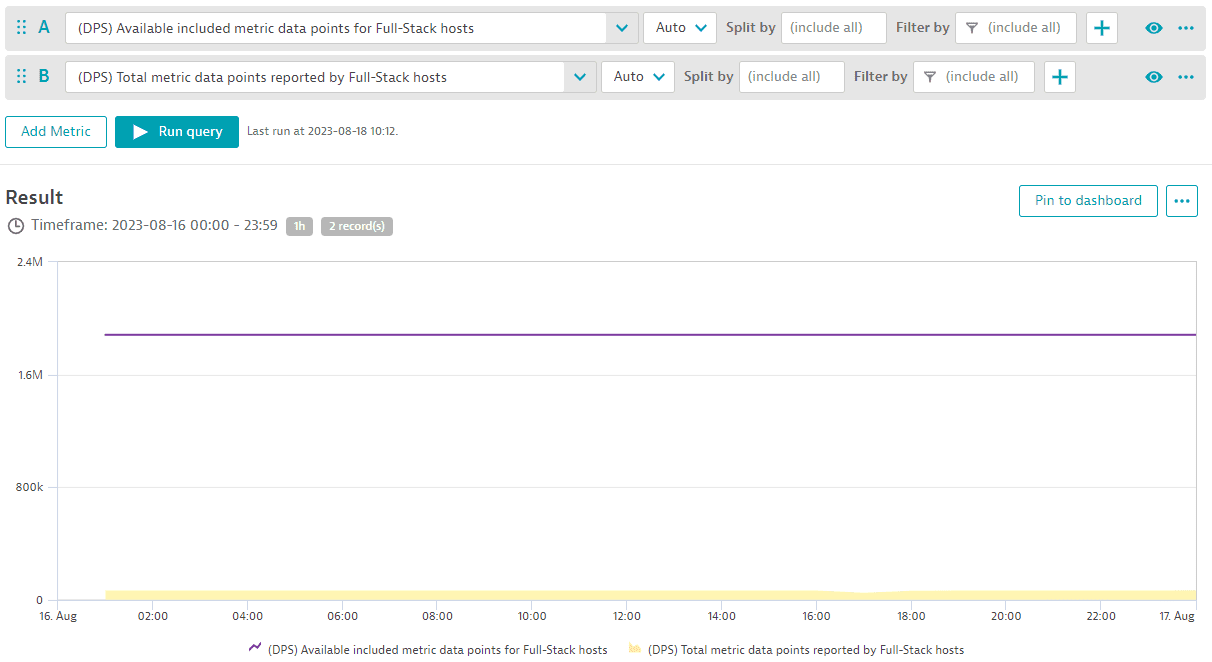
To monitor your metrics budget for the whole pool of metric data points in your environment, you can track available included metric data points against total reported metrics data points using these two metrics: "(DPS) Available included metric data points for Full-Stack monitored hosts" and "(DPS) Total metric data points reported by Full-Stack monitored hosts". The example below shows data for a full day. At no time was the number of included metrics for this environment's metric pool (purple line) overspent.
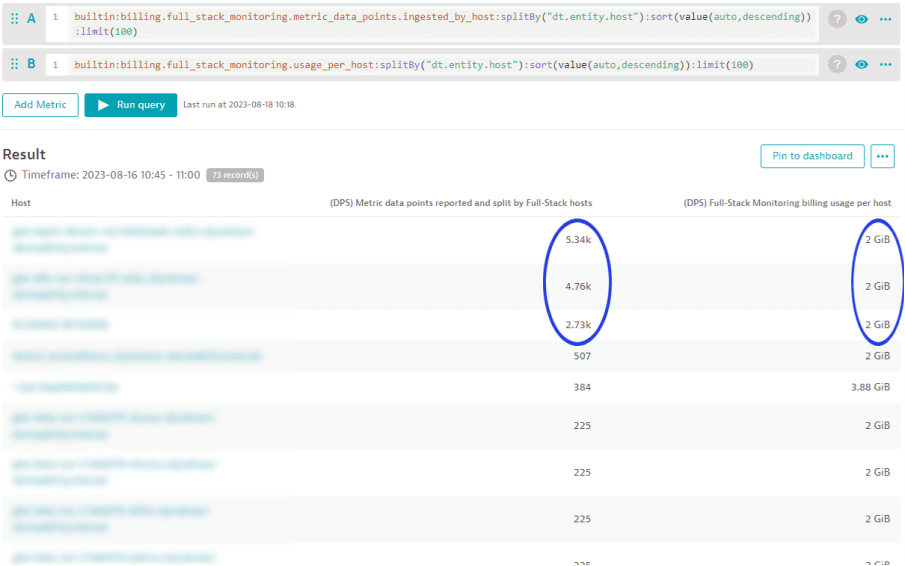
In cases where the number of included metrics for an environment's metric pool are overspent, the following analysis can help you to identify the hosts that are contributing to the overspending. Use the metric "(DPS) Metric data points reported and split by Full-Stack monitored hosts" for this analysis.
The example below shows that between 10:45 and 11:00, each of the first 3 hosts in the list reported far more than 2,000 metric data points. In the same period, each of these 3 hosts shows a memory-GiB-hour consumption of 2 GiB. Dynatrace offers 900 included custom metric data points for each GiB of host memory, calculated at 15-minute intervals. This means that the first 3 hosts contribute 1,800 (2*900) metric data points to the environment's pool of available data points. However these hosts consumed more data points than they contributed during the same time period.
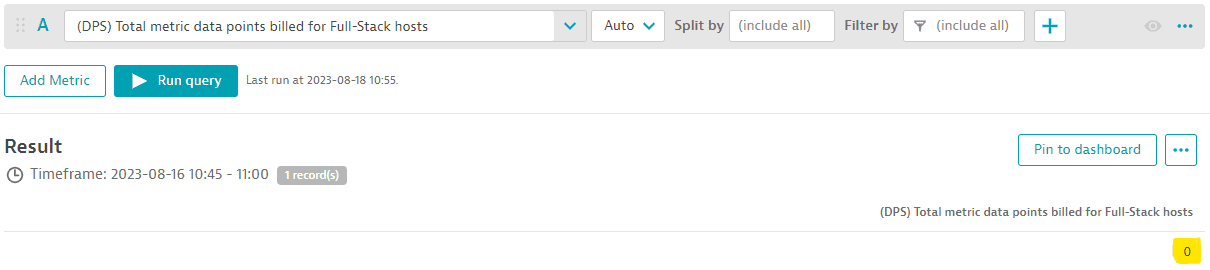
When using the metric "(DPS) Total metric data points billed for Full-Stack monitored hosts" from Custom Metrics Classic you can see that no overspending occurred for this environment's Full-Stack Monitoring metric pool between 10:45 and 11:00 because no metric data points were billed.