Health indicators
- Latest Dynatrace
- Reference
- 5-min read
- Published Jul 13, 2026
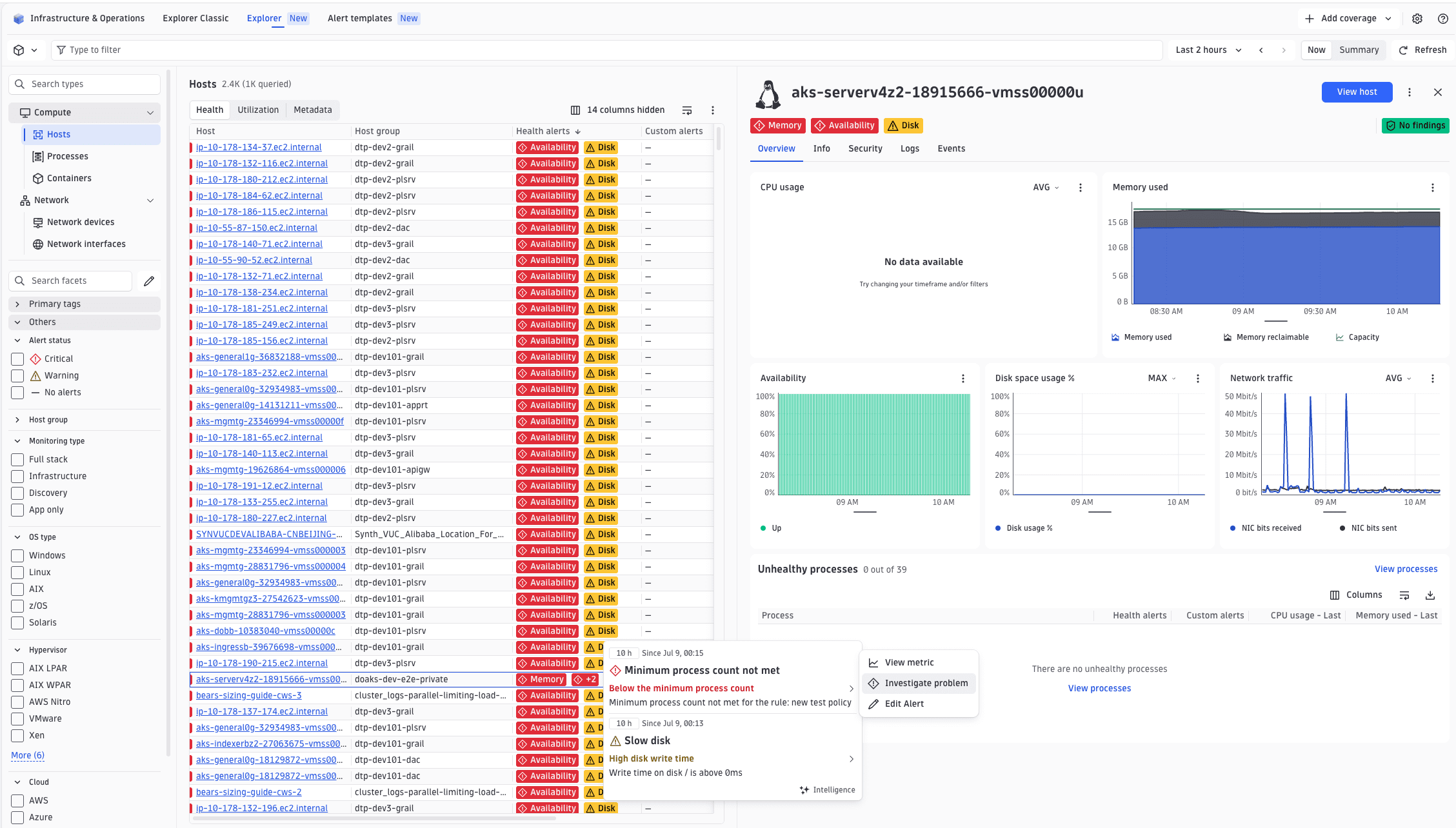
Health indicators connect Davis events to your app's UI, giving users a consistent health view wherever entity data is shown. Active alerts surface as colored chips in the entity header and entity lists, as event markers on charts, and as rows in the Alerts table. Chips always show current health, even when browsing a past timeframe. Each chip opens an overlay with the matched events and actions to navigate to the affected metric, investigate the underlying problem, or edit the alert configuration.
Configuration
Health indicators may be configured in two places:
-
DQL table: Add
alertGroupson the table to match events to named alerts, add theALERTS_LOOKUPbuilt-in lookup withlookupFieldpointing to your entity ID column, and include theHEALTH_ALERTS_COLUMNandCUSTOM_ALERTS_COLUMNbuilt-in columns. SetnodeTypeinInvExTypeDefinition.metadataso the lookup auto-filters to the correct entity type. See DQL table, Document types, andAlertLookupRelationbelow. -
Entity details: Add
alertGroupstoDetailsComposition.alertQueryParamsis optional. If omitted, health chips are derived from the active Inventory Explorer table row's data that theALERTS_LOOKUPalready populated. SetalertQueryParamsonly when you need a standalone query that runs independently of the table. See Entity details composition.
Examples
DQL table
A minimal table showing health alerts and custom alerts as dedicated columns. The ALERTS_LOOKUP fetches Davis events and joins them to rows via lookupField (your entity ID column). alertGroups defines which events map to named chips, while any unmatched events become custom alerts automatically. Include both HEALTH_ALERTS_COLUMN and CUSTOM_ALERTS_COLUMN, since the second catches events that don't match any configured group and may still be actionable.
groupName is the chip label visible in entity lists and the entity header; displayName is the label shown per event inside the chip overlay. In matchConditions, values are matched against event attributes. Use ["*"] to match any value for an attribute, or list specific strings such as built-in Davis event type names.
{"type": "dql-table","id": "services","title": "Services","alertGroups": [{"groupName": "Failure rate","alerts": [{"displayName": "Failure rate","matchConditions": { "event.type": ["SERVICE_ERROR_RATE_INCREASED"] }}]},{"groupName": "Response time","alerts": [{"displayName": "Response time","matchConditions": { "event.type": ["SERVICE_SLOWDOWN"] }}]}],"dqlQuery": {"query": "smartscapeNodes \"*\" | filter type == \"SERVICE\" | fields id, name","idField": "id","lookups": [{"builtInLookup": "ALERTS_LOOKUP","lookupField": "id"}]},"columns": [{ "id": "name", "field": "entity.name", "displayName": "Service" },{ "builtInColumn": "HEALTH_ALERTS_COLUMN" },{ "builtInColumn": "CUSTOM_ALERTS_COLUMN" }]}
The ALERTS_LOOKUP auto-generates the filter iAny(smartscape.affected_entities[][type] == "<nodeType>") when nodeType is set in InvExTypeDefinition.metadata. Without it, the lookup returns events for all Smartscape node types. Set nodeType to match the Smartscape type your table queries:
{"version": "1.4.0","type": "InvExTypeDefinition","target": { "app": "my.extension.app" },"metadata": { "nodeType": "MY_CUSTOM_TYPE" },"content": {"id": "my-custom-type","displayName": "My custom type","content": {"type": "vertical-layout","items": []}}}
Entity details
When alertQueryParams is omitted, health chips in Entity details are derived from the active Inventory Explorer table row's data, using the same healthIndicators and customAlerts fields the ALERTS_LOOKUP populates. No separate query runs, so the chips always reflect what the table already fetched. alertGroups still applies for grouping and labeling alerts. Use charts on an alert to link it to a chart card so the View metric action navigates there directly.
{"type": "details","id": "service-details","alertGroups": [{"groupName": "Failure rate","alerts": [{"displayName": "Failure rate","matchConditions": { "event.type": ["SERVICE_ERROR_RATE_INCREASED"] },"charts": ["golden-signals"]}]},{"groupName": "Response time","alerts": [{"displayName": "Response time","matchConditions": { "event.type": ["SERVICE_SLOWDOWN"] },"charts": ["golden-signals"]}]}],"content": {"type": "tabs","items": []}}
When the entity details panel can open outside an Inventory Explorer context, or when you need different event scoping, add alertQueryParams to run a standalone query. Scope it using your entity's Smartscape type (for example, "SERVICE") and $(entityId). filters accepts DQL filter expressions without the leading | filter. See DQL variables for the full variable list.
{"alertQueryParams": {"filters": ["iAny(smartscape.affected_entities[][type] == \"SERVICE\") AND iAny(smartscape.affected_entities[][id] == $(entityId))"]}}
Health indicators are configured via alertGroups on DetailsComposition (see Entity details composition), DqlTable (see DQL table), and ChartGroup (see Chart group). The reference types are described below.
HealthAlertGroup
Supports the Conditional mixin (see Conditional rendering).
| Property | Type | Description |
|---|---|---|
|
| Display name of the health indicator chip. |
|
| Alerts belonging to this group. |
|
| When true, the group doesn't appear as an alert in the detail view. |
|
| Group is hidden when conditions aren't satisfied. |
HealthAlert
Supports the Conditional mixin.
| Property | Type | Description |
|---|---|---|
|
| Event attribute conditions that must match for the alert to fire. |
|
| Alert display name. |
|
| Conditions that, if matched, exclude this alert. |
|
| Chart IDs this alert is associated with. |
|
| How the alert appears on associated charts. |
|
| Alert is hidden when conditions aren't satisfied. |
HealthAlertConditions
Record<string, string[] | ['*']>: a map from event attribute name to a list of allowed values. Use ['*'] to match any value for a given attribute.
ChartConfiguration
| Property | Type | Description |
|---|---|---|
|
| Renders the alert as an event marker on the chart timeline. |
|
| Marker/series color override. |
AlertQueryParams
Parameters for the standalone health-indicators query (used by DetailsComposition.alertQueryParams).
| Property | Type | Description |
|---|---|---|
|
| DQL filter expressions (without the leading |
|
| Extra fields included in the health indicator record. |
|
| Pre-filter for Davis problems. |
|
| Pre-filter for volatile attributes like |
|
| Overrides |
|
| Additional fields to expand. |
AlertLookupRelation
Used inside the AlertLookup built-in lookup's relations array (see DQL table).
| Property | Type | Description |
|---|---|---|
|
| Field prefix for the relation's output fields. |
|
| Filter expression identifying events for this relation. |
|
|
|
|
| Distinguishes configured alerts from custom alerts within this relation. |
|
| Only for |
When type: 'entity-remap', the lookup also produces a generated {fieldPrefix}.original_id output field (the pre-remap entity ID, or null for non-matching rows). Expose it via additionalFields if you need it.
See also
 ExtensionsInfrastructure Observability