Cluster Management Console
- Explanation
- 5-min read
The Cluster Management Console is the administration interface for the Managed Cluster. Use it to manage the Managed Cluster infrastructure and all environments hosted on it. The Cluster Management Console is separate from the monitoring environment UI. Only users with cluster admin permissions can access it.
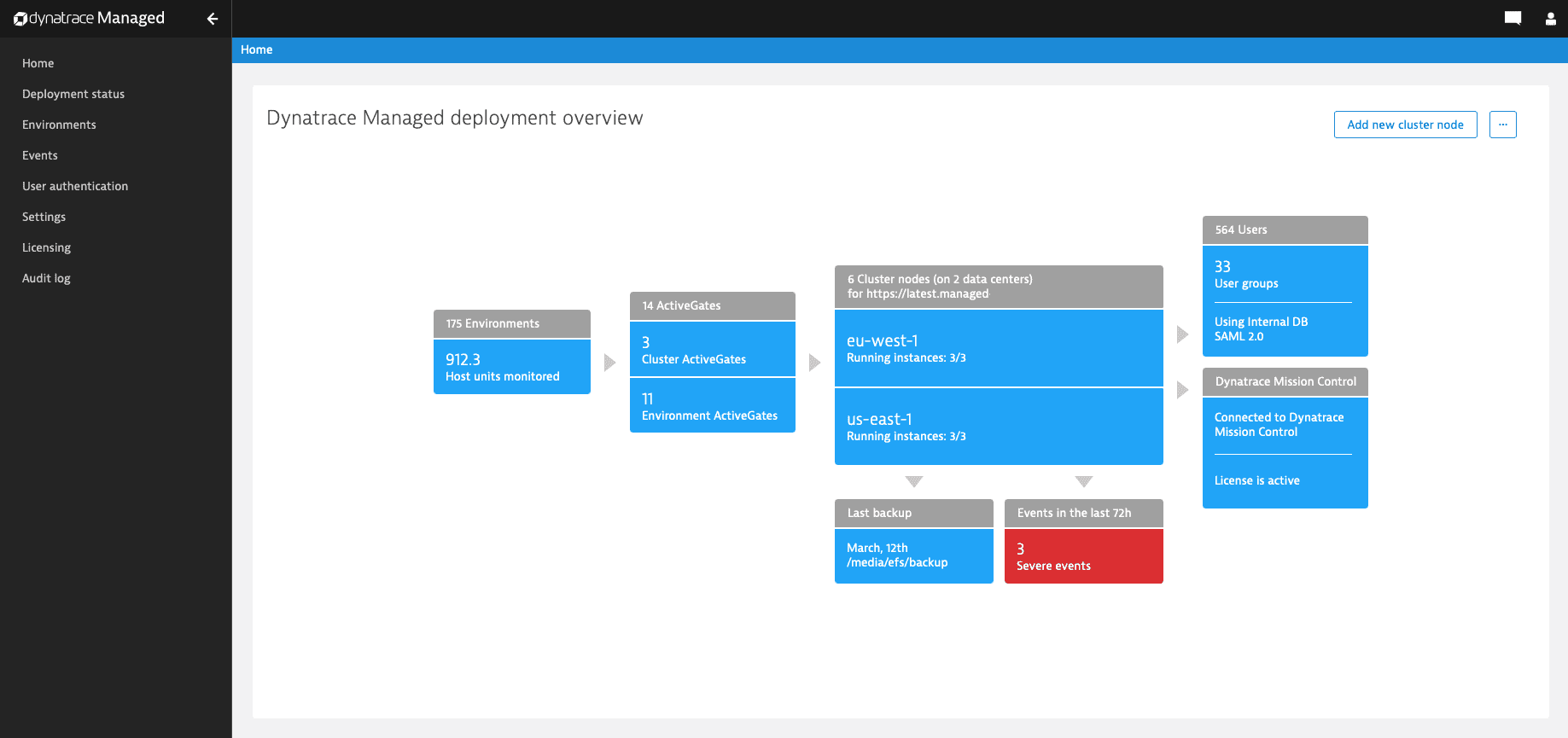
Home
Home displays the Dynatrace Managed deployment overview, with a graphical representation of your deployment at a glance.
- Environments—Displays the number of active environments. Links to Environments.
- ActiveGates—Displays the number of Cluster ActiveGates and Environment ActiveGates. Links to Deployment status.
- Cluster nodes—Displays the number of Cluster nodes.
- Last backup—Displays the date and storage location of the last backup.
- Events—Displays the number of log events.
- Users—Displays the number of users and user groups.
- Dynatrace Mission Control—Provides access to Mission Control proactive support.
Deployment status
Deployment status provides an overview of your Cluster infrastructure.
Cluster nodes
- For details on a cluster node, expand its row.
- To install a cluster node, select Install cluster node in the upper-right corner.
ActiveGates
- For details on an ActiveGate, expand its row.
- To install a cluster ActiveGate, select Install Cluster ActiveGate in the upper-right corner.
Network zones
- For details on a network zone, select its name in the table.
Environments
Environments displays a table of all Dynatrace environments you manage.
- To find an environment, use the filters on the left.
- To open an environment's details screen, select the environment name.
- To change an environment-specific setting, select for that setting.
Sections include:- Capability settings
- Storage settings
- Cluster overload prevention settings
- Assign environment permissions to user groups
- To go to the selected Dynatrace environment, select Go to environment in the upper-right corner.
- To disable the selected Dynatrace environment, select > Disable environment in the upper-right corner.
- To export the configuration of the selected Dynatrace environment, select > Export configuration in the upper-right corner.
- To change an environment-specific setting, select for that setting.
Events
Events lists log events by message and timestamp.
- Filter the table by:
- Severity level
- Timeframe
- String search
- Page through the table with the controls under the table.
User authentication
User authentication links to user-related settings.
- User accounts—Lists user accounts. Select a user to view details and group assignments and permissions. For details, see user and group management.
- User groups—Lists user groups. Select for a group to configure the group name, permissions, and policies. For details, see user and group management.
- Policy management—Lists policies. Select a policy in the Actions column to view or edit it.
- User sessions—Lists user sessions. For details, see user sessions.
- Password policy—For details, see password complexity rules.
- User repository—View and edit user repository settings. For details, see LDAP.
- Single sign-on settings—For details, see SAML settings and OpenID Connect settings.
- Login screen—For details, see sign-in customization.
Settings
Settings links to cluster-related settings.
- Public endpoints
- Internet proxy—For details, see Configure internet proxy.
- Emails
- SMTP server—Configure how email notifications for the cluster are delivered. For details, see Configure SMTP server connection.
- Email notifications—Configure email notification recipients.
- Preferences—For details, see Configure Cluster preferences.
- Remote access permissions—For details, see Configure Cluster remote access.
- API tokens—For details, see Cluster API - Tokens and authentication.
- Backup—For details, see Backup and restore a cluster.
- Service Providers
- Automatic update—For details, see Update a cluster.
Licensing
Licensing displays account and licensing information.
To verify your connection to Mission Control, select > Check Mission Control connection in the upper-right corner.
Audit log
Audit log lists events triggered by the cluster and selected configuration changes for all environments.
This table shows only changes related to cluster-wide configuration, licensing, storage quota, and permissions. For all environment audit log entries, use the Audit Logs API.