Ingest STIX/TAXII threat reports
- Latest Dynatrace
- Extension
- Published Aug 17, 2026
Bring threat intelligence from TAXII 2.x-compatible feed sources into Dynatrace to identify potential exposures, prioritize threats, and accelerate investigation and response.
Get started
Overview
Dynatrace integration with STIX/TAXII operationalizes threat intelligence from TAXII 2.x-compatible feed sources through continuous ingestion of STIX-formatted threat reports and indicators of compromise (IOCs) into Dynatrace.
STIX/TAXII sources, such as OpenCTI, provide a standardized mechanism for sharing cyber threat intelligence, enabling organizations to exchange structured threat reports and related intelligence across security platforms.
Dynatrace continuously monitors your runtime environment using logs, events, and traces to provide deep visibility into your applications and infrastructure. Searching and detecting indicators of compromise provided by a STIX-compliant data source against runtime data helps security teams identify potential exposures, prioritize threats, and accelerate investigation and response.
Requirements
See below for the STIX/TAXII provider and Dynatrace requirements.
STIX/TAXII provider requirements
To use this integration, ensure that you have:
- A TAXII 2.x-compatible threat intelligence platform (for example, OpenCTI) that exposes Discovery, API Roots, and Collections with readable report objects.
- Authentication credentials for the TAXII server: Basic username/password or API key (Bearer token), depending on your platform configuration.
- Network connectivity from the Dynatrace ActiveGate to the TAXII Discovery URL (and optional HTTP/HTTPS proxy if required).
Dynatrace requirements
-
ActiveGate version 1.310+ that needs to be able to
- Run the Extensions 2.0 framework
-
Permissions: For a list of required permissions, open Hub, select
 Extensions, and display Technical information.
 -
Generate an access token with the
openpipeline.events_securityscope and save it for later. For details, see Dynatrace API - Tokens and authentication.
Activation and setup
-
In Dynatrace, search for STIX/TAXII and select Install.
-
Follow the on-page instructions to configure the extension.
-
Verify the configuration by running the following query in
 Notebooks:
-
For threat report events:
fetch security.events| filter event.provider == "STIX/TAXII"AND event.type == "THREAT_REPORT"
-
-
After the extension is installed and setup, you can access and manage it in Dynatrace via
Extensions. For details, see About Extensions.
Details
How it works
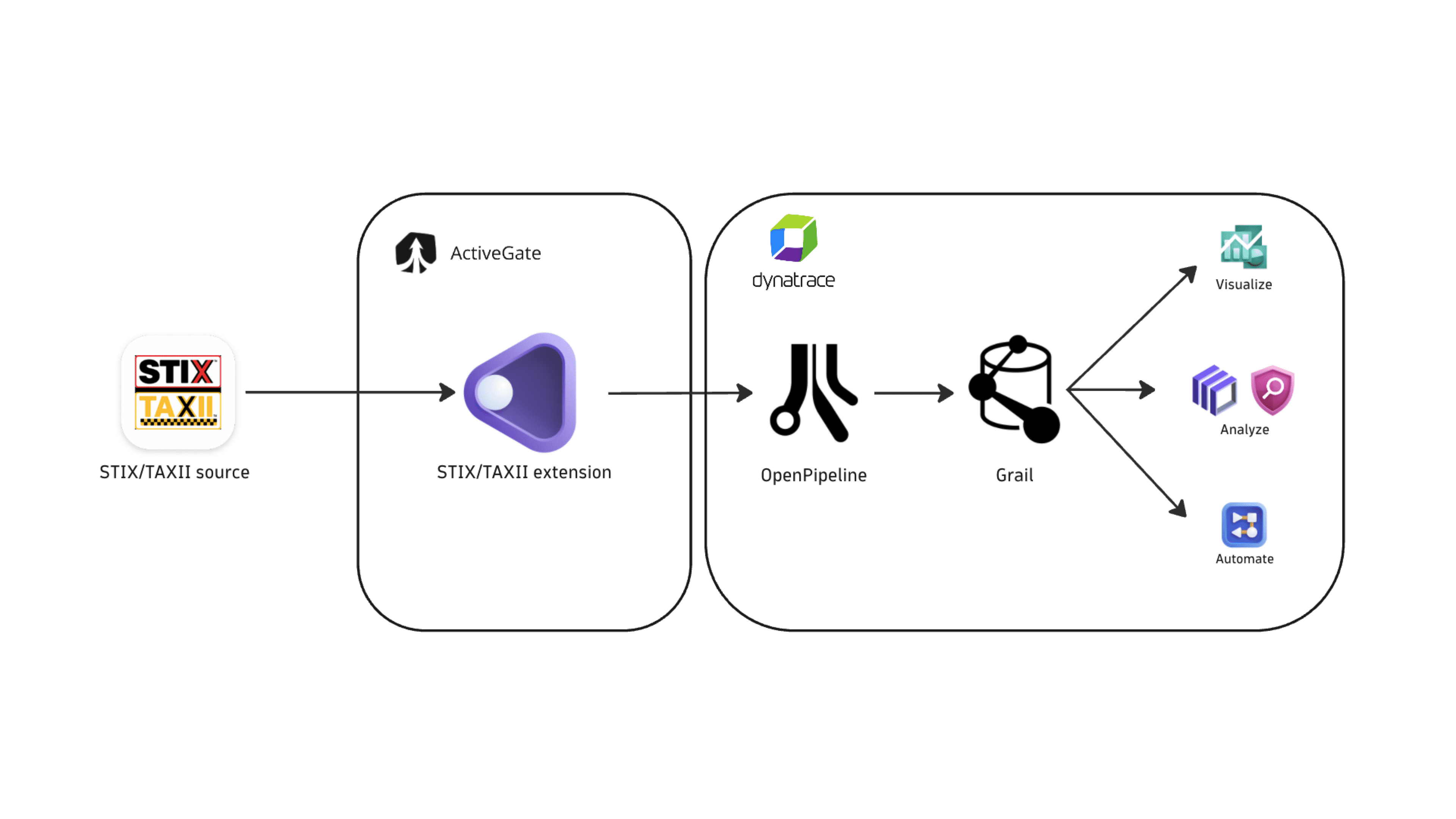
Dynatrace integration with STIX/TAXII is an extension running on Dynatrace ActiveGate. After you enable and configure the extension:
- It discovers TAXII API roots and readable collections (or only the collection IDs you configured).
- It periodically polls each collection for STIX report objects using
match[type]=reportand anadded_aftertime window. - Optional client-side filters (
namecontains,confidencegreater-than,labels) are applied when Collect all reports is turned off. - The fetched data is ingested into Dynatrace and mapped to the Dynatrace Semantic Dictionary.
- Data is stored in the
default_securityeventsbucket (for details, see Built-in Grail buckets).
Licensing and costs
For billing information, see Events powered by Grail.
FAQ
Which STIX/TAXII product does this integration support?
The integration ingests STIX threat intelligence reports from TAXII 2.x-compliant servers, including platforms such as OpenCTI that publish STIX content over the TAXII protocol.
Which data model is used for the security events coming from STIX/TAXII?
Threat report events store individual threat intelligence reports published in a STIX/TAXII tool, together with the related observables (indicators of compromise, CVEs, TTPs, and more). For a conceptual overview, see Threat report events.
How does Dynatrace import STIX/TAXII threat reports?
The integration ingests STIX report objects from configured TAXII collections based on the monitoring configuration.
- On the first ingest, Dynatrace fetches threat reports generated in the last
mdays, wheremis set by the Threat reports initial fetch time window option in the monitoring configuration. - On subsequent runs, the extension checks for new threat reports every
nminutes, wherenis set by the Threat reports ingest frequency option in the monitoring configuration. Only new and updated reports are ingested.
Which fields are added on top of the core Dynatrace security event fields?
The stix_taxii namespace is added for STIX/TAXII-specific attributes on top of the core security event schema. The full upstream payload is stored in event.original_content.
stix_taxii.title: Name of the TAXII server.stix_taxii.description: Description of the TAXII server and the data it exposes.stix_taxii.report.id: Identifier for the report (when present on the STIX object).stix_taxii.report.stix_ids: Additional STIX IDs associated with the report in the source platform.stix_taxii.report.confidence: Producer confidence score from the STIX report.
Which types of indicators of compromise (IOCs) are associated with STIX/TAXII threat reports?
The integration ingests and maps the IOC types that are supported as threat observables in Dynatrace. When these indicators are present on enriched STIX indicator or vulnerability objects, they are extracted and added as observables.
| IOC type | Mapped to |
|---|---|
Email addresses |
|
IP addresses |
|
Domain names |
|
URLs |
|
MD5 file hashes |
|
SHA-1 file hashes |
|
SHA-256 file hashes |
|
CVEs (Common Vulnerabilities and Exposures) |
|
Which STIX object types are enriched?
The extension resolves the following STIX SDO types when referenced by a report:
attack-pattern(MITRE ATT&CK techniques and sub-techniques)threat-actoridentity(industries, sectors, and report author)indicator(observable patterns)intrusion-setlocation(countries)malwarevulnerability(CVEs)