Ingest Recorded Future threat reports
- Latest Dynatrace
- Extension
- Published Jul 31, 2026
Bring threat intelligence from Recorded Future into Dynatrace to proactively assess emerging threat exposure and automate response workflows.
Get started
Overview
Dynatrace integration with Recorded Future operationalizes threat intelligence reports through real-time threat exposure analysis in Dynatrace.
Recorded Future provides threat intelligence about emerging threats in the form of Analyst Notes, which include related indicators of compromise (IOCs). This information helps security analysts and SREs proactively analyze their environment for exposures and potential exploitation attempts.
Dynatrace monitors your runtime environment with logs, events, and traces stored and available for continuous analysis to ensure the health of your applications and services. The Recorded Future integration helps security teams proactively assess emerging threat exposure and automate response workflows.
Requirements
See below for the Recorded Future and Dynatrace requirements.
Recorded Future requirements
To use this integration, ensure that you have:
- An active Recorded Future account with access to Analyst Notes.
- A Recorded Future API token (
X-RFToken) for authentication.
For more information, see Recorded Future API.
Dynatrace requirements
-
ActiveGate version 1.310+ that needs to be able to
- Run the Extensions 2.0 framework
- Reach the Recorded Future API endpoints
-
Permissions: For a list of required permissions, open Hub, select
 Extensions, and display Technical information.
 -
Generate an access token with the
openpipeline.events_securityscope and save it for later. For details, see Dynatrace API - Tokens and authentication.
Activation and setup
-
In Dynatrace, search for Recorded Future and select Install.
-
Follow the on-screen instructions to configure the extension.
-
Verify the configuration by running the following query in
 Notebooks:
-
For threat report events:
fetch security.events| filter event.provider == "Recorded Future"AND event.type == "THREAT_REPORT"
-
-
After the extension is installed and working, you can access and manage it in Dynatrace via
Extensions. For details, see About Extensions.
Details
How it works
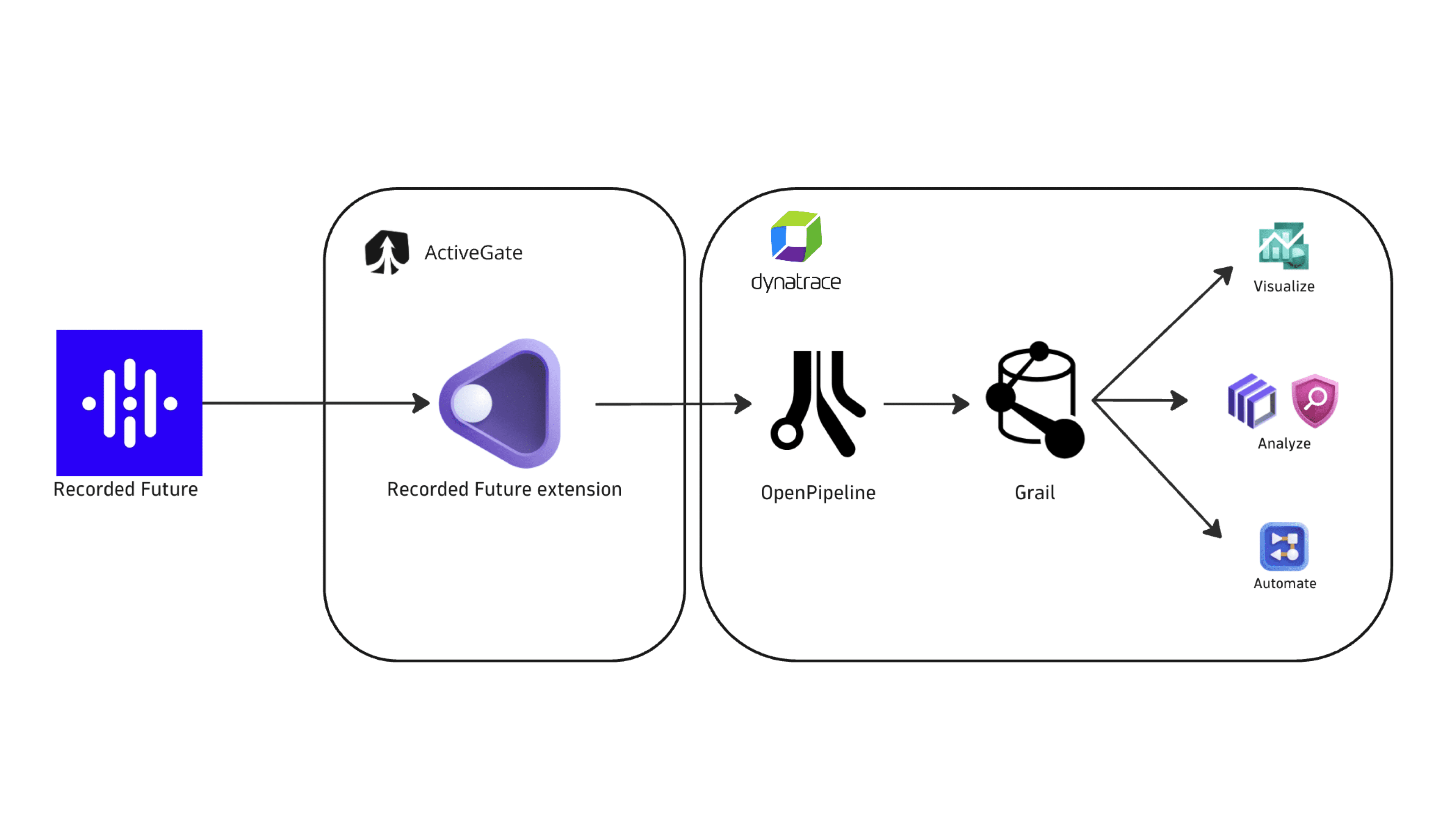
Dynatrace integration with Recorded Future is an extension running on Dynatrace ActiveGate. After you enable and configure the extension:
- It periodically collects threat intelligence from Recorded Future using the Recorded Future Analyst Note Search APIs.
- The fetched data is ingested into Dynatrace and mapped to the Dynatrace Semantic Dictionary.
- Data is stored in the
default_securityeventsbucket (for details, see Built-in Grail buckets).
Licensing and costs
For billing information, see Events powered by Grail.
FAQ
Which Recorded Future product does this integration support?
The integration supports Recorded Future Analyst Notes from the News and Research experience.
Which data model is used for the security events coming from Recorded Future?
Threat report events store the ingested Analyst Notes and their related indicators of compromise, such as IP addresses, domains, URLs, email addresses, file hashes, and CVEs. For a conceptual overview, see Threat report events.
Which Recorded Future threat intelligence events does Dynatrace import?
The integration ingests Analyst Notes from Recorded Future based on the configured ingestion options.
- On the first ingest, Dynatrace fetches notes published in the last
mdays, wheremis set by the Initial Analyst Note fetch time window option in the monitoring configuration. - On subsequent runs, the extension checks for notes published in the last
nhours, wherenis set by the Analyst Note ingest frequency option in the monitoring configuration. - Only newly published notes are ingested.
Which fields are added on top of the core Dynatrace security event fields?
The recordedfuture namespace is added for Recorded Future-specific attributes on top of the core security event schema. The full upstream payload is stored in event.original_content.
recordedfuture.note.source.id: Recorded Future source entity ID.recordedfuture.note.source.name: Source display name.recordedfuture.note.validated_on: Note validation timestamp.recordedfuture.note.portal_url: Deep link to the note in the Recorded Future portal.recordedfuture.note.event.types: Event types attached to the note (for example,CyberAttack,MalwareAnalysis).
Which types of indicators of compromise (IOCs) are associated with Recorded Future threat reports?
The integration ingests and maps the IOC types that are supported as threat observables in Dynatrace. When these indicators are present in a Recorded Future Analyst Note, they are extracted and added as observables to enrich the threat context.
| IOC type | Mapped to |
|---|---|
Email addresses |
|
IP addresses |
|
Domain names |
|
URLs |
|
MD5 file hashes |
|
SHA-1 file hashes |
|
SHA-256 file hashes |
|
CVEs (Common Vulnerabilities and Exposures) |
|