Configure service detection for OneAgent in Service Detection v2
- Latest Dynatrace
- How-to guide
- 4-min read
- Early Access
Service Detection v2 (SDv2) for OneAgent is the standard for OpenTelemetry services, generally available and the recommended default for Kubernetes and AWS Lambda services, and available as an Early Access release for all other OneAgent-monitored workloads. You need to activate it manually in the Dynatrace web UI or via the Settings API.
SDv2 for OneAgent covers three deployment scenarios, each activated separately:
- Kubernetes: Services running in Kubernetes clusters.
- FaaS: Serverless functions on AWS Lambda.
- Generic workloads: Web servers and cloud-native services that run outside Kubernetes and AWS Lambda, such as Nginx, Apache, or IIS on virtual machines or bare metal.
Configuration scopes
You can activate SDv2 for Kubernetes and AWS Lambda services for the following configuration scopes:
- Environment
- Host group
- Cluster
- Namespace
You can activate SDv2 for other workloads that run outside Kubernetes for the following configuration scopes:
- Environment
- Host group
Things to consider
If you're moving from Service Detection v1 (SDv1) to SDv2, note that SDv2 assigns new service IDs, so update any alerts and dashboards that reference your existing SDv1 services.
Activate SDv2 for Kubernetes services
Dynatrace SaaS version 1.323+
SDv2 is available for services running in Kubernetes and monitored by OneAgent. This feature is deactivated by default, but you can activate SDv2 for your Kubernetes services in the Dynatrace web UI or via the Settings API (builtin:service-detection-v2-for-oneagent schema ID).
To activate SDv2 for Kubernetes workloads
-
Navigate to the Service Detection v2 for OneAgent page for the required configuration scope.
Environment
Go to
 Settings > Process and contextualize > Services > Service Detection v2 for OneAgent.
Host group
- Go to Settings.
- In the upper-left corner of the page, select Go to entity >, filter by Host group, and select the required host group.
- Go to Process and contextualize > Services > Service Detection v2 for OneAgent.
Cluster and namespace
- Go to
 Kubernetes.
 - Find and select the required namespace or cluster.
- In the upper-right corner of the cluster or namespace pane, select (Actions menu) > Service detection settings. The Service detection page opens.
- Go to Process and contextualize > Services > Service Detection v2 for OneAgent.
- Go to
-
Turn on Enable Service detection v2 for Kubernetes workloads.
-
Specify the required DQL matcher in Matching condition for Kubernetes workloads. This matching condition limits the scope of service detection by filtering Kubernetes workloads with the provided DQL matcher.
Allowed attributes and examples
Allowed attributes
-
Recommended Primary Grail fields. Use to scope workloads by deployment context.
-
Primary Grail tags. Use for more fine-grained or cross-cutting scoping.
Only tags set by OneAgent are supported; tags set via OpenPipeline aren't available during service detection.
Example: Target specific language and namespace
Activate SDv2 only for the
javalanguage and theunguardnamespace:dt.agent.module.type == "java" ANDk8s.namespace.name == "unguard"If you're moving from SDv1 to SDv2, use the matching condition to start in lower environments first. Because SDv2 assigns new service IDs, update any alerts and dashboards that reference your existing SDv1 services.
-
-
Select Save changes.
You've activated SDv2 for the services that are running in Kubernetes and monitored by OneAgent.
Activate SDv2 for AWS Lambda services
Dynatrace SaaS version 1.337+
SDv2 is generally available for AWS Lambda services monitored by OneAgent. This feature is deactivated by default, but you can activate SDv2 for your AWS Lambda services in the Dynatrace web UI or via the Settings API (builtin:service-detection-v2-for-oneagent schema ID).
To activate SDv2 for AWS Lambda services
-
Navigate to the Service Detection v2 for OneAgent page for the required configuration scope.
Environment
Go to
Settings > Process and contextualize > Services > Service Detection v2 for OneAgent.Host group
- Go to Settings.
- In the upper-left corner of the page, select Go to entity >, filter by Host group, and select the required host group.
- Go to Process and contextualize > Services > Service Detection v2 for OneAgent.
Cluster and namespace
- Go to Kubernetes.
- Find and select the required namespace or cluster.
- In the upper-right corner of the cluster or namespace pane, select (Actions menu) > Service detection settings. The Service detection page opens.
- Go to Process and contextualize > Services > Service Detection v2 for OneAgent.
- Go to
-
Turn on Enable Service detection v2 for FaaS.
-
Specify the required DQL matcher in Matching condition for FaaS. This matching condition limits the scope of service detection by filtering services with the provided DQL matcher.
The default matching condition is
isNotNull(aws.region) AND isNotNull(aws.account.id).Allowed attributes
-
Recommended Primary Grail fields. Use to scope workloads by deployment context.
-
Primary Grail tags. Use for more fine-grained or cross-cutting scoping.
Only tags set by OneAgent are supported; tags set via OpenPipeline aren't available during service detection.
If you're moving from SDv1 to SDv2, use the matching condition to start in lower environments first. Because SDv2 assigns new service IDs, update any alerts and dashboards that reference your existing SDv1 services.
-
-
Select Save changes.
You've activated SDv2 for AWS Lambda services that are monitored by OneAgent.
SDv2 for AWS Lambda services only works when the [Built-in] FaaS name service detection rule is enabled, so check whether this rule is activated for your environment. For details, see Default service detection rules.
Activate SDv2 for generic workloads
Early Access Dynatrace SaaS version 1.343+
SDv2 brings generic workloads into the same one-service-per-process model as the rest of SDv2. It's available as an Early Access release for web servers and cloud-native services running outside Kubernetes and AWS Lambda. This includes web servers such as Nginx, Apache, and IIS on virtual machines or bare metal, and single-process cloud-native services on ECS, Cloud Run, and Azure Container Apps.
SDv2 for generic workloads works best for services that map to one service per process. For application servers that host multiple applications in one process, such as WebSphere or WebLogic, keep SDv1 for now while Dynatrace continues to test these setups. For details, see Which workloads to activate.
Dynatrace continues to expand its out-of-the-box rules to cover more setups, and you can always refine detection with your own configuration to fine-tune the results. As an Early Access release, testing on cloud and container services is ongoing. For best results, add your cloud connection first so that SDv2 can use cloud-related attributes.
You can activate SDv2 for generic workloads in the Dynatrace web UI or via the Settings API (builtin:service-detection-v2-for-oneagent schema ID). It's deactivated by default, and its matching condition is set to false, so it has no effect until you scope it to the workloads you choose.
This setting applies only to OneAgent-monitored workloads. OpenTelemetry services use SDv2 by default and are unaffected by this setting. For details, see Generic workload detection.
To activate SDv2 for generic workloads
-
Navigate to the Service Detection v2 for OneAgent page for the required configuration scope.
Environment
Go to
Settings > Process and contextualize > Services > Service Detection v2 for OneAgent.Host group
- Go to Settings.
- In the upper-left corner of the page, select Go to entity >, filter by Host group, and select the required host group.
- Go to Process and contextualize > Services > Service Detection v2 for OneAgent.
- Go to
-
Turn on Enable Service detection v2 for generic workloads.
-
In Matching condition for generic workloads, replace the default
falsewith a DQL condition that selects which workloads within the current configuration scope (environment or host group) activate SDv2.The default
falsematches no workloads or host groups, so activating SDv2 for generic workloads takes effect only once you provide a matching condition, which lets you opt in gradually.Allowed attributes and examples
Allowed attributes
-
Recommended Primary Grail fields. Use to scope workloads by deployment context.
-
Primary Grail tags. Use for more fine-grained or cross-cutting scoping.
Only tags set by OneAgent are supported; tags set via OpenPipeline aren't available during service detection.
Example 1: Target a host group
Opt in every supported workload running in one host group:
dt.host_group.id == "orders-demo-vm"Example 2: Target a single workload
Bring SDv2 to one process group and leave the rest on SDv1:
dt.process_group.detected_name == "SpringBoot orders-demo com.dynatrace.ordersdemo.OrdersDemoApplication"If you're moving from SDv1 to SDv2, use the matching condition to start in lower environments first. Because SDv2 assigns new service IDs, update any alerts and dashboards that reference your existing SDv1 services.
-
-
Select Save changes.
You've activated SDv2 for generic workloads.
Generic workload detection
SDv2 for generic workloads does not provide a built-in matching condition. As there's no namespace or cloud account to scope this feature automatically, you should define a DQL matcher using the attributes that are present on the workload's data, and then scope the setting to a host group or the whole environment.
When the condition matches, OneAgent processes that workload's trace data with the SDv2 service and endpoint detection. Existing request attributes continue to work, and SDv1 custom services are ignored, so their spans are grouped into the SDv2 service instead. For details, see Things to consider.
Which workloads to activate
SDv2 works best for workloads that map cleanly to one service per process:
-
Web servers and reverse proxies running outside containers, such as Nginx, Apache, and IIS.
For services that don't set
http.route, Dynatrace derives a fallback route based on the URL path, so your services get descriptive names. For details, see Automatic naming for services withouthttp.routeand Endpoint naming. -
Single-service application processes with one application service per process.
Keep the following workloads on SDv1 for now:
-
Application servers and multi-service processes where a single process hosts more than one logical service, such as WebSphere, WebLogic, J2EE multi-context JVMs, or multi-context ColdFusion.
SDv2 groups these into one service per process, so SDv1 keeps the per-application separation they need.
-
Background or scheduled workloads with no inbound request (timer-, cron-, or thread-triggered).
SDv2 detection is built around inbound request spans.
Example: Services in SDv1 vs SDv2
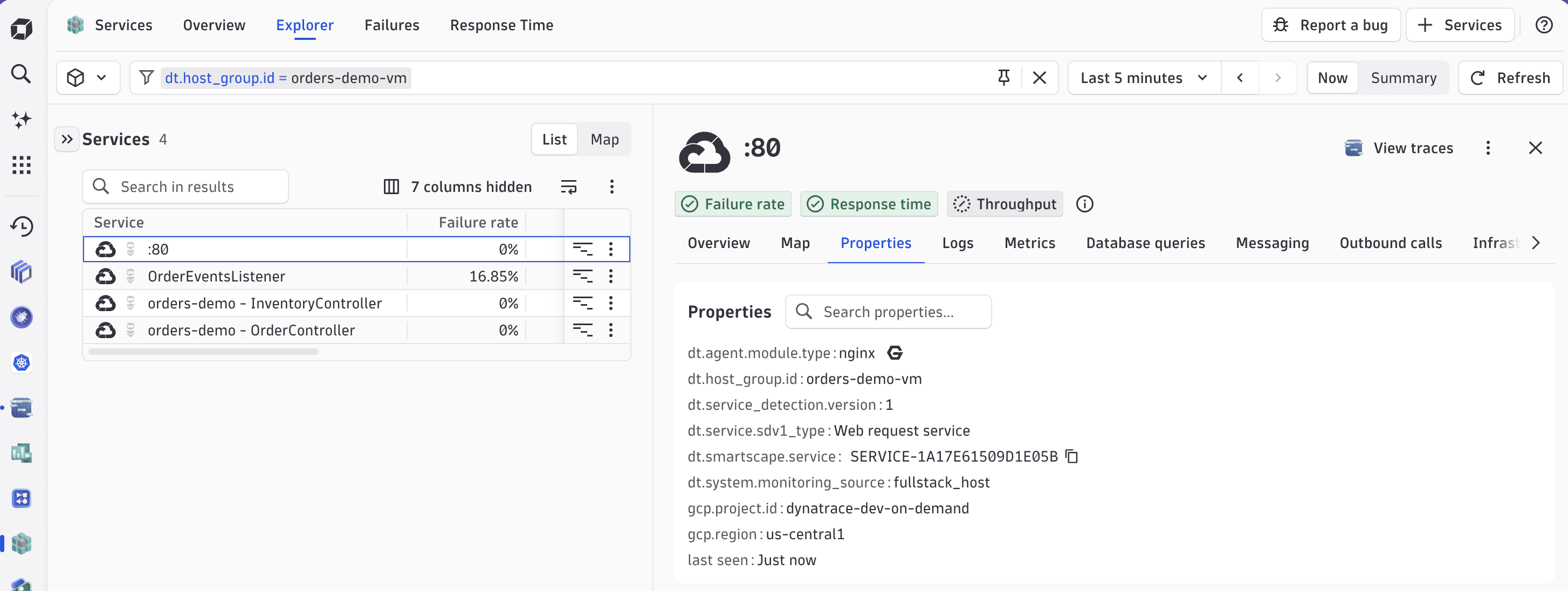
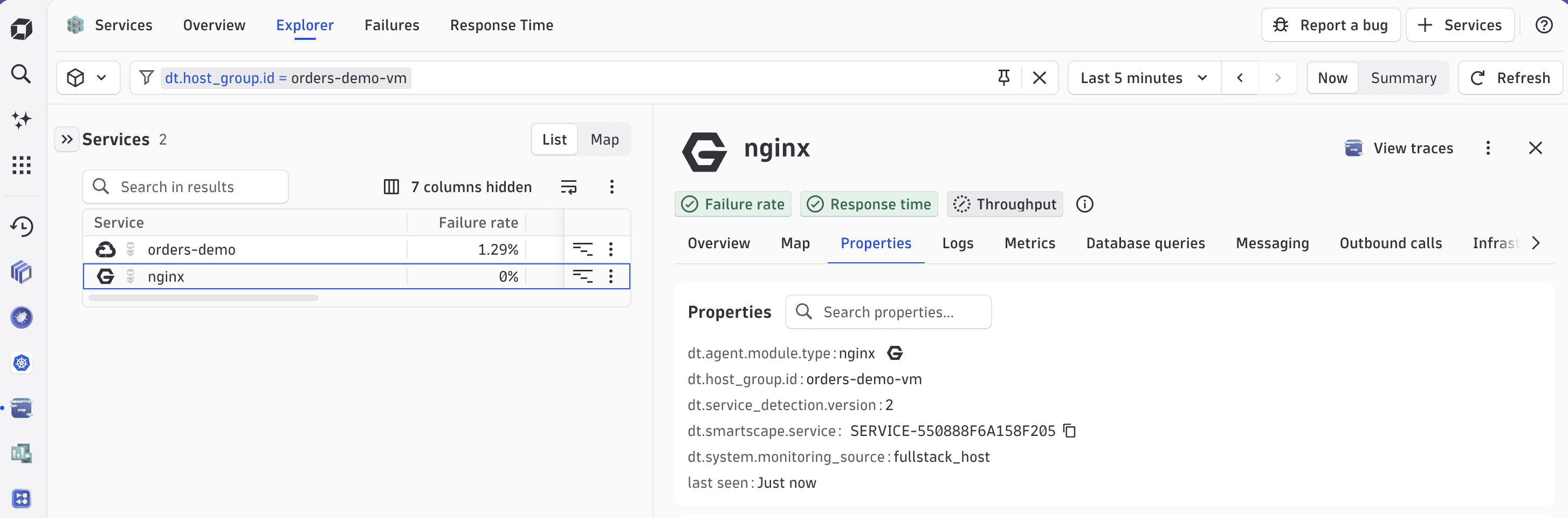
The following example shows how the orders-demo-vm host group appears in  Services before and after you activate SDv2 for generic workloads. The example uses one VM running a single Spring Boot application behind an Nginx reverse proxy.
SDv1
Under SDv1, the host group shows four fragments for this single VM:
orders-demo - InventoryControllerservice.orders-demo - OrderControllerservice.:80web server.OrderEventsListenerKafka consumer.
SDv2
After activating SDv2 for generic workloads, the same host group shows two clean SDv2 services, one per process:
orders-demoservice (Spring Boot application).nginxservice (web server).
Database and messaging activity has moved onto the calling service instead of separate entities; the information is available on the dedicated tabs within the service details pane.
Next steps
After activation, your services appear in Services. To fine-tune results, leverage service detection rules, endpoint detection rules, and URL pattern matching.