Configure URL path pattern matching in Service Detection v2
- Latest Dynatrace
- How-to guide
- 7-min read
Service Detection v2 (SDv2) uses the http.route span attribute to create names for HTTP-related endpoints. Web frameworks like Spring, Express, and .NET Core set http.route automatically, so most services get descriptive endpoint names—like GET /api/orders/{id}—with no configuration.
Web servers and reverse proxies that don't emit http.route get stable endpoint names from a derived http.route based on the URL path, where available, and fall back to generic names like GET /* otherwise. URL pattern matching fixes such generic endpoint names: you define URL path patterns that SDv2 uses to derive stable, low-cardinality endpoint names from raw URL paths.
You don't need to configure URL pattern matching for every service; you should do that only for the services that lack http.route. Each rule has a matching condition that scopes it to specific services, workloads, or namespaces so that teams can create and manage rules for their own services independently.
URL pattern matching doesn't discard the original URL path. The raw URL is always available. To view individual URLs, select View URLs next to an endpoint, or query them directly in  Notebooks and
  Dashboards.
URL pattern matching uses the url.path.pattern span attribute. The HTTP request method and URL path pattern built-in endpoint rule uses this attribute and takes precedence over the HTTP request method and route rule, so your URL patterns take priority when both url.path.pattern and http.route are available.
Set up endpoint names for generic workloads
Generic workload detection extends SDv2 to services that run outside Kubernetes and AWS Lambda. With URL path pattern matching, you can replace generic endpoint names like GET /* with stable, low-cardinality ones.
To set up endpoint names for a generic workload
- Activate SDv2 for generic workloads for the host group where the service runs.
- Create a URL pattern matching rule and scope it to the required workload. For non-Kubernetes services, scope the URL pattern matching rule using an attribute such as
dt.host_group.idrather thank8s.workload.name.
As a result, SDv2 derives url.path.pattern from matching spans, and the service's endpoints show your pattern instead of the generic GET /*.
Use cases and examples
The URL pattern matching feature is particularly useful for the following use cases:
| Use case | URL pattern | URL path | Resulting endpoint |
|---|---|---|---|
Nginx reverse proxy routing |
|
|
|
API versioning patterns |
|
|
|
Mixed depth paths |
|
|
|
URL pattern syntax reference
URL patterns are built from four token types. Use them to replace high-cardinality parts of your URLs (IDs, version numbers, deep paths) with stable placeholders.
| Token | Syntax | Matches | Output | When to use |
|---|---|---|---|---|
Literal |
| Exact path segment | Copied as-is | Fixed path parts that never change |
Placeholder |
| Exactly one segment |
| Hide dynamic values (IDs, UUIDs, timestamps) |
Variable |
| Exactly one segment | Original value kept | Segment should remain visible (for example, API version) |
Catch-all |
| Zero or more trailing segments (must be last) |
| Match any remaining path depth |
Examples:
| Pattern | URL path | Resulting endpoint |
|---|---|---|
|
|
|
|
|
|
|
|
|
|
|
|
Configure URL pattern matching
The sections below describe how to create and manage URL pattern matching rules.
Create a URL pattern matching rule
To create a URL path pattern matching rule
-
Go to
 Settings > Process and contextualize > Services > URL path pattern matching.
 -
Select New rule.
-
Fill in the following optional and required fields.
-
Rule name: User-defined name for the rule.
-
Description: Human-readable descriptor of the rule.
-
Matching condition: DQL matcher. If the matching condition applies, the rule is evaluated.
-
URL path patterns: URL path pattern according to the pattern syntax reference.
Select Add URL path pattern when more path patterns should be added.
If required, use (Drag to order row) to re-order the added URL path patterns, considering that the first matching pattern is used to determine the
url.path.patternattribute value.
-
-
Select Create.
-
When required, use (Drag to order row) to re-order your URL path pattern matching rule, and then select Save.
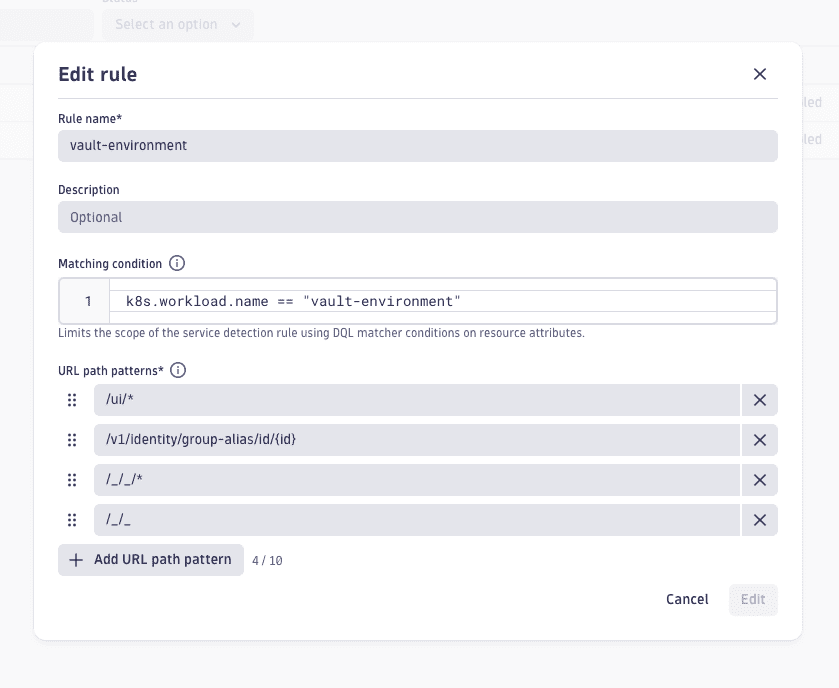
The example rule below demonstrates common URL path pattern techniques: a matching condition scopes the rule to a single Kubernetes workload, {id} placeholders normalize dynamic path segments to prevent high-cardinality endpoints, and wildcards (*) group related sub-paths together.
Scope rules to teams
The matching condition in each rule determines which spans the rule evaluates. Use matching conditions to scope rules to specific services, workloads, or namespaces so that different teams can create and manage their own URL pattern matching rules independently.
Below are the most common scoping patterns:
- Single workload:
matchesValue(k8s.workload.name, "nginx-proxy") - All services in a namespace:
matchesValue(k8s.namespace.name, "payments") - Workloads by prefix:
matchesValue(k8s.workload.name, "nginx*") - Cluster and namespace:
matchesValue(k8s.cluster.name, "prod") and matchesValue(k8s.namespace.name, "checkout")
Because each rule is scoped to specific spans, teams can work independently:
- Rules from different teams don't conflict, as each rule only evaluates spans that match its condition.
- Teams can add, update, or reorder their own patterns without affecting other teams.
- Place more specific rules higher in the list. Rules are evaluated from top to bottom, and only the first matching rule applies.
For matching condition syntax, see DQL matcher in OpenPipeline.
For OpenTelemetry-instrumented services that don't natively set http.route, you can derive it centrally using the OpenTelemetry Collector's transform processor. This can reduce the number of services that need URL pattern matching rules.
Manage URL pattern matching rules
You can edit, disable, or delete your URL pattern matching rules.
- Go to Settings > Process and contextualize > Services > URL path pattern matching.
- Perform the required changes to your URL path pattern matching rules:
- Edit a rule: Select (Actions menu) > .
- Make a copy of a rule: Select (Actions menu) > Duplicate.
- Permanently delete a rule: Select (Actions menu) > Delete.
- Re-order the rules: Use (Drag to order row).
- Disable or enable a rule: Use in the Status column.
- Select Save to apply the changes you've made.
Pattern matching logic and precedence
-
Only spans with
span.kind == serverandspan.kind == consumerare processed. -
For each rule, the matching condition is evaluated first. If the span doesn't match the condition, the rule is skipped and evaluation moves to the next rule.
-
One URL path pattern matching rule may contain one or more URL path patterns.
-
URL path pattern matching rules are evaluated in order from top to bottom. Only the first matching rule is applied. The first rule with a URL pattern that matches is applied to a span.
-
URL path patterns within a matching rule are also evaluated in order from top to bottom. Only the first matching URL pattern is applied.
The first matching URL path pattern defines the resulting value for the
url.path.patternattribute of a span. When the URL pattern matches, theurl.path.patternspan attribute is based on this matching URL pattern. -
URL patterns operate on path segments; path segments are URL parts between a slash
/. -
Leading slashes in URL paths are normalized before matching.
Before URL patterns are evaluated, any number of leading slashes in the path is reduced to a single
/to ensure consistent and reliable matching. -
Matching is case sensitive.