Upgrade to Latest Dynatrace with AI
- Latest Dynatrace
- Explanation
- 7-min read
- Published Oct 15, 2026
Dynatrace provides an upgrade skill that helps a coding agent guide you through parts of the upgrade to Latest Dynatrace. The skill isn't a wizard: it doesn't do all the upgrade work for you. You still need to understand the new concepts, decide what the upgrade means for your environment, and complete steps that the skill doesn't cover. For the decisions to make before you start, see Plan your upgrade to Latest Dynatrace.
Overview
The upgrade skill provides a coding agent the mapping knowledge it needs to migrate a Dynatrace Classic configuration to Latest Dynatrace. With that knowledge, the agent determines what each Dynatrace Classic object is intended to achieve and proposes a replacement for your review. The following sections explain why this approach suits the upgrade and where you can use the skill.
Why use AI for the upgrade?
There's rarely one mechanical mapping from a Dynatrace Classic object to its replacement. Understanding what each configuration was meant to achieve is key to rebuilding it correctly in Latest Dynatrace. A coding agent is good at this kind of work.
- Each area carries expert mapping knowledge, including the exceptions. The agent reads the documented mapping for an area instead of improvising one.
- The work proceeds in dependency order, not area-by-area.
Use cases
Use the upgrade skill to:
- Assess which Dynatrace Classic objects exist in your environment, how much they're used, and what blocks the upgrade.
- Use Upgrade Assistant to see which Dynatrace Classic features you still use, and delete the configurations that you no longer need instead of migrating them.
- Generate a replacement configuration for review and deploy it with your existing Configuration as Code tools. For more information, see What the upgrade skill produces.
- Plan a larger upgrade as a written specification and a task-by-task plan, and track the status of each object.
- Get advice and step-by-step instructions or apply approved changes from your own development environment.
What the upgrade skill produces
The upgrade skill produces a replacement configuration for review and analysis, not changes that have already been applied to your environment. It saves the configuration to files, so you can review it before you deploy anything. The following sections explain how to deploy the configuration and what additional output the skill produces.
Deploy with the tool you already use
The generated configuration uses the raw Settings format, which your existing Configuration as Code tools already accept. You choose how to deploy it:
- dtctl
- Monaco (version 2.22+ for SLOs)
- Terraform provider (version 1.78.0+ for SLOs)
- A direct
POSTrequest to the relevant Settings endpoint.
Output types
In addition to the replacement configuration, the upgrade skill produces assessments, plans, and status tables that document what it found and what it did. Depending on the size of the upgrade, you get the following types of output:
- Replacement configuration: Raw Settings payloads (JSON or YAML) for each migrated object. This is the main deliverable.
- Assessment reports: Which Dynatrace Classic objects exist, how much they're used, and what blocks the upgrade. Some tools produce the report as HTML.
- Scan inventories: Machine-readable JSON summaries of the classic configuration found in your environment.
- Specification and plan documents: For larger upgrades, a written specification, followed by a task-by-task plan.
- Migration status tables: For each object, whether it's migrated, remaining, or blocked, with evidence.
- Deletion candidates: Dynatrace Classic objects that appear unused and should be deleted rather than migrated. They're flagged, never deleted automatically.
What the coding agent never does without your approval
In your environment, where the agent can write to your environment:
- No configuration is written, no object is created, and nothing is deleted until you've seen what's intended and agreed to it.
- A Dynatrace Classic object is never deleted before its replacement is verified as working.
- Each area is approved separately. Approval for one area doesn't carry over to the next.
Approval prevents the agent from making unwanted changes to your environment. This is especially important because deleted Dynatrace Classic objects can’t be restored through rollback. You can revert an environment's upgrade group during the grace period, but Dynatrace Classic objects that were deleted stay deleted. For details, see Rollback and the grace period.
Before you begin
The upgrade skill runs in your own development environment, not in Dynatrace. Set up the tools it runs in and the access it needs before your first upgrade session.
Prerequisites
Meet the following prerequisites:
- A coding agent, for example, Claude Code.
- The upgrade skill made available to your coding agent.
Install this skill alongside other skills using
npx skills add dynatrace/dynatrace-for-aicommand. - dtctl, installed and configured for your environment.
- Other dependencies:
- Python 3.12 or later
- Node.js
- Python SDK 2.0.0a1 or later for the Dynatrace API
- Read and query permissions for your assessment. The specific permissions required depend on which areas you're upgrading.
For the complete list of upgrade areas and their permission requirements, see Upgrade to Latest Dynatrace.
You need
writescopes only when you apply changes.
Work in a folder under version control. The skill creates a working branch and commits your changes after each verified task, so that you can undo one task without losing the others. It never pushes changes and never opens a pull request.
How to start
You can start an upgrade session in two ways: copy a prompt from the Upgrade Assistant or write your own prompt.
Copy a prompt from the Upgrade Assistant
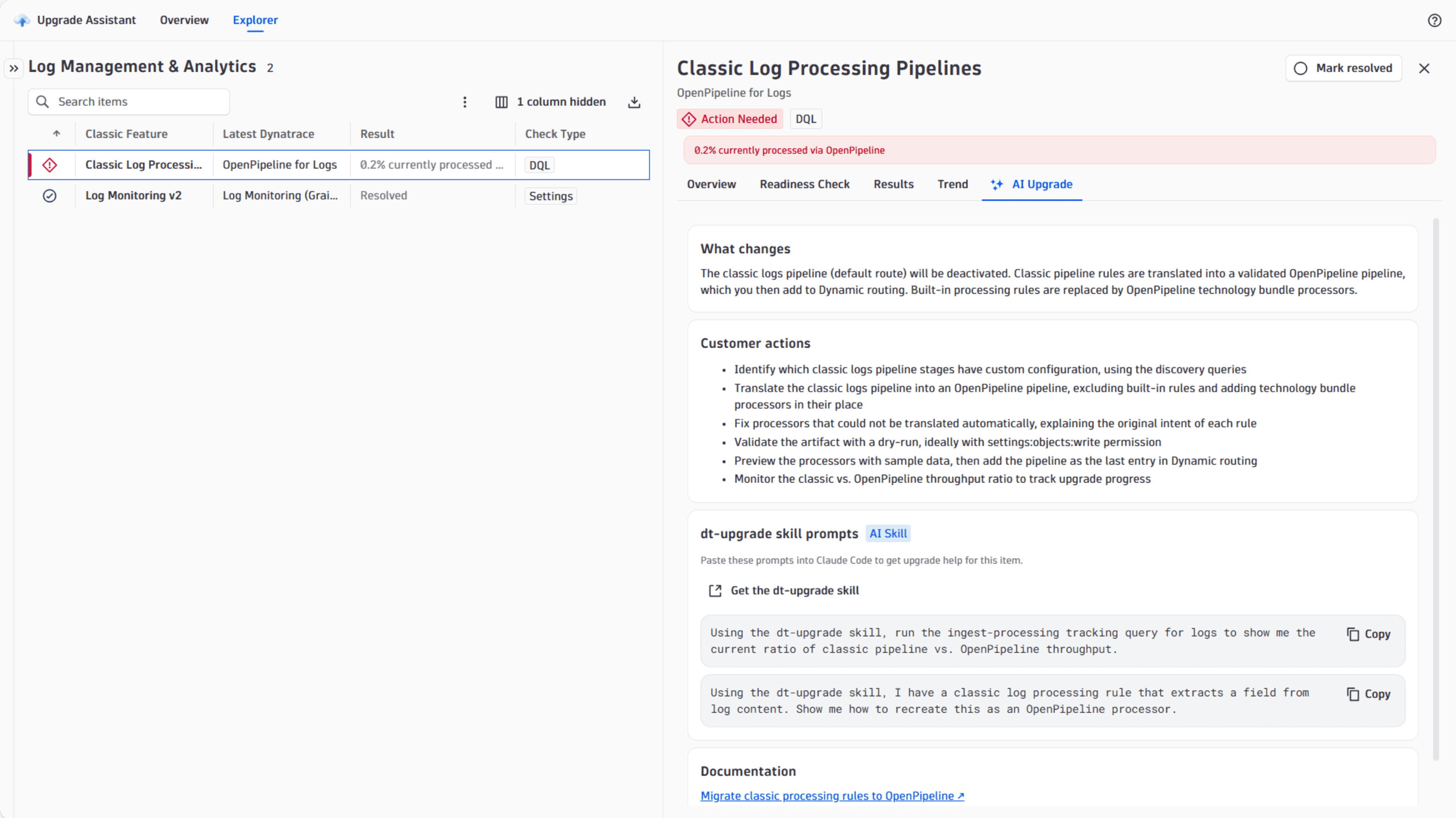
Open the Upgrade Assistant, select the task that you want to perform, copy the prompt from the task, and paste it into your coding agent. For more information, see Get started with the Upgrade Assistant.
Write your own prompt
Start with one of these types of prompts:
-
Questions: It is for targeted questions about the upgrade.
Prompt examples:
- What's different about SLOs in Latest Dynatrace?
- What are the prerequisites before upgrading to RUM on Latest Dynatrace?
-
Single tasks: These are for a scoped task, setup, or an edit.
Prompt examples:
- Show me all configs and dashboards that still reference Dynatrace Classic external entities.
- Check whether all Dynatrace Kubernetes operator deployments are ready for upgrade.
-
Large upgrade: These are for multiple areas.
Examples:
- Migrate all suitable management zones to Latest Dynatrace.
- Replace all uses of Dynatrace Classic credential vault with platform credential vault in workflows I own.
For details on how upgrade sessions work and when they stop, see Run an upgrade skill session.
Limitations and what to check
The upgrade skill speeds up the upgrade process, but it can't guarantee that a migrated configuration behaves like the Dynatrace Classic one. Review the following limitations, and check the result against your own environment before you rely on it.
Output is AI-generated and needs review
The configuration produced by the upgrade skill is generated by an AI coding agent that reasons about your Dynatrace Classic configuration. Review every generated object against your intent before deploying it, and keep the Dynatrace Classic object until you've confirmed that the replacement behaves as expected.
A successful apply isn't a verified upgrade
A successful write proves that the payload was well-formed, not that it replicates the Dynatrace Classic behavior.
dtctl apply --dry-run is a client-side preview only.
It reports success without contacting the API, even for a schema that doesn't exist.
It confirms only that the YAML or JSON can be parsed.
Suggested equivalents might not be feature-verified
When the agent suggests an equivalent based on name matching rather than a documented mapping, it says so. Such a suggestion is based on matching names and keywords, not on verified feature parity, so confirm that it covers what you need.
Migrated configuration isn't a one-to-one equivalent
Detection options, thresholds, and behavior differ between Dynatrace Classic and Latest Dynatrace, so an upgraded object can be correct and still behave differently. For details, see Classic capabilities and where to find them in Latest Dynatrace.
An upgrade can affect your billing costs by changing your consumption.
For example, when you upgrade RUM anomaly detection, custom metric alerts move from non-billable to billable consumption, and baseline changes from percentile(90) to percentile(75) increase your overall platform consumption.
Best practices
To get reliable results from an AI-assisted upgrade and keep your environment safe, follow these practices:
- Check readiness first using the Upgrade Assistant. Plan upgrades only for areas that have Dynatrace Classic usage.
- Delete what you no longer use before you migrate anything.
- Migrate in dependency order, not area by area.
- Keep the Dynatrace Classic object until its replacement is verified as working.
- Work on one area at a time, and review before you apply.
- Always work with read-only permissions. Apply produced and reviewed configurations in a separate action with write permissions.
- Use version control for the working folder.
- Rerun the upgrade readiness check as evidence of progress.
FAQ
Do I have to use AI to upgrade?
No. The upgrade guides are standalone.
Do I need to upgrade all of my Dynatrace Classic configuration?
Almost certainly not. A large share of Dynatrace Classic configuration is no longer used and should be deleted instead.
Can I use my existing Configuration as Code tools?
Yes.
The output uses the Settings format, so that you can deploy it with Monaco, Terraform, dtctl, or a direct POST request.
For details, see Configuration as Code overview.
What happens if the agent gets it wrong?
You review every generated object before it's applied. Nothing is written without your approval, and classic objects aren't deleted before their replacements are verified.
What if the agent gets stuck?
It stops after three failed attempts and escalates. A missing permission is reported as a blocker, with the specific scope named.