AI data governance with Amazon Bedrock
- Latest Dynatrace
- Tutorial
- 5-min read
Emerging AI regulations such as the European Union Artificial Intelligence Act provide the means to deploy a comprehensive strategy combining organizational and AI model oversight, covering everything from model training to AI/user interactions.
When running your AI models through Amazon Bedrock, Dynatrace helps you to comply with regulatory record-keeping requirements.
What you will learn
In this tutorial, we first configure your model training and deployment observability. Afterward, we configure your application to observe user inference requests.
Steps
The general steps are as follows:
- Configure Dynatrace
- Configure your AWS account to send data to your Dynatrace tenant
- Configure your application
 Configure Dynatrace
In this step, we create a Dynatrace token and we configure OpenPipeline to retain the data for 5+ years.
Create Dynatrace token
To authenticate, create one of the following:
- Platform token:
- Go to My platform tokens.
- Create a platform token with the required scope (listed below). See Platform tokens for details.
- Classic access token:
- Go to
 Access Tokens.
- Select Generate new token.
- Enter a name for your token.
- Select the required scopes listed below.
- Select Generate token.
- Copy the generated token. Store it securely — you can only access it once.
- Go to
Required scopes:
- Platform token:
openpipeline:bizevents:ingest,openpipeline:traces:ingest - Classic access token:
bizevents.ingest,openTelemetryTrace.ingest
Configure OpenPipeline
The default retention period for BizEvents is 35 days. Depending on the regulations, this might not be enough.
To change the retention period, you can create a custom Grail bucket.
- Go to Settings > Storage management > Bucket storage management.
- In Bucket Storage Management, select Bucket.
- On New bucket:
- Set Bucket name (for example,
gen_ai_events) - Set Retention period (in days) (for example,
1,825, which is about 5 years) - Set Bucket table type to
bizevents
- Set Bucket name (for example,
- Select Save.
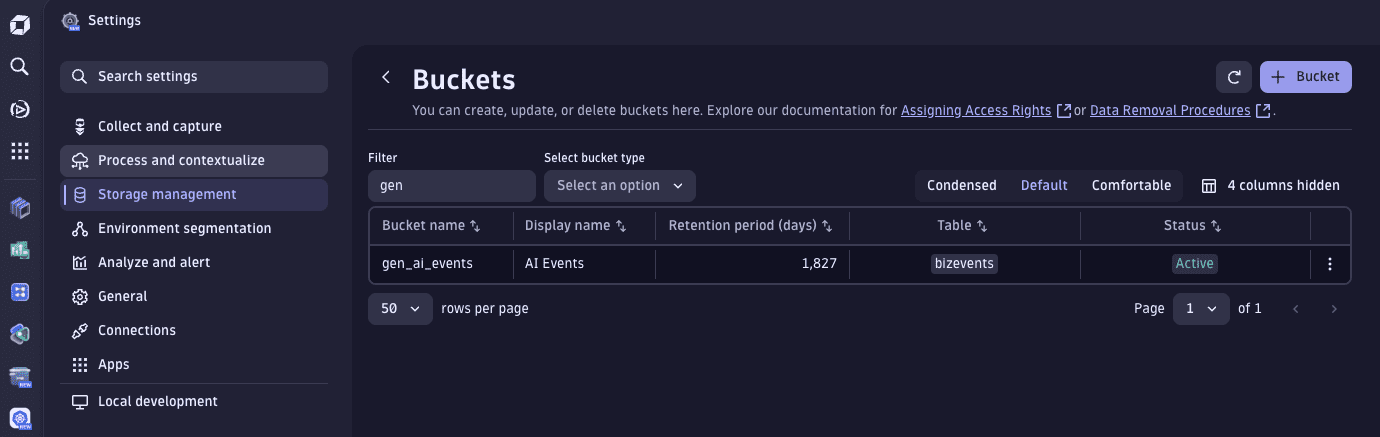
When the bucket is available, we can configure OpenPipeline to redirect AI-relevant events to storage there.
- Go to
 Settings > Process and contextualize > OpenPipeline > Business events > Pipelines.
- On the Pipelines tab, select Pipeline and name your pipeline (for example,
AI Data Governance). - Go to Bucket assignment > > Bucket assignment.
- Configure the processor:
- Enter a Name for the processor
- Set Matching condition to
matchesValue(event.type, "gen_ai.auditing") - Set Storage to the bucket you created in the previous procedure
- Select Save.
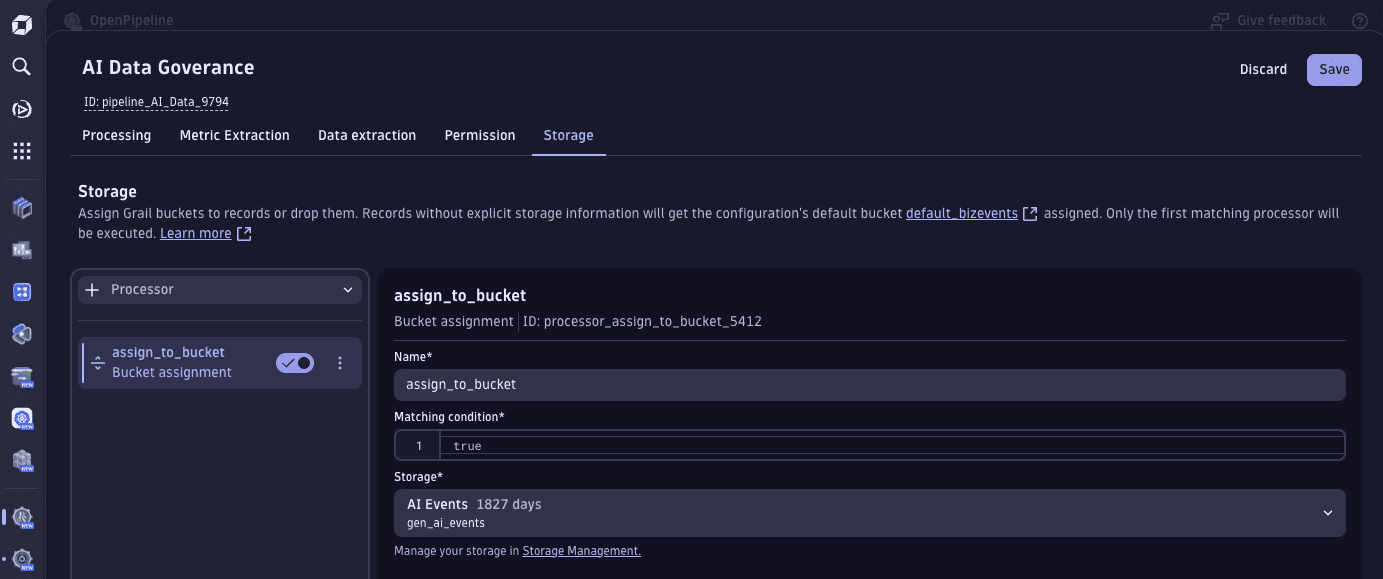
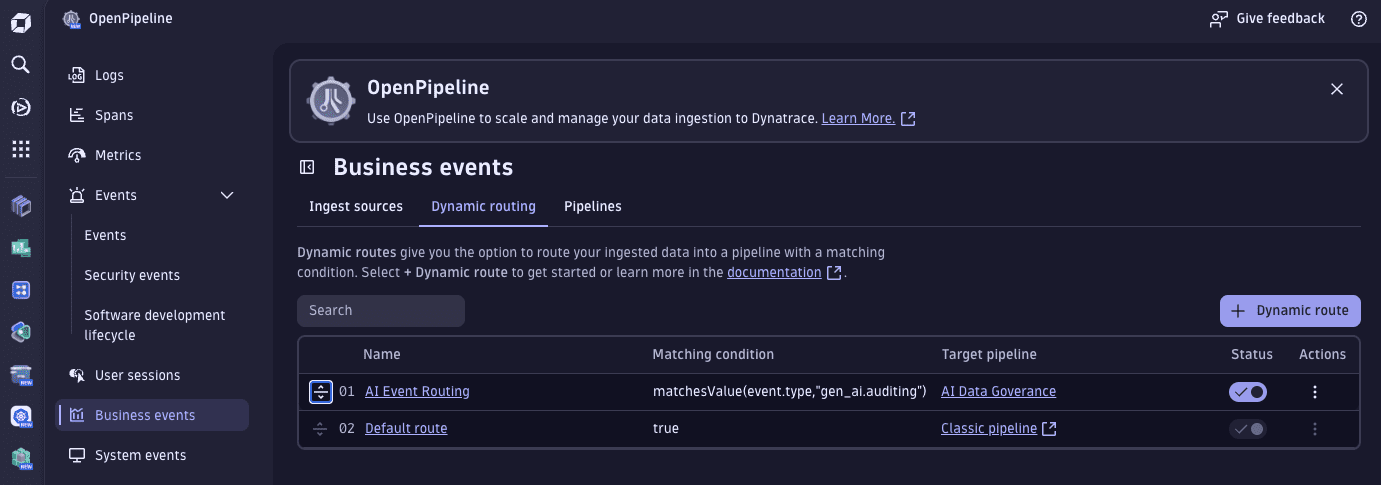
Finally, we route the ingestion of AI events to the pipeline.
Configure the dynamic routes in Settings, even if you use dtctl for the bucket and pipelines. All routes of a configuration scope are stored in one settings object, so applying a routing file with dtctl would replace your existing routes.
- Still in OpenPipeline > Business events, select the Dynamic routing tab.
- On the Dynamic routing tab, select Dynamic route to Add a new dynamic route.
- Enter a Name for the new route (for example,
AI Event Routing) - Set Matching condition to
matchesValue(event.type,"gen_ai.auditing") - Set Pipeline to the pipeline you created in the previous procedure.
- Enter a Name for the new route (for example,
- Select Add.
- Select Save.
Finally, to mark it as the first pipeline to trigger, drag it up to be the first row in the table.
Extract business events from LLM spans
Your application sends traces, not business events. To keep a record of each user/AI interaction, configure OpenPipeline to create a gen_ai.auditing business event from every LLM span. The dynamic route from the previous procedure then sends these events to your bucket.
- Go to Settings > Process and contextualize > OpenPipeline > Spans > Pipelines.
- On the Pipelines tab, select Pipeline and name your pipeline (for example,
AI Data Governance - Spans). - Go to Data extraction > > Business event.
- Configure the processor:
- Enter a Name for the processor (for example,
gen_ai.auditing extraction). - Set Matching condition to
isNotNull(gen_ai.input.messages) OR isNotNull(gen_ai.output.messages). - Set Event type to Static string with the value
gen_ai.auditing. - Set Event provider to Field name with the value
service.name. - In Field extraction, select Fields and add the fields you need to retain, for example:
gen_ai.input.messagesgen_ai.output.messagesgen_ai.request.modelgen_ai.response.modelgen_ai.provider.namegen_ai.operation.namegen_ai.usage.input_tokensgen_ai.usage.output_tokensservice.nametrace.idspan.id
- Enter a Name for the processor (for example,
- Select Save.
Then route the spans of your AI application to this pipeline.
- Still in OpenPipeline > Spans, select the Dynamic routing tab.
- Select Dynamic route.
- Enter a Name for the new route (for example,
AI Span Routing). - Set Matching condition to match your application, for example,
service.name == "<your-service>". - Set Pipeline to the pipeline you created in the previous procedure.
- Enter a Name for the new route (for example,
- Select Add.
- Select Save.
The extracted events go through the business events pipeline, so the bucket must exist before you send data. If the bucket doesn't exist, the events are dropped without an error.
Create the bucket and pipelines with dtctl
Instead of using Settings, you can create the bucket and both pipelines with dtctl. Configure the two dynamic routes as described in Configure OpenPipeline.
-
Create the bucket. This requires the
storage:buckets:writepermission.dtctl create bucket --name gen_ai_events --table bizevents --retention 1825 --display-name "GenAI auditing events" -
Save the business events pipeline as
bizevents-pipeline.yaml. SetbucketNameto your bucket.schemaid: builtin:openpipeline.bizevents.pipelinesscope: environmentvalue:customId: ai-data-governancedisplayName: AI Data Governancestorage:processors:- id: gen-ai-events-buckettype: bucketAssignmentenabled: truedescription: Store gen_ai.auditing events in gen_ai_eventsmatcher: matchesValue(event.type, "gen_ai.auditing")bucketAssignment:bucketName: gen_ai_events -
Save the spans pipeline as
spans-pipeline.yaml. Adjust the list of extracted fields to what you need to retain.schemaid: builtin:openpipeline.spans.pipelinesscope: environmentvalue:customId: ai-data-governance-spansdisplayName: AI Data Governance - SpansdataExtraction:processors:- id: gen-ai-auditing-bizeventtype: bizeventenabled: truedescription: Extract gen_ai.auditing business event from LLM spansmatcher: isNotNull(gen_ai.input.messages) OR isNotNull(gen_ai.output.messages)bizevent:eventType:type: constantconstant: gen_ai.auditingeventProvider:type: fieldfield:sourceFieldName: service.namefieldExtraction:type: includeinclude:- { extractionType: field, sourceFieldName: gen_ai.input.messages }- { extractionType: field, sourceFieldName: gen_ai.output.messages }- { extractionType: field, sourceFieldName: gen_ai.request.model }- { extractionType: field, sourceFieldName: gen_ai.response.model }- { extractionType: field, sourceFieldName: gen_ai.provider.name }- { extractionType: field, sourceFieldName: gen_ai.operation.name }- { extractionType: field, sourceFieldName: gen_ai.usage.input_tokens }- { extractionType: field, sourceFieldName: gen_ai.usage.output_tokens }- { extractionType: field, sourceFieldName: service.name }- { extractionType: field, sourceFieldName: trace.id }- { extractionType: field, sourceFieldName: span.id } -
Apply both files. This requires the
settings:objects:writepermission.dtctl apply -f bizevents-pipeline.yamldtctl apply -f spans-pipeline.yaml
 Configure your AWS account
Amazon Bedrock emits events for every configuration action executed, such as when you deploy a new model or when the fine-tuning of your model finishes.
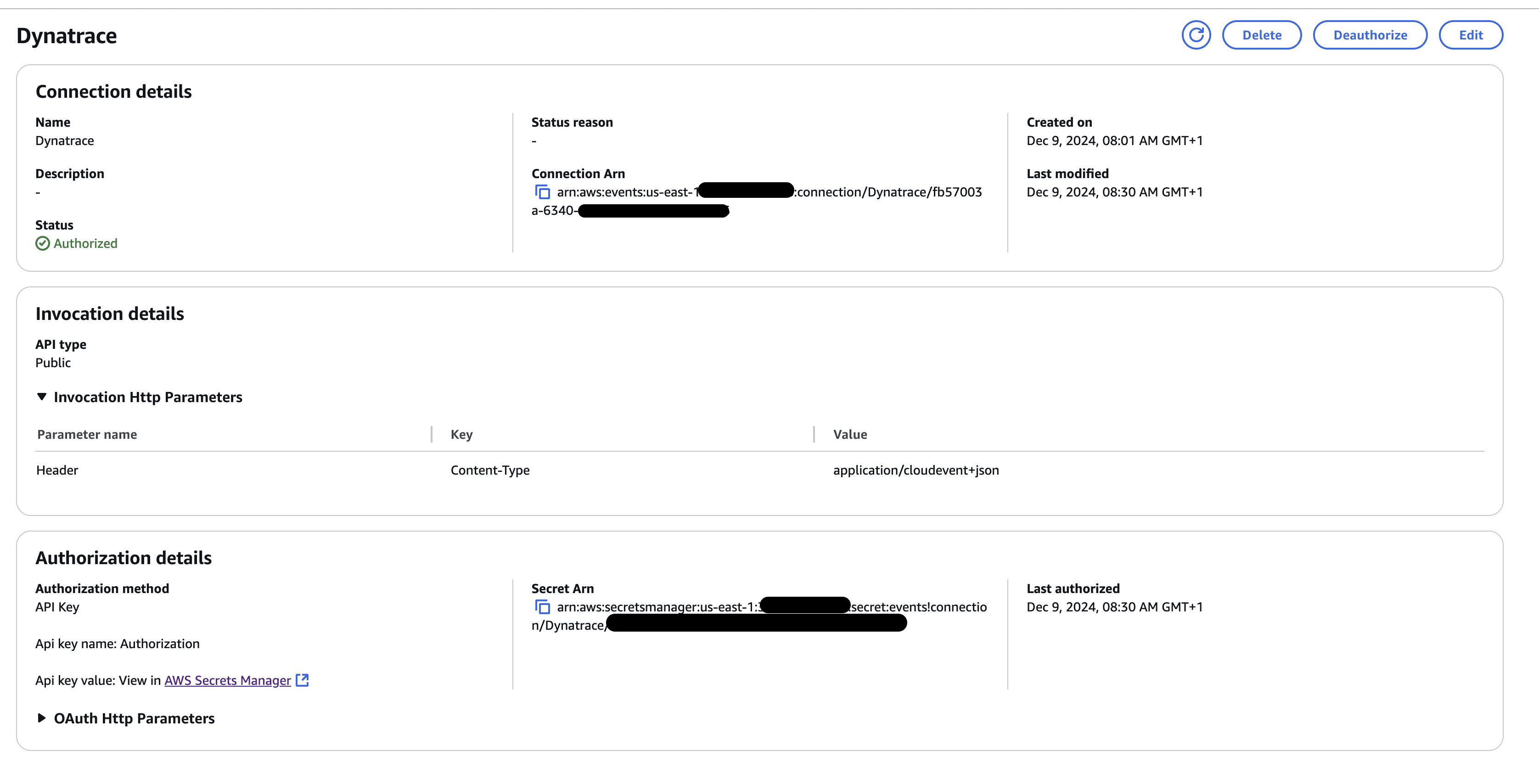
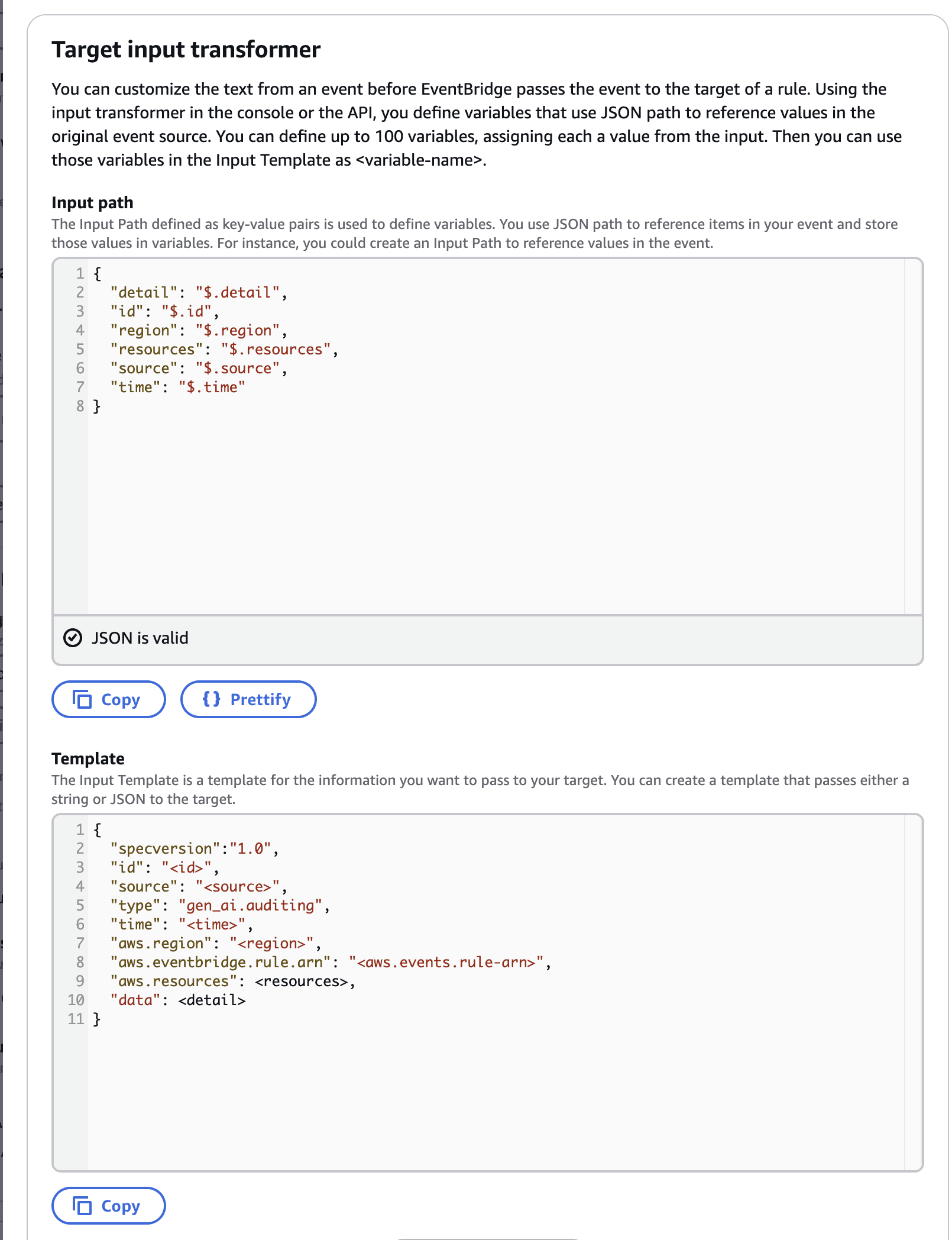
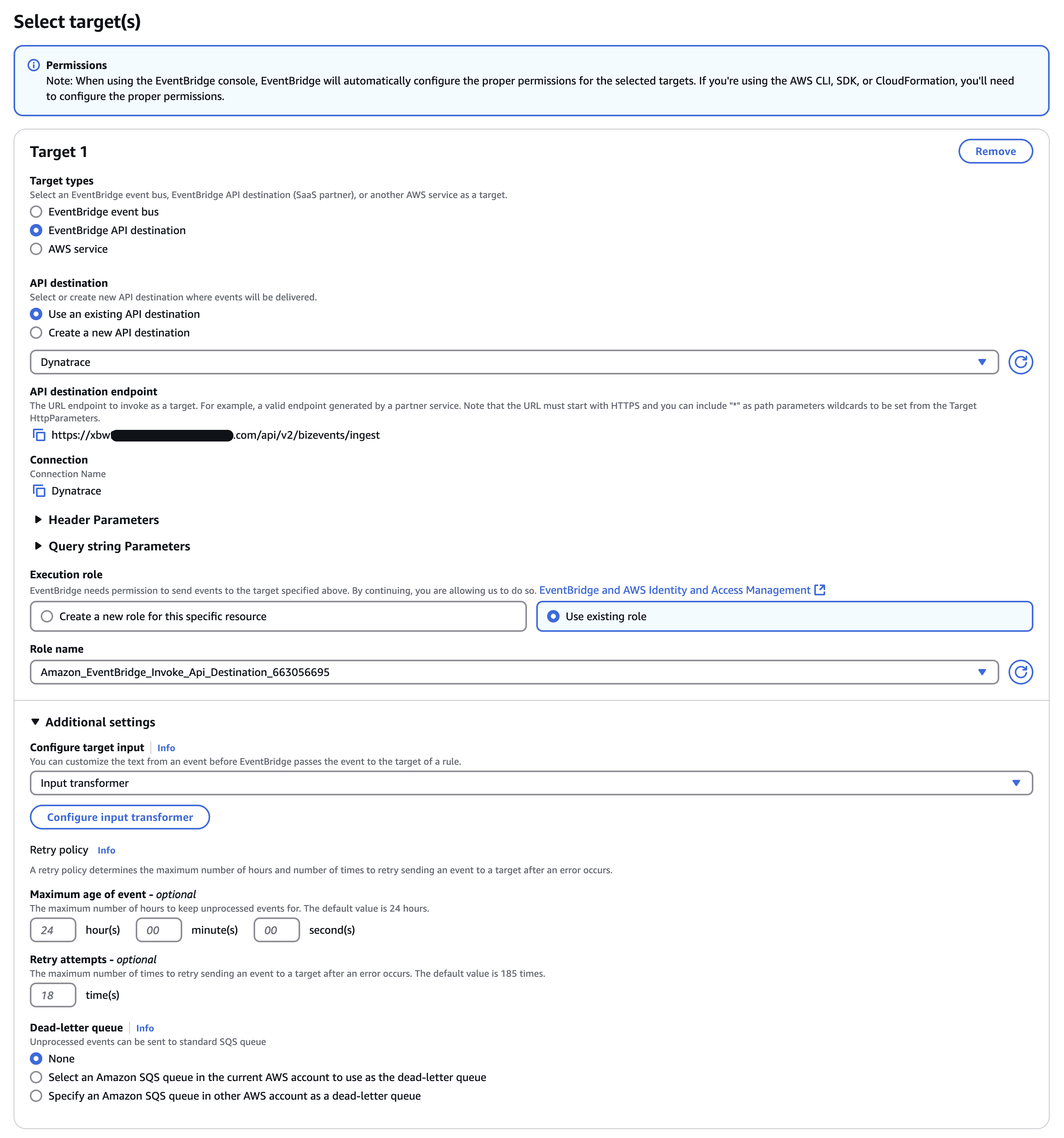
We can set up a rule to forward these events to Dynatrace. Please refer to our integration with Amazon EventBridge using BizEvent to configure the rule.
The only change is in the InputTemplate field, where the property "type" should be set to gen_ai.auditing. This change is required to match the values that OpenPipeline uses to redirect the events to our Grail bucket.
Example AWS configuration
The following screenshots show the connection, transformer, and target configuration in AWS.
 Configure your application
Instrument your application with OpenInference. The BedrockInstrumentor traces your Amazon Bedrock calls, including the prompts and responses.
The business event extraction reads gen_ai.* attributes. To emit them alongside the OpenInference attributes, set the following environment variable:
OPENINFERENCE_ENABLE_GENAI_SEMCONV=true
For details, see Use OpenTelemetry GenAI semantic conventions when available.
To install, use the following command:
pip install openinference-instrumentation-bedrock opentelemetry-sdk opentelemetry-exporter-otlp-proto-http
Afterward, add the following code at the beginning of your main file:
from opentelemetry import tracefrom opentelemetry.exporter.otlp.proto.http.trace_exporter import OTLPSpanExporterfrom opentelemetry.sdk.resources import Resource, SERVICE_NAMEfrom opentelemetry.sdk.trace import TracerProviderfrom opentelemetry.sdk.trace.export import BatchSpanProcessorfrom openinference.instrumentation.bedrock import BedrockInstrumentorexporter = OTLPSpanExporter(endpoint="https://<YOUR_ENV>.live.dynatrace.com/api/v2/otlp/v1/traces",headers={"Authorization": "Bearer <your-platform-token>"},)provider = TracerProvider(resource=Resource.create({SERVICE_NAME: "<your-service>"}))provider.add_span_processor(BatchSpanProcessor(exporter))trace.set_tracer_provider(provider)BedrockInstrumentor().instrument(tracer_provider=provider)
With a Classic access token, set the header to Api-Token <YOUR_DT_API_TOKEN> instead. The required scope is openpipeline:traces:ingest for a platform token, or openTelemetryTrace.ingest for a Classic access token.
Use the same <your-service> value as in the span routing condition.
For a complete runnable example, see the Amazon Bedrock OpenInference sample.
And that's it! 
Now you can:
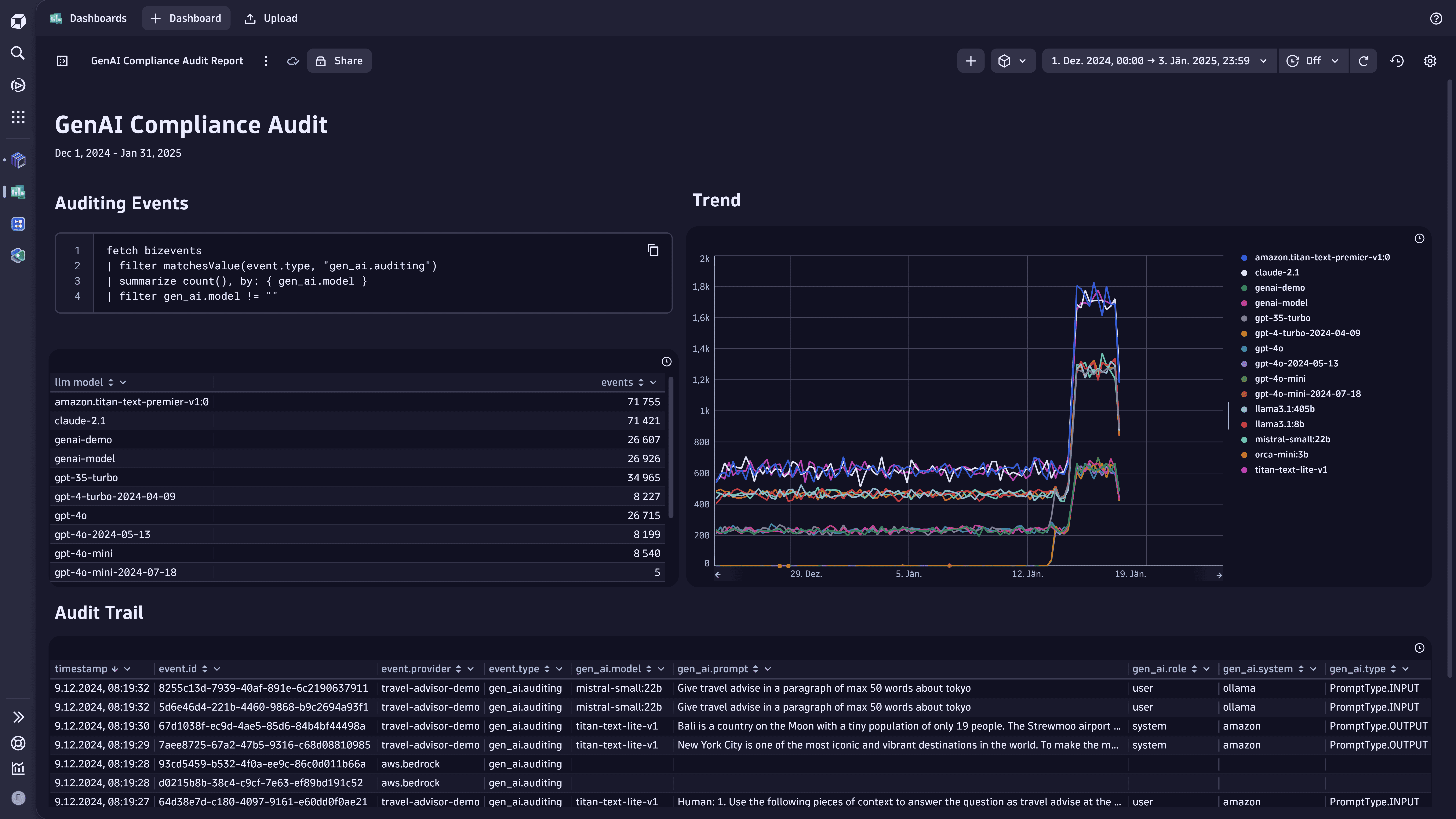
- Fetch all the user/AI interactions, training status, and more on demand.
- Use Notebooks
 or Dashboards
 to create data-driven documents for custom analytics on it.
 OpenPipeline