Understand and manage Mainframe Monitoring consumption (DPS)
- Latest Dynatrace
- Explanation
- 5-min read
Dynatrace Mainframe Monitoring provides automatic end-to-end application performance monitoring for transactions, regions, and applications deployed on IBM z/OS. This page explains how Mainframe Monitoring consumption is calculated, how to track and manage your usage, and how to optimize your spend.
Prerequisites
The technical prerequisites for DPS Mainframe Monitoring are:
- Dynatrace version 1.279+
- zRemote module version 1.265 or later.
- zDC subsystem version 1.247 or later.
How consumption is calculated
Mainframe Monitoring consumption is measured in MSU hours, using the Mainframe Monitoring rate card item.
Key terms
- LPAR (Logical Partition)
A hardware-level division of an IBM Z mainframe that runs as an independent system. Each monitored LPAR is represented as a host in Dynatrace. Billing is calculated per LPAR.
- MSU (Million Service Units)
IBM's standard unit for measuring how much processing work an IBM Z mainframe performs in one hour. Dynatrace derives MSU values from IBM Tailored Fit Pricing software consumption data retrieved from SMF type 70 subtype 1 records (the actual number of MSUs consumed).
- MSU hour
The unit of measure for Mainframe Monitoring. One MSU hour represents one MSU of processing work for one hour of monitoring.
- SMF type 70 subtype 1
An IBM z/OS system management facility record that captures CPU activity data, including actual MSU consumption per LPAR. Dynatrace reads these records to calculate billable consumption.
- IBM Tailored Fit Pricing
An IBM software pricing model based on actual workload consumption rather than peak capacity. Dynatrace aligns with this model when calculating MSU hours. For more information, see IBM Tailored Fit Pricing.
What's included in an MSU hour
Each MSU hour of Mainframe Monitoring includes:
-
Distributed tracing and code-level insight for 30+ supported z/OS technologies.
-
Application performance monitoring metrics and service metrics.
-
Topology and dependency mapping for mainframe transactions and services.
-
10 days of trace data retention. Trace data retained beyond 10 days can be extended for up to 10 years using custom Grail buckets. Retention beyond 10 days is billed per GiB as Traces – Retain.
-
Query consumption generated from within
 Distributed Tracing and
  Services is included with Dynatrace; no additional query charges apply for these apps.
MSU hours do not include custom metrics, such as custom JMX metrics. Custom metrics are measured in metric data points and billed as Metrics powered by Grail, or, if Metrics powered by Grail does not exist on your rate card, asCustom Metrics Classic.
Counting rules and billing granularity
MSU-hour consumption is derived from the actual MSU value reported by each LPAR via SMF type 70 subtype 1 records. The MSU value reflects the actual processing work performed, not a peak or capacity figure. The total consumption is the sum of MSU hours across all monitored LPARs.
Billing granularity for MSU-hour consumption is calculated in four 15-minute intervals per hour. If an LPAR is monitored for fewer than 15 minutes in a given interval, consumption is rounded up to 15 minutes. Because billing is based on actual MSU values, not simply the monitoring time, downtimes and periods of low workload directly reduce your consumption.
Estimate your cost
The following example demonstrates how to estimate your monthly cost for Mainframe Monitoring using data from the IBM Sub-Capacity Reporting Tool (SCRT).
Optional: Use the SCRT to estimate your MSU-hour consumption
Use the IBM Sub-Capacity Reporting Tool (SCRT) to estimate your MSU-hour consumption before deploying Mainframe Monitoring:
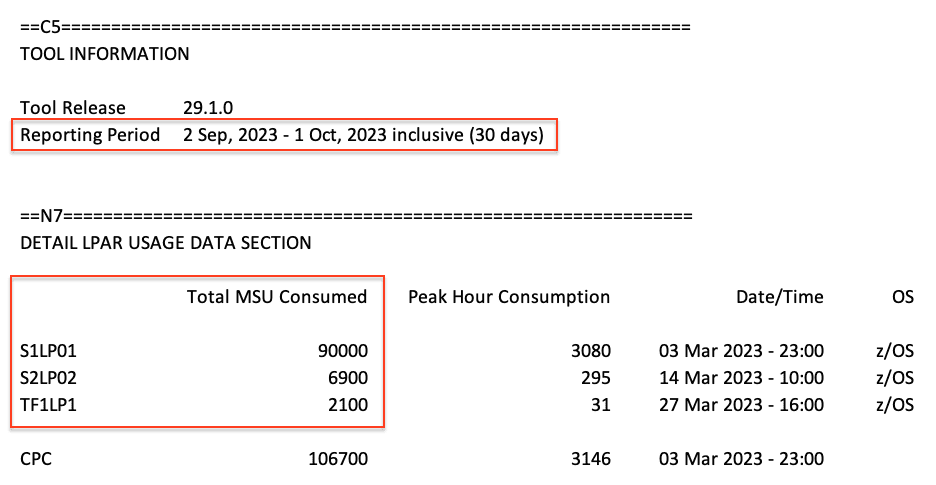
- In Section C5, check the Reporting Period. Typically it contains one month of data.
- In Section N7, sum the Total MSU Consumed value for each LPAR you intend to monitor. Section N7 has been available since IBM SCRT version 25.2, released in December 2017.
- If the reporting period is one month, multiply the Total MSU Consumed by 12 to get an annual estimate.
This approach may not account for seasonal workload fluctuations, which can cause deviations from actual consumption. Review SCRT data across multiple months for a more accurate forecast.
- Calculations are based on the list price of $0.10 per MSU hour. See Dynatrace pricing. This may differ from your rate card price.
- All costs are in USD.
If you monitor three LPARs with a combined total of 99,000 MSU hours consumed in one month (based on SCRT Section N7), your costs are: 99,000 MSU hours × $0.10 = $9,900 per month
Understand your consumption
Dynatrace provides several ways to monitor and analyze your Mainframe Monitoring consumption.
Insights via Account Management
License managers can view MSU-hour usage and costs in Account Management.
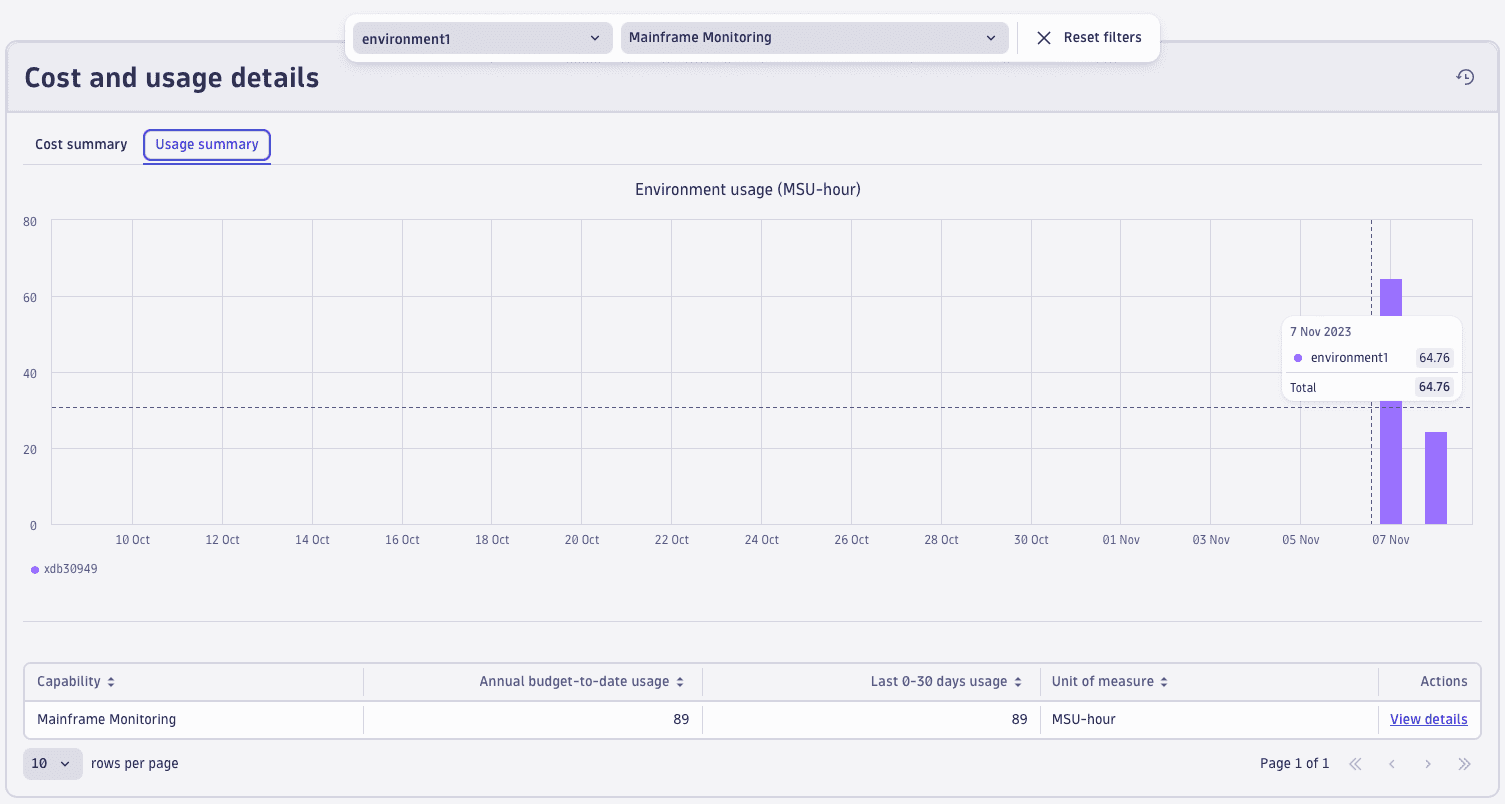
- Go to Account Management > Subscription > Overview > Cost and usage details > Usage summary.
- Select Mainframe Monitoring > View details.
- From this screen, you can also drill down into usage detail on the capability and environment level.
- Capability level: Select View Details next to the capability you want to explore.
- Environment level: In the Environments table, select … > Open details with Notebooks. The notebook provides DQL queries to see total MSUs billed, total MSUs billed per day, and total usage per host.
For more information, see Overview (Dynatrace Platform Subscription).
Insights via billing usage events
Billing usage events (billing_usage_event) are system events emitted by Dynatrace that represent the authoritative record of billable usage.
Use them to build reliable cost dashboards and chargeback reports.
Each billing usage event for Mainframe Monitoring contains:
- The DPS capability consumed (Mainframe Monitoring).
- The usage amount in MSU hours that contributes to billing.
- The time window the usage belongs to.
- The entity context (LPAR) the usage is attributed to.
Query billing usage events with DQL
-
Total Mainframe Monitoring MSU hours over time:
fetch dt.system.events| filter event.kind == "BILLING_USAGE_EVENT"and event.type == "Mainframe Monitoring"| dedup event.id| summarize totalMSUHours = sum(usage), by:{bin(timestamp, 1d)} -
Mainframe Monitoring MSU hours by LPAR (top consumers):
fetch dt.system.events| filter event.kind == "BILLING_USAGE_EVENT"and event.type == "Mainframe Monitoring"| dedup event.id| summarize totalMSUHours = sum(usage), by:{dt.entity.host}| sort totalMSUHours desc
Insights via Account Management API
Query Mainframe Monitoring MSU-hour consumption programmatically via the Account Management API for integration with external reporting systems.
For more information, see APIs for cost data integration.
Insights via Dynatrace Assist
Use Dynatrace Assist to surface usage trends for your mainframe environment. Here are some example questions you could use to start:
- "Which LPARs contributed most to Mainframe Monitoring consumption this month?"
- "How does this month's MSU-hour consumption compare to the previous month?"
Insights via Cost Allocation
You can use Cost Allocation to attribute your Mainframe Monitoring costs to specific cost centers or products. This lets you assign costs according to LPAR (host) entities.
For more information, see Set up Cost Allocation.
Optimize your consumption
This section presents some best-practice tips to optimize your consumption of Mainframe Monitoring.
Configuration best practices
- Deploy incrementally: Start with the LPARs that run the most business-critical workloads, then expand coverage as you validate the monitoring value. Because billing is based on actual MSU consumption, you can make informed decisions about which LPARs to monitor next.
- Use the SCRT report before deploying: The IBM Sub-Capacity Reporting Tool provides historical MSU consumption per LPAR. Use it to estimate your expected DPS consumption before onboarding new LPARs to avoid unexpected costs.
- Validate technical prerequisites: Ensure you are running the required Dynatrace version 1.279+, zRemote (version 1.265+), and zDC subsystem (version 1.247+) before enabling DPS billing for Mainframe Monitoring.
Ongoing optimization
- Review workload patterns: Because billing is based on actual MSU values, periods of low activity or planned downtime directly reduce consumption. Understand your seasonal workload patterns when forecasting annual spend.
- Manage custom metric usage: Custom metrics, such as custom JMX metrics, are billed separately as Metrics powered by Grail or Custom Metrics Classic. Review custom metric configuration and remove low-value metrics to control this cost.
Automation
You can use Dynatrace to automate some of your optimization efforts.
| Automation | Description | How |
|---|---|---|
Anomaly alerts | Get notified of unexpected spikes in Mainframe Monitoring MSU-hour consumption. | Cost Monitors in Account Management. |
Scheduled reports | Deliver automated MSU-hour consumption reports to stakeholders. |
|
Remediation workflows | Automatically alert LPAR owners when MSU-hour consumption exceeds a defined budget threshold. |


FAQs
What is an MSU, and why is it used for billing?
An MSU (Million Service Units) is IBM's standard measurement of the amount of processing work that an IBM Z mainframe can perform in one hour. Dynatrace uses MSUs as the billing unit because they directly reflect actual workload, rather than a fixed per-host fee, which means your costs scale with actual usage rather than with infrastructure capacity.
Where does Dynatrace get the MSU data?
Dynatrace derives MSU values from IBM Tailored Fit Pricing software consumption data retrieved from SMF type 70 subtype 1 records for each monitored LPAR. These records capture the actual number of MSUs consumed, not a peak or licensed capacity figure.
Am I charged during mainframe downtime?
No. Mainframe Monitoring consumption is based on actual MSU usage during active monitoring periods. If a monitored LPAR is down or not being monitored, no MSU hours are generated for that period. This is a key benefit of the DPS model compared to capacity-based licensing.
How does billing granularity work?
MSU-hour consumption is calculated in four 15-minute intervals per hour. If an LPAR is monitored for fewer than 15 minutes in a given interval, consumption is rounded up to 15 minutes. During low-activity periods, the actual MSU value will be lower, so the MSU-hour consumption for that interval will also be lower.
Are custom metrics included in Mainframe Monitoring?
No. Custom metrics are not included in the MSU-hour rate for Mainframe Monitoring. These include, for example, custom JMX metrics configured for z/OS monitoring. Custom metrics are measured in metric data points and billed separately as Metrics powered by Grail or Custom Metrics Classic.
How do I estimate my annual Mainframe Monitoring consumption?
Use the IBM Sub-Capacity Reporting Tool (SCRT):
- In Section N7, sum the Total MSU Consumed for each LPAR you plan to monitor.
- If the SCRT report covers one month, multiply by 12 for an annual estimate.
Note that seasonal workload fluctuations can cause the actual annual consumption to differ from this estimate. Review SCRT data across multiple months for a more accurate forecast.