Try it free

Tags and management zones for Azure integration

  • Latest Dynatrace
  • How-to guide
  • 5-min read

To organize cloud entities in your environment and simplify searches for them, you can use tags and basic instance properties imported from the cloud, as well as tags and management zones assigned in Dynatrace. Tags and management zones are applied to cloud entities just as they are for other entities, but they are best applied via the entity selector.

Cloud entities in your environment

You can browse all cloud entites in your environment using their ID or type from cloud entity types via the entity selector, just as for other entities. You can also explore all available properties and relationships available for each individual resource or type.

You can also browse their metrics using entity selector as part of metric selector, e.g. in Data Explorer.

Cloud entity types

To learn more about Dynatrace cloud entities and to check which ones can have tags imported from the cloud, see Cloud services with their respective Dynatrace entity types.

Add an automatically applied tag to cloud entities

Follow the steps below to automatically apply a tag to cloud entities. To learn more about tags, see Define and apply tags.

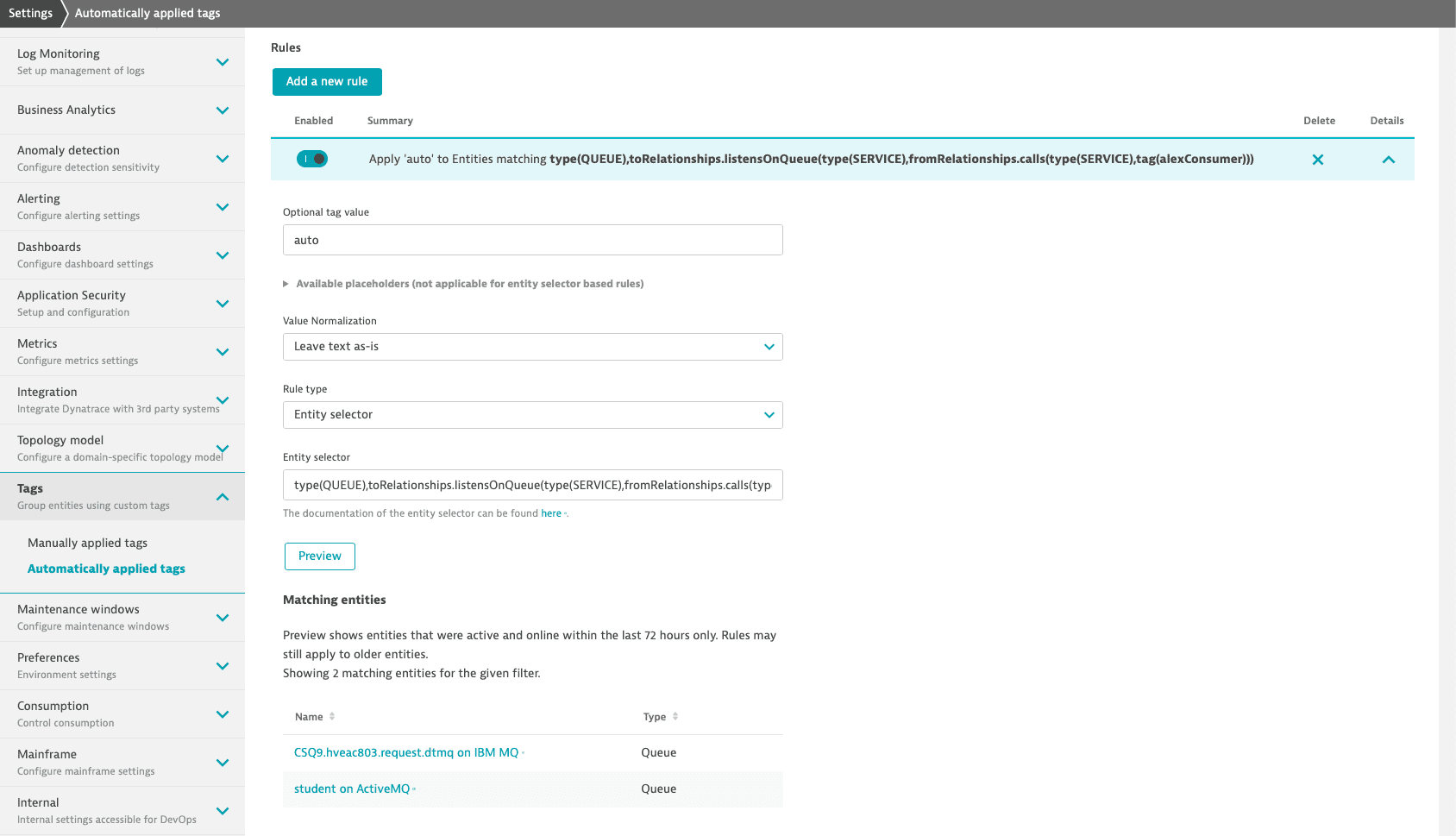
  1. Go to Settings > Tags > Automatically applied tags.

  2. Select Create tag and type a name for the new tag in the Tag name field.

  3. Select Add a new rule.

  4. Optional Optional tag value. This value appears next to the tag name that the rule is specified for, after a :, and is used to provide more precise information based on the individual rule. Note that for rules based on the entity selector, this value cannot be extracted from the entity itself using placeholders.

  5. From the Rule type list, choose the Entity selector type.

  6. Use one of the code snippets from the examples and adapt it with your own values to apply tags to cloud entities matching your entity selector.

  7. Select Preview to verify the results returned by the specific entity selector.

  8. Select Save changes.

Example of a rule-based entity selector
Queue entity selector

Add cloud entities to existing management zones

Follow the steps below to add cloud entities to existing management zones. To learn more about management zones, see Set up management zones.

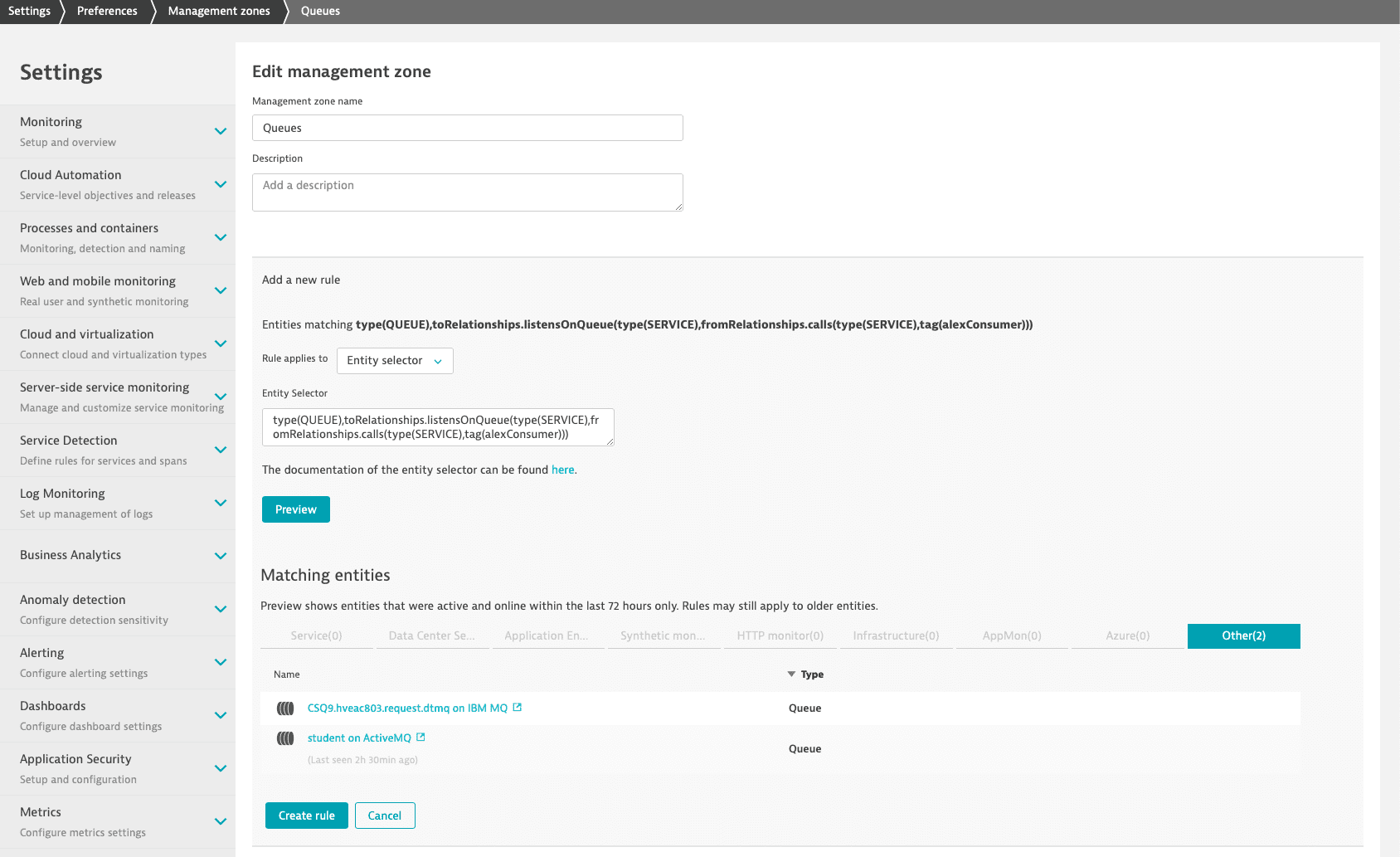
  1. Go to Settings > Preferences > Management zones.
  2. Edit an existing management zone and select Add a new rule.
  3. In the Rule applies to list, choose the Entity selector.
  4. Use one of the code snippets from the examples and adapt it with your own values to add to the management zone cloud entities matching the entity selector.
  5. Select Preview to verify the results returned by the specific entity selector.
  6. Select Save changes.
Example of a management zone based on the entity selector
Management zone for queues

Entity selector examples for Azure entities

You can use the examples below and cloud entity types to suit your own needs.

Non-built-in cloud services types

type(CUSTOM_DEVICE), customDeviceSource("AZURE"), customProperties("Region:South Africa North")
type(CUSTOM_DEVICE), customDeviceSource("AZURE"), not(customProperties("Region:South Africa North"))
type(cloud:azure:batch:account), customDeviceSource("AZURE"), customProperties("Region:South Africa North")

Built-in cloud service types

type(AZURE_STORAGE_ACCOUNT), toRelationship.isSiteOf(type(AZURE_REGION), entityName(northeurope))

Non-built-in cloud services types

type(CUSTOM_DEVICE),customProperties("Resource group:test-rg3")
type(cloud:azure:batch:account),customProperties("Resource group:test-rg3")

Built-in cloud service types

type(AZURE_STORAGE_ACCOUNT), azureResourceGroupName("cloud-test-rg-westeurope")

Non-built-in cloud services types

type(CUSTOM_DEVICE),fromRelationships.belongsTo(type("AZURE_SUBSCRIPTION"),entityName("Team-Product"))
type(CUSTOM_DEVICE),fromRelationships.belongsTo(type("AZURE_SUBSCRIPTION"),azureSubscriptionUuid("d1234e5f-de67-4db2-ad02-d89d2a1234f5"))
type(cloud:azure:batch:account),fromRelationships.belongsTo(type("AZURE_SUBSCRIPTION"),entityName("Team-Product"))

Built-in cloud service types

type(AZURE_STORAGE_ACCOUNT),fromRelationships.isAccessibleBy(type("AZURE_SUBSCRIPTION"),entityName("Team-Product"))
type(AZURE_STORAGE_ACCOUNT),fromRelationships.isAccessibleBy(type("AZURE_SUBSCRIPTION"),azureSubscriptionUuid("d1234e5f-de67-4db2-ad02-d89d2a1234f5"))

Non-built-in cloud services

type(CUSTOM_DEVICE),tag([AZURE]environment:DEV)
type(CUSTOM_DEVICE),tag([AZURE]owner:TeamA)

Non-built-in cloud service - specific service type

type(cloud:azure:batch:account),tag([AZURE]environment:DEV)

Built-in cloud services

type(AZURE_STORAGE_ACCOUNT),tag([AZURE]environment:DEV)
type(AZURE_VM),tag([AZURE]owner:TeamA)

Tags on parent resource for Azure service that doesn't have tags itself

type(AZURE_SERVICE_BUS_TOPIC), toRelationship.isAzrServiceBusNamespaceOfQueue(type(AZURE_SERVICE_BUS_NAMESPACE),tag("[Azure]tagOnParent:valueOnParent"))

Non-built-in cloud services

type(CUSTOM_DEVICE),customProperties("Resource group:new-resources")
type(CUSTOM_DEVICE),customDeviceSource("AZURE"),dnsNames(ademotestlab.file.core.windows.net)
type(CUSTOM_DEVICE),customDeviceSource("AZURE"), ipAddress(172.0.0.202)

Non-built-in cloud service - specific service type

type(cloud:azure:storage:storageaccounts:file),customProperties("Resource group:new-resources")
type(cloud:azure:storage:storageaccounts:file),dnsNames(ademodevtestlab5563.file.core.windows.net)
type("cloud:azure:network:loadbalancers:standard"),ipAddress(10.237.0.223)
type(cloud:azure:storage:storageaccounts),not(customProperties.exists("Secondary region"))
type(cloud:azure:storage:storageaccounts:file),customProperties("Status of primary region:available")

Built-in cloud services

type(AZURE_STORAGE_ACCOUNT), azureStorageAccountSecondaryRegion.exists()
type(AZURE_STORAGE_ACCOUNT), dnsNames("csb10030000ab28bff8.blob.core.windows.net")
type(AZURE_SERVICE_BUS_TOPIC), azureServiceBusMaxSizeMb("1024")
type("AZURE_VM"), dnsNames("ag-vm.eastus.cloudapp.azure.com")

Azure VMs with OneAgent installed

type("AZURE_VM"), toRelationship.runsOn(type(HOST))

Azure VMs without OneAgent installed

type("AZURE_VM"), not(toRelationship.runsOn(type(HOST)))

Azure Functions running on App Service Plan with OneAgent site extension installed

type("AZURE_FUNCTION_APP"),fromRelationships.isPgAppOf(type(HOST))
type("AZURE_FUNCTION_APP"),fromRelationships.isPgAppOf(type(PROCESS_GROUP_INSTANCE))
type("AZURE_FUNCTION_APP"),fromRelationships.isPgAppOf(type(PROCESS_GROUP))

Azure Functions running on App Service Plan without OneAgent Site extension installed

type("AZURE_FUNCTION_APP"),not(sku("Dynamic")),not(fromRelationships.isPgAppOf(type(HOST)))
type("AZURE_FUNCTION_APP"),sku("Standard"),not(fromRelationships.isPgAppOf(type(HOST)))

Azure Functions instrumented with Dynatrace OpenTelemetry libraries (ODIN)

type(AZURE_FUNCTION_APP), toRelationship.runsOn(type("SERVICE"))

Azure Functions running on Consumption Plan instrumented with Dynatrace OpenTelemetry libraries (ODIN)

type(AZURE_FUNCTION_APP), sku("Dynamic"), toRelationship.runsOn(type("SERVICE"))

Azure Functions running on Consumption Plan not instrumented with Dynatrace OpenTelemetry libraries (ODIN)

type(AZURE_FUNCTION_APP), sku("Dynamic"), not(toRelationship.runsOn(type("SERVICE")))

App Services with OneAgent installed

type("AZURE_WEB_APP"),fromRelationships.isPgAppOf(type(HOST))
type("AZURE_WEB_APP"),fromRelationships.isPgAppOf(type(PROCESS_GROUP_INSTANCE))
type("AZURE_WEB_APP"),fromRelationships.isPgAppOf(type(PROCESS_GROUP))

App Services without OneAgent installed

type("AZURE_WEB_APP"),not(fromRelationships.isPgAppOf(type(HOST)))

Services which are also monitored by Azure integration—for Function Apps on App Service Plan

type(SERVICE), fromRelationships.runsOnOsi(type(HOST), toRelationships.isPgAppOf(type(AZURE_FUNCTION_APP)))
type(SERVICE), fromRelationships.runsOn(type(PROCESS_GROUP), toRelationships.isPgAppOf(type(AZURE_FUNCTION_APP), entityName("funcapp-name")))
type(SERVICE), fromRelationships.runsOnProcessGroupInstance(type(PROCESS_GROUP_INSTANCE), toRelationships.isPgAppOf(type(AZURE_FUNCTION_APP), entityName("funcapp-name")))
type(SERVICE), fromRelationships.runsOnOsi(type(HOST), toRelationships.isPgAppOf(type(AZURE_FUNCTION_APP), entityName("funcapp-name")))
type(SERVICE), fromRelationships.runsOnOsi(type(HOST), toRelationships.isPgAppOf(type(AZURE_FUNCTION_APP),tag("[Azure]environment:DEV")))
type(SERVICE), fromRelationships.runsOnOsi(type(HOST), toRelationships.isPgAppOf(type(AZURE_FUNCTION_APP),fromRelationships.isAccessibleBy(type(AZURE_SUBSCRIPTION),entityName("Cloud Dev Subcription"))))

Services which are also monitored by Azure integration—for Function Apps instrumented with Dynatrace OpenTelemetry libraries (ODIN)

type(SERVICE), fromRelationship.runsOn(type("AZURE_FUNCTION_APP"))

Services which are also monitored by Azure integration—for Function Apps running on Consumption Plan instrumented with Dynatrace OpenTelemetry libraries (ODIN)

type(SERVICE), fromRelationship.runsOn(type("AZURE_FUNCTION_APP"), sku("Dynamic"))

Services which are also monitored by Azure integration—for Web Apps

type(SERVICE), fromRelationships.runsOnOsi(type(HOST), toRelationships.isPgAppOf(type(AZURE_WEB_APP)))
type(SERVICE), fromRelationships.runsOn(type(PROCESS_GROUP), toRelationships.isPgAppOf(type(AZURE_WEB_APP), entityName("webapp-name")))
type(SERVICE), fromRelationships.runsOnProcessGroupInstance(type(PROCESS_GROUP_INSTANCE), toRelationships.isPgAppOf(type(AZURE_WEB_APP), entityName("webapp-name")))
type(SERVICE), fromRelationships.runsOnOsi(type(HOST), toRelationships.isPgAppOf(type(AZURE_WEB_APP), entityName("webapp-name")))
type(SERVICE), fromRelationships.runsOnOsi(type(HOST), toRelationships.isPgAppOf(type(AZURE_WEB_APP),tag("[Azure]environment:DEV")))
type(SERVICE), fromRelationships.runsOnOsi(type(HOST), toRelationships.isPgAppOf(type(AZURE_WEB_APP),fromRelationships.isAccessibleBy(type(AZURE_SUBSCRIPTION),entityName("Cloud Dev Subcription"))))

Process groups and hosts also monitored by Azure integration

type(HOST), fromRelationships.runsOn(type(AZURE_VM),fromRelationships.isAccessibleBy(type("AZURE_SUBSCRIPTION"),entityName("Cloud Dev Subcription")))
type(PROCESS_GROUP_INSTANCE), toRelationships.isPgAppOf(type(AZURE_FUNCTION_APP),fromRelationships.isAccessibleBy(type("AZURE_SUBSCRIPTION"),entityName("Cloud Dev Subcription")))
type(HOST), toRelationships.isPgAppOf(type(AZURE_FUNCTION_APP),fromRelationships.isAccessibleBy(type("AZURE_SUBSCRIPTION"),entityName("Cloud Dev Subcription")))
type(PROCESS_GROUP_INSTANCE), toRelationships.isPgAppOf(type(AZURE_FUNCTION_APP),fromRelationships.isAccessibleBy(type(AZURE_SUBSCRIPTION),entityName("Cloud Dev Subcription")))
type(PROCESS_GROUP), toRelationships.isPgAppOf(type(AZURE_FUNCTION_APP),fromRelationships.isAccessibleBy(type("AZURE_SUBSCRIPTION"),entityName("Cloud Dev Subcription")))

Related topics

  • Management zones
  • Queue tags and management zones
  • Set up management zones
  • Define and apply tags
  • Infrastructure Observability
Related tags
Infrastructure ObservabilityAzure