Scrape Prometheus metrics with the OTel Collector (standard)
- How-to guide
- 12-min read
- Published Jun 23, 2026
Use this page to scrape and process Prometheus endpoints with the standard, production-grade deployment. This setup uses architecture with the Target Allocator and separate Collector pools for scraping and processing. It is the recommended approach for most production deployments, and is built for Kubernetes clusters that need auto-scaling, redundancy, and high-volume Prometheus workloads.
When to use this approach
Use this architecture when one or more of the following scenarios apply.
- The workload exceeds what a single Collector or a small set of duplicated Collectors can handle.
- You scrape thousands of pods, or hundreds of distinct endpoints.
- Total ingest is in the millions of data points per minute.
- You want horizontal scaling across the scraper and gateway pools instead of manually partitioning targets.
If you scrape a small or static set of endpoints and don't need auto-scaling or redundancy, you can use the simplified deployment with a single Collector instead. For more information, see Scrape Prometheus metrics with the OTel Collector (simplified).
Prerequisites
This use case assumes that you have:
You don't need to install everything below up front. The Deploy the tiered architecture walkthrough installs the CRDs, Target Allocator, and both Collector tiers step by step. Treat this list as a reference for what the deployment needs—only the Kubernetes cluster and Dynatrace API access are true prerequisites.
- A Kubernetes cluster with the Prometheus Operator Custom Resource Definitions (CRDs)—
ServiceMonitor,PodMonitor, andScrapeConfig—installed. You need only these CRDs, not the full Prometheus Operator. Step 1 of the walkthrough installs the CRD-only bundle. - One of the following Collector distributions for the scraper tier, with the
prometheusreceiver and theloadbalancingexporter: - One of the following Collector distributions for the gateway tier, with the
metric_start_time,cumulative_to_delta,k8sattributes, andtransform processors and theotlphttpexporter: - One of the following Target Allocator distributions deployed via the upstream
opentelemetry-target-allocatorHelm chart: - The Dynatrace API endpoint URL to which the data should be exported.
- A Classic access token with the relevant access scope (only required for SaaS and ActiveGate).
Architecture overview
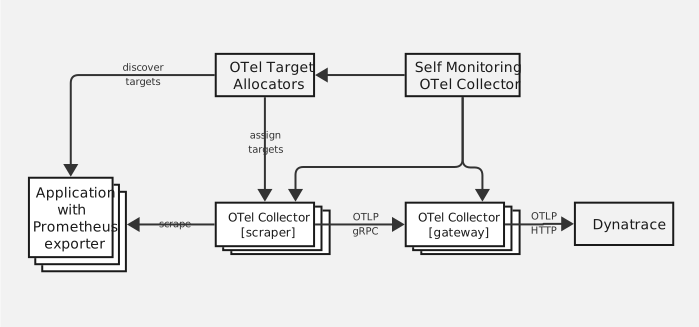
This setup has the following components:
-
Target Allocator: The Target Allocator (TA) discovers Prometheus targets via a
ServiceMonitor,PodMonitor, orScrapeConfigCustom Resource Definition (CRD) and distributes them across the scraper pool using consistent hashing.The hashing algorithm is deterministic, so every replica produces the same target-to-scraper assignment independently. Run multiple replicas for failure tolerance.
-
Scrapers: Deployment of Collectors. Each scraper polls the TA, scrapes its assigned Prometheus targets, and forwards data to the gateway pool through the
loadbalancingexporter.The
loadbalancingexporter routes by resource hash, so all data from a given source pod consistently lands on the same gateway, which keeps per-series state consistent. -
Gateways: StatefulSet of Collectors. Receives OTLP from the scrapers, runs the stateful
metric_start_timeandcumulative_to_deltaprocessors, applies Kubernetes enrichment viak8sattributesandtransform, and exports to Dynatrace.The
metric_start_timeandcumulative_to_deltaprocessors are stateful and must see every consecutive sample of a series in one place to compute deltas correctly. They run on the gateway tier rather than the scrapers because theloadbalancingexporter consistently routes all data from a given source to the same gateway, so each series' full sample stream converges there even as the scraper pool autoscales. Running gateways as a StatefulSet gives each replica a stable identity and ordered rollout, which keeps the gateway pool's endpoint set predictable during scale events.
Reference configuration
A reference configuration is available in the Dynatrace OTel Collector's GitHub repo, see
config_examples/prometheus-large-scale/.
The set includes the following YAML files.
allocator.values.yaml: Helm values for the TAtier1-scraper.values.yaml: Helm values for the scraper Deploymenttier2-gateway.values.yaml: Helm values for the gateway StatefulSetrbac.yaml: ServiceAccounts, ClusterRoles, and bindings for all tiersscrapeconfig.yaml: exampleScrapeConfigCRD for annotation-based discoveryselfmon-scraper.yaml: Helm values for a dedicated self-monitoring Collector that collects self-monitoring metrics from all tiers and exports them directly to Dynatrace, independent of the main pipeline
Apply the values as-is or adapt them to your cluster, see Customize the configuration.
Deploy the tiered architecture
The walkthrough below references the Helm charts and manifests linked from the reference configuration.
This walkthrough uses Helm values, but it isn't the only option.
You can also deploy both Collector tiers and the Target Allocator through the OpenTelemetry Operator using its OpenTelemetryCollector and TargetAllocator custom resources.
Either route requires the same RBAC.
-
Install the Prometheus Operator CRDs (
ServiceMonitor,PodMonitor,ScrapeConfig) so the TA can discover targets.kubectl apply -f https://github.com/prometheus-operator/prometheus-operator/releases/download/v0.91.0/stripped-down-crds.yaml -
Apply RBAC for the TA and Collector ServiceAccounts.
kubectl apply -f rbac.yaml -
Deploy the TA with the upstream
opentelemetry-target-allocatorHelm chart and the provided values. Run multiple replicas for failure tolerance if needed.helm install otel-allocator open-telemetry/opentelemetry-target-allocator \--values allocator.values.yaml -
Apply
ServiceMonitorandPodMonitorCRDs for the workloads you want to scrape. Optionally, apply aScrapeConfigfor annotation-based discovery. For examples of each, see Configure the Target Allocator. If you're moving from a single Collector, see Migrate from a single Collector. -
Deploy the gateway pool before the scrapers so the
loadbalancingexporter has destinations available on first start.helm install otel-gateway open-telemetry/opentelemetry-collector \--values tier2-gateway.values.yaml -
Deploy the scraper pool.
helm install otel-scraper open-telemetry/opentelemetry-collector \--values tier1-scraper.values.yaml
Configure the Target Allocator
The TA discovers Prometheus scrape targets from ServiceMonitor, PodMonitor, and ScrapeConfig CRDs and distributes them across the scraper pool using consistent hashing. It maintains a single authoritative view of which scraper is responsible for which target.
Configure which CRDs the TA watches by setting label selectors in the Helm values. The reference configuration uses the prometheus.dynatrace.com: "true" label:
prometheus_cr:enabled: truescrapeInterval: 15sservice_monitor_selector:matchlabels:prometheus.dynatrace.com: "true"pod_monitor_selector:matchlabels:prometheus.dynatrace.com: "true"scrape_config_selector:matchlabels:prometheus.dynatrace.com: "true"
Migrate from a single Collector
If you're coming from the simplified deployment, your targets are defined as static scrape_configs on the Prometheus receiver. The Target Allocator discovers targets through CRDs instead, so convert each scrape job into a ServiceMonitor (recommended) or PodMonitor.
For the quickest path off scrape_configs with minimal changes, wrap your existing static targets in a ScrapeConfig CRD instead (see ScrapeConfig). This keeps the static target list, so it doesn't benefit from label-based service discovery. In the long term, we recommend to convert to ServiceMonitor or PodMonitor.
The following example shows how to convert a single static job into an equivalent ServiceMonitor.
-
Before, on the single Collector:
receivers:prometheus:config:scrape_configs:- job_name: my-appscrape_interval: 60smetrics_path: /metricsstatic_configs:- targets: ['my-app.my-namespace.svc:8080'] -
After, as a
ServiceMonitor(see ServiceMonitor for the full schema):apiVersion: monitoring.coreos.com/v1kind: ServiceMonitormetadata:name: my-applabels:prometheus.dynatrace.com: "true"spec:selector:matchLabels:app: my-appendpoints:- port: metricsinterval: 60spath: /metrics
The metric_start_time, cumulative_to_delta, and otlp_http configuration from your single Collector moves to the gateway pool unchanged. Only target discovery changes form.
ServiceMonitor
ServiceMonitor selects Kubernetes Services by label. The TA discovers the endpoints behind each Service and allocates them to scrapers.
Add the prometheus.dynatrace.com: "true" label to your ServiceMonitor:
apiVersion: monitoring.coreos.com/v1kind: ServiceMonitormetadata:name: my-servicelabels:prometheus.dynatrace.com: "true"spec:selector:matchLabels:app: my-serviceendpoints:- port: metricsinterval: 60s
PodMonitor
PodMonitor selects pods directly by label, bypassing the Service abstraction. Use it when pods expose metrics but are not fronted by a Service.
apiVersion: monitoring.coreos.com/v1kind: PodMonitormetadata:name: my-podslabels:prometheus.dynatrace.com: "true"spec:selector:matchLabels:app: my-apppodMetricsEndpoints:- port: metricsinterval: 60s
ScrapeConfig
ScrapeConfig exposes native Prometheus scrape configuration. It is useful as a migration path for setups that already use metrics.dynatrace.com/scrape pod annotations from the ActiveGate Kubernetes module.
The following ScrapeConfig discovers all pods in the cluster and keeps only those with the metrics.dynatrace.com/scrape: "true" annotation. It reads the port, path, and secure annotations to build the scrape target. To limit the TA's memory footprint, scope the kubernetesSDConfigs to specific namespaces instead of cluster-wide discovery.
apiVersion: monitoring.coreos.com/v1alpha1kind: ScrapeConfigmetadata:name: dynatrace-annotationslabels:prometheus.dynatrace.com: "true"spec:jobName: dynatrace-annotationsscrapeInterval: 60skubernetesSDConfigs:- role: Podrelabelings:- sourceLabels:- __meta_kubernetes_pod_annotation_metrics_dynatrace_com_scrape- __meta_kubernetes_pod_annotationpresent_metrics_dynatrace_com_scrapeaction: keepregex: true;true- sourceLabels:- __meta_kubernetes_pod_annotation_metrics_dynatrace_com_secure- __meta_kubernetes_pod_annotationpresent_metrics_dynatrace_com_secureaction: replaceregex: true;truetargetLabel: __scheme__replacement: https- sourceLabels:- __address__- __meta_kubernetes_pod_annotation_metrics_dynatrace_com_port- __meta_kubernetes_pod_annotationpresent_metrics_dynatrace_com_portaction: replaceregex: (.+?)(?::\d+)?;(\d+);truetargetLabel: __address__replacement: $1:$2- sourceLabels:- __meta_kubernetes_pod_annotation_metrics_dynatrace_com_path- __meta_kubernetes_pod_annotationpresent_metrics_dynatrace_com_pathaction: replaceregex: (.+);truetargetLabel: __metrics_path__replacement: $1- sourceLabels:- __meta_kubernetes_pod_phaseaction: dropregex: (Failed|Succeeded)
This approach requires no application-side changes. For new workloads, prefer ServiceMonitor or PodMonitor for a standard Prometheus Operator setup.
Scale the Target Allocator
The TA holds all Prometheus service discovery metadata (pod labels, annotations, node information) in memory. On large clusters this can consume multiple gigabytes.
Run multiple TA replicas for failure tolerance. Because the consistent-hashing algorithm is deterministic, all replicas independently produce the same target-to-scraper assignments without coordination.
When memory becomes a bottleneck, you can:
-
Scale vertically. Increase the TA's memory limit in the Helm values. Optionally use a Vertical Pod Autoscaler to automate this.
-
Reduce your discovery scope. Tighten relabeling rules in
ScrapeConfigCRDs or scopekubernetesSDConfigsto specific namespaces to limit the amount of metadata the TA holds. -
Use sharded TAs. Run multiple independent TA instances, each watching a distinct subset of namespaces. Each shard requires its own dedicated scraper pool because a scraper can only poll a single TA endpoint. Downstream gateway Collectors can be shared across shards.
Customize the configuration
The reference configuration is a starting point. Adjust the following settings to match your workload.
cumulative_to_delta staleness
The cumulative_to_delta processor converts Prometheus counters to delta metrics by tracking the previous value of each series in memory. max_staleness controls how long the processor keeps per-series state after the last observed data point. Once that window expires without an update, the processor drops the series from the cache. The next sample for that series is treated as a fresh starting point, so one delta is lost.
Set cumulative_to_delta.max_staleness on the gateway to roughly 10 times the Prometheus receiver scrape_interval. The factor of 10 covers occasional missed scrapes (target restarts, network blips, slow endpoints) without keeping state for series that are genuinely gone.
Higher values keep state for inactive series longer, so gateway memory can grow without bound as series churn over time (pod restarts, autoscaled workloads, label changes). Lower values evict still-active series between scrapes, which creates visible gaps and resets the running delta for each affected series.
Horizontal pod autoscaling
The scraper Deployment and the gateway StatefulSet support Kubernetes Horizontal Pod Autoscalers (HPAs). The reference configuration includes HPA settings for both tiers. For the full configuration, see the following YAML files in the Dynatrace Collector GitHub repo.
Both tiers use the same target utilization percentages: when either 50% memory or 70% CPU are reached, the HPA will scale out, and start to add pods automatically. Adjust minReplicas and maxReplicas based on your expected load range. Memory is typically the dominant constraint for scrapers because the Prometheus receiver buffers scraped data in memory. Gateways consume both CPU and memory, and the stateful cumulative_to_delta processor memory usage grows proportionally with the number of tracked series.
Target Allocator behavior during scaling
The Target Allocator detects Collector pod changes automatically. When the HPA adds or removes scraper pods, the Target Allocator redistributes targets across the updated pool. Consistent hashing minimizes reshuffling: Most targets stay on the same scraper, and only a fraction moves to the new or remaining pods.
Stabilization window tuning
Prometheus scrapes cause periodic CPU and memory spikes. Without a scale-down stabilization window, these spikes can trigger premature scale-down after temporary dips between scrapes. Set the HPA stabilization windows relative to the Prometheus scrape_interval.
- Scale up is controlled by
stabilizationWindowSeconds. SetstabilizationWindowSeconds: 0(the Kubernetes default) to ensure the HPA scales up immediately when utilization exceeds the target, which lets the fleet absorb load increases without delay. - Scale down is controlled by
stabilizationWindowSeconds. SetstabilizationWindowSeconds: <scrape_interval * 5>to ensure the HPA only scales down after the load has stabilized.
The YAML below shows an appropriate configuration for a 60-second scrape interval.
behavior:scaleUp:stabilizationWindowSeconds: 0scaleDown:stabilizationWindowSeconds: 300
The immediate scale-up ensures the fleet reacts quickly to sustained load increases. The longer scale-down window prevents premature scale-down during temporary dips between scrapes.
Resource sizing reference
The following table shows approximate replica counts at different load levels, measured in data points per minute (DPM) with a 60-second scrape interval. Use these counts as a ballpark for initial sizing. Actual replica counts depend on the number of series per target, label cardinality, and processor configuration.
The reference configuration uses the following resource limits per pod.
- Scraper: 1 CPU, 6 GiB memory
- Gateway: 2 CPUs, 8 GiB memory
These limits include headroom above typical steady-state usage. The Prometheus receiver buffers entire scrape responses in memory before processing, which causes sharp spikes at each scrape cycle. Scrapers are memory-bound because of this buffering behavior, so the scraper resource limit absorbs those periodic spikes without out-of-memory (OOM) kills. Gateways need headroom for the cumulative_to_delta processor, which grows memory proportionally to the number of tracked series, and CPU usage scales with the volume of incoming data. The gateway resource limit accounts for both steady-state tracking and burst processing when multiple scrapers flush data simultaneously.
| Load | Scrape targets | Scraper replicas | Gateway replicas |
|---|---|---|---|
1M DPM | 5 | 2 | 2 |
5M DPM | 30 | 6 | 2 |
10M DPM | 60 | 13 | 4 |
30M DPM | 334 | 38 | 8 |
60M DPM | 667 | 74 | 18 |
90M DPM | 1,000 | 102 | 23 |
Set your resource requests and HPA minReplicas to handle your baseline load, and let the HPA scale up from there. Different resource limits per pod change the replica counts.
For general information about scaling the Collector, see Scale OpenTelemetry Collector deployments.
Custom sizing and vertical scaling
If you would like to tune the resource allocation of your Collector pods to fit your particular use-case, we suggest starting with the following limits for each tier, assuming one instance in each tier, per 1 million data points per minute (DPM):
- Scraper Collectors: 1 core CPU, 6 GiB memory
- Gateway Collectors: 500 millicores CPU, 2 GiB memory
While a single pod in each tier should be sufficient for this level of load, it is still suggested to run at least one extra Collector for redundancy to prevent data loss.
Resource requirements scale linearly with load in this setup, so multiples of these limits can also be used as a guidepost to determine the right sizing for your situation.
Vertical scaling will be required when handling particularly large targets, which can not be split amongst multiple scrapers. See the section on troubleshooting hotspots for more information on how to identify when you may be encountering this situation.
Modifying resource allocation for the Target Allocator
The Target Allocator is very efficient at even high loads. Since it does not process data itself, it does not scale with the rate of metric ingestion but rather with the number of pods exposing Prometheus metrics. It operates as a singleton and (in most cases) will not need to be tuned.
The following table shows suggested Target Allocator resource limits that can be used to help guide appropriate sizing for your cluster. Note that the resource requirements do not scale linearly with scraper target count; they grow relatively slowly.
| Scrape targets | CPU limit | Memory limit |
|---|---|---|
200 | 10m | 256 MiB |
5000 | 100m | 512 MiB |
20000 | 1 (1000m) | 1 GiB |
Limitations of hash-based load distribution
The Target Allocator and the loadbalancing exporter distribute work by hash, not by actual resource consumption. The HPA scales the fleet based on average utilization, but neither component rebalances work toward instances with less load.
- Scraper tier: The Target Allocator assigns targets to scrapers by hashing the target identity; it does not consider how many series each target produces. A target with 500,000 series and a target with 100 series are handled the same. The
loadbalancingexporter on the scraper then routes data to gateways by hashing the resource identity, which pins all data from a given source pod to a single gateway. - Gateway tier: A gateway that receives data from a heavy source pod carries more load than its peers, regardless of how many gateway replicas the HPA adds.
- A single target must fit into one pod. The Target Allocator assigns each target to exactly one scraper, and that scraper buffers the entire scrape response in memory. The pod's resource limits are the hard ceiling for any individual target. The HPA can add more pods to the fleet, but it cannot split a single target across multiple pods. If one target produces more data than a single pod can handle, adding replicas does not help.
- Adding replicas does not move existing assignments. The HPA can grow or shrink the fleet, but a heavy target stays on the same scraper and its data stays pinned to the same gateway.
To mitigate these behaviors, you can:
- Separate heavy workloads into distinct scrape targets. If an application can expose metrics on multiple ports or paths, each one becomes a separate target that the Target Allocator can assign to a different scraper. Similarly, use separate
ServiceMonitororScrapeConfigCRDs with narrow label selectors to ensure heavy pods are seen as individual targets rather than grouped together. - Scale vertically for the heaviest target. Set per-pod resource limits high enough to handle the single largest target that any one scraper might receive. Since the HPA cannot split a target across pods, the per-pod limits determine the maximum target size the architecture can support.
- Accept the imbalance. When only a few targets are heavy and splitting is impractical, slightly over-provision resources across the pool.
Verify the deployment
After you deploy all tiers, verify that data flows from the scraped targets through the Collector pipeline into Dynatrace.
Check self-monitoring metrics
Self-monitoring is enabled by default on all Collectors. Confirm that the key metrics report healthy values on every Collector in the architecture. For setup instructions , see Enable OpenTelemetry Collector self-monitoring.
Set self-monitoring level: detailed so that all metrics listed below are available. The reference configuration already includes a self-monitoring telemetry exporter in each tier's Helm values.
Check the following metrics on each tier.
Scraper tier
| Metric | What to look for |
|---|---|
| Increases after every scrape cycle. If it stays constant or at zero, the Prometheus receiver is not scraping any targets. |
| Incoming and outgoing counts should be equal. A gap between them indicates a processor is dropping data (for example, |
| Should be zero or near zero. Non-zero values mean the |
| Increments each time the exporter re-resolves the gateway DNS. Frequent spikes during steady state indicate DNS instability or gateway pod churn. |
Gateway tier
| Metric | What to look for |
|---|---|
| Should match the total sent by all scrapers. A significant mismatch means data is lost between the tiers. |
| Incoming and outgoing counts should be equal. A gap indicates a processor (typically |
| Increases steadily. If it falls behind the receiver count, check exporter errors and queue size. |
Inspect Target Allocator assignments
Query the Target Allocator HTTP API to confirm that it discovered your targets and distributed them across the scraper pool.
-
Port-forward to the Target Allocator pod.
kubectl port-forward svc/otel-allocator 8080:80 -
List all discovered scrape jobs.
curl -s http://localhost:8080/jobs | jq . -
List targets and their assigned Collector for a specific job. Replace
<job-name>with a job name from the previous step.curl -s http://localhost:8080/jobs/<job-name>/targets | jq .
The response groups targets by Collector ID. Each key is a collector and its value contains the targets assigned to that collector. Verify that:
- All expected targets appear in the response.
- Targets are distributed across multiple Collector IDs (not all assigned to one scraper).
- No targets are listed as unassigned.
For a visual overview of target-to-Collector assignments, use the ta-visualize.py script. It queries the Target Allocator API and renders a human-readable mapping of which targets are assigned to which scraper.
Troubleshoot common issues
Missing metrics
If expected metrics do not appear in Dynatrace, check the following causes.
- Label selector mismatch in CRDs: The Target Allocator discovers targets through
ServiceMonitor,PodMonitor, orScrapeConfigCRDs. If the labels on the target workload do not match, the Target Allocator never discovers it. Usekubectl get servicemonitor -o yamland compare thematchLabelsagainst the actual labels on the target Service or Pod. - RBAC missing for the Target Allocator: The Target Allocator ServiceAccount needs
get,list, andwatchpermissions onServiceMonitor,PodMonitor,ScrapeConfig, Pods, Services, Endpoints, and Nodes. Missing permissions cause silent discovery failures. Check the Target Allocator logs for permission errors. - Target unreachable from scraper pods: The scraper must be able to reach the target's metrics endpoint over the network. Verify that no
NetworkPolicyblocks traffic from the scraper namespace to the target namespace, and that the target port is correct. - Service or Pod selector does not match any workload: A
ServiceMonitorcan reference a Service that has no matching Endpoints, or aPodMonitorcan have aselectorthat matches zero Pods. Usekubectl get endpoints <service-name>to verify that the Service has active endpoints.
Data duplication
If you see duplicate metric values in Dynatrace, check for these scenarios.
- Multiple scrapers with the same
collector_id: Each scraper must register with the Target Allocator under a unique Collector ID. If two scrapers share the same ID, both receive the same target assignments and scrape the same endpoints. The reference configuration setscollector_id: ${K8S_POD_NAME}in the Prometheus receiver'starget_allocatorblock, which ensures each pod registers with its own name. Use the steps in Inspect Target Allocator assignments to check which Collector IDs appear and whether the same targets are assigned to multiple scrapers. - Collectors outside the Target Allocator's
collector_selector: If you run additional Collectors that scrape Prometheus endpoints independently (not managed by the Target Allocator), they may overlap with the Target Allocator-managed scrapers. Ensure that only Target Allocator-managed scrapers scrape the targets assigned by the Target Allocator.
Target Allocator not distributing targets
If the /targets API returns no entries or all targets are assigned to one scraper, check the following.
- CRDs not picked up: The Target Allocator watches for
ServiceMonitor,PodMonitor, andScrapeConfigresources. If these CRDs are in a namespace that the Target Allocator is not configured to watch, they are ignored. Check the Target Allocator'sprometheus_crconfiguration: theservice_monitor_selector,pod_monitor_selector, andscrape_config_selectorfields filter which CRDs the Target Allocator picks up by label. - Target Allocator pod not running: Use
kubectl get podsto confirm the Target Allocator pod is running and ready. Check its logs for errors. collector_selectormissing or incorrect: The Target Allocator usescollector_selectorto discover which Collector pods to distribute targets to. If this selector does not match the scraper pods' labels, the Target Allocator has no pool to distribute to. Verify that the label selector in the Target Allocator'scollector_selectormatches the labels on the scraper Deployment's pod template.
Hotspots from uneven load
If some scraper or gateway pods show significantly higher resource utilization than their peers, the hash-based distribution is causing an imbalance. See Limitations of hash-based load distribution for an explanation of why this happens.
Signs of imbalance in self-monitoring metrics:
- One scraper shows a much higher
otelcol_receiver_accepted_metric_pointsrate than the others. - One gateway shows higher memory or CPU usage than the others, visible in the
otelcol_process_memory_rssorotelcol_process_cpu_secondsmetrics.
To mitigate hotspots, scale vertically by increasing per-pod resource limits for the tier that is overloaded.
OOM kills on scrapers or gateways
If scraper or gateway pods are killed with OOMKilled status, the pod's memory limit is too low for the workload.
- Scraper OOM kills: The Prometheus receiver buffers the entire scrape response in memory. A single target that exposes a large number of series can cause a memory spike that exceeds the pod's limit. Increase the scraper pod's memory limit, or reduce the number of series per target by splitting heavy targets.
- Gateway OOM kills: The
cumulative_to_deltaprocessor tracks per-series state in memory. High series cardinality or a longmax_stalenessvalue grows memory usage over time. Reducemax_stalenessto evict stale series sooner, or increase the gateway pod's memory limit. memory_limiterprocessor: If configured, thememory_limiterprocessor drops data before the pod reaches its memory limit. Compareotelcol_processor_incoming_itemsandotelcol_processor_outgoing_itemson the affected tier. A gap between them means thememory_limiteris dropping data. If it triggers frequently, the pod is under-provisioned for the workload.
Load-balancing exporter routing issues
The loadbalancing exporter on the scraper tier routes data to gateways by hashing a key derived from the OTLP data.
routing_key: resourcevs.routing_key: streamID: Theresourcerouting key (the default) hashes all resource attributes, so all metrics from a given source pod land on the same gateway. This is efficient because the exporter computes one hash per resource, but it can create hotspots when a single source pod emits many series. ThestreamIDrouting key hashes the full stream identity (resource, scope, metric name, and datapoint attributes), which distributes individual metric streams across gateways for a more even load. Thecumulative_to_deltaprocessor still works correctly withstreamIDbecause each unique stream is consistently routed to the same gateway. However,streamIDcomputes a hash for every individual datapoint stream rather than once per resource, which significantly increases CPU usage on the scraper tier. Thecumulative_to_deltaprocessor on the gateway tier tracks state by stream identity regardless of the routing key, so the total memory usage across all gateways stays the same. Only the distribution of that state across gateways changes.- Resolver cache freshness during pod churn: The
loadbalancingexporter uses thek8sresolver to discover gateway pod IPs by watching KubernetesEndpointSliceobjects. The watch API reacts faster than DNS polling, but there is still a brief window during gateway pod restarts or scaling events where the resolver's view does not match the actual topology. During this window, the exporter may route data to a pod that is terminating or miss a newly started pod, which causes send failures. Monitorotelcol_loadbalancer_num_resolutionsandotelcol_exporter_send_failed_metric_pointsduring scaling events. Thek8sresolver requires the Collector's ServiceAccount to haveget,list, andwatchpermissions ondiscovery.k8s.io/v1EndpointSliceobjects in the gateway namespace; without these permissions, the resolver cache stays empty and the exporter cannot route to any backend.