OpenTracing
- 2-min read
OpenTracing is an open-source project that provided APIs and instrumentation for distributed tracing, before merging with OpenCensus in 2019 to form OpenTelemetry.
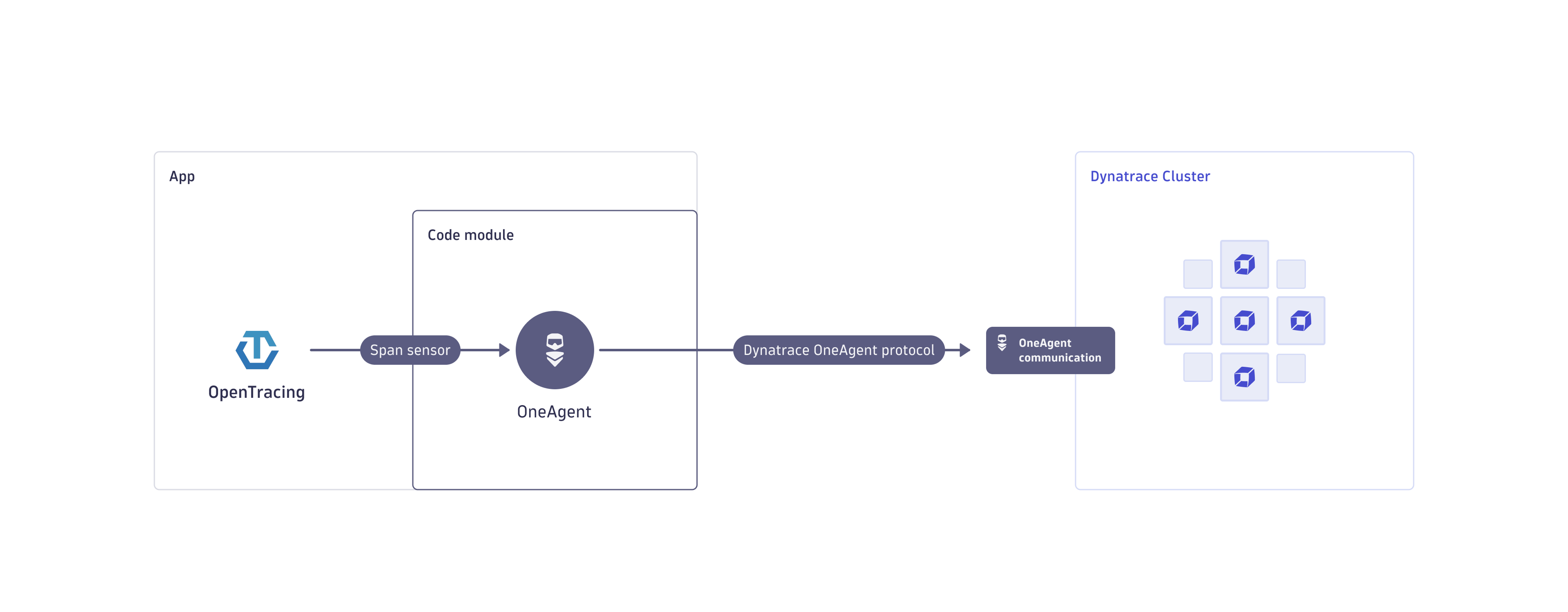
OpenTracing instrumentations are still used by many popular frameworks, libraries, and projects. To support these, OneAgent automatically collects OpenTracing span data and integrates it into end-to-end distributed traces. This lets you:
- Get insights into Java third-party libraries or frameworks that come with OpenTracing pre-instrumentation.
- Enrich monitoring data with project-specific additions, such as business data or developer-specific diagnostics points.
- Extend end-to-end distributed traces by stitching together independent, unrelated transactions with vendor-neutral custom instrumentation.
Prerequisites
-
This requires OpenTracing version 0.31, 0.32, or 0.33.
-
The following libraries and frameworks have been tested successfully.
- Hazelcast for OpenTracing Java
- Couchbase starting with java-client version 3.1.3 for OpenTracing Java
-
Note that integrating traces from the OpenTracing Spring framework instrumentation is not supported.
Enable OpenTracing integration
To capture OpenTracing span data:
-
Go to Settings > Preferences > OneAgent features.
-
Filter for OpenTracing.
-
Use the toggles to turn on or turn off the following OneAgent behaviors:
-
OpenTracing (Java) GlobalTracer auto-injection w/ override [Opt-In]: Automatically register Dynatrace as GlobalTracer and override any other tracer that is registered in the application.
Select this setting only if you're sure that you want to override the other tracers (for example, Jaeger) in your tracing system.
-
OpenTracing (Java) GlobalTracer auto-injection w/o override: Automatically register Dynatrace as GlobalTracer, if no other tracer is registered in the application.
Select this setting if you don't want to interfere with any other tracers in your tracing system.
-
OpenTracing (Java) TracerResolver override Tracer [Opt-In]: Override any Tracer created by TracerResolver with a Dynatrace Tracer.
-
-
If you change the configuration settings, restart the monitored applications or services to apply the new configuration.
-
In your application code, use the return value from
GlobalTracer.get()to create spans. See Span settings for all configuration options.-
The following sample shows how to manually create spans with OpenTracing:
// Make sure to use the correct Tracer.Tracer tracer = GlobalTracer.get();SpanBuilder spanBuilder = tracer.buildSpan("hello");spanBuilder.withTag("foo", "bar");Span span = spanBuilder.start();// Make sure to close every created Scope.// It is recommended to use a try-with-resource statement for that.try (Scope scope = tracer.activateSpan(span)) {// Do actual operation.} finally {// Make sure to finish every started Span.span.finish();} -
The following sample shows how to use an existing instrumentation scope/library to create spans with OpenTracing.
HazelcastInstance untraced = HazelcastClient.newHazelcastClient();// This operation will not be visible in Dynatrace.untraced.getMap("map").put("key", "value");// TracingHazelcastInstance implements the same interface (HazelcastInstance)// but automatically creates a span for every operation.// It internally calls GlobalTracer.get().// Available as a separate instrumentation scope/library:// https://github.com/opentracing-contrib/java-hazelcastHazelcastInstance traced = new TracingHazelcastInstance(HazelcastClient.newHazelcastClient(),false // traceWithActiveSpanOnly);// This operation will be visible in Dynatrace.traced.getMap("map").put("key", "value");
-
Limitations
- Use caution when you turn on OneAgent OpenTracing Java support for technologies that OneAgent instruments by default.
- When both OneAgent and OpenTracing instrumentation are present for the same technology (for example, incoming web requests via the Servlet API), you may experience the following limitations.
- Duplicate spans
- Additional overhead
- Service detection may not work properly (for JDBC)
- The OpenTracing Java sensor only captures
boolean,numeric, andStringtags. - OneAgent captures OpenTracing spans only within an active trace, including spans created on background threads. A trace starts at a sensor that OneAgent provides by default or at a configured span entry point, and span capturing settings apply. For details, see Span settings.