Session Replay in an environment with strong privacy requirements for web frontends
- Latest Dynatrace
- Explanation
- 5-min read
Many industries and geographies have strict privacy requirements. In most cases, these requirements don't prevent the usage of Session Replay. The right configuration and processes can help you reach compliance.
This guide describes the privacy-by-default approach to data privacy compliance with Session Replay:
- Unify your guidelines.
- Configure privacy by default.
- Decentralize unmasking.
- Centralize verification.
- Establish a feedback loop.
Problem description
Most businesses today need to comply with multiple laws and regulations with privacy implications. Some are based on geography, others on the industry that a company operates in. A thoughtful strategy combined with Dynatrace's robust privacy tools allows you to comply with these complex rules.
Privacy by default
Session Replay configuration is one element of your overall privacy setup. Our approach to privacy is much broader than Session Replay. Our documentation explains the breadth of configuration options available to you to avoid collection of personal data. Given the close relationship between Real User Monitoring (RUM) and Session Replay, we recommend that you also review the privacy capabilities for RUM described in our documentation.
Session Replay offers four masking approaches, including the Mask all and Allow list masking modes.
-
The Mask all masking mode offers the highest level of privacy, where all text, user input, attribute values, and images are masked out of the box. However, given the breadth of this mode, it can limit the replay experience because it masks content that doesn't contain personal or sensitive data.
-
The Allow list masking mode offers a good alternative if you prefer a narrower approach: all page content is masked unless you selectively and explicitly unmask it. If necessary, this can be combined with the opt-in mode. As the unmasking is applied on-ingest, any changes only apply to future sessions and cannot be applied retroactively.
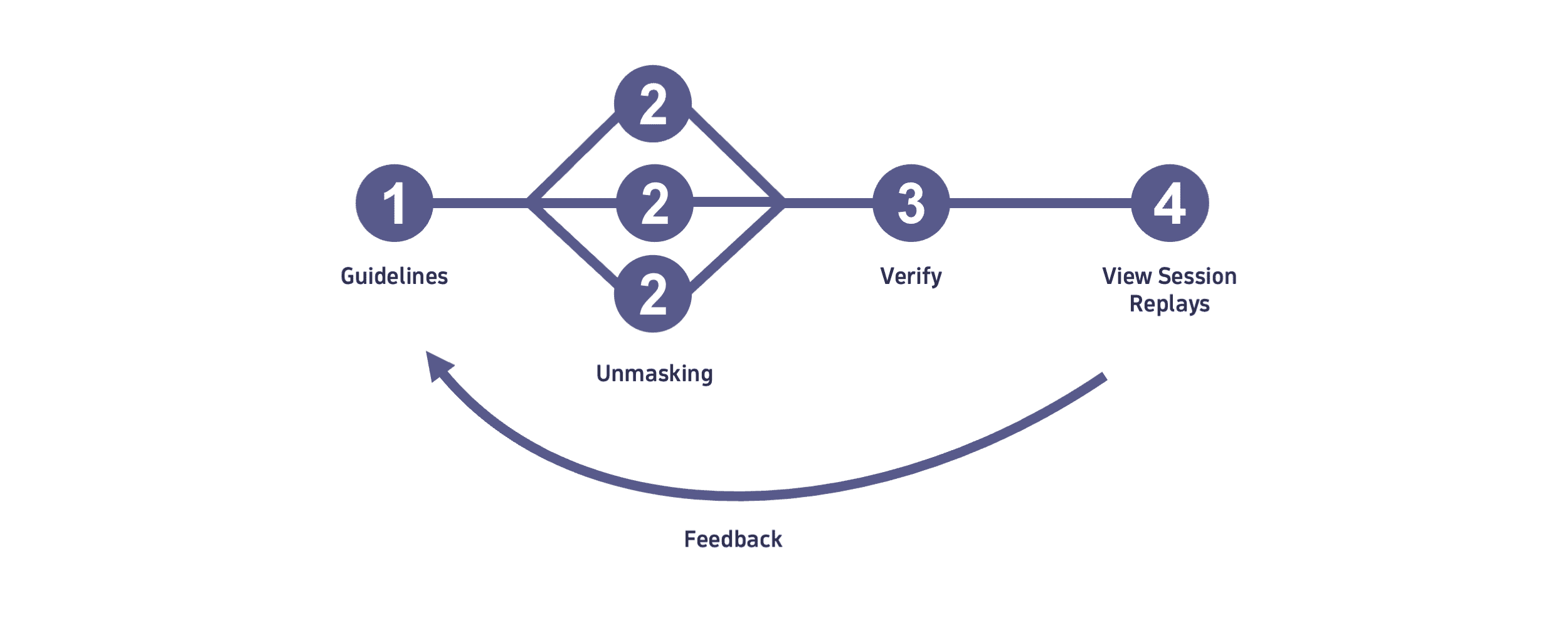
Unify your guidelines
Following the privacy-by-default approach, as a first step, establish guidelines to categorize content into allowed content and protected content to help guide configuration of privacy features of the Dynatrace platform.
-
Allowed content
Content that can be captured is referred to here as allowed content.
This could include:
- All content that is either static or generated by the application that is not based on user input. Typically includes table headers (but not table contents), navigation entries, and other information not based on user input.
- Filter criteria selected by users.
- Error messages.
-
Protected content
Content that should not be captured is referred to here as protected content.
Decentralize unmasking
To decentralize unmasking, add a single entry to the Session Replay recording allow list.
| Parameter | Value |
|---|---|
Target | Element |
CSS selector to identify the content element |
|
This delegates all unmasking decisions from the central allow list to the page contents. Each HTML element that contains only allowed content can be marked with the attribute data-dtrum-allow. Its content will then be unmasked and included in Session Replay.
Timing and dependencies
Because these unmasking decisions are decentralized, they are also implemented asynchronously. This does not, however, impede the implementation of this approach, as the Allow list masking mode can be implemented before applications have implemented their unmasking decisions.
During the interval after Allow list masking mode is implemented but before applications have implemented their unmasking decisions, Session Replay provides reduced insight for applications that haven't unmasked any elements yet. As the unmasking process is completed, however, visibility into the sessions is restored.
Component library
Organizations that use a custom component library can simplify the unmasking process by implementing and exposing corresponding unmasking flags and setting meaningful defaults. This reduces effort for the application teams and increases maintainability.
Centralize verification
As applications evolve, there is a risk that page content and previously implemented unmasking rules diverge.
If a previously unmasked section of a page is changed to include protected content that now needs to be masked, unmasking needs to be updated accordingly. If it is not updated, this introduces the risk of capturing protected content.
To avoid such cases, implement corresponding quality gates in the release process. These can be implemented by capturing sessions of a new application version in the source stage, and using Session Replay to verify that no protected content is available in the replays.
Only allow to promote a new application version to the target stage if no protected content can be located.
Establish a feedback loop
The privacy-by-default approach distributes the unmasking process to the application teams.
Without unmasking, all content is masked. This broad masking of recorded sessions can limit the use of those recorded sessions, because no content is visible. To make it possible to view some of the content, the application teams need to implement unmasking.
Summary
The approach described on this page allows organizations to roll out and configure Session Replay in an environment with strict privacy requirements. Built on the flexible configuration model in Dynatrace, it uses a privacy-by-default approach that distributes unmasking decisions to teams with the right domain knowledge.