Infrastructure requirements for RUM
- Latest Dynatrace
- Reference
Real User Monitoring (RUM) operates within an HTTP ecosystem and relies on a set of requests, headers, and cookies to capture and report real user data, and to link it with backend distributed traces. For RUM to work as expected, your infrastructure must let RUM traffic pass through unaltered and add headers that allow RUM to determine the IP addresses of your end users.
Infrastructure pass-through requirements
Your infrastructure—including firewalls, proxies, load balancers, content delivery networks (CDNs), web servers, and any other components in the request path—must allow the requests, headers, and cookies that RUM relies on to pass through unaltered. In addition, OneAgent uses the headers described in Span and trace context propagation in Distributed Tracing, which also need to pass through your infrastructure.
Web frontends
Requests
On web frontends, the RUM JavaScript is either injected automatically or inserted manually into webpages. The RUM monitoring code is loaded as an external file unless you use the snippet format inline code—and even then, the Session Replay monitoring code is loaded as a separate file. Once active, the RUM JavaScript starts sending beacon requests to report the captured RUM data.
For RUM to function fully, both requests for the RUM monitoring code and RUM beacons must pass through your infrastructure.
Requests for the RUM monitoring code
- For agentless monitoring, requests are sent to the Dynatrace CDN with a URL that contains the string
js-cdn.dynatrace.com/jstag/. - For auto-injection, requests are, by default, sent to the web or app server that hosts the application, and the URL path contains the string
ruxitagentjs_.
For details on the default URL and the available configuration options, see Configure the Real User Monitoring code source.
RUM beacons
RUM beacons report the data captured by the RUM JavaScript back to a beacon endpoint.
- For agentless monitoring, beacons are, by default, sent to a beacon endpoint with the URL path
/bfon a Cluster ActiveGate that is part of the Dynatrace SaaS infrastructure. - For auto-injection, beacons are, by default, sent to the web or app server that hosts the application, and the URL path ends with
/rb_<id>. - The beacon URL includes a query string that must not be altered—this includes modifying, removing, or reordering parameters. Its integrity is verified through a checksum.
- Don't filter the query string for specific parameter keys, and let all beacon requests pass instead. Dynatrace intentionally doesn't publish a list of parameter keys, because the parameters can change at any time and setups that rely on a fixed list break with the next change.
- The
POSTbody contains the payload, sent with thetext/plaincontent type. For Session Replay, theapplication/octet-streamcontent type can also be used. - For Session Replay,
POSTrequests may be preceded by CORS preflight requests, which areOPTIONSrequests. - The RUM JavaScript may also send
GETrequests to the beacon endpoint to retrieve configuration updates.GETresponses have atext/plaincontent type.
For the available beacon endpoint configuration options, see Configure the beacon endpoint for web frontends.
RUM Classic validates the beacon URL query string more leniently and doesn't use a checksum. If you upgrade from RUM Classic to RUM on the latest Dynatrace and your infrastructure alters the query string in any way—for example, by reordering parameters—RUM Classic beacons may still be processed without immediate errors, while beacons in the new format will fail. For details, see Do not alter the beacon URL query string.
Headers
RUM uses the following HTTP headers, all of which must be allowed to pass through your infrastructure.
Custom request headers
| Header | Purpose |
|---|---|
| Set by the RUM JavaScript when cross-origin XHR linking is configured, to carry information required for correlating cross-origin XHRs in RUM Classic. |
| Set by the RUM JavaScript to carry IDs required for RUM beacon routing, user session aggregation, and RUM Classic correlation. |
| Set by the RUM JavaScript when the instrumented application modifies the standard |
| Set by OneAgent on the first instrumented server-side tier (the one closest to the browser) to forward context to downstream OneAgents, such as the detected frontend ID, the cookie domain, and any applicable custom injection rule. |
| OneAgent versions before 1.167 Legacy header set on the first instrumented server-side tier (the one closest to the browser) to preserve the original URL of the request in case of URL rewriting. |
| Set by OneAgent to prevent the .NET code module from capturing distributed traces for RUM beacons. |
Standard request headers
| Header | Purpose |
|---|---|
Read by OneAgent to determine whether to compress the RUM JavaScript before delivery. | |
Set or modified by OneAgent on the first instrumented server-side tier (the one closest to the browser) when no | |
| Modified by OneAgent when cache control header optimizations are active. |
Set by the browser. Captured by OneAgent and by the beacon endpoint on the Cluster ActiveGate for RUM Classic correlation. | |
Set by the RUM JavaScript on XHR and Fetch requests for frontend-backend linking. | |
Set by the browser. Read by OneAgent to evaluate browser exclusion rules, and captured by beacon endpoints for browser and OS detection. Setting it to |
Custom response headers
| Header | Purpose |
|---|---|
| Set by OneAgent when its RUM health check is active, carrying the IDs of the OneAgent code modules involved in handling the request. |
| Set by OneAgent when its RUM health check is active, carrying the health check results. |
| Set by OneAgent to indicate that it has started injecting the RUM JavaScript, preventing duplicate injection. |
Standard response headers
| Header | Purpose |
|---|---|
| Set by beacon endpoints for responses to |
Set by beacon endpoints for responses to RUM beacons. To control from which origins beacons are accepted, configure the beacon origin allowlist. Also set for responses to requests for the RUM monitoring code when they are handled via the Dynatrace CDN. | |
Set for responses to RUM beacons and requests for the RUM monitoring code. | |
Set for responses to requests for the RUM monitoring code; also read during HTML injection. | |
Adapted upon HTML injection, and set for responses to RUM beacons and requests for the RUM monitoring code. | |
Set for responses to RUM beacons and requests for the RUM monitoring code, and read during HTML injection. | |
When cache control header optimizations are active, OneAgent appends a suffix to the original header value. It may set the header if the application doesn't. | |
Set for responses to requests for the RUM monitoring code when they are handled via the Dynatrace CDN. | |
When cache control header optimizations are active, OneAgent subtracts 1 second from the original header value. The header is also set for responses to requests for the RUM monitoring code. | |
Set by OneAgent to carry information relevant for frontend-backend linking and RUM Classic correlation. Responses cached on infrastructure components such as web servers, proxies, caching servers, and CDNs must not include this header. | |
Set by OneAgent to place the | |
Set by the beacon endpoint on the Cluster ActiveGate. | |
Set by OneAgent to allow the RUM JavaScript to access the content of the | |
Read by OneAgent during HTML injection. | |
Set for responses to RUM beacons and requests for the RUM monitoring code. |
Cookies
RUM uses the following cookies, which must be able to reach Dynatrace. Configure infrastructure components such as web servers, proxies, caching servers, and CDNs to ignore these cookies in requests and responses. For more details on how Dynatrace uses cookies, and for an explanation of the <environmentID> suffix used in the table, see Cookies and client-side storage for RUM and Session Replay.
| Cookie | Max size | Purpose |
|---|---|---|
| No set limitation, but usually less than 100 B | Tracks a visit across multiple requests. |
| 58 B | Required for routing RUM beacons; includes the session ID for user session aggregation. |
| Max URL length | Serves as intermediate storage for page-spanning actions. |
| Length of | Used to determine the top-level domain. |
| 45 B | Contains the visitor ID to correlate sessions. |
| 27 B | Stores the session timeout. |
| 20 B | Specifies the ID of the current recorded view. |
| 81 B | If Session Replay is enabled, stores the required values to keep the recording consistent through pages. |
The dtsrVID cookie is available from RUM JavaScript version 1.325+ to RUM JavaScript version 1.333.
The optional cookie dtSR is available from RUM JavaScript version 1.335+.
Cookies on upgraded environments
Once an environment has been upgraded to Latest Dynatrace, RUM uses the following additional cookies. All of these must be able to reach Dynatrace. Configure infrastructure components such as web servers, proxies, caching servers, and CDNs to ignore these cookies in requests and responses. For details, see Cookies and client-side storage for RUM and Session Replay.
| Cookie | Max size | Purpose |
|---|---|---|
| 130 B | Tracks users across multiple sessions. |
| No set limitation, but usually less than 150 B. The size grows with the number of involved frontends. | Tracks a session across multiple requests. |
| 38 B | Stores the consent state. |
Mobile frontends
Requests
OneAgent for Mobile sends beacon requests to report the captured RUM data. The beacon URL path depends on the configured beacon endpoint:
- If beacons are handled by an ActiveGate, the URL path is
/mbeacon. - If beacons are handled by a OneAgent instrumenting a web or application server, the URL path is
/dtmb.
In addition to the POST requests that report the captured data, OneAgent for Mobile also sends GET requests to the beacon endpoint to retrieve configuration updates. Beacon responses have a text/plain content type.
The beacon URL includes a query string that must not be altered—this includes modifying, removing, or reordering parameters. Its integrity is verified through a checksum.
Don't filter the query string for specific parameter keys, and let all beacon requests pass instead. Dynatrace intentionally doesn't publish a list of parameter keys, because the parameters can change at any time and setups that rely on a fixed list break with the next change.
RUM Classic validates the beacon URL query string more leniently and doesn't use a checksum. If you upgrade from RUM Classic to RUM on the latest Dynatrace and your infrastructure alters the query string in any way—for example, by reordering parameters—RUM Classic beacons may still be processed without immediate errors, while beacons in the new format will fail. For details, see Do not alter the beacon URL query string.
Headers
On mobile frontends, the following HTTP headers are used, all of which must be allowed to pass through your infrastructure.
Request headers
| Header | Purpose |
|---|---|
Set by OneAgent for Mobile for frontend-backend linking. | |
| Set when you use the Cordova Plugin in RUM Classic and manually instrument native web requests. Links native web requests with their server-side distributed traces. |
| Set by OneAgent for Mobile in RUM Classic to link the mobile part of a web request with the server-side distributed trace. |
Response headers
| Header | Purpose |
|---|---|
Set for responses to RUM beacons. | |
Set by the ActiveGate beacon endpoint for responses to RUM beacons. |
Cookies
The following cookies are used for hybrid applications in RUM Classic that combine OneAgent for Mobile with the RUM JavaScript. They need to pass through your infrastructure unaltered.
| Cookie | Max size | Purpose |
|---|---|---|
| 92 B | Joins sessions captured by OneAgent for Mobile and the RUM JavaScript. |
| 36 B | Propagates settings between OneAgent for Mobile and the RUM JavaScript. |
IP address determination headers
RUM uses client IP addresses—the IP addresses of your end users' devices—to determine end users' geolocations and, for web frontends, apply IP address exclusions. When a request reaches an instrumented web or application server or the beacon endpoint on the Cluster ActiveGate directly, the client IP address is taken from the socket connection. If, however, uninstrumented components such as load balancers, reverse proxies, or CDNs are part of the request path, the socket connection carries the IP address of the last of these components instead. To determine the client IP address in this case, OneAgent and the beacon endpoint on the Cluster ActiveGate rely on a request header that your infrastructure adds.
Add an IP address determination header
Components like load balancers and reverse proxies can be configured to forward the client IP address to the backend in a request header. Common headers for this purpose include X-Forwarded-For and the standardized Forwarded header, as well as CDN-specific headers such as True-Client-IP and CF-Connecting-IP. When a request passes through several components, each component typically appends the IP address it received the request from, so the header contains a comma-separated list. Dynatrace assumes that the first entry represents the client IP address.
Some components add such a header by default. If yours doesn't, you need to configure it to add one. Make sure that the header is added to all requests, including RUM beacons, since the IP address that shows up in RUM data is determined from beacon requests. To check whether Dynatrace already evaluates the header that your component adds, see the next section.
Configure IP address determination
Dynatrace uses a list of request headers to determine the IP address. By default, the list contains a set of common headers. Headers in the list are processed in order, with those at the top taking precedence. As soon as Dynatrace finds a matching header on the request, it stops evaluating the remaining headers. If none of the headers is present, Dynatrace uses the IP address of the socket connection. After confirming that your uninstrumented component adds a suitable header, you might need to add that header to the list. You can add any header whose value has the same format as X-Forwarded-For: a single IP address or a comma-separated list of IP addresses, with the client IP address first.
To check or configure the headers used for IP address determination
- Go to
 Settings > Process and contextualize > Real User Monitoring > Network and location > Identify client IP addresses.
- If the header added by your component is missing from the list, select Add client IP header and enter the header name.
- You can reorder entries by selecting and holding next to the header name, then dragging it up or down.
Example
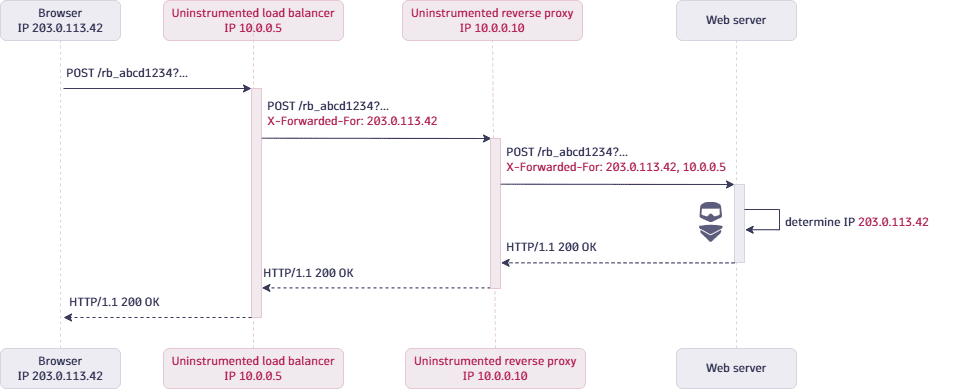
The following diagram shows a beacon request from a web frontend with OneAgent used as the beacon endpoint. The request is served through an uninstrumented load balancer and an uninstrumented reverse proxy. The browser has the IP address 203.0.113.42. Without an IP address determination header, OneAgent on the web server would only see the IP address of the reverse proxy, 10.0.0.10.
- The load balancer adds the
X-Forwarded-Forheader with the IP address of the browser,203.0.113.42. - The reverse proxy appends the IP address of the load balancer,
10.0.0.5, so the header value becomes203.0.113.42, 10.0.0.5. - OneAgent on the web server determines the client IP address,
203.0.113.42, from the first entry of the header. This IP address is the one that shows up in RUM data.