Configure service failure detection
- Dynatrace Classic
- How-to guide
- 9-min read
Dynatrace failure detection automatically detects the vast majority of error conditions in your environment, including the underlying root causes. With this approach, Dynatrace is able to provide you with answers when problems occur or when your application performance drops.
When Dynatrace detects a service error, it doesn't necessarily mean that you want to label a request as failed. If the default service-error detection settings don't meet your needs, you can configure failure detection settings as explained in this page.
By default, Dynatrace detects:
- Programming exceptions (Java, .NET, Node.js, and PHP) as the reason for failed requests when exceptions result in the abort of service calls.
- Error pages provided by many web containers for the handled exceptions.
- HTTP
500–599error codes for web requests interpreted as errors on the server side. - HTTP
400–599error codes for web requests interpreted as errors on the client side.
Why does client side include 5xx codes?
The detected error codes depend on the perspective:
- From the server perspective, only a
5xxcode is an error, because a4xxcode means a client error. - From the client perspective, a
5xxstill means there's an error even though it's not the client's fault.
Failure detection settings
You can configure failure detection globally or on individual services.
- When you configure failure detection settings on the service level, they override the global setup.
- Failure detection rules are evaluated from top to bottom; the first matching rule applies. If multiple failure detection rules have the same conditions, only the first matching rule applies.
The following failure detection rules don't apply to the service types:
-
Span service
-
Unified service
To learn more about unified service failure detection, see Unified services.
To configure service failure detection globally
-
Go to Settings and expand Server-side service monitoring.
-
To add a new failure detection rule, go to Failure detection rules > Add failure detection rule.
Each rule can have multiple conditions, based on defined failure detection parameters. You can use existing failure detection parameters for failure detection rules or create new ones.
- To add a new failure detection parameter, go to Failure detection parameters > Add failure detection parameters. To learn more, see Parameters, HTTP parameters, and General parameters below.
- Use the Enabled switch to turn a rule on or off.
- Dynatrace recalculates global rule matching every 10 minutes.
Parameters
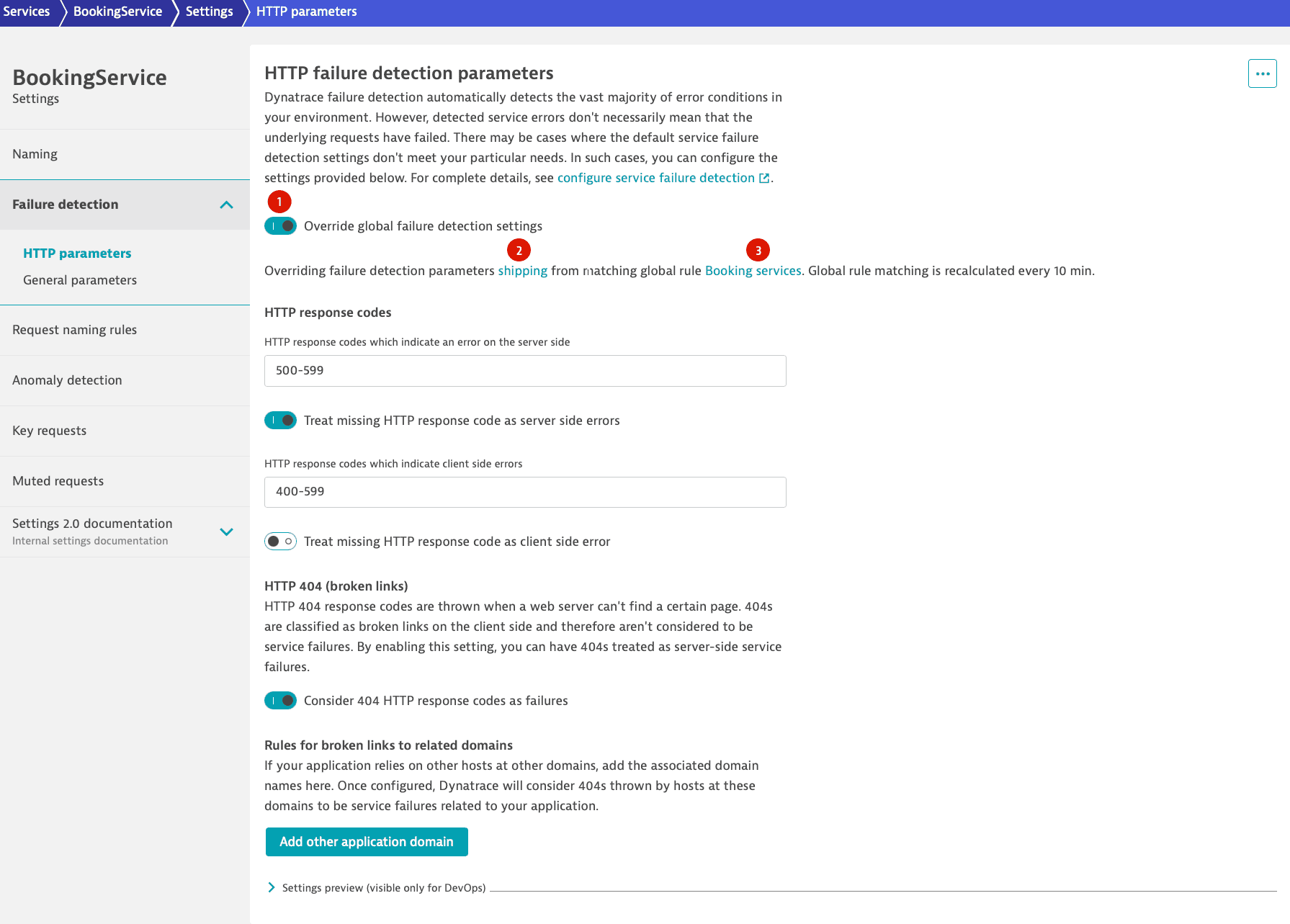
Parameters for failure detection include HTTP-specific parameters and general parameters (related to exceptions, custom errors, and span failure detection). While you can always access general parameters both globally and on the service level, you might not see HTTP failure detection parameters on the service level, as they are visible only on specific services, such as web requests and web services. You can set them up after enabling Override global failure detection settings (1 in the graphic) and even if no global rule matches the service.
HTTP parameters
-
HTTP response codes
HTTP-4XXresponse codes usually indicate client-side errors, not server-side errors. You can specify which missing HTTP response codes should be treated as server-side errors and which as client-side errors. You can define multiple ranges separated by commas (for example,400-402, 405-417).Depending on your application, missing response codes might indicate a "fire and forget" call that didn’t return a response at all, a timeout, or an error situation. Dynatrace considers missing response codes as special cases and doesn’t report them as a default behavior. You can change this by enabling Treat missing HTTP response code as server side errors or Treat missing HTTP response code as client side errors.
-
HTTP 404 - broken link configuration
When a web server can’t find a certain page, it returns an
HTTP 404response code. Usually, this indicates a problem on the calling side. When the calling side belongs to the same website, this would be considered a broken link.Because most customers don't consider broken links to be a problem on their server, Dynatrace classifies broken links as client-side problems and not automatically as failures on the server side. However, you can enable the Consider 404 HTTP response codes as failures switch to classify broken links as server-side failures. After doing so, you can associate additional hosts at other domains to your application by adding the name of the host under Add other application domain.
General parameters
-
Success forcing exceptions
These exceptions indicate that a service call should not be considered as failed, for example, because the client aborted the operation. Although they are technical errors, in principle they don't count as failed requests because they aren't caused by faults with the service. If a request encounters such an exception in the root call of the service, Dynatrace considers the request to be successful, regardless of the HTTP error code or any other information. You can select Add exception to add exception classes that indicate such situations.
-
Ignored exceptions
There are situations in which your code (or third-party code that you don't control) returns exceptions that indicate a certain response and not an error. For example, the Thrift client for Cassandra returns a
NotFoundExceptionresponse when a row isn’t found. This isn’t an error, but simply a response code.You can select Add exception to configure Dynatrace to not consider such exceptions as failed request indicators. Additionally, you can define a string that must be found within an exception message for the exception to be ignored. If the HTTP response code for the same call shows an error, Dynatrace considers the request as failed. To consider a request successful regardless of the HTTP error code or any other information, see Success forcing exceptions.
-
Custom handled exceptions
There are situations in which application code handles exceptions gracefully in a manner that isn’t automatically detected by Dynatrace. When this happens, Dynatrace doesn’t detect failed requests or alert you to errors.
You can remedy such situations by specifying an exception class that should result in a failed request. Optionally, you can define a string that must be found in the exception message. If this string isn't found, the exception won't lead to a failed request.
If Dynatrace finds the defined exception (and the optionally-defined exception message) on a request, Dynatrace marks the request as failed.
Note that this doesn't work if you exclude the exception class from capture in Deep process monitoring settings. -
Ignore all exceptions
When Ignore all exceptions is enabled, Dynatrace ignores Success forcing exceptions, Ignored Exceptions and Custom handled exceptions for the services to which the parameters apply—the specific service if the switch is enabled on the service-level or the services that match the global rule. Because exceptions are still tracked, they appear in distributed traces, but you don't receive alerts for them and requests aren't labeled as failed.
-
Custom errors via request attributes
Custom error situations might be triggered by exceptions, but some are detectable only via a return value or other means. To support such cases, you can define a request attribute that captures the required data. You can then define a custom error rule based on the request attribute that checks the value of the request attribute to determine if the request has failed or not.
Requests might fail for reasons related to business logic. These situations often aren’t detectable via exceptions or HTTP response codes. Nevertheless, they are indicative of problems and might be even more important than situations detected via exceptions and response codes. For example, you might have a business function in your Java code that indicates an error via a return value or you might have your own error-handling functionality that, when called, indicates a functional business error.
Such situations can be captured via request attributes, which you can use as indicators for error situations.
To create a custom error rule
-
Go to
 Services Classic.
 -
Select the service for which you need to adapt failure detection.
-
Select More (…) > Settings.
-
Select Failure detection > General parameters
-
Under Custom error rules, select Add custom error rule.
-
Select a request attribute from the displayed list.
-
Define a condition for the rule, such as contains and a value.
In the example below, a value of
-1in theAmount of recommendationsattribute indicates an error. Following this rule, if Dynatrace detects such an error, it will mark the respective service request as failed and explain that the rule match is the reason for the failure.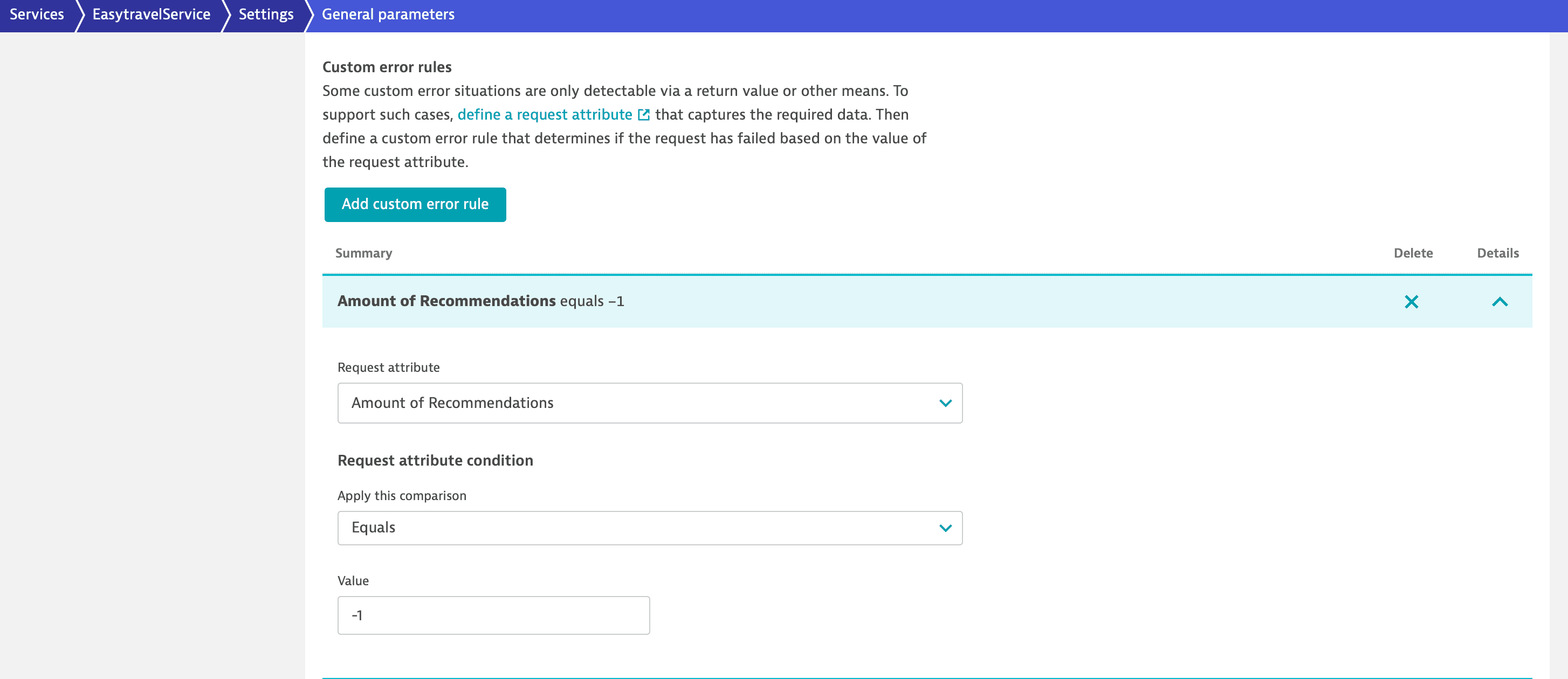 Custom error rule
 -
-
Span failure
Span failure detection is specific to OpenTelemetry. Dynatrace by default detects span failures, but there are specific cases in which you might want to change these settings. To ignore span failure detection, turn on Ignore span failure detection.
Schema info
On the service level, you can visualize the Schema ID by selecting More (…) > Schema info in the upper-right corner of the HTTP parameters or General parameters page.
Settings API reference
You can also configure failure detection settings via the Settings 2.0 API. Use the following two schema IDs:
| Schema ID | Description |
|---|---|
| Defines failure detection parameter sets (HTTP response codes, broken links, exception rules). |
| Defines rules that assign parameter sets to services based on conditions. |
Authentication
You need an access token with the following scopes:
| Scope | Operations |
|---|---|
| List and view settings objects. |
| Create, update, and delete settings objects. |
To learn how to obtain and use an access token, see Dynatrace API - Tokens and authentication.
Failure detection parameter sets
The Settings 2.0 API supports four operation types for failure detection parameter sets: GET, POST, PUT, and DELETE.
List all parameter sets
To get the complete list of all defined parameter sets, use the following request.
GET /api/v2/settings/objects?schemaIds=builtin:failure-detection.environment.parameters&scopes=environment
View a parameter set
To read the contents of a single parameter set, use a GET request together with its unique objectId.
GET /api/v2/settings/objects/{objectId}
The ID must be the RFC 4122 UUID assigned to this parameter set settings object.
Create a parameter set
You can add a new parameter set using a POST request with a body specifying the necessary values.
POST /api/v2/settings/objects
Example request body:
[{"schemaId": "builtin:failure-detection.environment.parameters","scope": "environment","value": {"name": "Ignore known database errors","httpResponseCodes": {"serverSideErrors": "500-599","failOnMissingResponseCodeServerSide": false,"clientSideErrors": "401-402,405-499","failOnMissingResponseCodeClientSide": false},"brokenLinks": {"http404NotFoundFailures": false},"exceptionRules": {"ignoreAllExceptions": false,"successForcingExceptions": [],"ignoredExceptions": [{"classPattern": "psycopg2.errors.UniqueViolation","messagePattern": "duplicate key value violates unique constraint \"run_once_at_unique_identifier_and_timestamp\""}],"customHandledExceptions": [],"customErrorRules": [],"ignoreSpanFailureDetection": false}}}]
For custom error rules, each entry includes a request attribute and a condition:
{"requestAttribute": "<request-attribute-object-id>","condition": {"compareOperationType": "STRING_EQUALS","textValue": "error","caseSensitive": false}}
The response body returns the new objectId and could look like this:
[{"code": 200,"objectId": "vu9U3hXa3q0AAAABADBidWlsdGluOmZhaWx1cmUtZGV0ZWN0aW9uLmVudmlyb25tZW50LnBhcmFtZXRlcnMABnRlbmFudAAGdGVuYW50ACRlNWEwYjAyYi0zMDNlLTM2ZTEtOTMyNS0wMjM1YWNhMDc5MmO-71TeFdrerQ"}]
You can then use this ID directly to create or update a failure detection rule.
Update a parameter set
To modify an existing parameter set, use a request body similar to the one shown in the Create section. In the URL, specify a valid settings object ID.
PUT /api/v2/settings/objects/{objectId}
Use the same value structure as shown in the Create section.
Delete a parameter set
To delete an existing parameter set, first fetch its objectId, then perform a DELETE request that specifies this ID.
DELETE /api/v2/settings/objects/{objectId}
For optional and required parameters, as well as detailed type information, see Settings API - Failure detection parameters schema table.
Failure detection rules
Failure detection rules are evaluated from top to bottom; the first matching rule applies.
List all rules
To fetch all currently defined failure detection rules, use the following request.
GET /api/v2/settings/objects?schemaIds=builtin:failure-detection.environment.rules&scopes=environment
View a rule
Use a GET request with the rule objectId as a path parameter to read a single failure detection rule.
GET /api/v2/settings/objects/{objectId}
Create a rule
You can add a new failure detection rule using a POST request with a body that specifies the necessary attributes.
POST /api/v2/settings/objects
The parameterId field must contain the object ID of an existing parameter set. By default, new rules are added at the bottom of the rule list. To insert a rule at a specific position, set insertAfter to the object ID of the preceding rule, or to an empty string to place it at the top of the rule list.
Example request body:
[{"schemaId": "builtin:failure-detection.environment.rules","scope": "environment","value": {"name": "Ignore known database errors for automation-server","enabled": true,"parameterId": "<object-id-of-parameter-set>","conditions": [{"attribute": "SERVICE_NAME","predicate": {"predicateType": "STRING_EQUALS","textValues": ["automation-server"],"caseSensitive": true}}]}}]
Update a rule
To modify an existing rule, use the same request body structure as shown in the Create section and specify the settings object ID in the URL.
PUT /api/v2/settings/objects/{objectId}
Use the same value structure as shown in the Create section.
Delete a rule
To delete an existing rule, first fetch its objectId; then use a DELETE request that specifies this ID.
DELETE /api/v2/settings/objects/{objectId}
Reorder rules
To change the evaluation order for your failure detection rules, update each rule with the insertAfter or insertBefore field set to the object ID of the rule that should precede or follow it. To place the rule at the top of the rule list, leave insertAfter empty. To move it to the end of the rule list, add an empty insertBefore attribute.
[{"schemaId": "builtin:failure-detection.environment.rules","scope": "environment","value": {"name": "New top rule","...": "...","parameterId": "<object-id-of-a-parameter-set>","...": "..."},"insertAfter": ""}]
For more details about accepted types and available parameters, such as supported condition attributes, see the Settings API - Failure detection rules schema table.
Condition attributes
Each failure detection rule contains a list of conditions. All conditions must be fulfilled for the rule to match. Each condition checks a service or process group attribute using a predicate.
| Attribute | Description | Predicate types |
|---|---|---|
| Matches the detected service name. |
|
| Matches the service type. |
|
| Matches the process group name. |
|
| Matches process group tags. |
|
| Matches service management zones. |
|
| Matches service tags. |
|
For environments with the latest Dynatrace SaaS experience, the SERVICE_MANAGEMENT_ZONE and SERVICE_TAG condition attributes are no longer available, and failure detection rules using them are ignored at runtime.
Moreover, the PG_TAG condition attribute is no longer evaluated. Instead, you can use this field to match based on the primary tags defined in the deployment of your application.
Inputs starting with primary_tags. are matched against the primary tags on the input data.