Where to view your costs (Dynatrace Classic)
- Dynatrace Classic
- Explanation
- 6-min read
Account Management is the front door for subscription totals, capability and environment breakdowns, billing reports, and the APIs that expose this same data programmatically.
Overview
Account Management surfaces your metered usage as ready-made summaries, breakdowns, and reports, and the same data is exportable for finance integrations.
Use cases
- Check your current subscription consumption against your annual commitment.
- Compare cost across environments, capabilities, or time periods.
- Pull billing data into Excel, Power BI, or another finance tool.
Account Management
Account Management gives you hourly reporting on DPS usage, daily updates on your current budget, and a drill-down view that lets you compare costs across time periods, environments, and capabilities.
Cost overviews
You can get an overview of your Dynatrace Platform Subscription consumption in Account Management > Subscription.
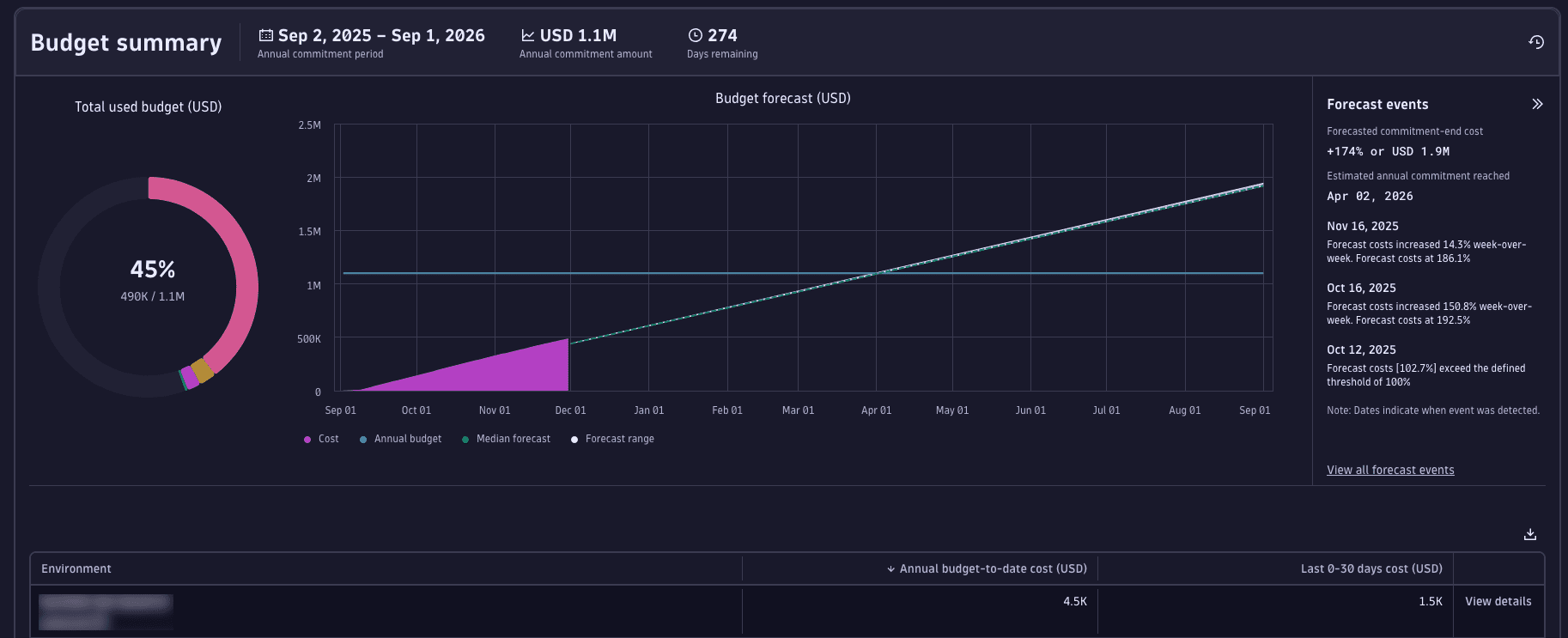
- Budget summary: a summary of total subscription period costs and forecast, with a breakdown by environment.
- Cost and usage breakdown: a detailed cost and usage breakdown for the last 30 days, including consumption by capability and by environment.
- Cost and usage analysis: a flexible drill-down view where you can compare time periods, filter by environment or capability, and identify cost drivers and trends.
For a detailed walkthrough of the UI, see Overview (Dynatrace Platform Subscription).
Billing report
Your billing report provides details about accrued costs per booking date. Use this view to determine which Dynatrace monitoring costs were recognized and booked on which day.
Billing reports are available in Account Management > Subscription > Billing report.
For more information, see Billing report (Dynatrace Classic).
APIs for cost data integration
Every usage and cost data point you see in Account Management is also available via the Dynatrace API. This means you can export your consumption data, share it across teams, and integrate it into any tool your organization already uses, from finance systems to custom dashboards. Common use cases:
- Share cost visibility with budget owners and finance teams.
- Feed consumption data into enterprise tools.
- Automate budget reports and alerts.
- Integrate with internal cost allocation or chargeback systems.
For a full walkthrough including OAuth setup and request examples, see Export cost data via API (Dynatrace Classic).
You can also explore all available endpoints directly in the API Explorer in Account Management or via the Account Management API documentation.
 Dynatrace Platform Subscription