Cost monitors
- Latest Dynatrace
- Explanation
- 5-min read
Cost monitors help you manage your Dynatrace Platform Subscription budget and identify unexpected cost increases. They monitor your overall forecasted usage and warn you when costs increase significantly, or forecasts exceed user-defined threshold amounts. They also monitor daily costs at the capability and environment levels, alerting you when costs exceed predicted levels.
- Cost monitors notify you when forecast costs at the end of the subscription exceed budget or when there are significant increases in the week-over-week forecast.
- Cost monitors inspect costs for each capability in each environment daily and notify you when a capability exhibits an unexpected increase, allowing you to stay on top of daily and weekly usage.
Forecast and cost events are only estimates and therefore can be misleading in some cases. Forecasts are based on statistical models and should therefore be relied on with caution.
Overview
Cost monitors detect unexpected consumption changes as they happen, complementary to budgets. They evaluate consumption against thresholds, forecast projections, change rates, and route alerts to the Notification center.
Use cost monitors when you need an alert the moment something deviates, not after a budget threshold is crossed.
Use cases
- Detect when a forecast projects a breach before the actual budget is hit.
- Detect rate-of-change anomalies, such as a sudden spike in daily ingest.
- Route different alert categories to different teams via the Notification center.
How cost monitors work
Cost monitors are enabled automatically for all DPS accounts and will notify license administrators by default without configuration, which helps to minimize surprise costs. License administrators can adjust forecast thresholds at any time.
Cost events are shown in Account Management > Notification center, and Dynatrace sends email notifications when cost events occur.
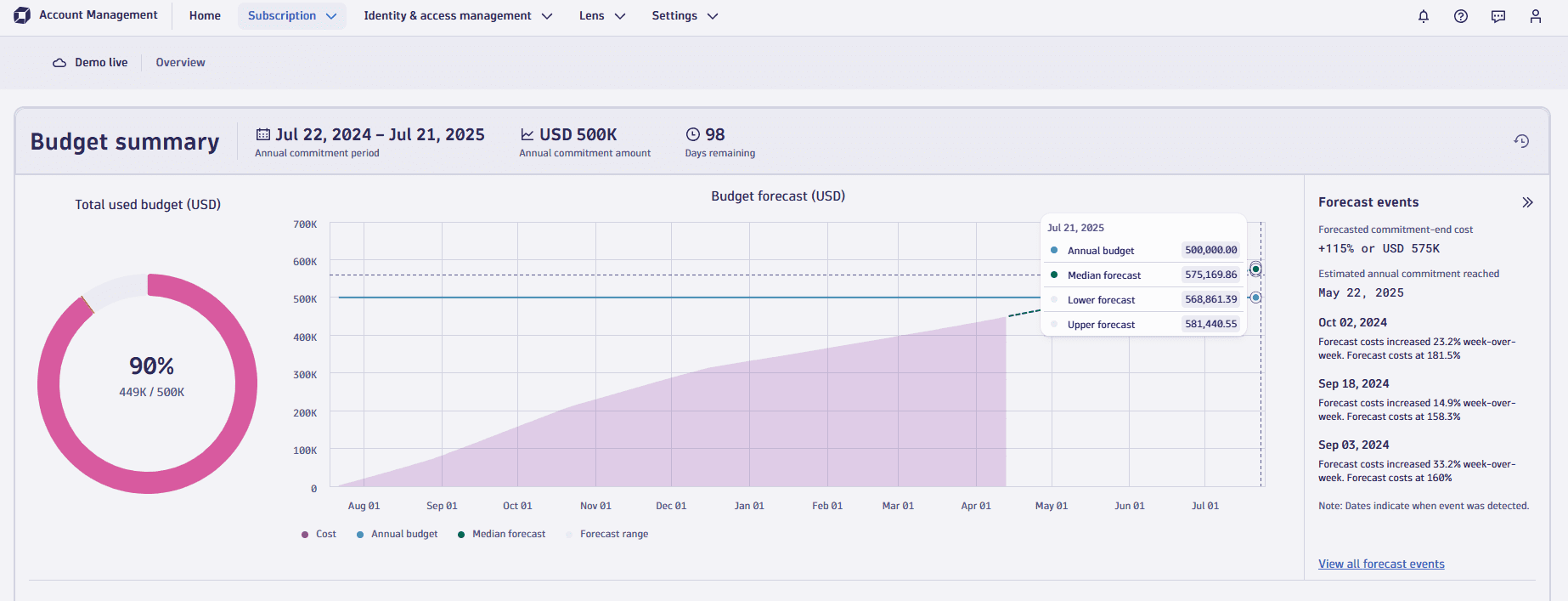
The Forecast events panel displays the projected costs (percentage of budget; absolute cost) forecast to incur at the end of the annual commitment period. If the forecast usage exceeds the annual commitment, the date when the forecast exceeds the annual commitment is shown. The forecast also provides a range of values. Hover over the chart to display the median forecast value along with the predicted upper and lower ranges of the forecast. No forecast is shown until 15 days of consumption data is available to generate a forecast.
Cost monitor algorithms use linear forecasting techniques to predict future usage from the past month of consumption data.
- The algorithm gives more weight to more recent data points to adapt to changing consumption behavior.
- A significant change in usage will only fully affect the forecast after a few days as the forecasting algorithm adapts to the new usage behavior. However, you may receive alerts that an unexpected cost change has been detected.
Notifications
Cost notifications inform you when forecast and cost event thresholds are reached. This section describes notification triggers and configuration options.
You can get notifications in the Notification center, via email, and the API.
For more information about cost monitor notifications, see Notification center.
Email notifications
License administrators will be notified by email that alerts them when something may require further analysis. Example triggers for notification emails are:
- Whenever there is a significant change in week-over-week forecast.
- The forecasted costs are predicted to exceed the budget.
Usually, one email notification is sent per day. In case cost events are reported after the email was sent, additional emails may be sent during the day. Allow up to one hour between when the cost event is reported and the email notification is sent.
To configure cost monitor notifications, go to Account Management > Subscription > Cost Management > Cost monitors. You can notify up to 50 email recipients.
You can configure:
- Send email to license administrators on this account. When selected, emails are sent to license administrators. License administrators are users that have the View and manage account and billing information permission. This checkbox is selected by default.
- Send email to additional recipients on this account. When selected, emails are sent to the email addresses that you enter in the text field. Emails can be sent to up to 50 recipients; see the note below for more information.
Remember to save your changes when you finish setting up notifications.
If you have specified more than 50 recipients, Dynatrace filters the email addresses as follows:
- Dynatrace sends emails to all of the specified email addresses, up to 50 email addresses.
- If there are fewer than 50 email addresses specified, Dynatrace sends emails to all of the license administrators, up to a total of 50 email addresses. Emails are sent to license administrators in alphabetical order according to the email addresses.
Forecast notifications
For forecast notification thresholds, you can configure when notifications are sent by email.
- Week-over-week threshold: Get notified when there is a weekly jump in the forecast. This notification helps identify significant increases in account usage, even if the total forecast remains below target.
- Total forecast threshold: Get notified when projected usage exceeds a user-defined value. The default is 95% to ensure you get the most from your Dynatrace Platform Subscription without exceeding your annual commitment.
Cost event notifications
For cost event notifications, Dynatrace uses linear forecasting algorithms to determine an acceptable range of values. When observed values fall outside this range, a notification is generated in Notification center and a notification email is sent as configured.
Example cost monitor scenarios
This section describes different notifications that you'll receive, describes possible causes, and suggests actions to take.
Forecast increased week-over-week
-
Notification message: “Forecast costs increased 15% week-over-week. Forecast costs at 75%.”
-
Description: There has been a significant weekly change in the forecast, but the total forecast prediction is only at 75% of the overall commitment.
-
Possible actions:
-
As the forecast remains below the commitment, no action is required, but you may wish to analyze the increase's root cause to ensure it aligns with your adoption goals.
-
If you're still in the deployment phase of Dynatrace, you can ignore this kind of notification, as increased weekly usage is expected.
-
If there was a significant increase in capability, you might also receive a cost event notification. Check the Cost events pane or the Notification center to identify capability spikes in a specific environment.
Forecast exceeds threshold
-
Notification message: “Forecast costs [105%] exceed the defined threshold of 95%.”
-
Description: Your current usage pattern will result in a possible budget overrun.
-
Possible actions:
-
If you're still in the deployment phase of Dynatrace, your current usage pattern may suggest ever-increasing usage, as the forecast algorithms can't anticipate deployment plans. Once deployment is complete, usage and costs will level off, and the forecast will also trend downwards after a few days as it detects a new usage pattern. If the forecast continues to show a budget overage 30 days after ramp-up finishes, your usage might be over budget.
-
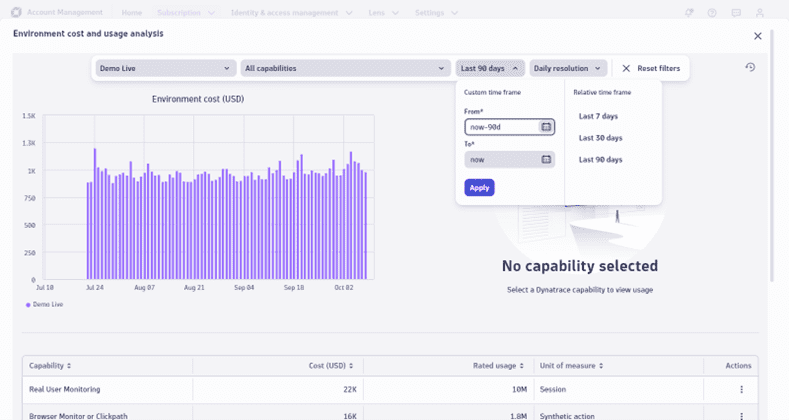
To understand if your subscription usage is ramping up, select the View details link for the primary environment and increase the timeframe to the last 90 days or since the start of the subscription. This displays the cumulative cost of your subscription over time, allowing you to identify if costs are increasing or leveling off. Your forecast might show an exponential growth curve if the costs are not leveling off.
-
Once your annual commitment is reached, you can continue to use Dynatrace while incurring on-demand usage. Dynatrace applies the same rate card for on-demand usage without additional fees or premium pricing. You receive monthly invoices for on-demand costs until the next annual commitment period begins.
Unexpected increase in consumption
- Notification: "Increase in Events – Query cost detected in environment [environment name].”
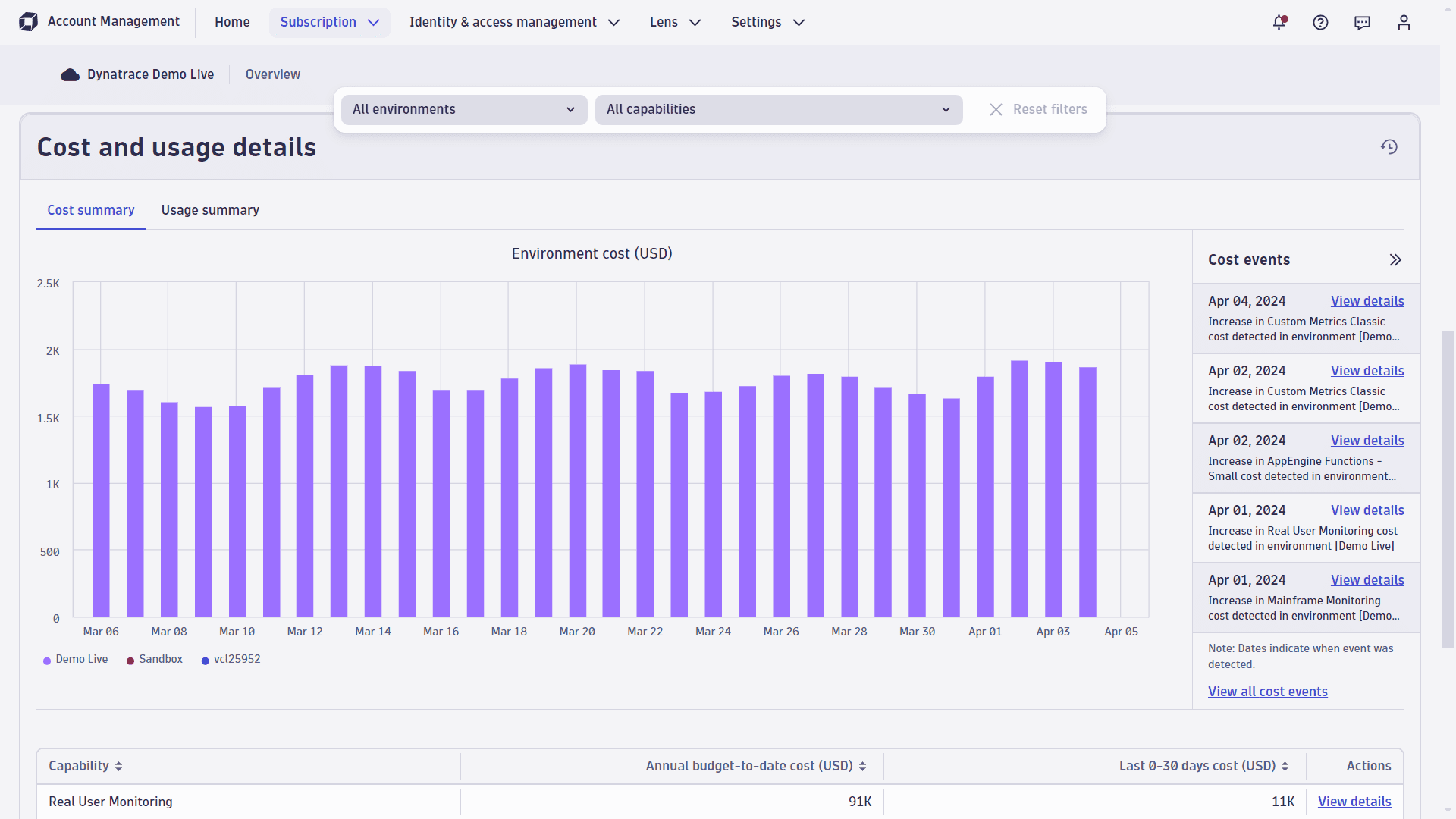
- Description: Consumption for a specific capability unexpectedly increased. Sometimes this is due to an increase at the environment level (as shown in the screenshot below), or it can also be at the account level (which indicates usage increased in all environments).
- In the Capability cost and usage > Cost events panel, find the specific cost event and select View details to open the capability cost and usage analysis filtered to that event.
This example shows a clear capability outlier on the selected day. Adjusting the time frame will give you a better sense of whether this is a one-off (suggesting that someone in your organization is experimenting with Dynatrace capabilities), or if it indicates that the rise will persist and result in higher costs over time.
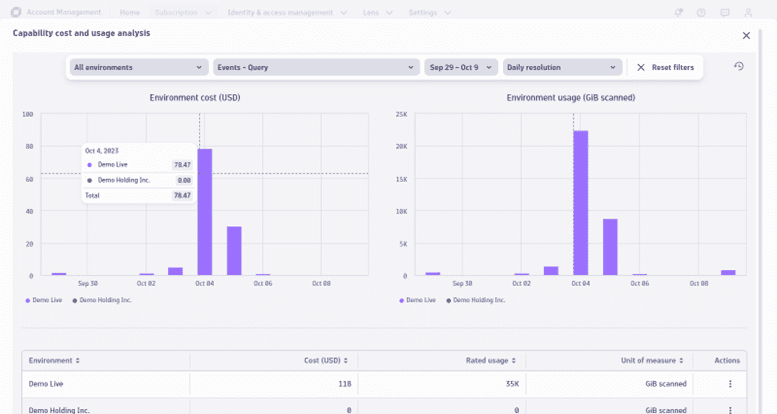
In such scenarios, if you find that this notification is triggered by a specific capability, you can do a root cause analysis. For more information, see Trace a cost spike to its root cause.
 Dynatrace Platform Subscription