Enable Dynatrace SQL database extensions
- Latest Dynatrace
- How-to guide
- 10-min read
- Stable
Dynatrace Operator version 1.8+
Enable SQL database monitoring in Kubernetes by deploying SQL Extension Executor pods inside your cluster. The pods connect to your databases, run SQL-based Dynatrace extensions, and forward collected metrics to the Dynatrace backend.
How it works
SQL database extensions run as SQL Extension Executor pods inside your Kubernetes cluster and connect to SQL databases. Databases can be inside the same cluster or accessible remotely, such as a managed cloud service.
The deployment consists of SQL Extension Executor pods, an Extension Execution Controller (EEC) pod, and an ActiveGate pod. Executor pods query your databases and collect metrics. The EEC distributes tasks across executor pods and forwards data to the ActiveGate, which enriches and routes it to the Dynatrace backend. All communication is encrypted.
You can declare multiple independent executor groups using spec.extensions.databases. Each entry produces a dedicated SQL Extension Executor Deployment with its own scheduling, credential, and scaling configuration. All executor groups share the single EEC and ActiveGate pod. Attach each monitoring configuration to an executor group by setting the group id as the executorId.
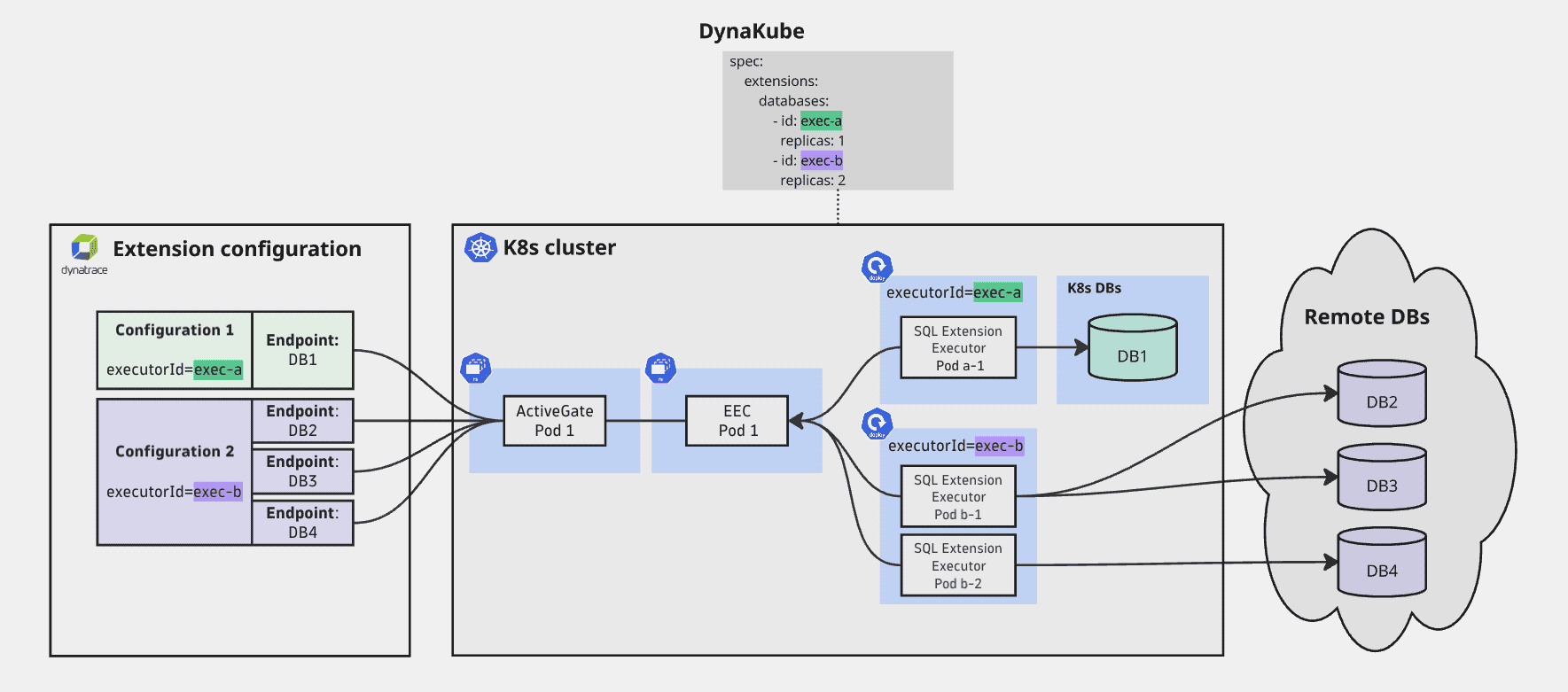
Prerequisites
- Dynatrace Operator 1.8 or later deployed in your cluster. To upgrade, see Update or uninstall Dynatrace Operator.
- Image pull access to the public ECR or a private registry mirror
- API token with
extensions.readandextensions.writescopes—see Tokens and permissions - If your databases use TLS certificates signed by a private CA, see Trusted CA certificate
Step 1: Enable the extensions subsystem and declare SQL Extension Executors
Configure SQL Extension Executor in the DynaKube
Add spec.extensions.databases to your DynaKube. Each array entry declares one SQL monitoring deployment.
apiVersion: dynatrace.com/v1beta6kind: DynaKubemetadata:name: dynakubenamespace: dynatracespec:apiUrl: https://ENVIRONMENT_ID.live.dynatrace.com/apitokens: dynakube-tokensextensions:databases:- id: default
The id field identifies the executor group within the DynaKube. It must:
- Be at most eight characters
- Contain only lowercase alphanumeric characters and hyphens
- Start and end with an alphanumeric character: For example,
default,exec-1,pg-1,db.
AWS IAM-based authentication
For AWS RDS IAM authentication, configure the SQL Extension Executor pod to use a Kubernetes ServiceAccount bound to an IAM role. No credentials are stored in Kubernetes.
Create a ServiceAccount with the appropriate cloud IAM annotation
The following example uses AWS IAM Roles for Service Accounts (IRSA):
apiVersion: v1kind: ServiceAccountmetadata:name: sql-executor-awsnamespace: dynatraceannotations:eks.amazonaws.com/role-arn: arn:aws:iam::ACCOUNT_ID:role/ROLE_NAME
Reference the ServiceAccount in the databases entry
spec:extensions:databases:- id: rds-1serviceAccountName: sql-executor-aws
When set, serviceAccountName replaces the default dynatrace-sql-ext-exec account for that executor deployment.
The IAM role, database user mapping, and any cloud-provider-specific setup are your responsibility. Consult your AWS documentation for details specific to your database service.
Azure Active Directory managed identity authentication
For Azure Active Directory managed identity authentication, configure the SQL Extension Executor pod to use a Kubernetes ServiceAccount bound to a managed identity. No credentials are stored in Kubernetes.
Create a ServiceAccount with the appropriate cloud identity label and annotation
The following example uses Azure Workload Identity for Service Accounts:
apiVersion: v1kind: ServiceAccountmetadata:name: sql-executor-azurenamespace: dynatracelabels:azure.workload.identity/use: "true"annotations:azure.workload.identity/client-id: MANAGED_IDENTITY_CLIENT_ID
Reference the ServiceAccount in the databases entry and add the azure.workload.identity/use label to the executor group
spec:extensions:databases:- id: sql-1serviceAccountName: sql-executor-azurelabels:azure.workload.identity/use: "true"
When set, serviceAccountName replaces the default dynatrace-sql-ext-exec account for that executor deployment.
The managed identity, database user mapping, and any cloud-provider-specific setup are your responsibility. Consult your Azure documentation for details specific to your database service.
Step 2: Configure container images
Set the container images
Both the Extension Execution Controller (EEC) and SQL Extension Executor require a container image. You must provide both explicitly—no automatic image resolution is available.
Extension Execution Controller image 1.345+
The EEC image is configured in spec.templates.extensionExecutionController.imageRef:
spec:templates:extensionExecutionController:imageRef:repository: public.ecr.aws/dynatrace/dynatrace-eectag: "<tag>"
SQL Extension Executor image 1.345+
The SQL Extension Executor image is configured in spec.templates.sqlExtensionExecutor.imageRef:
spec:templates:sqlExtensionExecutor:imageRef:repository: public.ecr.aws/dynatrace/dynatrace-sql-extension-executortag: "<tag>"
To use a private registry or mirror, set repository to your internal image path for each image:
spec:templates:extensionExecutionController:imageRef:repository: registry.example.com/dynatrace/dynatrace-eectag: "<tag>"sqlExtensionExecutor:imageRef:repository: registry.example.com/dynatrace/dynatrace-sql-extension-executortag: "<tag>"
Step 3: Verify the rollout
After applying the DynaKube, confirm that SQL Extension Executor Deployments are running:
kubectl get deployments -n dynatrace \-l app.kubernetes.io/component=dynatrace-sql-extension-executor
Check the DatabaseDatasourcesAvailable condition on the DynaKube:
kubectl get dynakube dynakube -n dynatrace \-o jsonpath='{.status.conditions[?(@.type=="DatabaseDatasourcesAvailable")]}'
Step 4: Configure extensions to run on Kubernetes
See Run SQL extensions on Kubernetes to create monitoring configurations for your SQL extensions.
Advanced configuration
Replicas and HPA
When replicas is not set, the operator preserves the current replica count, making it compatible with a Horizontal Pod Autoscaler (HPA). The initial default is 1.
To pin the replica count and prevent HPA or manual changes from taking effect, set replicas explicitly:
spec:extensions:databases:- id: defaultreplicas: 2
Node placement
Use nodeSelector, affinity, and topologySpreadConstraints to control pod scheduling. These fields are set per databases[] entry.
spec:extensions:databases:- id: defaultnodeSelector:kubernetes.io/os: linuxaffinity:nodeAffinity:requiredDuringSchedulingIgnoredDuringExecution:nodeSelectorTerms:- matchExpressions:- key: node-roleoperator: Invalues:- database-tier
Tolerations apply globally to all executor deployments and are set on spec.templates.sqlExtensionExecutor:
spec:templates:sqlExtensionExecutor:tolerations:- key: dedicatedoperator: Equalvalue: databaseeffect: NoSchedule
Resource overrides
The default resource requests and limits for SQL Extension Executor containers are:
| CPU | Memory | |
|---|---|---|
Requests |
|
|
Limits |
|
|
Override them per databases[] entry:
spec:extensions:databases:- id: defaultresources:requests:cpu: 500mmemory: 512Milimits:cpu: "1"memory: 1Gi
For sizing recommendations based on the number of monitored endpoints, see Kubernetes resource planning.
Custom extension signing certificates
If your custom extension is signed with your own certificate, the EEC must trust it. Provide the signing certificate—or its CA—as a Kubernetes Secret and reference it in spec.templates.extensionExecutionController.customExtensionCertificates.
Create a Secret with the signing certificate
kubectl -n dynatrace create secret generic extensions-certs \--from-file=ca.pem=/path/to/ca.pem \--from-file=dev.pem=/path/to/dev.pem \--from-file=developer.pem=/path/to/developer.pem
Reference the Secret in DynaKube
spec:templates:extensionExecutionController:customExtensionCertificates: extensions-certs
The Secret must be in the same namespace as the DynaKube. You can include multiple certificate files—the EEC imports all of them.
Only needed for extensions signed with a certificate not trusted by default. Extensions signed by Dynatrace are trusted without additional configuration.
Troubleshooting
| Symptom | Cause | Resolution |
|---|---|---|
Webhook rejects with |
| Set |
CRD validation error on |
| Use a valid identifier such as |
Webhook error | A | Verify mount paths against the reserved list; ensure every |
Webhook error about an unused volume | A | Add a |
SQL Extension Executor pod fails to start on OpenShift | HostPath volume is rejected by the default SCC | Replace HostPath volumes with Secret or ConfigMap volumes (OpenShift SCC documentation) |
For runtime issues with controller and executor pods—connectivity errors, log entries, service account problems—see Troubleshoot SQL extensions on Kubernetes.