Get started with OpenLLMetry and AI Observability
- Latest Dynatrace
- Getting started guide
- 4-min read
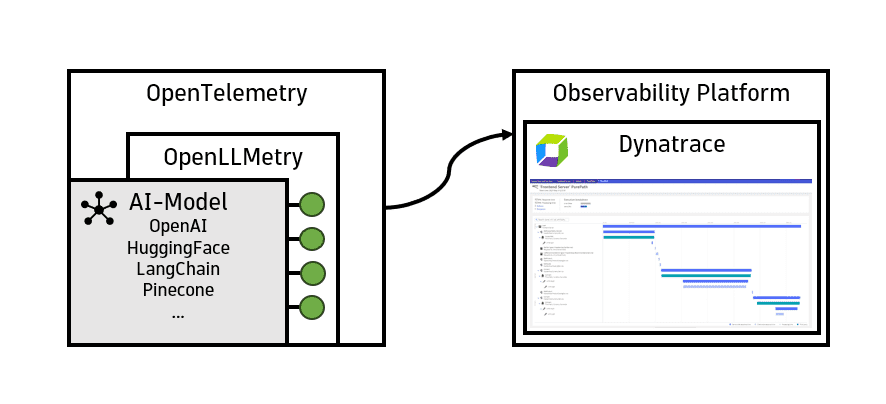
OpenLLMetry captures and transmits AI model or agent KPIs to the Dynatrace environment, empowering businesses with unparalleled insights into their AI deployment landscape.
The collected data seamlessly integrates with the Dynatrace environment, so users can analyze LLM metrics, spans, and logs in the context of all traces and code-level information.
Who is this for?
This getting started guide is for:
- AI engineering teams building agent- and LLM-powered applications and services.
- Site Reliability Engineers responsible for monitoring AI workloads on hyperscalers.
- Platform engineers integrating OTel data, which is sent from AI apps into Dynatrace.
What will you learn?
By following this guide, you'll learn:
- How to set up OpenLLMetry and get trace- and metric-level visibility into your AI apps.
- How to configure and instrument your app with OpenLLMetry.
- How to configure OTLP exports to Dynatrace.
- How to report attributes following GenAI semantic conventions.
- What traces and metrics can be sent to Dynatrace.
- How to achieve trace- and token-level visibility into agent and LLM operations.
- Collect insights about an OpenAI LLM model that is built on top of the LangChain framework.
Before you begin
Prerequisites
In order for this to work, you need to have:
-
A running AI app or AI demo app.
-
Dynatrace SaaS with a Dynatrace Platform Subscription (DPS) license that has Traces powered by Grail, Metrics powered by Grail, and Log Analytics enabled.
-
OTLP ingestion enabled, see OpenTelemetry and Dynatrace.
-
An OpenAPI platform API key.
-
A Dynatrace API token the following scopes, see Dynatrace API - Tokens and authentication.
- Ingest metrics (
metrics.ingest) - Ingest logs (
logs.ingest) - Ingest OpenTelemetry traces (
openTelemetryTrace.ingest)
- Ingest metrics (
Prior knowledge
It's helpful to have some basic knowledge of:
- Python or Node.js.
- OTel concepts like SDKs, spans, exporters, and collectors.
- Dynatrace permissions and data ingestion.
About OpenLLMetry and AI observability
OpenLLMetry supports AI model observability by capturing and normalizing key performance indicators (KPIs) from diverse AI frameworks. Utilizing an additional OpenTelemetry SDK layer, this data seamlessly flows into the Dynatrace environment, offering advanced analytics and a holistic view of the AI deployment stack.
OpenTelemetry's auto-instrumentation provides valuable insights into spans and basic resource attributes. However, it doesn't capture specific KPIs crucial for AI models, such as model name, version, prompt and completion tokens, and temperature parameter.
OpenLLMetry bridges this gap by supporting popular AI frameworks like OpenAI, HuggingFace, Pinecone, and LangChain. By standardizing the collection of essential model KPIs through OpenTelemetry, it ensures comprehensive observability. The open-source OpenLLMetry SDK, built on top of OpenTelemetry, enables thorough insights into your LLM application.
Get started with OpenLLMetry and Dynatrace
In this example, we demonstrate the implementation of a customizable LLM using OpenAI's cloud service and the LangChain framework. This compact example showcases the integration of LangChain to construct a template layer for the LLM model.
Once you've configured your application, you can use Dynatrace to:
- Track your AI model in real time.
- Examine its model attributes.
- Assess the reliability and latency of each specific LangChain task.
1. Instrument your application for OpenLLMetry
We can leverage OpenTelemetry to provide auto-instrumentation that collects traces and metrics of your AI workloads, particularly OpenLLMetry. Install it with the following command.
OpenLLMetry provides auto-instrumentation for popular AI frameworks and automatically collects GenAI semantic conventions. You can use either Python or Node.js.
Currently, OpenLLMetry for Node.js doesn't support metrics.
-
Install the OpenLLMetry SDK. Run the following command in your terminal.
pip install traceloop-sdk -
Initialize the tracer. Add the following code at the beginning of your main file.
from traceloop.sdk import Traceloopheaders = { "Authorization": "Api-Token <YOUR_DT_API_TOKEN>" }Traceloop.init(app_name="<your-service>",api_endpoint="https://<YOUR_ENV>.live.dynatrace.com/api/v2/otlp", # or OpenTelemetry Collector URLheaders=headers)Replace the placeholders with relevant values:
<YOUR_ENV>: Your Dynatrace environment. For more information, see Base URLs.<YOUR_DT_API_TOKEN>: The token that you created in the previous step.<your-service>: Your app's name.
-
Depending on your framework, you'll need to add annotations to get proper tracing. These include, for example,
@workflow,@task,@agent, and@tool. For more information about annotations, see Install OpenLLMetry for Python.
2. Configure your application
You can copy-paste the example code block below directly into your application's code. Just replace the placeholders with the relevant values.
(The primary objective of this AI model is to provide a concise executive summary of a company's business purpose. LangChain adds a layer of flexibility, enabling users to dynamically alter the company and define the maximum length of the AI-generated response.)
The comprehensive approach used here showcases the practical implementation of an LLM model, and emphasizes the importance of configuring Dynatrace OpenTelemetry for efficient data export and analysis. The result is a robust system that you can use to assess AI model performance.
import osimport openaifrom langchain.llms import OpenAIfrom langchain.chat_models import ChatOpenAIfrom langchain.prompts import ChatPromptTemplatefrom traceloop.sdk import Traceloopfrom traceloop.sdk.decorators import workflow, taskos.environ['OTEL_EXPORTER_OTLP_METRICS_TEMPORALITY_PREFERENCE'] = "delta"headers = { "Authorization": "Api-Token <YOUR_DT_API_TOKEN>" }Traceloop.init(app_name="<your-service>",api_endpoint="https://<YOUR_ENV>.live.dynatrace.com/api/v2/otlp",headers=headers,disable_batch=True)openai.api_key = os.getenv("OPENAI_API_KEY")@task(name="add_prompt_context")def add_prompt_context():prompt = ChatPromptTemplate.from_template("explain the business of company {company} in a max of {length} words")model = ChatOpenAI()chain = prompt | modelreturn chain@task(name="prep_prompt_chain")def prep_prompt_chain():return add_prompt_context()@workflow(name="ask_question")def prompt_question():chain = prep_prompt_chain()return chain.invoke({"company": "dynatrace", "length" : 50})if __name__ == "__main__":print(prompt_question())
3. Set up sampling
You can point the OTLP endpoint into your Collector and to any ActiveGate endpoint.
For more information, see the upstream documentation at Sampling.
4. Execute your AI model
Execute your AI model and inquire about the company Dynatrace.
The code block below shows an example output with the subsequent 50-token response.
> python chaining.pyTraceloop exporting traces to https://<MY_ENV>.live.dynatrace.com/api/v2/otlp, /authenticating with custom headers content='Dynatrace is a software /intelligence company that provides monitoring and analytics solutions /for modern cloud environments. They offer a platform that helps /businesses optimize their software performance, improve customer /experience, and accelerate digital transformation by leveraging /AI-driven insights and automation.'
5. Observe in Dynatrace
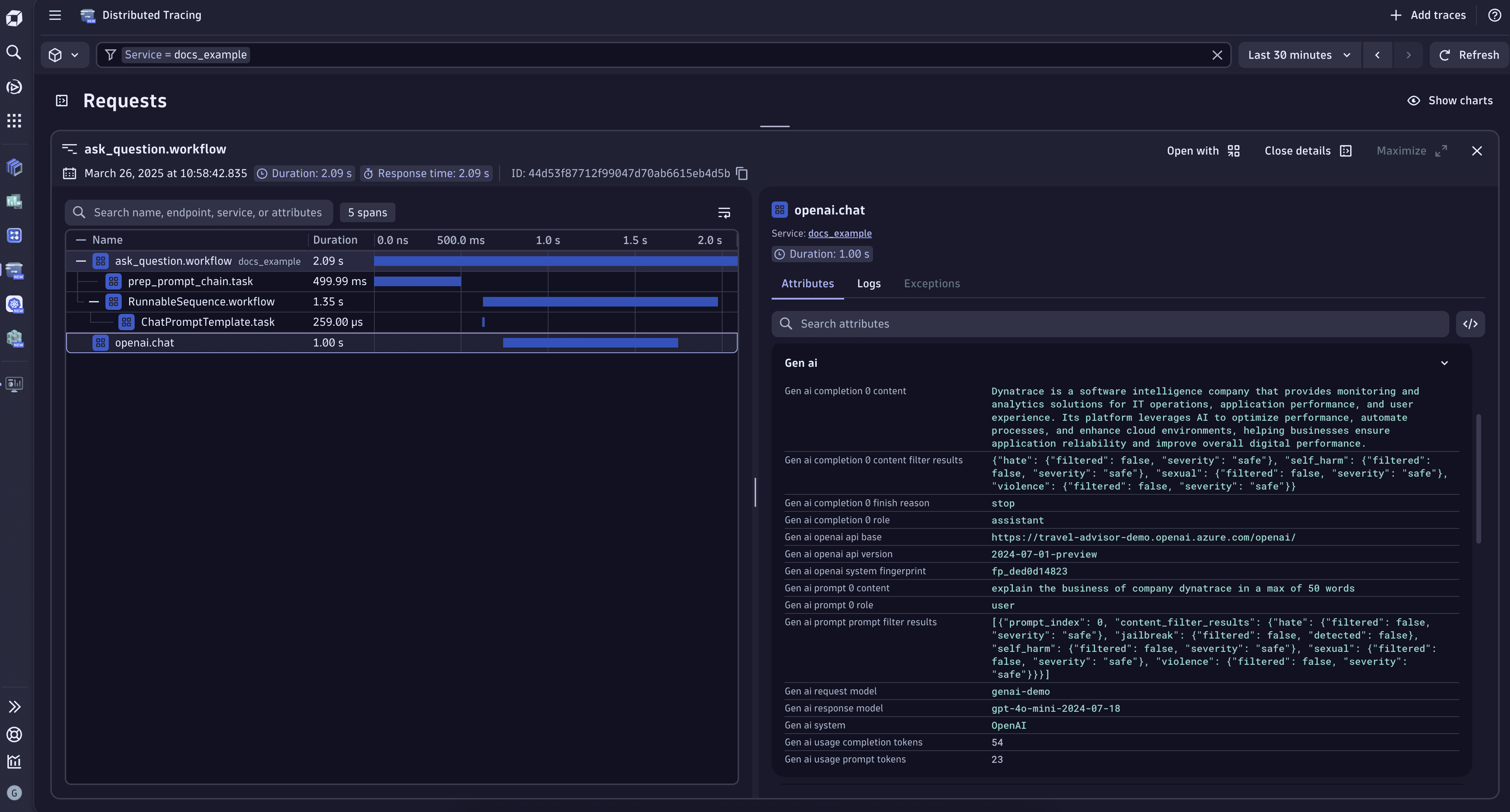
To see traceloop traces related to the AI model that we just configured, go to  Distributed Tracing and search for the ask_question workflow.
Span captured by OpenLLMetry automatically display vital details, including:
Distributed Tracing and search for the ask_question workflow.
Span captured by OpenLLMetry automatically display vital details, including:
- The mode utilized by our LangChain model,
gpt-4o-mini. - The model's invocation with a temperature parameter of
0.7. - The utilization of 54 completion tokens for this individual request.
- Other relevant metadata.
Congratulations!
Now that you've set up your AI app to send observability data directly to Dynatrace, you can:
- Explore Distributed Tracing and the AI Observability app to visualize your AI workloads.
- Check out the sample applications for more examples.
- Point the OTLP endpoint to your Collector and to any ActiveGate endpoint.