What's new in Dynatrace Managed 1.344
- Release notes
- 8-min read
- Rollout start on Aug 03, 2026
This page showcases new features, changes, and bug fixes in Dynatrace Managed version 1.344. It contains:
Software Delivery
Configurable update windows and target versions for Environment ActiveGate
Environment ActiveGate auto-updates now offer the same controls as OneAgent.
You can pick a target version (Latest stable, Previous stable, Older stable, or a specific main version, and the latest sub-version is applied automatically), choose one of three update modes (Automatic at earliest convenience, Automatic during update window, or No automatic updates), and share the same update windows you already use for OneAgent.
Per-ActiveGate settings can override environment defaults, and manually managed ActiveGates expose an Update now to target version button.
The Environment Deployment API endpoints GET /api/v1/deployment/installer/gateway/{osType}/latest and GET /api/v1/deployment/installer/gateway/{osType}/latest/metainfo honor the configured target version too, so downloads and installer metadata stay consistent with the environment's chosen ActiveGate version.
Feature updates
Account Management | Cost Management
Improved DPS forecast and cost events
Cost monitors now deliver richer cost insights. The improved calculation model logic is reflected in forecasted value adjustments when the update takes effect.
Most values will experience no significant changes; deviations are possible, though rare, and are based on your actual DPS consumption data. If a deviation occurs, you'll receive a notification email. After the adjustment, forecasts are stable and consistent.
Application Security | Vulnerabilities
Catch malicious packages running in your environment with Runtime Vulnerability Analytics
Malicious package detection coverage in the Dynatrace Vulnerability Feed has been expanded. Runtime Vulnerability Analytics (RVA) now evaluates a broader set of malicious packages against the components loaded and executing in your environment, alongside existing vulnerability data.
Malicious package records use the same structure as vulnerability records, so existing dashboards, filters, and remediation workflows continue to work.
- Titles begin with
Malicious codeto distinguish them from known vulnerabilities. - Each record carries
CWE-506(Embedded Malicious Code). - Records default to critical severity with a CVSS 4.0 score of 9.3 (vector
AV:N/AC:L/AT:N/PR:N/UI:N/VC:H/VI:H/VA:H/SC:N/SI:N/SA:N).
Coverage spans the same six ecosystems as the Dynatrace Vulnerability Feed: Java, JavaScript, Python, Go, .NET, and PHP.
Infrastructure Observability
Modernized AWS page for quicker insights
We’re excited to announce a redesigned AWS page, bringing broader visibility, smoother navigation, and a more intuitive monitoring experience to your infrastructure performance workflows.
Infrastructure Observability
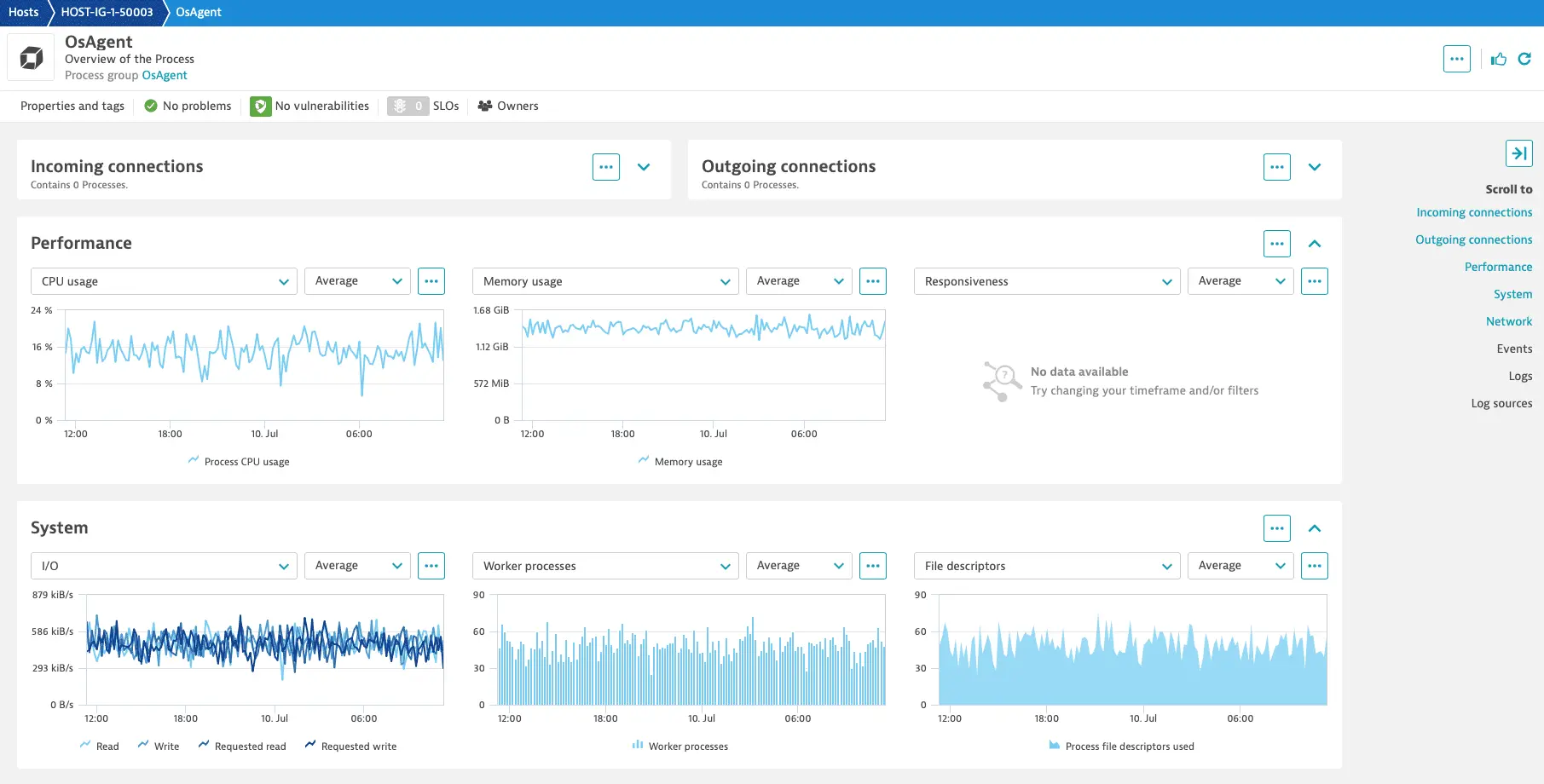
Modernized generic Process page for quicker insights
The generic Process page for processes without a specific technology reference has been redesigned with improved visibility, navigation, and monitoring experience for your infrastructure performance workflows.
Infrastructure Observability | Extensions
New REST API serving public URIs for Dynatrace images
We've added a new REST API to provide URIs for the images used in Dynatrace components. The endpoint is GET /api/v2/fleetManagement/components/containerImages.
Infrastructure Observability | Kubernetes
Automatic cleanup of stale Kubernetes connection settings
Dynatrace will automatically disable stale Kubernetes connection settings if no successful connection has been established for 60 days. This action is recorded in the audit log and can be reversed by re-enabling the connection via the API or the web UI.
Platform
Managed FIPS module version support for NGINX and OpenSSL
The Managed FIPS module component now supports NGINX 1.30.2 and OpenSSL 3.5.7.
Platform
Block ingestion of metric dimensions you don't need
You can now stop specific metric dimensions from being ingested using the new Metric dimension block list in Settings > Metrics. Previously, unneeded metric dimensions were collected automatically with no way to exclude them. This gives you direct control over which metric dimensions enter your environment, so that you can cut out data you don't use and keep monitoring focused on what matters.
Platform
Simplified local self-monitoring environment
Local self-monitoring environments now show only the relevant capabilities that are available in the environment. This affects the environment’s Settings, main menu, and preset dashboards.
Platform
Log message for cluster upgrade message now has an INFO level
Now, the log level for a common log message during cluster upgrades is INFO instead of WARNING. The specific message is ClusterUpgradeStartUpStateService] Could not start node upgrade, cluster is not ready: not all nodes are up.
Platform
NGINX updated to version 1.30.4
The Dynatrace Managed installer now includes NGINX version 1.30.4.
Platform
Cassandra nodes upgrade to version 4.1.12
The Cassandra nodes are upgraded to version 4.1.12, delivering critical bug and security fixes. No manual user intervention or downtime is required—the upgrade happens via rolling updates as a part of normal version updates.
Platform
Avoid deleting monitoring data by mistake
Avoid accidental data truncation when setting transaction storage, Session Replay, or mobile symbol files to 0. A hint and a pop-up window now inform you of the consequences of this operation and prevent the change from being made by mistake.
Platform | OneAgent
New configuration option to detect logs in binary format
We've introduced a new configuration option, BinaryDetectionMode that lets you control how the Log Agent handles binary or non-supported encoding files within a log source (LGI).
To configure this setting, go to Settings > Log Monitoring > Advanced Settings and set the BinaryDetectionMode property.
By default, the entire log source is marked as binary and stops being processed. There is no change in behavior for existing deployments.
Breaking changes
Platform | Problems
Closed problems no longer reopen
Resolved closed problems remain closed even after related events are detected. If new related events occur, Dynatrace Intelligence creates a new problem instead. This makes problem tracking more predictable and consistent.
Fixes and maintenance
Resolved issues in this release
- Fixed an issue where Trace ingest control settings on the process level, and Adaptive capture control settings via process group override, were not sent to the OneAgent. (PS-48670)
- Fixed an issue where all of an environment's management zones were unintentionally deleted, when only an unsaved configuration should have been discarded. (PS-47784)
- Fixed an issue where users were missing from audit logs related to user removal from User Groups and Alert Notifications. (MGD-13761)
- Fixed an issue so that now the Deploy Dynatrace ActiveGate page also adapts the file name and installation commands according to the ActiveGate target version. (MGD-13588)
- The installer’s
hostparameter now has no default value. The previous value is used instead. (MGD-13238) - We’ve improved access control enforcement for ActiveGate downloads: ActiveGate download links now require a token with the
UnattendedInstallorServiceApiProviderscope. Existing UI workflows are not affected. If you use custom scripts, automation, or direct API access to download ActiveGates, verify that the token being used contains one of the required scopes. (MGD-12913) - We’ve changed the error message when cluster upgrades cannot be started because not all nodes are up. (MGD-12678)
- Fixed an issue where the Explorer table records for services displayed incorrect stats. The service’s entity details displayed the correct stats. (ICP-6867)
- Fixed an issue where duplicate endpoints in a sufficiently big monitoring configuration of an extension sometimes broke parts of the configuration, until the extension was disabled and re-enabled. (DAQ-24689)
- Fixed an issue that caused data points from
calc:calculated metrics to be dropped every two hours. (PRISM-15432)
Operating systems support
Future Dynatrace Managed operating systems support changes
The following operating systems will no longer be supported starting 01 November 2026
- Linux: Red Hat Enterprise Linux 9.4, 9.7
- x86-64
- Vendor announcement
- Linux: Ubuntu 16.04
- x86-64
- Vendor announcement
The following operating systems will no longer be supported starting 01 January 2027
- Linux: Amazon Linux 2
- x86-64
- Vendor announcement
Past Dynatrace Managed operating systems support changes
The following operating systems are no longer supported since 01 June 2026
- Linux: Oracle Linux 9.6
- x86-64
- Vendor announcement
- Linux: Rocky Linux 9.6
- x86-64
- Vendor announcement
The following operating systems are no longer supported since 01 July 2026
- Linux: SUSE Enterprise Linux 15.3
- x86-64
- Vendor announcement