Migrate a Managed Cluster
- How-to guide
- 5-min read
Managed Cluster migration options depend on the details of your deployment environment (latency, proximity, and traffic volume), downtime tolerance, and data policies. The recommended ways to migrate a Managed Cluster are:
Each method has advantages and disadvantages, as described below.
Backup method
The backup method involves backing up your source Managed Cluster, migrating the backup data, and restoring the data to a target Managed Cluster. Before choosing this migration option, consider the following:
Advantages of the backup method
- Since you're manually migrating the Managed Cluster data to the target Managed Cluster, the latency within your deployment has no effect on this process. This type of migration is recommended for deployments with high latency.
Disadvantages of the backup method
- Monitoring will be unavailable from the time you begin the Managed Cluster backup until you complete the Managed Cluster restore on the target Managed Cluster.
- By default, Cassandra is backed up daily, so your Managed Cluster restore point is the most recently performed backup, which can set your data back by up to 24 hours. You can schedule your migration close to the backup time to minimize data loss. However, considering the time it takes to manually transfer data and restore the new Managed Cluster, some data loss always occurs.
- Since transaction storage (distributed trace data with typical retention of 10 days) isn't included in the backup, transaction storage data is lost with this migration method.
Migrate a Managed Cluster using backup and restore
To migrate Dynatrace Managed nodes using the backup and restore method, follow these steps.
-
Set up your target nodes and all the necessary networking in your target deployment.
- Make sure the target nodes meet the hardware requirements.
- For a typical scenario, it's assumed that the number of target nodes is equal to or higher than the number of source nodes.
-
Back up your current Managed Cluster.
-
Stop your current Managed Cluster. As a root user, log in to the Linux machine where the Dynatrace Managed nodes are installed and run the
dynatrace.shcommand with thestopparameter. By default, the script is located at/opt/dynatrace-managed/launcher.[root@localhost]# dynatrace.sh stop -
Restore from your backup to your target Managed Cluster.
Replication method
The replication method is designed to maintain monitoring continuity during the migration. You temporarily expand the Managed Cluster by adding new nodes and wait for the data to replicate automatically onto them. Once the replication is complete, remove the old nodes one at a time.
The replication method of migration is possible even if the target nodes are in a different data center, provided the data centers are in close proximity with a round-trip time between nodes of no more than 10 ms and sufficient bandwidth between them.
In data center scenarios where no direct link between data centers is available, use a virtual private network for the link between data centers.
Since the Managed Cluster requires constant cross-node connectivity, the network link between the data centers must be stable and secure. Keep in mind that the traffic within the Managed Clusters (that is, between nodes) is not encrypted. As a result, an encrypted connection is required for cross-data center traffic, for example, by using a virtual private network.
Advantages of the replication method
- No downtime and no data loss.
Disadvantages of the replication method
- The replication method works well only for low-latency or low-traffic deployments.
- Approximate time for replication, including data resharding and waiting for non-replicated transaction storage data to expire, is typically 10 days.
Migrate a Managed Cluster using replication
To migrate Dynatrace Managed nodes using the replication method, follow these steps.
-
Set up target nodes and all the necessary networking.
For the typical scenario, it's assumed that the number of target nodes is at least as high as the number of source nodes. Make sure the target nodes meet the hardware requirements and that there is unrestricted connectivity between your current nodes and the target nodes. All ports that are open within the current nodes must also be open within newly added target nodes.
-
Add new Dynatrace Managed nodes to the current Managed Cluster one at a time.
Verify that all the existing Cluster nodes are healthy and reachable before adding another node. If you migrate multiple nodes, verify that the new node is fully started before proceeding to the next one.
-
Disable OneAgent traffic on the source nodes but keep them running until data replication is finished and until non-replicated transaction storage data has expired.
To check the progress of data replication, on the new node only, run
cassandra-nodetool.shwith thestatusparameter:sudo $DT_DIR/utils/cassandra-nodetool.sh statusThe result should look similar to this:
Datacenter: datacenter1===============Status=Up/Down/ State=Normal/Leaving/Joining/Moving– Address Load Tokens Owns (effective) Host ID RackUN 10.176.41.167 18.82 GB 256 100.0% 3af25127-4f99-4f43-afc3-216d7a2c10f8 rack1UN 10.176.41.154 19.44 GB 256 100.0% 5a618559-3a73-42ec-83f0-32d28e08beec rack1The Load value shouldn't differ significantly between the nodes, and Status should display
UNon all nodes.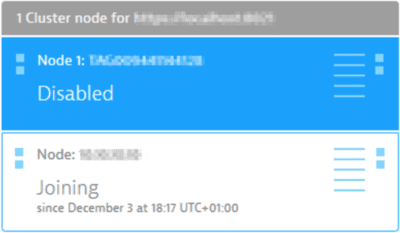 Node joining the Managed ClusterTransaction storage
Disabling a node sets the transaction storage to read-only mode, but the node is still able to handle requests.
-
Remove the source nodes one at a time.
It's recommended that you postpone the removal of the source (old) node until the non-replicated transaction storage data has expired. The retention of this data is configurable, but typically it's kept for 10 days.
You cannot remove multiple nodes simultaneously, so ensure that data is resharded before removing each subsequent node. Data resharding typically takes a couple of hours, depending on the data volume and the bandwidth between the nodes, and can take a couple of days in extreme cases.