Multi-data center failover
- Explanation
- 6-min read
The Premium High Availability (PHA) multi-data center failover mechanism detects Elasticsearch or Cassandra node outages longer than 15 minutes and shorter than 72 hours. If Mission Control (MC) detects that two or more Elasticsearch or Cassandra nodes in a data center (DC) are down for 15 minutes, it automatically stops the server processes in that DC. MC then marks the DC as unhealthy.
- The PHA multi-data center failover mechanism is triggered only when two or more nodes in the same DC are down.
- To transfer responsibility to another DC, it must be healthy at the time of failover.
Mission Control controls the PHA multi-data center failover mechanism and instructs Nodekeepers on what to do. Every minute, each Nodekeeper sends a health check to Mission Control. In the response, each Nodekeeper receives information about the health state of other nodes collected by Mission Control, along with some instructions. The instructions can include stopping or starting the server, or starting a Cassandra repair. Nodekeepers don't receive the instructions simultaneously. Nodekeepers should receive the instructions within a minute if there are no connection problems.
If one part of a Managed Cluster loses connection with another part, the disconnected part isn't necessarily unavailable. The problem might be a connectivity issue. PHA automatically repairs network disconnections of up to 72 hours between DCs. MC tracks node health and designates one part as primary, or surviving. During recovery, this designation determines how to re-sync all parts of the Managed Cluster.
The graphics in the following sections illustrate the PHA failover mechanism in case of Elasticsearch or Cassandra node outages.
Elasticsearch failover mechanism
The following graphic illustrates the PHA failover mechanism when two or more Elasticsearch nodes in a DC are down.
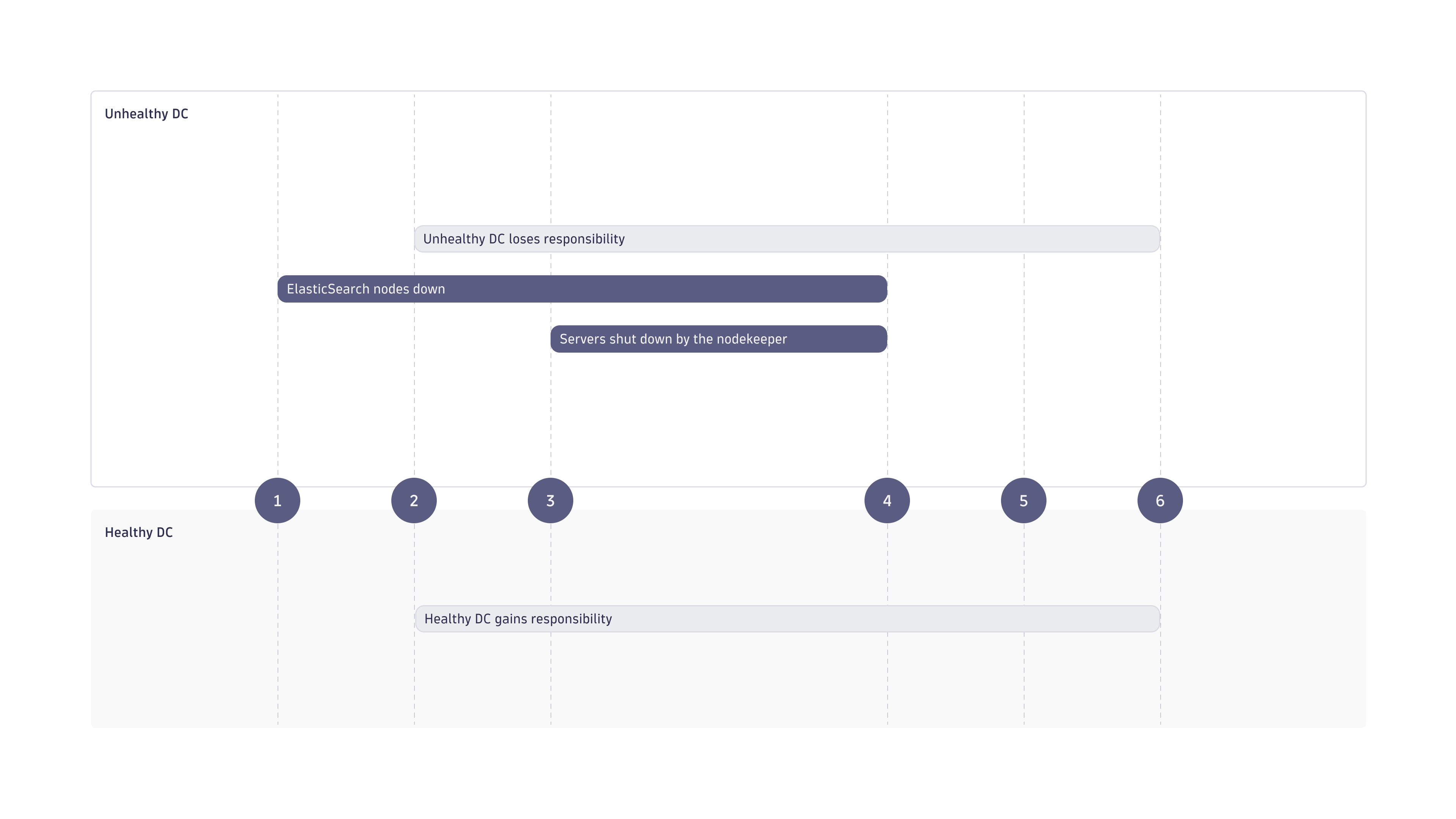
- Mission Control detects that two or more Elasticsearch nodes in a DC are down (this is later referred to as an unhealthy DC).
- After 15 minutes, Mission Control informs all Nodekeepers that one DC is unhealthy, requests to change the responsibility override (to the healthy DC), and requests Nodekeepers to stop all server processes in the unhealthy DC.
- Nodekeepers stop server processes in the unhealthy DC, switch responsibility override, and ask a healthy server to generate an event and an email.
- After you start the Elasticsearch processes on the nodes that were down, Mission Control requests that Nodekeepers start all server processes.
- All servers are up and running.
- After 30 minutes, Mission Control requests the Nodekeepers to change the responsibility override—the Managed Cluster is fully operational.
Cassandra failover mechanism
The following graphic illustrates the PHA failover mechanism when two or more Cassandra nodes in a DC are down.
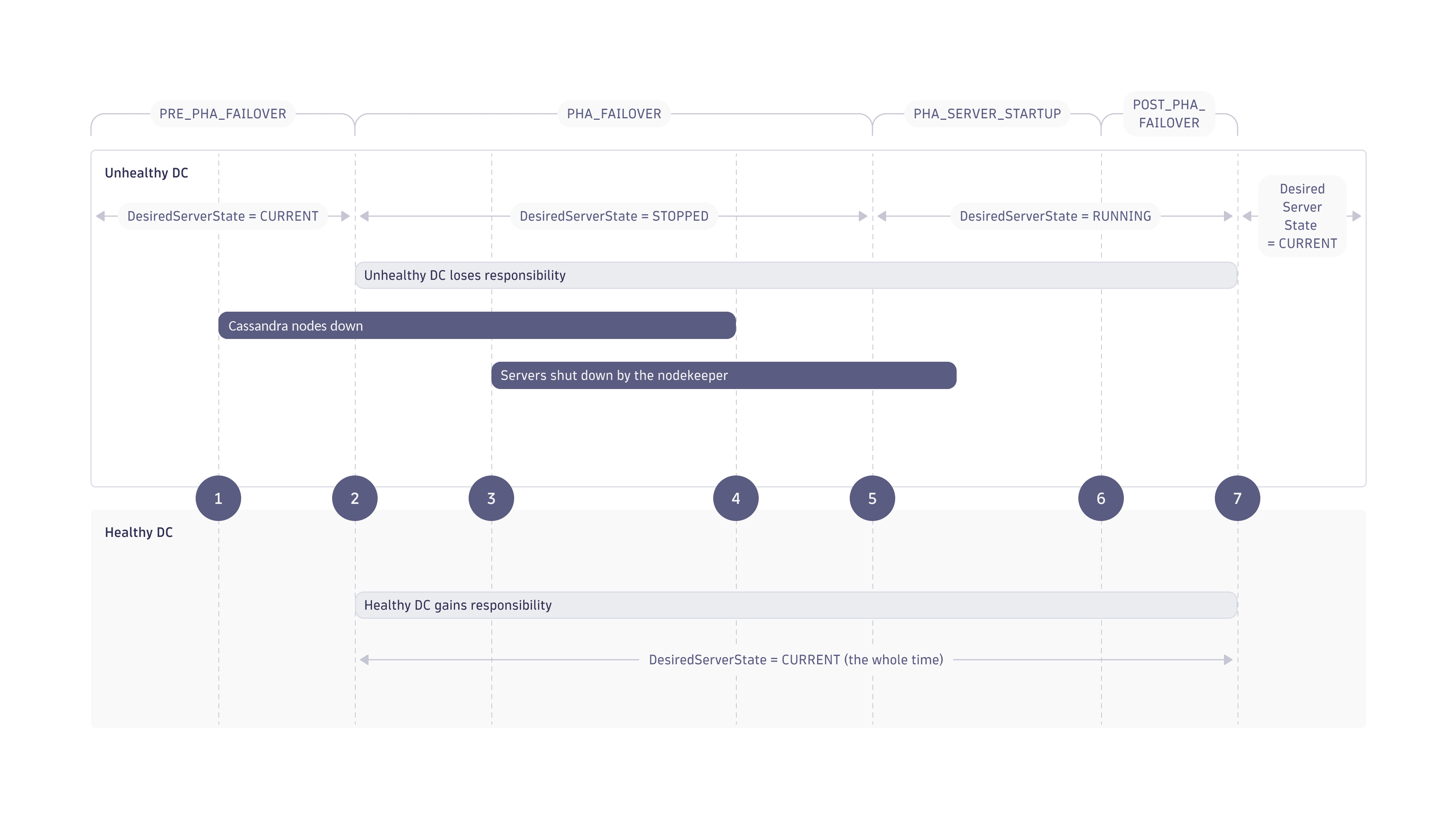
- Mission Control detects that two or more Cassandra nodes in a DC are down (this is later referred to as an unhealthy DC).
- After 15 minutes, Mission Control informs all Nodekeepers that one DC is unhealthy, requests to change the responsibility override (to the healthy DC), and requests Nodekeepers to stop all server processes in the unhealthy DC.
- Nodekeepers stop server processes in the unhealthy DC, switch responsibility override, and ask a healthy server to generate an event and an email.
- After you start the Cassandra processes on the nodes that were down, Mission Control requests that Nodekeepers start all server processes.
- MC initiates server startup (sending the desired server state to
RUNNING). If Cassandra was down for 3 hours or more, Nodekeepers also run Cassandra repairs, one by one, on all nodes in the unhealthy DC. - Thirty minutes after all Cassandra nodes are repaired, Mission Control requests the Nodekeepers to change the responsibility override—the Managed Cluster is fully operational.
Rack awareness
Dynatrace ignores racks when a DC contains only one or two racks.
When you configure rack awareness for a Managed Cluster, make sure to account for it during unhealthy data center detection. If you're setting up rack awareness together with PHA, go to Combine Premium High Availability with rack awareness for the procedure.
The following five rules apply when evaluating DC health:
- If two or more Cassandra nodes fail in different racks, Dynatrace marks the DC as unhealthy.
- If two or more Elasticsearch nodes fail in different racks, Dynatrace marks the DC as unhealthy.
- If two or more Cassandra nodes fail in the same rack, Dynatrace considers the DC healthy.
- If two or more Elasticsearch nodes fail in the same rack, Dynatrace considers the DC healthy.
- If one Cassandra and one Elasticsearch node fail (regardless of rack), Dynatrace considers the DC healthy.
Frequently asked questions
What triggers the PHA failover mechanism?
The PHA failover mechanism is triggered when at least two Elasticsearch or Cassandra nodes are down. When a node isn't reachable by other nodes, it's automatically added to the list of Elasticsearch or Cassandra down nodes.
Does Elasticsearch in RED status trigger the PHA failover mechanism?
No. Dynatrace reacts only to Elasticsearch down status.
Does Dynatrace run a repair on all nodes in the unhealthy DC or only on the one down?
Dynatrace repairs only the nodes that were down.
Can the minimum node downtime and Mission Control health assessment intervals be changed?
No. The Elasticsearch or Cassandra nodes must be down for 15 minutes for the failover mechanism to start. Cassandra repair is only triggered when nodes were down for 3 hours or more. Mission Control needs 30 minutes to consider the Managed Cluster fully recovered.
What happens after 72 hours have passed?
The Managed Cluster will be marked in Mission Control as not repaired in 72 hours from the failover. Such a Managed Cluster is not reliable, and you should replicate it from a healthy DC.
What if the primary DC fails without MC access?
If the primary DC fails and the Managed Cluster can't connect to MC, act as soon as possible.
Shut down any nodes that are still running in the failed DC.
The healthy secondary DC can continue to serve the Managed Cluster, provided that the failed DC is completely down.
After the Managed Cluster can connect to MC again, plan to restore or recreate the failed DC according to the PHA recovery procedures.
Can the secondary DC autonomously detect that it needs to take over?
No. Without access to MC, the secondary DC doesn't autonomously detect that it needs to take over.
However, the Managed Cluster can continue to work from the healthy secondary DC if the failed DC is completely down.
Can manual or local failover run without Mission Control?
No. There is no manual or local failover option that bypasses MC.
If MC isn't reachable, shut down any nodes still running in the failed DC and continue working from the healthy secondary DC.
After the Managed Cluster can connect to MC again, plan the failed DC restoration or recreation according to the PHA recovery procedures.
What events will be generated during the failover?
- Start of the failover recovery.
- Start and end of each Cassandra repair.
- End of the failover recovery.
What emails will be generated during the failover?
- Start of the failover.
- Failed Cassandra repairs (if not all finished successfully).
- End of the failover.
I got an email titled "Automatic failover of datacenter2 has been started." How can I fix the data center?
The message specifies which components are down (Elasticsearch, Cassandra, or both). First check if the machine is up and running. Then try to start Elasticsearch and Cassandra using the following commands:
/opt/dynatrace-managed/launcher/elasticsearch.sh start/opt/dynatrace-managed/launcher/cassandra.sh start
If you notice any issues with the start process, check the following logs:
/var/opt/dynatrace-managed/log/elasticsearch/*/var/opt/dynatrace-managed/log/cassandra/*
What's required by Mission Control to mark a node as healthy after failover?
- Nodekeeper sends a health check to Mission Control.
- Cassandra, Elasticsearch, and server processes are up and running.
- Any needed Cassandra repair is complete.
What happens if the repair fails?
The repair process runs only once, even if it fails. You should manually run the repair process on nodes where it automatically triggered repair failure. Dynatrace continues repairs on other nodes. Only after all repairs complete does Dynatrace tell you which repairs failed and considers the repair complete.
What logs are crucial for troubleshooting?
In an unhealthy DC, check nodekeeper.0.0.log, nodekeeper-healthcheck.0.log, and repair-cassandra-data.log.
In a healthy DC, only server.log and audit.cluster.event.0.0.log are important.