Overview (DPS for Hybrid)
- Explanation
- 3-min read
- Preview
This page is specifically for customers with a DPS for Hybrid setup, see DPS for Hybrid.
If you do not share your DPS license with other accounts, see Subscription (DPS) for a description of your Overview view.
When a new DPS for Hybrid setup is created, by default, all administrators for all linked accounts can access Subscription overview for the relevant DPS subscription.
Specifically, this means users with either "View account" (account-viewer) or "View and manage account and billing information" (account-company-info) permissions on at least one of the Dynatrace accounts that consumes from the DPS subscription.
If administrators from a specific account should not have access to Subscription overview, contact Dynatrace to configure access permissions.
The Account Management subscription overview view provides key analyses of your DPS for Hybrid subscription. You can see overall information about your license, and drill-downs at the account level.
To see this information, go to Account Management > Subscription > Subscription Overview.
License level
When you first open the Subscription > Subscription Overview page, you'll see information about your DPS license.
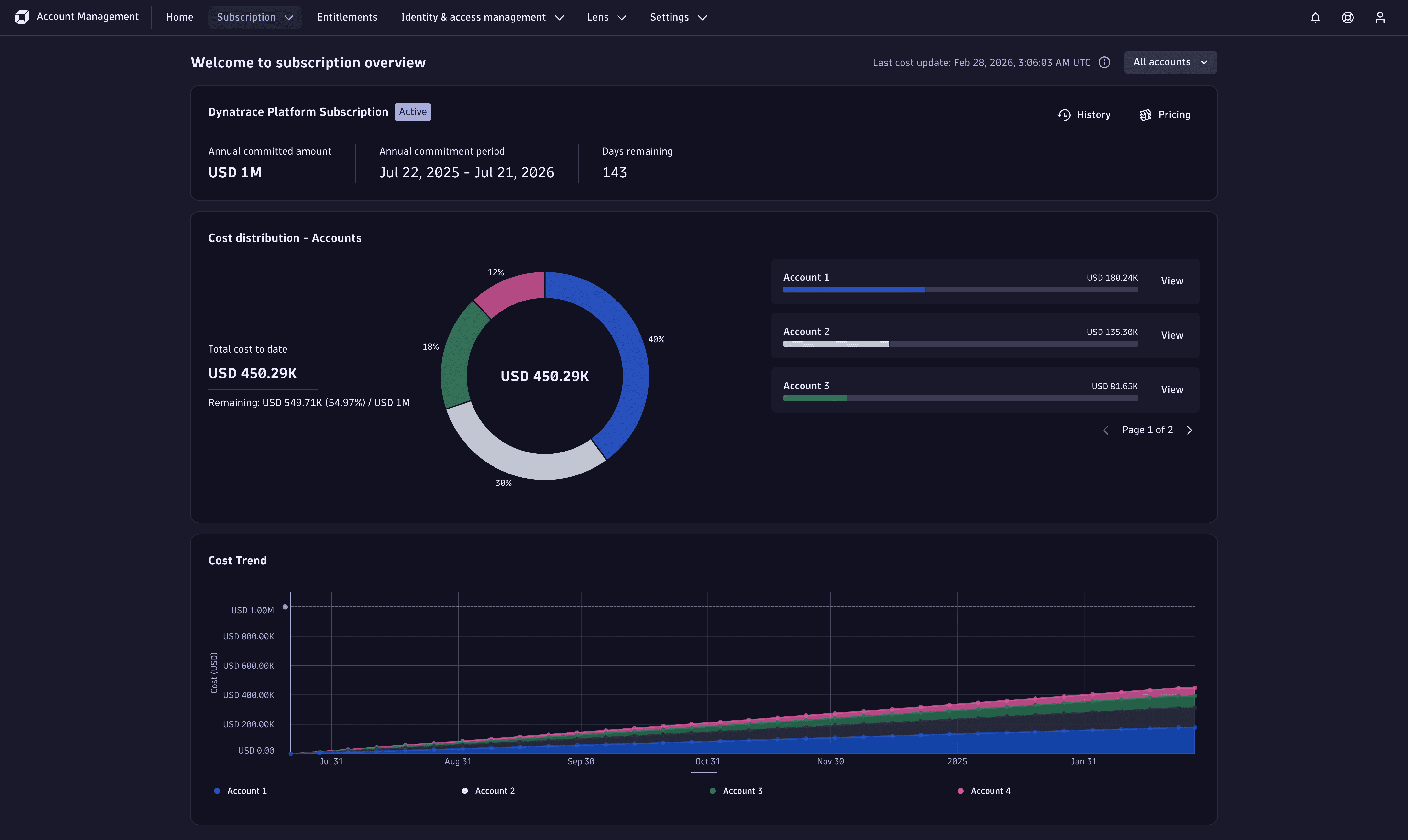
- Dynatrace Platform Subscription: Overall information about your DPS license.
- Cost distribution - Accounts: Total cost to date for all accounts within your DPS for Hybrid setup, separated at the account level.
- Cost Trend: How each account's costs have developed over time.
To see consumption of all accounts attached to the license, make sure that All accounts is selected in the drop-down menu at the top-right. To drill-down and view account-level costs, select the drop-down menu and then select the appropriate account name.
Dynatrace Platform Subscription pane
The Dynatrace Platform Subscription pane gives you an overview of the DPS license that all accounts are attached to. This includes the:
- Annual committed amount.
- Annual commitment period.
- Days remaining. This is measured from the current day until the last full day of the annual commitment period (inclusive).
Additional information about your licenses is available by selecting:
- History, to see all licenses associated with the accounts, including active and expired licenses.
- Pricing, to view details about capability unit prices.
Cost distribution - Accounts
The Cost distribution - Accounts pane gives you a breakdown of how each individual account contributes to your total license consumption.
- The pie chart on the left side shows how much each account has contributed to the total costs to date.
- The bar charts on the right side show each account's costs, as a proportion of the total license commitment.
Cost Trend
The Cost Trend pane shows how each account's costs have developed over time. The accounts are stacked, so the total consumption for all accounts is also visible.
Account level
To view license consumption at the account level, select the drop-down menu in the top-right corner. (By default, it says All accounts.) When you select the menu, the drop-down expands and you'll see a list of all accounts that are associated with your DPS license. Select the account that you want to view.
The account-level view provides the following information:
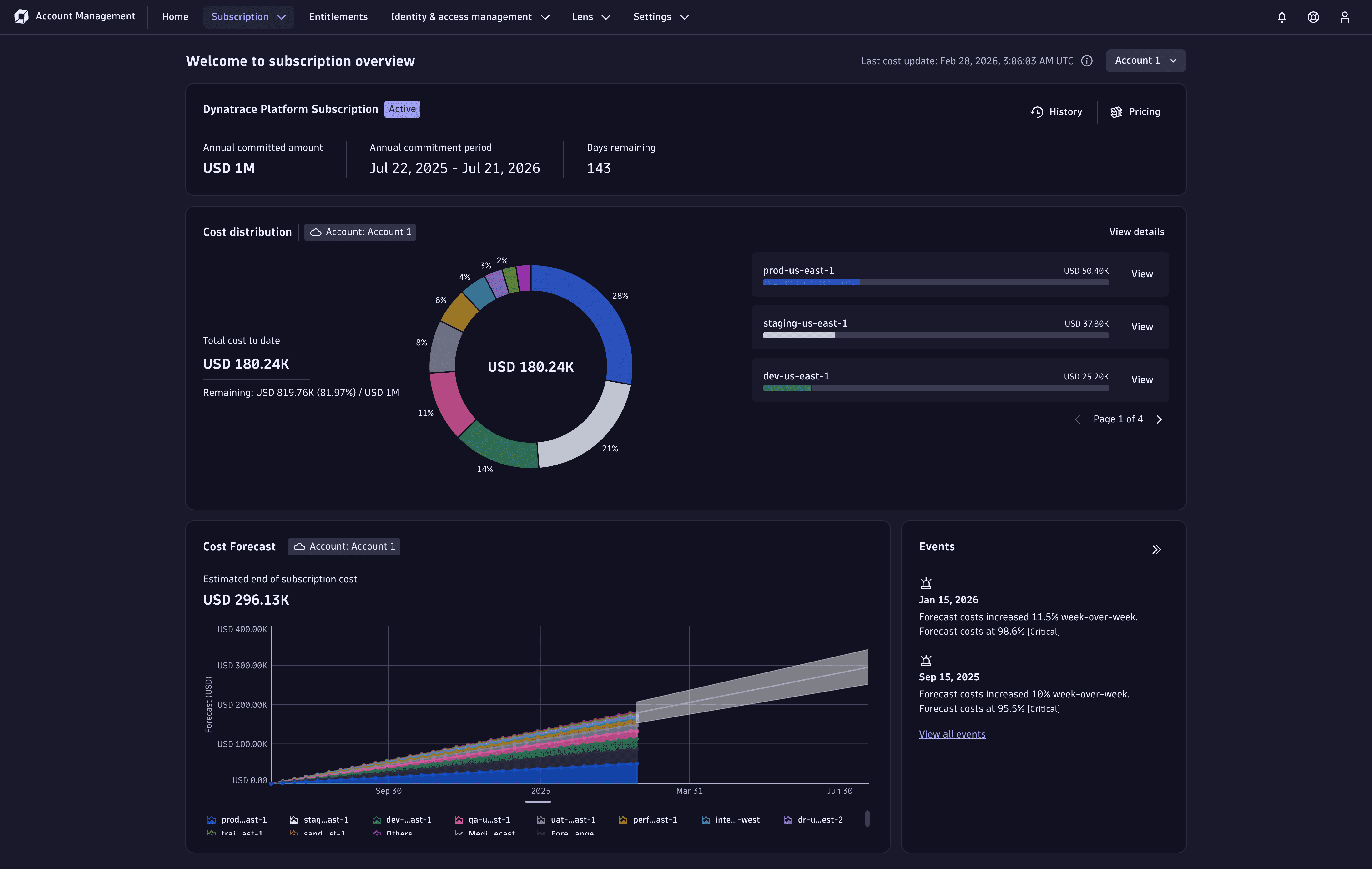
- Dynatrace Platform Subscription: As with the license-level view, this provides overall information about your DPS license.
- Cost distribution: Total cost to date for the account.
- Cost Forecast: How the account's costs have developed over time, including a forecast of future costs.
- Events: All applicable forecast events related to the account.
Dynatrace Platform Subscription pane
The Dynatrace Platform Subscription pane gives you an overview of the DPS license that this account is attached to. This is the same information as shown at in the subscription overview view, see Dynatrace Platform Subscription pane.
Cost distribution
The Cost distribution pane gives you insights into the account's consumption of different Dynatrace rate-card capabilities.
Select View details to see the Cost and usage details page, see Cost and usage.
Cost Forecast
The Cost Forecast pane shows your cumulative accrued costs. Data is shown from the start of the subscription period, and includes a forecast of costs through the end of the period. Hover over the chart to display the actual and forecast costs.
Account Management uses advanced forecasting models to predict future costs. These forecasts are available only for accounts with 15 days or more of cost data.
Forecast data is an estimate only. It does not guarantee future costs.
Events
The Events pane shows projected on-demand usage increase (percentage and cost) that you're forecast to incur at the end of the annual commitment period. When usage is forecasted to exceeds the annual commitment, the panel shows the specific date at which the forecasted usage exceeds the annual commitment.