Understand and manage Foundation & Discovery consumption (DPS)
- Explanation
- 5-min read
Dynatrace Foundation & Discovery provides basic host monitoring, including host health, disk status, and OS service status.
This page explains how Foundation & Discovery consumption is calculated, how to track and monitor your usage, and how to optimize your spend.
Foundation & Discovery is built for broad deployment. By running it on all hosts, you gain full visibility into your environment. Use the insights here in deciding where deeper monitoring (with Infrastructure Monitoring or Full-Stack Monitoring) would provide more actionable insights, based on each host's criticality, stack, and topology.
How consumption is calculated
Foundation & Discovery consumption is measured in host hours, using the Foundation & Discovery rate card item.
Key terms
- Host
An operating system instance (physical or virtual machine) on which Dynatrace OneAgent is installed and running.
- Host hour
One host hour represents one hour of active monitoring for a single host. Consumption is independent of the host's memory size: Each monitored host consumes one host hour per hour regardless of how much RAM it has.
What's included
With Foundation & Discovery, you can ingest:
- Basic built-in metrics, which are included in your host-hour consumption.
- Logs. These consume Log Monitoring Classic.
Unlike Infrastructure Monitoring and Full-Stack Monitoring, Foundation & Discovery does not include the ability to ingest custom metrics. For more information about ingesting custom metrics, see OneAgent monitoring modes.
Counting rules and billing granularity
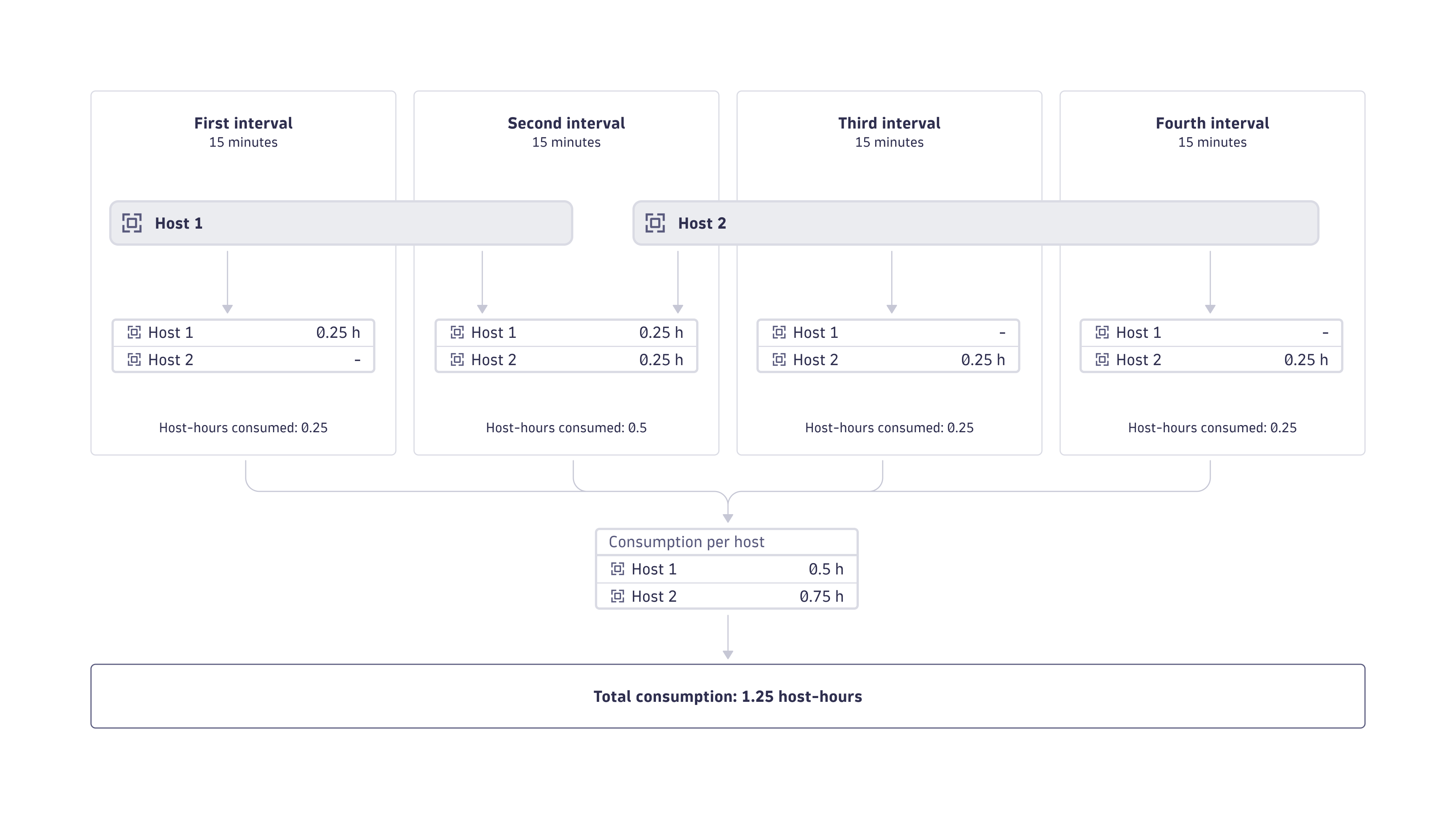
Dynatrace is built for dynamic cloud-native environments where hosts and services are rapidly spun up and destroyed. Therefore, billing granularity for host-hour consumption is calculated in 15-minute intervals. When a host is monitored for fewer than 15 minutes in an interval, host-hour consumption is rounded up to 15 minutes before consumption is calculated.
The figure below illustrates how host-hour consumption per host is calculated at 15-minute intervals.
Estimate your cost
The following example demonstrates how to calculate your monthly cost for Foundation & Discovery.
- Calculations are based on a list price of $0.01 per host-hour. See Dynatrace pricing. This may differ from your rate card price.
- All costs are in USD.
- One month is equivalent to 30 days.
- 100 hosts are monitored for 24 hours per day.
- 100 hosts × 24 hours × 30 days = 72,000 host-hours per month
- 72,000 host-hours × $0.01 = $720 per month
Understand your consumption
Dynatrace provides several ways to monitor and analyze your Foundation & Discovery consumption.
Insights via Account Management
License managers can view usage and costs directly in Account Management.
- Go to Account Management > Subscription > Overview > Cost and usage details > Usage summary.
- Select Foundation & Discovery > View details.
- From this screen, you can also drill down into usage detail on the capability and environment level.
- Capability level: Select View Details next to the capability you want to explore.
- Environment level: In the Environments table, select … > Open details with Notebooks.
For more information, see Overview (Dynatrace Platform Subscription).
You can also configure budget alerts at 75%, 90%, and 100% thresholds via Account Management. For more information, see Budget alerts.
Insights via Account Management API
Query Foundation & Discovery consumption programmatically via the Account Management API for integration with external reporting or cost allocation systems.
For more information, see APIs for cost data integration.
Optimize your consumption
This section presents some best-practice tips to optimize your consumption of Foundation & Discovery.
Configuration best practices
- Deploy Foundation & Discovery broadly as your baseline monitoring tier: Installing it on all hosts gives you full topology coverage and the discovery context needed to make informed monitoring decisions, at a lower cost than Infrastructure Monitoring or Full-Stack Monitoring.
- Upgrade selectively: Use the topology data discovered by Foundation & Discovery to identify which hosts have significant external connectivity, run business-critical services, or interact with many downstream dependencies. These hosts are strong candidates for Infrastructure Monitoring or Full-Stack Monitoring.
- Review monitoring modes regularly: Host criticality can change over time as infrastructure evolves. Periodically revisit your OneAgent mode assignments to ensure you're monitoring at the right depth for each host.
Ongoing optimization
- Monitor metrics split by host: Use the
builtin:billing.foundation_and_discovery.usage_per_hostmetric to identify high-consuming hosts and correlate with their business value. - Disable OneAgent on idle non-production hosts: For example, staging environments outside of working hours, to avoid paying for unused monitoring.
Automation
You can use Dynatrace to automate some of your optimization efforts.
| Automation | Description | How |
|---|---|---|
Anomaly alerts | Get notified of unexpected spikes in Foundation & Discovery host-hour consumption. | Cost Monitors in Account Management. |
FAQs
Is Foundation & Discovery consumption affected by host memory size?
No. Host-hour consumption is independent of the host's memory size. Each monitored host contributes one host hour per hour of monitoring, regardless of how much RAM it has.
How does billing granularity work?
Consumption is calculated in 15-minute intervals. If a host is monitored for fewer than 15 minutes in a given interval, its consumption is rounded up to 15 minutes. For example, a host that reports for just 2 minutes within a 15-minute window is billed as if it reported for 15 minutes.
How does Foundation & Discovery compare to Infrastructure Monitoring?
Both modes use host hours as their unit of measure, but they differ in capability and cost:
- Foundation & Discovery provides basic host health metrics, OS service monitoring, process discovery, and Smartscape topology. It does not include custom metrics, process-level deep monitoring, or full infrastructure dashboards.
- Infrastructure Monitoring adds the ability to ingest deeper host and process-level metrics, custom metrics, and full infrastructure observability. It has a higher cost per host hour than Foundation & Discovery.
The right choice depends on how critical a host is and how much observability depth is needed for the services running on it.
Does Foundation & Discovery include log ingestion?
Automated log ingestion is available with all OneAgent monitoring modes, including Foundation & Discovery. However, log ingestion does not consume Foundation & Discovery host hours. It is billed separately as Log Monitoring Classic.
Does Foundation & Discovery include custom metrics?
No. Foundation & Discovery includes basic built-in metrics only. To collect custom metrics, you need Infrastructure Monitoring or Full-Stack Monitoring.
Does monitoring start and stop affect billing?
Yes. Consumption is generated only while a host is actively monitored. If you uninstall OneAgent or take a host offline, that host stops contributing to your Foundation & Discovery consumption. Thanks to 15-minute billing granularity, short-lived cloud instances are billed accurately without over-counting.