Quickstart
- Getting started guide
- 2-min read
This page guides you to install Dynatrace components within a minute on your Kubernetes cluster in order to quickly benefit from the Dynatrace observability & analytics platform.
Prerequisites
Before installing Dynatrace on your Kubernetes cluster, ensure that you meet the following requirements:
- Your
kubectlCLI is connected to the Kubernetes cluster that you want to monitor. - You have sufficient privileges on the monitored cluster to run
kubectloroccommands. If you don't use thecluster-admincluster role, see deployment permissions for the required permissions.
Cluster setup and configuration
-
You must allow egress for Dynatrace pods (default: Dynatrace namespace) to your Dynatrace environment URL.
- For Dynatrace Managed, you can optionally use a Cluster ActiveGate URL.
-
For OpenShift Dedicated, you need the cluster-admin role.
-
Helm installation Use Helm version 3.
Supported versions
See supported Kubernetes/OpenShift platform versions and distributions.
Deploy Dynatrace Operator
You will get insights and actionable answers into your Kubernetes platform as well as your containerized apps by deploying Dynatrace for Full Kubernetes Observability in cloud-native full-stack mode.
-
Go to Kubernetes.
-
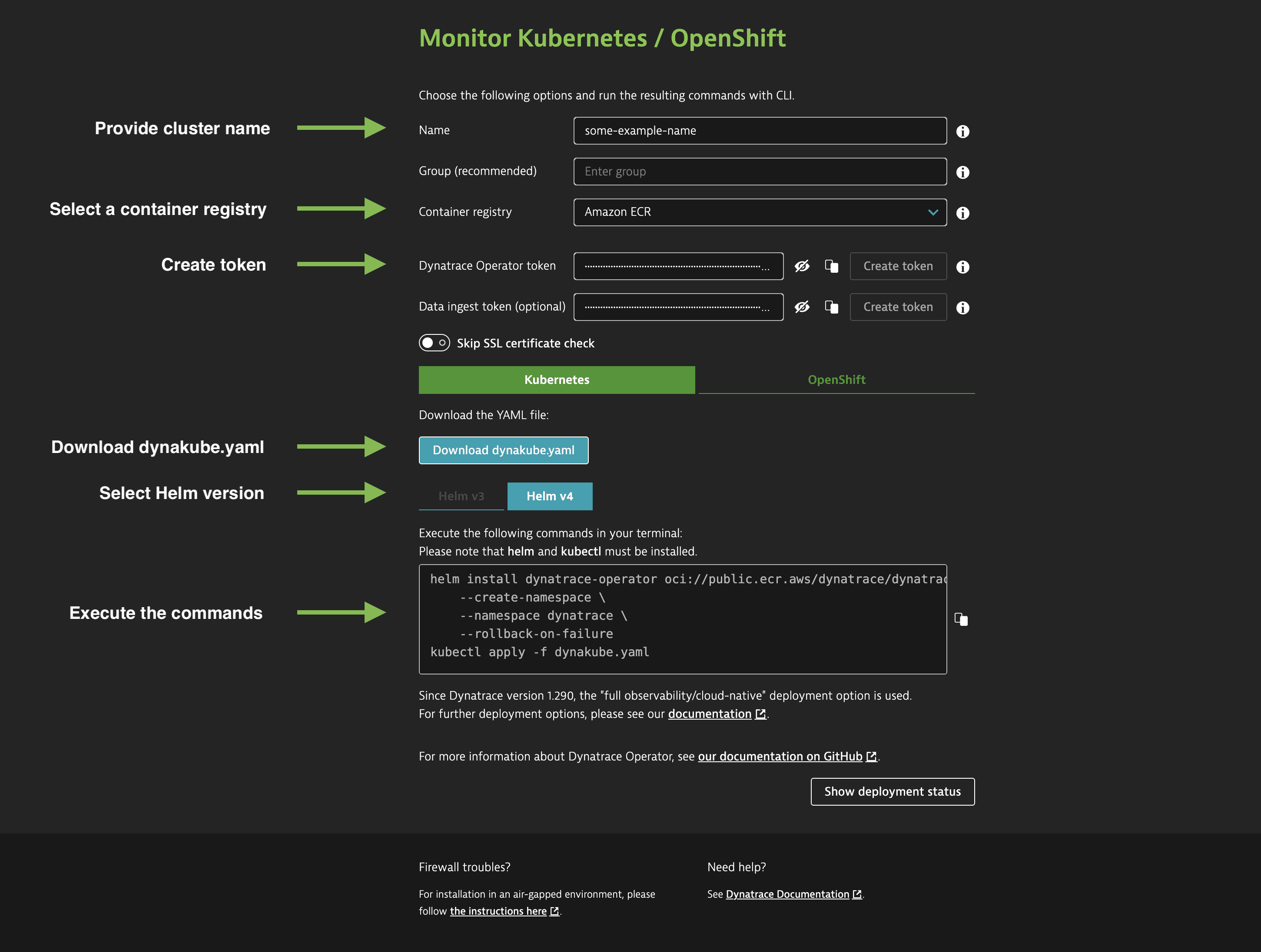
Select Connect automatically via Dynatrace Operator.
-
Follow the on-screen instructions.
Learn more
Deployment mode
Determine the recommended deployment mode for your intended setup based on your requirements.
Integrations
Leverage open source components to ingest additional observability signals into Dynatrace.
How it works
Familiarize yourself with Dynatrace components that are deployed in your Kubernetes cluster.
Guides
Learn how you can configure Dynatrace Operator to support specific use cases.
Get actionable answers
Start to analyze your Kubernetes clusters and containerized Apps with Dynatrace and benefit from actionable answers.