Azure Storage Account (Blob, File, Queue, Table)
- How-to guide
- 11-min read
For information about differences between classic services and other services, see Migrate from Azure classic (formerly 'built-in') services to cloud services.
Dynatrace ingests metrics for multiple preselected namespaces, including Azure Storage Account. You can view metrics for each service instance, split metrics into multiple dimensions, and create custom charts that you can pin to your dashboards.
Prerequisites
- Dynatrace version 1.196+
- Environment ActiveGate version 1.195+
This service monitors a part of Storage Account (Microsoft.Storage/storageAccounts).
While you have this service configured, you can't have Azure Storage accounts (built-in) service turned on.
To monitor resources of the Microsoft.ClassicStorage/storageAccounts type, check Storage Account Classic and the Cloud services section on the Azure overview page
Enable monitoring
To learn how to enable service monitoring, see Enable service monitoring.
View service metrics
You can view the service metrics in your Dynatrace environment either on the custom device overview page or on your Dashboards page.
View metrics on the custom device overview page
To access the custom device overview page
- Go to Technologies & Processes.
- Filter by service name and select the relevant custom device group.
- Once you select the custom device group, you're on the custom device group overview page.
- The custom device group overview page lists all instances (custom devices) belonging to the group. Select an instance to view the custom device overview page.
View metrics on your dashboard
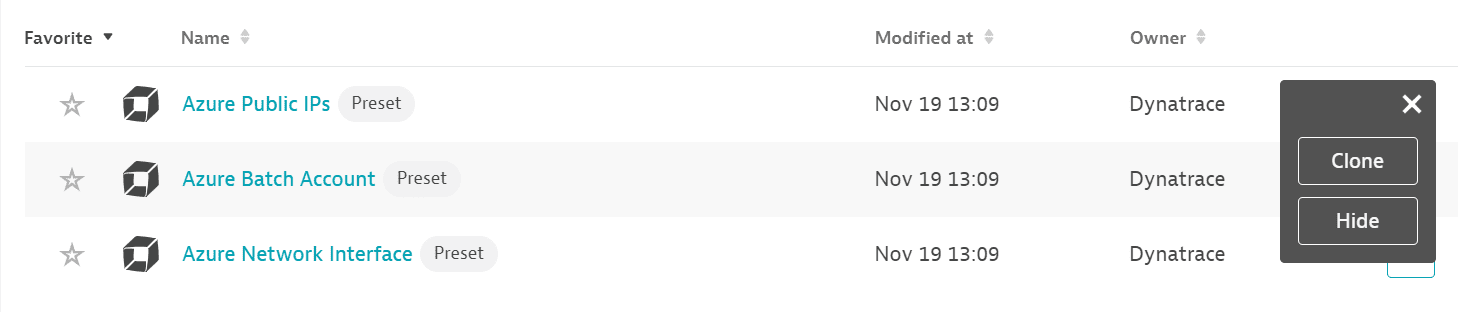
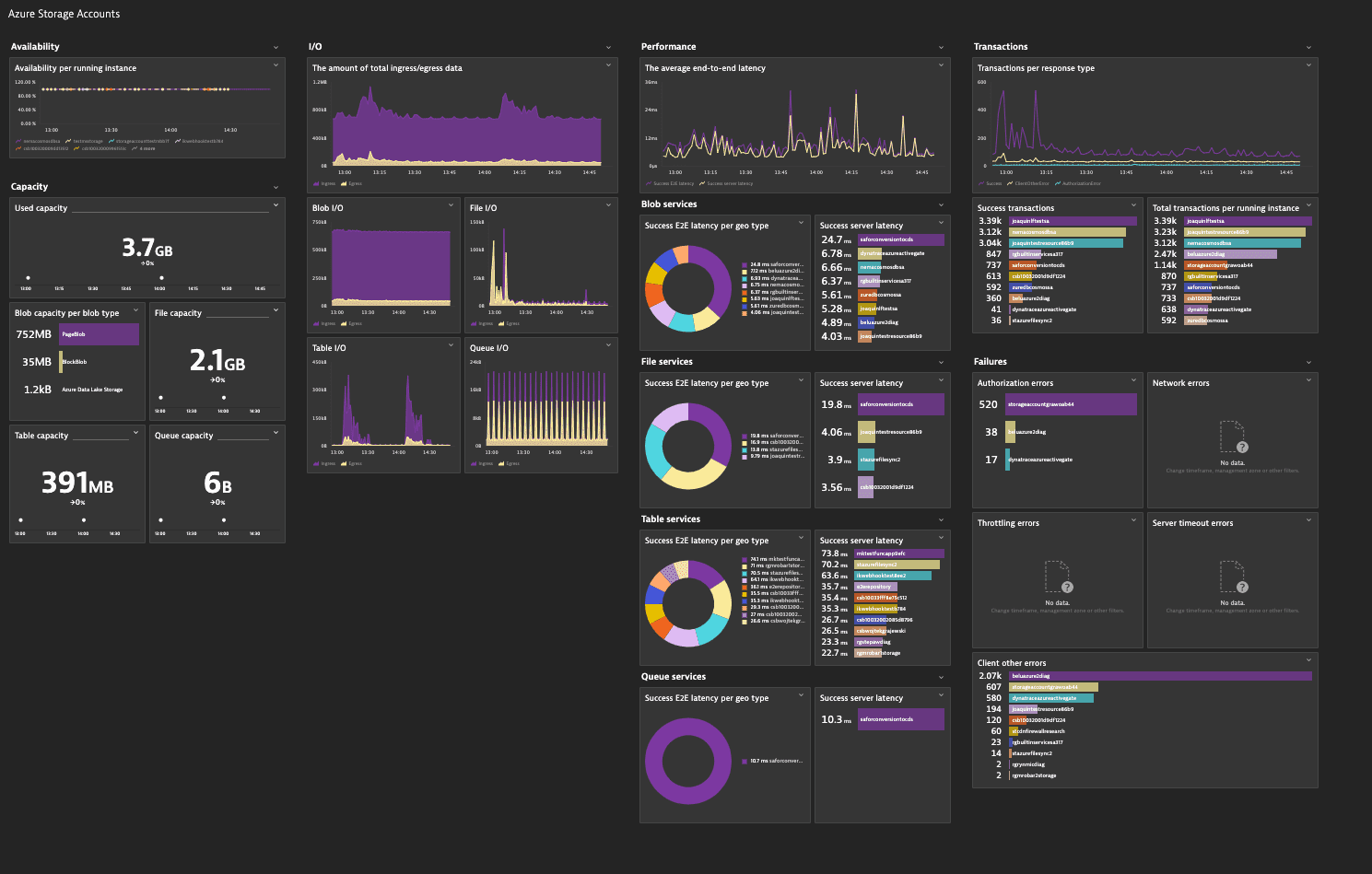
If the service has a preset dashboard, you'll get a preset dashboard for the respective service containing all recommended metrics on your Dashboards page. You can look for specific dashboards by filtering by Preset and then by Name.
For existing monitored services, you might need to resave your credentials for the preset dashboard to appear on the Dashboards page. To resave your credentials, go to Settings > Cloud and virtualization > Azure, select the desired Azure instance, then select Save.
You can't make changes on a preset dashboard directly, but you can clone and edit it. To clone a dashboard, open the browse menu (…) and select Clone.
To remove a dashboard from the dashboards list, you can hide it. To hide a dashboard, open the browse menu (…) and select Hide.
Hiding a dashboard doesn't affect other users.
Available metrics
This service monitors a part of Storage Account (Microsoft.Storage/storageAccounts). While you have this service configured, you can't have Azure Storage accounts (built-in) service turned on.
To monitor resources of the Microsoft.ClassicStorage/storageAccounts type, check Storage Account Classic and Cloud services sections on the Azure overview page.
Storage Account
| Display name | Name | Description | Dimensions | Unit | Recommended |
|---|---|---|---|---|---|
Availability | Availability | The percentage of availability for the storage service or the specified API operation. All unexpected errors result in reduced availability for the storage service or the specified API operation. | API name, Authentication, Geo type | Percent | |
Egress | Egress | The amount of egress data. | API name, Authentication, Geo type | Byte | |
Ingress | Ingress | The amount of ingress data, in bytes. | API name, Authentication, Geo type | Byte | |
Success E2E latency | SuccessE2ELatency | The average end-to-end latency of successful requests made to a storage service or the specified API operation, in milliseconds. | API name, Authentication, Geo type | MilliSecond | |
Success server latency | SuccessServerLatency | The average time used to process a successful request by Azure Storage. This value does not include the network latency specified in SuccessE2ELatency. | API name, Authentication, Geo type | MilliSecond | |
Transactions | Transactions | The number of requests made to a storage service or the specified API operation. Use ResponseType dimension for the number of different type of response. | API name, Authentication, Geo type, Response type, Transaction type | Count |
|
Used capacity | UsedCapacity | The amount of storage used by the storage account. For standard storage accounts, it's the sum of capacity used by blob, table, file, and queue. For premium storage accounts and Blob storage accounts, it is the same as BlobCapacity or FileCapacity. | Byte |
|

Azure Storage Blob Services
This service monitors a part of Storage Account (Microsoft.Storage/storageAccounts). While you have this service configured, you can't have Azure Storage accounts (built-in) service turned on.
To monitor resources of the Microsoft.ClassicStorage/storageAccounts type, check Storage Account Classic and Cloud services sections on the Azure overview page.
| Display name | Name | Description | Dimensions | Unit | Recommended |
|---|---|---|---|---|---|
Availability | Availability | The percentage of availability for the storage service or the specified API operation. All unexpected errors result in reduced availability for the storage service or the specified API operation. | API name, Authentication, Geo type | Percent | |
Blob capacity | BlobCapacity | The amount of storage used by the storage account's Blob service in bytes. | Blob tier, Blob type | Byte |
|
Blob container count | ContainerCount | The number of containers in the storage account. | Count | ||
Blob count | BlobCount | The number of blob objects stored in the storage account. | Blob tier, Blob type | Count | |
Blob provisioned size | BlobProvisionedSize | The amount of storage provisioned in the storage account's Blob service in bytes. | Blob tier, Blob type | Byte | |
Egress | Egress | The amount of egress data. | API name, Authentication, Geo type | Byte | |
Index capacity | IndexCapacity | The amount of storage used by Azure Data Lake Storage Gen2 hierarchical index. | Byte | ||
Ingress | Ingress | The amount of ingress data, in bytes. | API name, Authentication, Geo type | Byte | |
Success E2E latency | SuccessE2ELatency | The average end-to-end latency of successful requests made to a storage service or the specified API operation, in milliseconds. | API name, Authentication, Geo type | MilliSecond | |
Success server latency | SuccessServerLatency | The average time used to process a successful request by Azure Storage. This value does not include the network latency specified in SuccessE2ELatency. | API name, Authentication, Geo type | MilliSecond | |
Transactions | Transactions | The number of requests made to a storage service or the specified API operation. Use ResponseType dimension for the number of different type of response. | API name, Authentication, Geo type, Response type, Transaction type | Count |
|
Azure Storage File Services
This service monitors a part of Storage Account (Microsoft.Storage/storageAccounts). While you have this service configured, you can't have Azure Storage accounts (built-in) service turned on.
To monitor resources of the Microsoft.ClassicStorage/storageAccounts type, check Storage Account Classic and Cloud services sections on the Azure overview page.
| Display name | Name | Description | Dimensions | Unit | Recommended |
|---|---|---|---|---|---|
Availability | Availability | The percentage of availability for the storage service or the specified API operation. All unexpected errors result in reduced availability for the storage service or the specified API operation. | API name, Authentication, File share, Geo type | Percent | |
Egress | Egress | The amount of egress data. | API name, Authentication, File share, Geo type | Byte | |
File capacity | FileCapacity | The amount of File storage used by the storage account. | File share, Tier | Byte |
|
File count | FileCount | The number of files in the storage account. | File share, Tier | Count | |
File share capacity quota | FileShareCapacityQuota | The upper limit on the amount of storage that can be used by Azure Files Service in bytes. | File share | Byte | |
File share count | FileShareCount | The number of file shares in the storage account. | Count | ||
File share provisioned IOPS | FileShareProvisionedIOPS | The baseline number of provisioned IOPS for the premium file share in the premium files storage account. | File share | PerSecond | |
File share snapshot count | FileShareSnapshotCount | The number of snapshots present on the share in storage account's Files Service. | File share | Count | |
File share snapshot size | FileShareSnapshotSize | The amount of storage used by the snapshots in storage account's File service in bytes. | File share | Byte | |
Ingress | Ingress | The amount of ingress data, in bytes. | API name, Authentication, File share, Geo type | Byte | |
Success E2E latency | SuccessE2ELatency | The average end-to-end latency of successful requests made to a storage service or the specified API operation, in milliseconds. | API name, Authentication, File share, Geo type | MilliSecond | |
Success server latency | SuccessServerLatency | The average time used to process a successful request by Azure Storage. This value does not include the network latency specified in SuccessE2ELatency. | API name, Authentication, File share, Geo type | MilliSecond | |
Transactions | Transactions | The number of requests made to a storage service or the specified API operation. Use ResponseType dimension for the number of different type of response. | API name, Authentication, File share, Geo type, Response type, Transaction type | Count |
|
Azure Storage Queue Services
This service monitors a part of Storage Account (Microsoft.Storage/storageAccounts). While you have this service configured, you can't have Azure Storage accounts (built-in) service turned on.
To monitor resources of the Microsoft.ClassicStorage/storageAccounts type, check Storage Account Classic and Cloud services sections on the Azure overview page.
| Display name | Name | Description | Dimensions | Unit | Recommended |
|---|---|---|---|---|---|
Availability | Availability | The percentage of availability for the storage service or the specified API operation. All unexpected errors result in reduced availability for the storage service or the specified API operation. | API name, Authentication, Geo type | Percent | |
Egress | Egress | The amount of egress data. | API name, Authentication, Geo type | Byte | |
Ingress | Ingress | The amount of ingress data, in bytes. | API name, Authentication, Geo type | Byte | |
Queue capacity | QueueCapacity | The amount of Queue storage used by the storage account. | Byte |
| |
Queue count | QueueCount | The number of queues in the storage account. | Count | ||
Queue message count | QueueMessageCount | The number of unexpired queue messages in the storage account. | Count | ||
Success E2E latency | SuccessE2ELatency | The average end-to-end latency of successful requests made to a storage service or the specified API operation, in milliseconds. | API name, Authentication, Geo type | MilliSecond | |
Success server latency | SuccessServerLatency | The average time used to process a successful request by Azure Storage. This value does not include the network latency specified in SuccessE2ELatency. | API name, Authentication, Geo type | MilliSecond | |
Transactions | Transactions | The number of requests made to a storage service or the specified API operation. Use ResponseType dimension for the number of different type of response. | API name, Authentication, Geo type, Response type, Transaction type | Count |
|
Azure Storage Table Services
This service monitors a part of Storage Account (Microsoft.Storage/storageAccounts). While you have this service configured, you can't have Azure Storage accounts (built-in) service turned on.
To monitor resources of the Microsoft.ClassicStorage/storageAccounts type, check Storage Account Classic and Cloud services sections on the Azure overview page.
| Display name | Name | Description | Dimensions | Unit | Recommended |
|---|---|---|---|---|---|
Availability | Availability | The percentage of availability for the storage service or the specified API operation. All unexpected errors result in reduced availability for the storage service or the specified API operation. | API name, Authentication, Geo type | Percent | |
Egress | Egress | The amount of egress data. | API name, Authentication, Geo type | Byte | |
Ingress | Ingress | The amount of ingress data, in bytes. | API name, Authentication, Geo type | Byte | |
Success E2E latency | SuccessE2ELatency | The average end-to-end latency of successful requests made to a storage service or the specified API operation, in milliseconds. | API name, Authentication, Geo type | MilliSecond | |
Success server latency | SuccessServerLatency | The average time used to process a successful request by Azure Storage. This value does not include the network latency specified in SuccessE2ELatency. | API name, Authentication, Geo type | MilliSecond | |
Table capacity | TableCapacity | The amount of Table storage used by the storage account. | Byte |
| |
Table count | TableCount | The number of tables in the storage account. | Count | ||
Table entity count | TableEntityCount | The number of table entities in the storage account. | Count | ||
Transactions | Transactions | The number of requests made to a storage service or the specified API operation. Use ResponseType dimension for the number of different type of response. | API name, Authentication, Geo type, Response type, Transaction type | Count |
|
Additional notes
As newly implemented Azure Storage Accounts and Azure Storage accounts (built-in) monitor the same resources (from the Microsoft.Storage/storageAccounts group), they can't be switched on simultaneously.
- Enabling the built-in version will disable all of the generic versions.
- Enabling any of the generic versions will disable the built-in version.