Azure IoT Hub monitoring
- How-to guide
- 10-min read
For information about differences between classic services and other services, see Migrate from Azure classic (formerly 'built-in') services to cloud services.
Dynatrace ingests metrics from Azure Metrics API for Azure IoT Hub. You can view metrics for each service instance, split metrics into multiple dimensions, and create custom charts that you can pin to your dashboards.
Prerequisites
- Dynatrace version 1.199+
- Environment ActiveGate version 1.195+
Enable monitoring
To learn how to enable service monitoring, see Enable service monitoring.
View service metrics
You can view the service metrics in your Dynatrace environment either on the custom device overview page or on your Dashboards page.
View metrics on the custom device overview page
To access the custom device overview page
- Go to Technologies & Processes.
- Filter by service name and select the relevant custom device group.
- Once you select the custom device group, you're on the custom device group overview page.
- The custom device group overview page lists all instances (custom devices) belonging to the group. Select an instance to view the custom device overview page.
View metrics on your dashboard
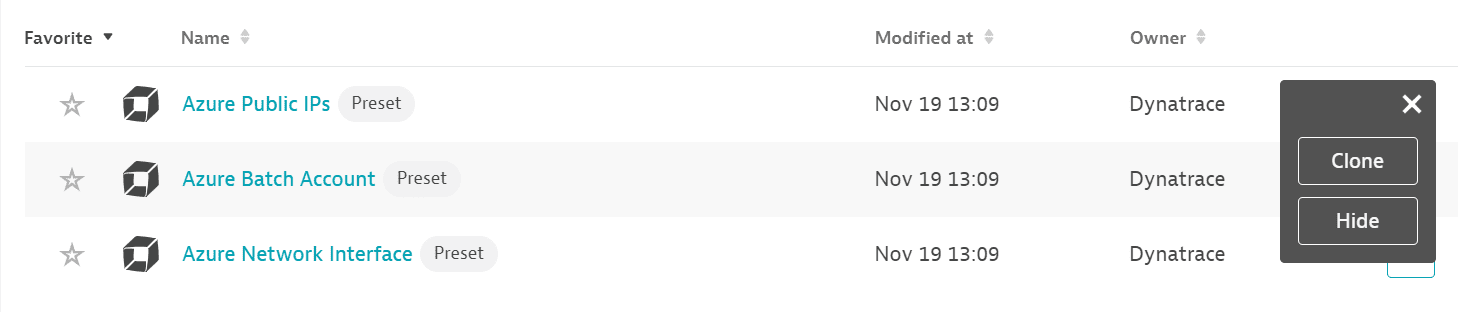
If the service has a preset dashboard, you'll get a preset dashboard for the respective service containing all recommended metrics on your Dashboards page. You can look for specific dashboards by filtering by Preset and then by Name.
For existing monitored services, you might need to resave your credentials for the preset dashboard to appear on the Dashboards page. To resave your credentials, go to Settings > Cloud and virtualization > Azure, select the desired Azure instance, then select Save.
You can't make changes on a preset dashboard directly, but you can clone and edit it. To clone a dashboard, open the browse menu (…) and select Clone.
To remove a dashboard from the dashboards list, you can hide it. To hide a dashboard, open the browse menu (…) and select Hide.
Hiding a dashboard doesn't affect other users.
Available metrics
This service monitors a part of Azure IoT Hub (Microsoft.Devices/IotHubs). While you have this service configured, you can't have Azure Iot Hub (built-in) service turned on.
| Name | Description | Dimensions | Unit | Recommended |
|---|---|---|---|---|
Telemetry message send attempts | Number of device-to-cloud telemetry messages attempted to be sent to your IoT hub | Count |
| |
Telemetry messages sent | Number of device-to-cloud telemetry messages sent successfully to your IoT hub | Count |
| |
C2D message deliveries completed | Number of cloud-to-device message deliveries completed successfully by the device | Count | ||
C2D messages abandoned | Number of cloud-to-device messages abandoned by the device | Count | ||
C2D messages rejected | Number of cloud-to-device messages rejected by the device | Count | ||
C2D messages expired | Number of expired cloud-to-device messages | Count | ||
Total devices (deprecated) | Number of devices registered to your IoT hub | Count | ||
Connected devices (deprecated) | Number of devices connected to your IoT hub | Count | ||
Routing - telemetry messages delivered | The number of times messages were successfully delivered to all endpoints using IoT Hub routing. If a message is routed to multiple endpoints, this value increases by one for each successful delivery. If a message is delivered to the same endpoint multiple times, this value increases by one for each successful delivery. | Count |
| |
Routing - telemetry messages dropped | The number of times messages were dropped by IoT Hub routing due to dead endpoints. This value does not count messages delivered to fallback route as dropped messages are not delivered there. | Count |
| |
Routing - telemetry messages orphaned | The number of times messages were orphaned by IoT Hub routing because they didn't match any routing rules (including the fallback rule). | Count |
| |
Routing - telemetry messages incompatible | The number of times IoT Hub routing failed to deliver messages due to an incompatibility with the endpoint. This value does not include retries. | Count |
| |
Routing - messages delivered to fallback | The number of times IoT Hub routing delivered messages to the endpoint associated with the fallback route. | Count |
| |
Routing - messages delivered to event hub | The number of times IoT Hub routing successfully delivered messages to Event Hub endpoints. | Count | ||
Routing - message latency for event hub | The average latency (milliseconds) between message ingress to IoT Hub and message ingress into an Event Hub endpoint. | MilliSecond | ||
Routing - messages delivered to service bus queue | The number of times IoT Hub routing successfully delivered messages to Service Bus queue endpoints. | Count | ||
Routing - message latency for service bus queue | The average latency (milliseconds) between message ingress to IoT Hub and telemetry message ingress into a Service Bus queue endpoint. | MilliSecond | ||
Routing - messages delivered to service bus topic | The number of times IoT Hub routing successfully delivered messages to Service Bus topic endpoints. | Count | ||
Routing - message latency for service bus topic | The average latency (milliseconds) between message ingress to IoT Hub and telemetry message ingress into a Service Bus topic endpoint. | MilliSecond | ||
Routing - messages delivered to messages/events | The number of times IoT Hub routing successfully delivered messages to the built-in endpoint (messages/events). | Count | ||
Routing - message latency for messages/events | The average latency (milliseconds) between message ingress to IoT Hub and telemetry message ingress into the built-in endpoint (messages/events). | MilliSecond | ||
Routing - messages delivered to storage | The number of times IoT Hub routing successfully delivered messages to storage endpoints. | Count | ||
Routing - message latency for storage | The average latency (milliseconds) between message ingress to IoT Hub and telemetry message ingress into a storage endpoint. | MilliSecond | ||
Routing - data delivered to storage | The amount of data (bytes) IoT Hub routing delivered to storage endpoints. | Byte | ||
Routing - blobs delivered to storage | The number of times IoT Hub routing delivered blobs to storage endpoints. | Count | ||
Event grid deliveries | The number of IoT Hub events published to Event Grid. Use the Result dimension for the number of successful and failed requests. | Routing result, Event type | Count | |
Event grid latency | The average latency (milliseconds) from when the Iot Hub event was generated to when the event was published to Event Grid. This number is an average between all event types. Use the EventType dimension to see latency of a specific type of event. | Event type | MilliSecond | |
Routing deliveries (preview) | The number of times IoT Hub attempted to deliver messages to all endpoints using routing. To see the number of successful or failed attempts, use the Result dimension. To see the reason of failure, like invalid, dropped, or orphaned, use the FailureReasonCategory dimension. You can also use the EndpointName and EndpointType dimensions to understand how many messages were delivered to your different endpoints. The metric value increases by one for each delivery attempt, including if the message is delivered to multiple endpoints or if the message is delivered to the same endpoint multiple times. | Endpoint type, Endpoint name, Failure reason category, Result, Routing source | Count | |
Routing delivery latency (preview) | The average latency (milliseconds) between message ingress to IoT Hub and telemetry message ingress into an endpoint. You can use the EndpointName and EndpointType dimensions to understand the latency to your different endpoints. | Endpoint type, Endpoint name, Routing source | MilliSecond | |
Routing delivery message size in bytes (preview) | The total size in bytes of messages delivered by IoT hub to an endpoint. You can use the EndpointName and EndpointType dimensions to view the size of the messages in bytes delivered to your different endpoints. The metric value increases for every message delivered, including if the message is delivered to multiple endpoints or if the message is delivered to the same endpoint multiple times. | Endpoint type, Endpoint name, Routing source | Byte | |
Successful twin reads from devices | The count of all successful device-initiated twin reads. | Count | ||
Failed twin reads from devices | The count of all failed device-initiated twin reads. | Count | ||
Response size of twin reads from devices | The average, min, and max of all successful device-initiated twin reads. | Byte | ||
Successful twin updates from devices | The count of all successful device-initiated twin updates. | Count | ||
Failed twin updates from devices | The count of all failed device-initiated twin updates. | Count | ||
Size of twin updates from devices | The average, min, and max size of all successful device-initiated twin updates. | Byte | ||
Successful direct method invocations | The count of all successful direct method calls. | Count | ||
Failed direct method invocations | The count of all failed direct method calls. | Count | ||
Request size of direct method invocations | The average, min, and max of all successful direct method requests. | Byte | ||
Response size of direct method invocations | The average, min, and max of all successful direct method responses. | Byte | ||
Successful twin reads from back end | The count of all successful back-end-initiated twin reads. | Count | ||
Failed twin reads from back end | The count of all failed back-end-initiated twin reads. | Count | ||
Response size of twin reads from back end | The average, min, and max of all successful back-end-initiated twin reads. | Byte | ||
Successful twin updates from back end | The count of all successful back-end-initiated twin updates. | Count | ||
Failed twin updates from back end | The count of all failed back-end-initiated twin updates. | Count | ||
Size of twin updates from back end | The average, min, and max size of all successful back-end-initiated twin updates. | Byte | ||
Successful twin queries | The count of all successful twin queries. | Count | ||
Failed twin queries | The count of all failed twin queries. | Count | ||
Twin queries result size | The average, min, and max of the result size of all successful twin queries. | Byte | ||
Successful creations of twin update jobs | The count of all successful creation of twin update jobs. | Count | ||
Failed creations of twin update jobs | The count of all failed creation of twin update jobs. | Count | ||
Successful creations of method invocation jobs | The count of all successful creation of direct method invocation jobs. | Count | ||
Failed creations of method invocation jobs | The count of all failed creation of direct method invocation jobs. | Count | ||
Successful calls to list jobs | The count of all successful calls to list jobs. | Count | ||
Failed calls to list jobs | The count of all failed calls to list jobs. | Count | ||
Successful job cancellations | The count of all successful calls to cancel a job. | Count | ||
Failed job cancellations | The count of all failed calls to cancel a job. | Count | ||
Successful job queries | The count of all successful calls to query jobs. | Count | ||
Failed job queries | The count of all failed calls to query jobs. | Count | ||
Completed jobs | The count of all completed jobs. | Count | ||
Failed jobs | The count of all failed jobs. | Count | ||
Number of throttling errors | Number of throttling errors due to device throughput throttles | Count |
| |
Total number of messages used | Number of total messages used today | Count | ||
Total device data usage | Bytes transferred to and from any devices connected to IotHub | Byte |
| |
Total device data usage (preview) | Bytes transferred to and from any devices connected to IotHub | Byte | ||
Total devices | Number of devices registered to your IoT hub | Count |
| |
Connected devices | Number of devices connected to your IoT hub | Count |
| |
Configuration metrics | Metrics for Configuration Operations | Count |