Root cause analysis concepts
- Explanation
- 11-min read
As dynamic system architectures increase in complexity and scale, IT teams face mounting pressure to detect and react to business-critical incidents across multi-cloud environments. Incidents can affect one or more IT components, leading to large-scale outages that take down critical business services and applications. Such services and applications (for example, accounting systems or web shops) consist of many components that depend on each other to work reliably and deliver excellent user experience. When a critical component fails, the ripple effect negatively influences many other dependent components, triggering a large-scale incident.
Concepts such as Service Level Objectives (SLOs) establish a framework of trust between individual components and shift responsibility toward the teams building and owning those components. SLOs provide a machine-processable understanding of the normal operating boundaries for individual services. However, they don't deliver a deeper understanding of the cause of a problem or the best remediation.
Root cause analysis fills this gap by using all available context information to evaluate an incident and determine its precise root cause. Evaluating the impact of an incident is equally important, enabling the operations team to triage the incident and reduce the mean time to repair (MTTR).
This page introduces the following core concepts:
Incidents and problems
Davis AI events
Root cause analysis
Fault tree analysis
Impact analysis
Problem lifecycle
Problem timing
Duplicate problems
Incidents and problems
An incident is an abnormality in your environment—in an application, infrastructure, and more. A problem is an entity that represents the incident in Dynatrace. A problem is the result of automatic Davis® AI root cause and impact analysis of an incident. Problems (just like underlying incidents) can span multiple dependent components, sharing the same impact and root cause.
A problem can result from single or multiple Davis AI events occurring simultaneously within the same topology, which is often the case in complex environments. To prevent over-alerting, Davis correlates all Davis AI events with the same root cause into a single problem.
Davis automatically detects problems, lists them in the problem feed, and updates them in real time with all incoming Davis AI events and findings.
Davis AI events
Events represent different types of singular anomalies, such as a metric breaching a threshold, baseline degradations, or point-in-time Davis AI events, such as process crashes. Dynatrace also detects and processes informational Davis AI events such as new software deployments, configuration changes, and other Davis AI event types.
Dynatrace ingests and stores Davis AI events from multiple sources. Those events can trigger root cause analysis, an automation, or serve as raw data for dashboards and reports. Together with logs, metrics, and traces, Davis AI events provide the input for root cause and impact analysis.
Most Davis AI events don't indicate abnormal or unhealthy states, therefore only a small fraction of Davis AI events fall within problems.
Root cause analysis
Root cause analysis uses all available context information—such as topology, transaction, and code-level information—to identify Davis AI events that share the same root cause and impact.
To identify the root cause of problems, time correlation alone isn't sufficient. Dynatrace follows a context-aware approach, detecting interdependent Davis AI events across time, processes, hosts, services, applications, and both vertical and horizontal topological monitoring perspectives. This approach combines multiple standalone anomalies into a single consistent problem, dramatically reducing the alert load.
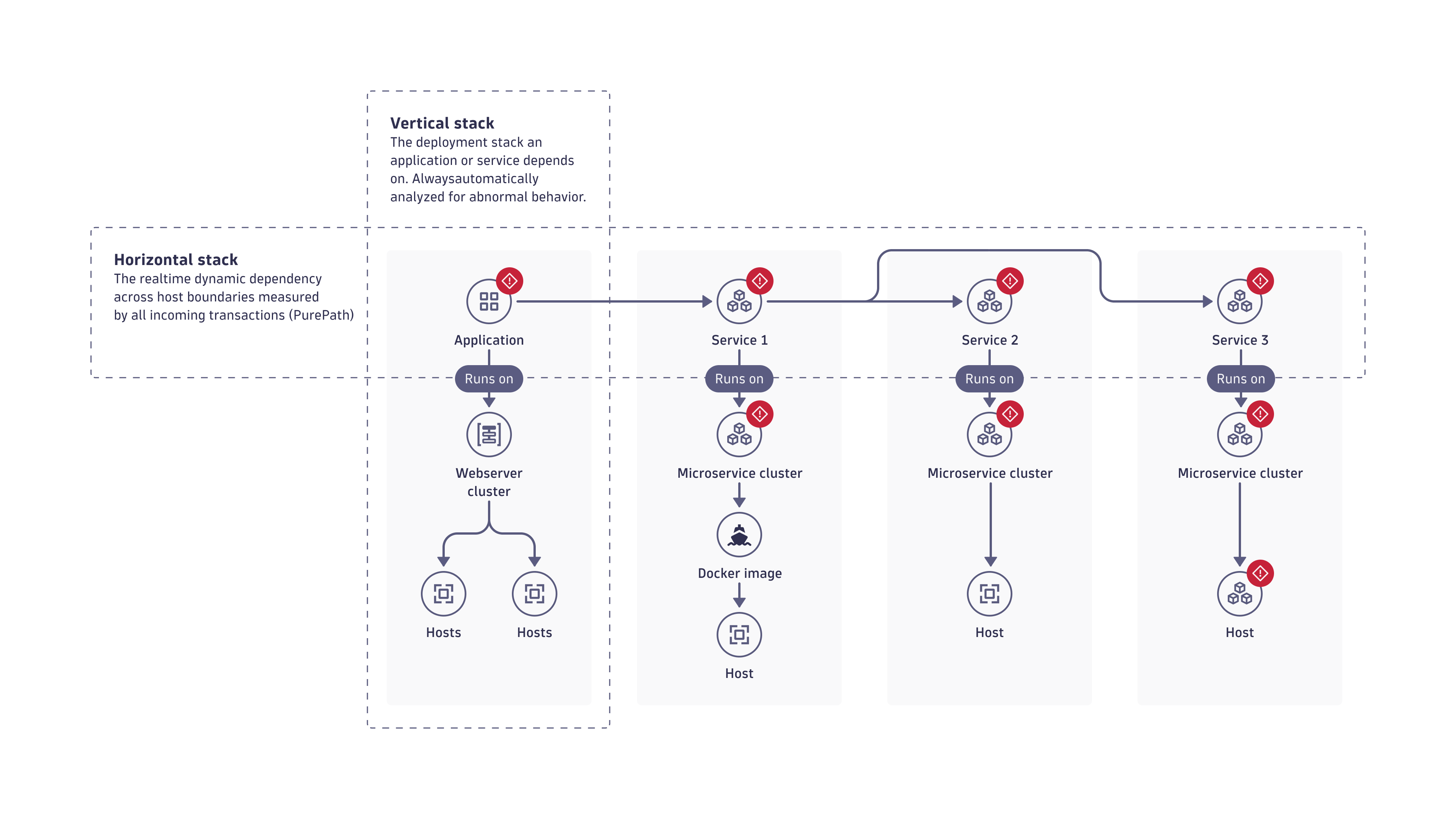
The image below illustrates how Davis analyzes all horizontal and vertical dependencies of a problem. In this example, the application shows abnormal behavior, while the underlying vertical stack operates normally. The analysis follows the transactions of the application, detecting dependency on a service (Service 1) that also shows abnormal behavior. In turn, all the service's dependencies exhibit abnormal behavior and are part of the same problem.
Davis includes all relevant abnormalities and ranks all root cause contributors, determining which is the primary negative impact. You can drill down to the component level and analyze the root cause down to the source code level. For example, Dynatrace can show failing methods within your service code or high GC activity on underlying Java processes.
Why is context correlation important?
A problem is seldom a one-time Davis AI event. Often they appear in regular patterns and are symptoms of larger issues within your environment. If multiple entities depending on an affected component experience issues around the same time, Davis includes all those entities in root cause analysis.
Time correlation alone isn't enough to identify the root cause of many application and service problems. Consider, for example, a simple time correlation in which the Booking service calls the Verification service, and the Verification service experiences a slowdown. The first Davis AI event in the problem evolution is a slowdown of the Verification service. Subsequently, the Booking service experiences a slowdown too, caused by its dependency on the Verification service. In this case, time correlation works well in detecting the root cause of the problem: a slowdown of the Verification service. However, this is an oversimplified description of what happens in real applications.
What if the Davis AI events in the problem evolution sequence are more nuanced and open to interpretation? What if, for example, the Booking service has a long history of performance problems? Without the complete context, it becomes impossible to decisively conclude that the slowdown of the Booking service is caused by the slowdown of the Verfication service. There is a possibility that the Booking service is experiencing another performance issue, unrelated to the Verfication service.
Davis root cause analysis uses all related monitoring data to identify interdependencies between the problem and other components that took place around the same time and within a dependent topology. That is, all topological dependencies, vertical and horizontal, are part of the analysis.
Fault tree analysis
The Davis context model uses known dependency information from Smartscape, OneAgent, and cloud integration. Davis uses this information to conduct a fault tree analysis, examining millions of dependencies to arrive at the most probable root cause of a problem.
Impact analysis
The impact of a problem is as important as its root cause, since both represent essential information for triaging and remediating the underlying incident. Problems that threaten your company's business most have higher priority to resolve.
Impact analysis identifies which applications' entry-point services an incident affects and the size of the overall "blast radius" in terms of the total number of affected entities. Impact analysis also delivers the number of affected SLOs and the number of real users the incident may affect.
Impact analysis strives to determine how badly the incident affects your business.
Problem lifecycle
Dynatrace opens a problem upon receiving the first indicator of an incident. This is typically a single Davis AI event representing abnormal behavior, such as a service slowdown, node saturation, or a workload crash and restart.
A problem automatically follows a lifecycle and remains active while at least one entity remains in an unhealthy or abnormal state, mostly indicated by an active Davis AI event.
In the following scenario, a problem that has a performance incident in the infrastructure layer is the root cause.
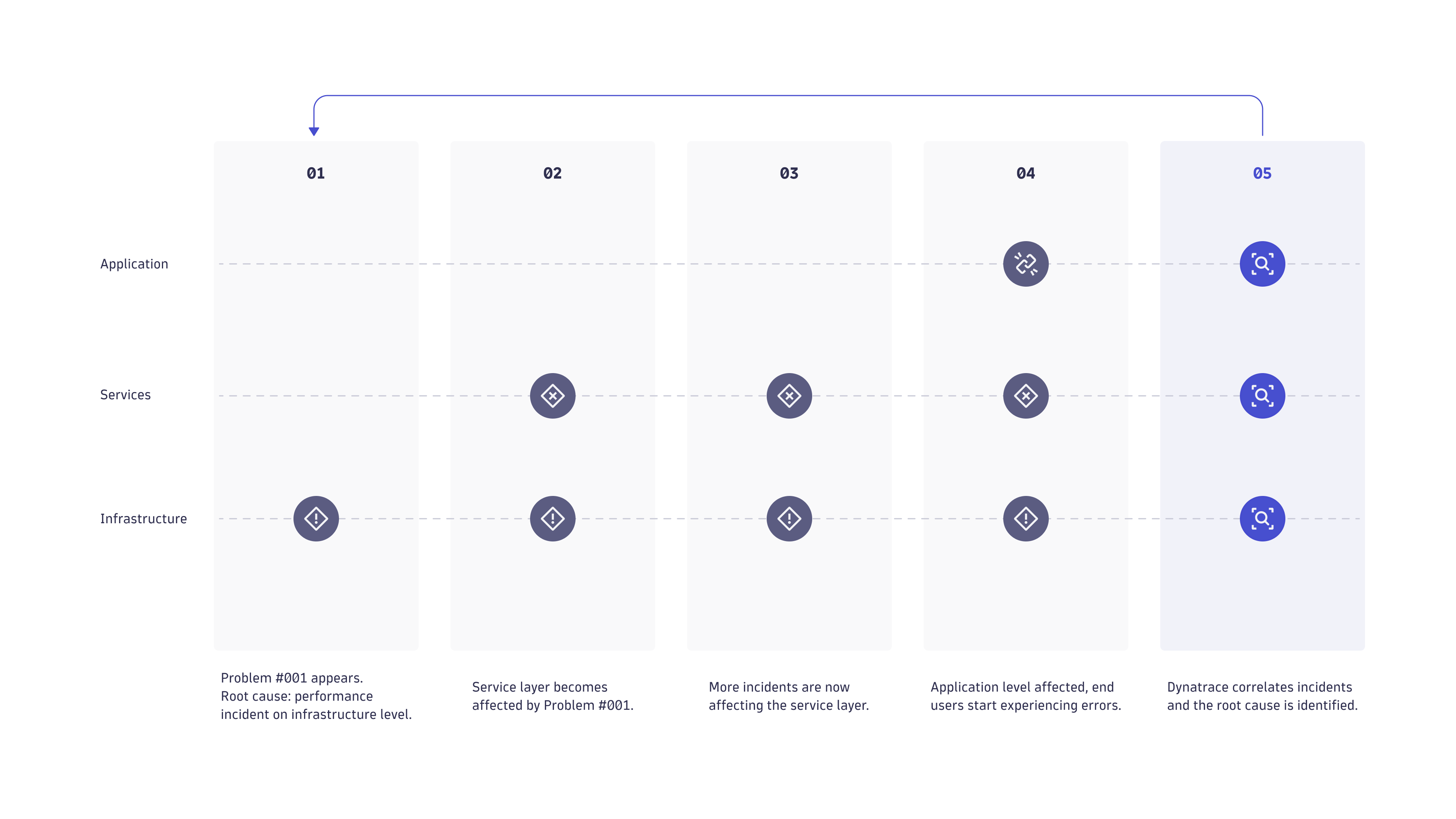
- Dynatrace detects an infrastructure-level performance incident, creates a new problem for tracking purposes, and sends a notification.
- After a few minutes, the infrastructure problem leads to the appearance of a performance degradation problem in one of the application's services.
- Additional service-level performance degradation problems begin to appear. What began as an isolated infrastructure problem has grown into a series of service-level problems that each have their root cause in the original incident in the infrastructure layer.
- Eventually, the service-level problems begin to affect the user experience of customers who are interacting with the application via desktop or mobile browsers. At this point in the problem life span, you have an application problem with one root cause in the infrastructure layer and additional root causes in the service layer.
- Because Dynatrace understands all the dependencies in your environment, it correlates the performance degradation problem your customers are experiencing with the original performance problem in the infrastructure layer, facilitating quick problem resolution.
Problem timing
The Dynatrace Davis® root-cause engine collects all Davis AI events that belong to the same incident. As a result, Davis generates a problem that references all incident-relevant information such as individual Davis AI events that were detected on the impacted topology graph.
The following shows how two individual Davis AI events are analyzed within one problem generated by Davis.
- Each Davis AI event comes with its own start and end timestamps.
- Each Davis AI event producer uses various observation sliding time windows, referred to as event analysis time (shown in yellow).

Consider a metric Davis AI event configured to use a five-minute sliding window, where three one-minute samples need to violate the threshold to trigger a Davis AI event. In that case, the metric starts violating the threshold three minutes before the timestamp when the event triggers.
- The event start analysis timestamp is the earliest point in time when Dynatrace observed the violating state.
- The event end analysis timestamp is the point in time after Davis collects all necessary violation samples and opens a problem.
- If a problem remains open for longer than 90 minutes, Davis no longer merges new Davis AI events into it after the 90-minute point. This prevents Davis from collecting unrelated information for long-lasting incidents (for example, a synthetic test constantly failing and keeping problems open for weeks).
Summary of problem lifecycle timings
- Individual Davis AI events use variable analysis sliding windows.
- A problem is raised at the event end analysis timestamp.
- The lifespans of individual Davis AI events in the problem define the problem lifespan.
- A problem closes when all Davis AI events in the problem close.
- A closed problem is never reopened. New related active events create a new problem instead.
- If a problem lasts for longer than 90 minutes, no new Davis AI events are merged after the 90-minute point—a new problem is raised instead.
- If the time gap between creation (start timestamp) of the first Davis AI events is longer than 5 minutes, Davis won't merge the events into the same problem. Instead, Davis identifies them as two different problems.
Duplicate problems
The detection and analysis of a large-scale incident always requires a balance between fast alerting and having a complete picture of the situation. Data collection is asynchronous by nature due to different observation windows, different synthetic check schedules, and different latencies of information originating from various data sources.
The asynchronous processing of incoming information leads to situations where root-cause detection identifies two problems that share the same root cause.
- At the time of detection, root cause analysis might lack the necessary information to connect both problems into a single incident.
- After Davis processes the delayed information and identifies one main problem, it marks other identical problems as duplicates (
dt.davis.is_duplicate=true).
Dynatrace could remove duplicates entirely by waiting longer (for example, 30 minutes) to receive all possible information, but this would delay notifications to the operations teams.
Real-time alerting is critical, so Dynatrace accepts incomplete information and problem duplicates to enable the fastest possible notifications.
Problem processing state
After Davis AI detects a problem, the problem enters the Processing state. Davis AI analyzes the Davis AI event to determine whether to merge it into a more significant problem. The Processing state aims to avoid duplicate issues and false alarms, so Davis sends no notifications until the state changes. Analysis and information gathering necessary for Davis AI to make a decision usually take up to 3 minutes.
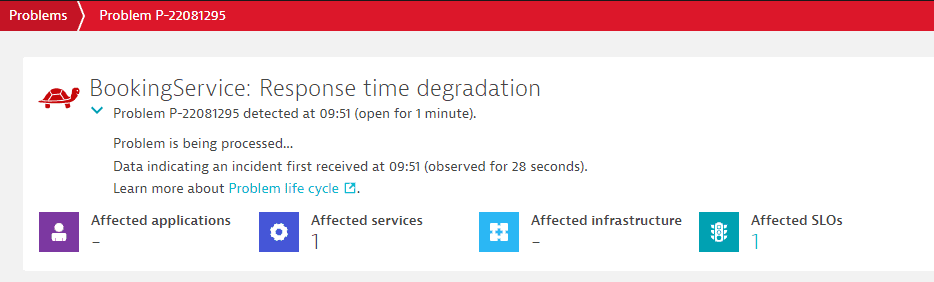
Below, you can find the example of a problem in the Processing state.
To receive notifications immediately when Davis AI detects a problem, use Custom alert with Metric events. In this case, Davis sets the event flags dt.davis.trigger_delay and dt.davis.analysis_time to 0. The problem won't enter the Processing state, and Davis AI skips the analysis.