RUM JavaScript DebugInformation
General Information
The RUM JavaScript has a built-in Health check.
On Version 1.337 or lower it can be invoked by calling
dynatrace.runHealthCheck();
On Version 1.339 and higher it can be invoked by calling
await dynatrace.loadDebugTools();
dynatrace.debugtools.runHealthCheck();
The output looks like this:
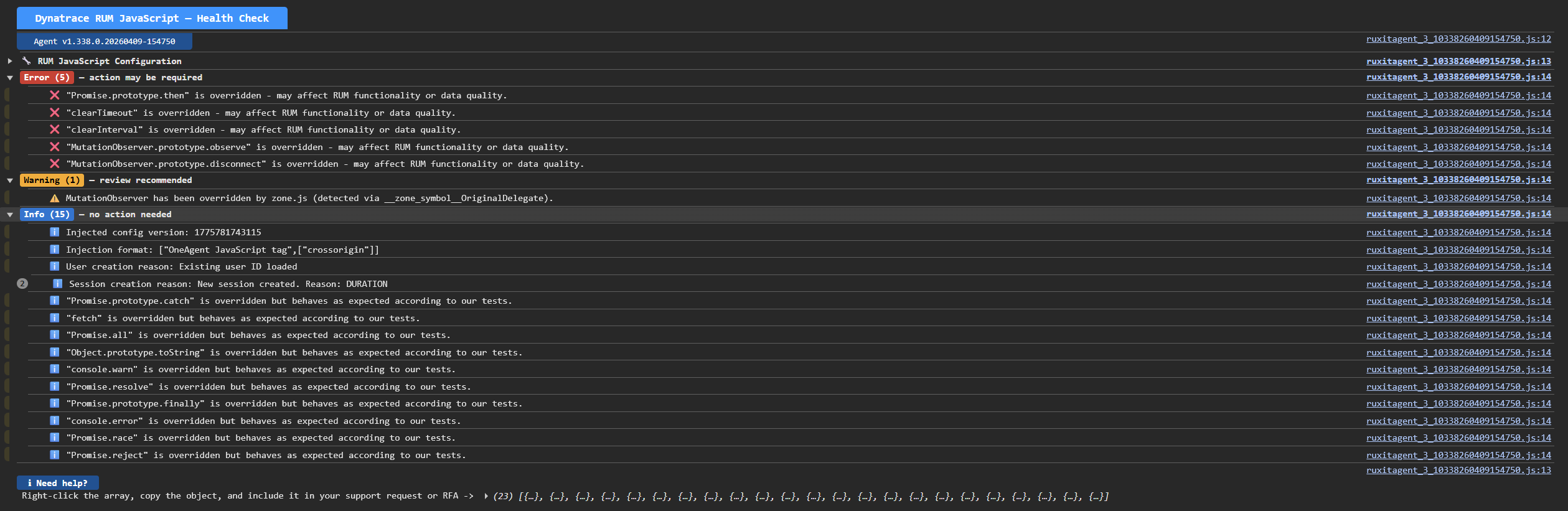
Findings have a severity assigned and are grouped by severity:
| Level | Meaning |
|---|---|
❌ ERROR |
A feature is completely broken with no usable fallback, AND the user can fix it — typically by correcting their configuration or addressing a runtime error in their integration. Immediate attention recommended. |
⚠️ WARNING |
Something unexpected happened and data is being silently lost, or a feature is degraded but falls back to a reasonable default. The user may not notice without actively checking, but monitoring quality is affected. Any form of data drop — rate limiting, size limits, off state, browser limitations, or a discarded user action — belongs here. |
ℹ️ INFO |
A normal operational event useful for diagnosing behavior. No data is lost and no action is required. These messages describe expected lifecycle transitions (e.g. sessions starting, config versions loading, injection format detection). |
🔎 VERBOSE |
Fine-grained trace-level events primarily useful for debugging internals. High-frequency details that are too noisy for routine monitoring but valuable when investigating a specific issue. |
Findings
❌ Health check <name> failed unexpectedly: <error>
An internal Health check threw an unexpected error while running. The affected check produced no results.
Possible Causes:
- A JavaScript API used by the Health check is broken or missing on the page.
- An exception was thrown inside a check that should normally never fail.
Mitigation:
- Check the other findings for broken APIs (e.g. native function overrides) that may be causing the crash.
❌ <errorCode>: <errorReason>
The RUM JavaScript received an HTTP error response from the beacon endpoint.
Possible Causes:
- The beacon endpoint has been misconfigured.
- The beacon request is handled by something other than a beacon endpoint.
- There are valid cases where the beacon endpoint returns error codes.
Mitigation:
- Make sure the beacon endpoint is configured correctly.
- Make sure the infrastructure is not interfering with the beacon requests.
- Depending on the error code, it might be possible to fix the issue, or it might only be informational.
❌ Invalid or unparseable beacon response: <response>
The Health check detected that the response to a beacon request was invalid. The response is expected to be a proper JSON.
Possible Causes:
- The beacon endpoint is not actually a OneAgent or BeaconForwarder and some other component is handling the request (very commonly the response would then e.g. contain a HTML page for a "File not found" error or something similar).
- Not every webserver of this application is running the OneAgent and the beacon is sent to an uninstrumented webserver → make sure all the webservers are instrumented.
Mitigation:
- Make sure the beacon endpoint is configured correctly.
- Make sure the infrastructure is not interfering with the beacon requests.
❌ Cookies are disabled or can't be set
If both RUM Classic and RUM are active, RUM will also be disabled when setting cookies is not possible.
Possible Causes:
- Cookies are disabled in the browser.
- Cookies are blocked by browser settings.
- A script on the page intercepts
document.cookiewrites and drops cookies matching certain name patterns. - A browser extension blocks cookies for the monitored origin.
Mitigation:
- Check if cookies are disabled in the browser.
- Check if any script on the page prevents cookies from being set.
❌ Got invalid origin from the shareCrossOriginFrameInfo configuration
The shareCrossOriginFrameInfo configuration contains an origin value that is not valid. Cross-frame communication will not work correctly.
Mitigation:
- Review and correct the
shareCrossOriginFrameInfoconfiguration in the application settings. - Ensure origin values follow the format
https://example.com(scheme + host, no trailing slash).
❌ Feature <hash> failed to initialize
A RUM JavaScript feature module threw an error during its initialization phase. The affected feature will not be active, which may mean certain types of RUM data (e.g., resource timings, errors, or user actions) are not collected.
Possible Causes:
- Some JavaScript API on the page might be not working according to the specification.
Mitigation:
- Check the other findings to see if any JavaScript APIs are overridden and not working according to the specification (see MDN).
❌ Got an unsupported status code for the beacon response: <responseCode>
When the RUM JavaScript receives an unsupported response code, this message will be shown.
Possible Causes:
- Most likely the beacon endpoint is not actually a OneAgent or BeaconForwarder and the request is handled by some other part of the infrastructure.
- Not every webserver of this application is running the OneAgent and the beacon is sent to an uninstrumented webserver → make sure all the webservers are instrumented.
Mitigation:
- Make sure the beacon endpoint is configured correctly.
- Make sure the infrastructure is not interfering with the beacon requests and they are correctly routed to a OneAgent or BeaconForwarder.
❌ Mobile agent bridge threw an error in notifyActivity
In hybrid mode (RUM JavaScript running inside a mobile app's WebView, controlled by a mobile agent), the RUM JavaScript notifies the mobile agent of user activity through a bridge API exposed on the page. This finding indicates that call threw an exception. The error is caught so it does not affect the RUM JavaScript, but the mobile agent may not have been informed of the activity.
Possible Causes:
- The mobile agent's bridge implementation has a bug or was not fully initialized yet.
- The bridge object was torn down (e.g. the WebView is being destroyed) while a call was in flight.
Mitigation:
- This is only reported once per page load to avoid flooding the diagnostic data buffer with repeated errors.
- Contact Dynatrace support with the mobile agent version and platform for further analysis.
❌ / ⚠️ / ℹ️ Cookie "<name>" could not be set
An attempt was made to write the cookie with the specified name, but after immediately reading it back, it was no longer available.
The severity reflects whether cookie storage is required for the current configuration:
- ❌ ERROR — cookie persistence is explicitly configured, so cookie failures directly affect data collection.
- ⚠️ WARNING — the effective storage mode is not yet known (if the Health Check is running in Standalone mode)
- ℹ️ INFO — another storage mode is active, so cookie failures do not affect data collection.
Possible Causes:
- Cookies are globally disabled in the browser or blocked by browser settings.
- A script on the page intercepts
document.cookiewrites and drops cookies matching certain name patterns. - A browser extension blocks cookies for the monitored origin.
- The
SameSiteattribute is not configured correctly.
Mitigation:
- Verify that cookies are enabled and that the browser is not in a restricted mode (e.g. private browsing with strict settings).
- Check whether any script on the page overrides or wraps
document.cookieand prevents writing cookies. - Validate that the
SameSiteattribute is configured correctly.
❌ / ⚠️ / ℹ️ Cookie "<name>" was set but its value was modified (expected "<expected>", got "<actual>")
A test cookie was written and read back immediately, but the value stored in document.cookie differed from the value that was written. The expected and actual values are both shown in the message.
The severity reflects whether cookie storage is required for the current configuration (see Cookie could not be set for the full explanation).
Possible Causes:
- A script on the page encodes or transforms cookie values after they are set.
- A browser extension rewrites cookie values.
Mitigation:
- Check for scripts that wrap
document.cookieand transform values on write or read. - Identify whether a browser extension is responsible by testing in a clean browser profile.
❌ / ⚠️ / ℹ️ Cookie "<name>" was set but not retained after 500ms
The test cookie was written and present immediately after the write, but when checked again after 500 ms the cookie had disappeared. This indicates that something is deleting cookies after they are set, not that the initial write failed.
The severity reflects whether cookie storage is required for the current configuration (see Cookie could not be set for the full explanation).
Possible Causes:
- A script on the page periodically clears cookies or deletes cookies matching certain name patterns.
- A browser extension removes cookies for the monitored origin.
- A consent management platform or cookie banner script clears cookies before consent is given.
Mitigation:
- Check for timer-based or event-driven scripts on the page that delete cookies.
- Review consent management scripts to ensure they do not delete RUM cookies.
❌ / ⚠️ / ℹ️ Cookie "<name>" was retained after 500ms but its value was modified (expected "<expected>", got "<actual>")
The test cookie was written and present immediately after writing, but when checked again after 500 ms the cookie value had changed. The expected and actual values are both shown in the message.
The severity reflects whether cookie storage is required for the current configuration (see Cookie could not be set for the full explanation).
Possible Causes:
- A script on the page modifies cookie values asynchronously after a short delay.
- A browser extension rewrites cookie values in the background.
- A consent management or data governance script normalizes or sanitizes cookie values.
Mitigation:
- Check for scripts that run asynchronously and modify cookie values.
- Identify whether a browser extension is responsible by testing in a clean browser profile.
❌ Cookie access threw an error (<message>)
Accessing document.cookie threw a JavaScript exception. The error message is included in the finding. This will prevent features like session and user tracking from working.
Possible Causes:
- The page is embedded in a sandboxed iframe with the
allow-same-originattribute missing, which disables cookie access. - A script on the page replaces
document.cookiewith an implementation that throws on access. - A browser security policy or Content Security Policy configuration restricts cookie access.
Mitigation:
- If the page is embedded in an iframe, ensure the iframe has the
allow-same-originsandbox attribute set. - Check whether any script on the page overrides the
document.cookiegetter or setter with an implementation that throws errors. - Review browser security policies and CSP headers for any restrictions on cookie access.
❌ / ⚠️ / ℹ️ Events are not sent: <reason>
An event-sending gate is active and blocking events from being dispatched. The message describes the active blocking condition:
cookies are disabled or blocked (mixed mode)— cookie gate is active (❌ ERROR).consent not granted— user has not granted consent or has opted out (ℹ️ INFO).off state active, reason: …, ~Xs remaining— the RUM JavaScript entered the off state after repeated beacon failures (⚠️ WARNING).server dynamic config is DISABLED— server-side config has disabled the RUM JavaScript (⚠️ WARNING).Low-priority events are not sent: server dynamic config is PRIORITY_HIGH— only high-priority events are sent (⚠️ WARNING).
Mitigation:
- Cookies gate: see Cookies are disabled or can't be set and Cookie could not be set.
- Consent gate: this is expected behavior when the user has not consented. No action needed unless consent management is misconfigured.
- Off state: check Code 1004 - Beacon retries exceeded and fix the beacon endpoint reachability issue. The off state clears automatically after up to 2 hours.
- Server config: check the application settings in Dynatrace to verify the RUM JavaScript has not been disabled or set to high-priority-only mode.
❌ Module has not been enabled
There are dependencies between modules (e.g. the XHR module [X] depends on the Resourcetiming module [R]) and there are required dependencies and optional dependencies. If a required dependency is missing, a module is unable to be enabled and the RUM JavaScript will make this known with this error message.
Possible Causes: There can be multiple reasons for this:
- The module has not been enabled in the config.
- The server did not enable the module.
- The RUM JavaScript is manually injected and the code on the page simply does not have this module loaded. Modules are not loaded on demand.
- The OneAgent does not have the module in question or there is something interfering with delivering the module (e.g. infrastructure or proxy replacement). To verify, take the URL of the RUM JavaScript (e.g.
ruxitagentjs_ICA_1234.js) and replace the featurehash with the featurehash of the module in question (if e.g. the moduleRis missing, it would beruxitagentjs_R_1234.js. CASE MATTERS!). If the returned JavaScript code is empty or mangled, then there is an issue.
Mitigation:
- Check the config (this is also a finding of the Health check) if it contains the modules in question (in the sample below, the
Rmodule) and if not, enable it in the settings or check if there is a caching issue. - If manual injection is used and the config was modified to contain a new module, it is necessary to roll out the update RUM JavaScript file on the page (except for the complete tag).
- If the RUM JavaScript file is mangled/empty/…, make sure to fix infrastructure issues.
❌ Module <name> has not been enabled because its dependencies failed to activate
A module could not be enabled because one or more of its required dependencies are present in the feature hash but failed to activate at runtime.
Possible Causes:
- A required dependency module loaded but threw an error during its own activation.
- See also: Module has not been enabled for the case where the dependency is not present in the feature hash at all.
Mitigation:
- Check the other findings — a dependency failure is usually preceded by an Feature failed to initialize (feature failed to initialize) or Module has not been enabled finding for the dependency module.
❌ Failed NativeFunctionality Test: <error message>
The Health check is able to run some tests about the basic functionality of certain functions. The MDN contains a specification of the APIs browsers have to provide and how they have to behave.
The RUM JavaScript has some tests to verify that this works correctly (e.g. if reverse is called on an Array, will it properly reverse? If an element is added to a Map, is it possible to retrieve it at a later point again). If this finding is shown, then the implementation of those functions is not correct and the RUM JavaScript will not function correctly.
Possible Causes:
- This is usually caused by some code on the page (e.g. Windchill) that provides an incomplete implementation of the APIs in question (e.g. for older browsers, which did not have this implementation in the past).
- Old applications sometimes provide their own implementation of APIs that were created before the official specification existed. These implementations are not always compatible with the official specification.
Mitigation: The only way to fix it is to fix the webpage by making sure the APIs behave as specified in the MDN.
❌ Fetch test timed out
A test request using fetch did not complete within the allowed timeout. This indicates that the fetch implementation on the page may not be working correctly.
Possible Causes:
- A third-party library has replaced
fetchwith an implementation that does not resolve promises correctly. - The test URL (current page URL) is unreachable or hanging.
Mitigation:
- Check the other findings for any
fetch-related overrides or wrappers (Fetch wrapper detected on the page). - Verify that
fetchbehaves according to the specification on this page.
❌ XHR test timed out
A test using XMLHttpRequest did not complete within the allowed timeout. This indicates that the XMLHttpRequest implementation on the page may not be working correctly.
Possible Causes:
- A third-party library has replaced
XMLHttpRequestwith an implementation that does not fire events or callbacks correctly. - The test URL (current page URL) is unreachable or hanging.
Mitigation:
- Check the other findings for any XHR-related overrides.
- Verify that
XMLHttpRequestbehaves according to the specification on this page.
❌ An element with ID <id> was found on the page
A DOM element on the page uses an ID that is reserved by the RUM JavaScript. This will cause functionality issues. The reserved IDs are:
dynatracedT_dtrumDT_RUM
Mitigation:
- Remove or rename the conflicting element ID from your page's HTML.
❌ Rejected Promise not caught! This can cause all sort of problems!
Rejected Promises are not being caught. This is abnormal browser behavior, typically caused by zone.js interference with the Promise implementation.
Mitigation:
- Investigate whether zone.js is patching
Promiseson this page. - Ensure all Promise rejections are handled with
.catch()ortry/catchinasyncfunctions.
⚠️ <N> event(s) dropped this minute: event rate limit exceeded
The number of events generated in the current minute exceeded the configured per-minute rate limit. Events above the limit were dropped and will not be sent.
Possible Causes:
- The frontend generates an unusually high number of user actions, errors, or custom events in a short time.
- Automated test traffic or synthetic monitoring is sending events through the RUM JavaScript.
Mitigation:
- Review your frontend's event volume. Check for runaway loops creating user actions or custom events via the API.
⚠️ Beacon sending suppressed for app "<appId>"
The beacon endpoint responded with HTTP 405 or a Retry-After header, and the RUM JavaScript has temporarily suppressed beacon sending for the affected frontend.
Possible Causes:
- The beacon endpoint is rate-limiting requests from this frontend.
- A proxy or load balancer is responding with 405 to beacon requests.
Mitigation:
- Check the beacon endpoint configuration and infrastructure for any rate-limiting or method-restriction rules.
- The suppression lifts automatically after the indicated remaining time.
⚠️ Form <identifier> has native DOM properties overridden by named form controls: <property list>
A <form> element on the page contains child elements (e.g., <input>, <select>) whose name or id attributes match native HTMLFormElement property names. This causes those native properties to be shadowed, which can prevent the RUM JavaScript from correctly reading form data.
Example: <input name="action"> inside a form overrides form.action
Mitigation:
- Rename the form controls listed in the message to avoid clashing with native HTML form property names.
⚠️ Injection format is unsupported
The currently used RUM JavaScript injection mode is not supported.
Possible Causes:
- The RUM JavaScript is placed on the page with a custom method (e.g. bundled as part of another file).
- A Tag Manager is used and performs unknown modifications.
Mitigation:
- Switch to a supported RUM Injection mode.
- If no issues occur, this can be ignored.
⚠️ MutationObserver has been overridden by a non-native, non-zone.js implementation
MutationObserver has been replaced by a third-party library other than zone.js. This may cause the RUM JavaScript to miss DOM changes.
Mitigation:
- Identify the library overriding
MutationObserver. - Load the RUM JavaScript before the offending library.
⚠️ MutationObserver has been overridden by zone.js
The MutationObserver API has been wrapped by zone.js (commonly used with Angular). The RUM JavaScript detects this via the presence of __zone_symbol__OriginalDelegate or similar zone.js markers.
Mitigation:
- This is expected in Angular applications. The RUM JavaScript is aware of zone.js and attempts to work correctly with it.
- If you observe data quality issues, consider configuring zone.js to exclude
MutationObserverfrom patching.
⚠️ Function.prototype.toString() is overridden
Function.prototype.toString has been replaced on this page. The override check uses this method to detect native vs. wrapped functions, so its results may be unreliable.
Possible Causes:
- Some JavaScript on the page modifies the
Function.prototype.toStringfunction.
Mitigation:
- Identify and remove the library overriding
Function.prototype.toStringif possible. - Treat all override check results on this page with caution.
⚠️ <name> was not found by the override check - not supported by this browser or removed
The function was not present in the browser environment. It may not be supported by this browser version, or it may have been deleted by a third-party script.
Mitigation:
- If the browser is known to support the function, check whether a third-party script is deleting it.
- If the browser genuinely does not support the function, the RUM JavaScript might skip collecting data or may fail to run properly. If functionality is affected, make sure to restore the function to its original functionality.
⚠️ / ❌ / ℹ️ <XYZ> is overridden
The RUM JavaScript detected that the function or object <XYZ> is no longer a native implementation. There are five variants of this message:
-
"<XYZ>" is overridden - may affect RUM functionality or data quality.(❌ ERROR)Something other than the RUM JavaScript has overridden a function that the RUM JavaScript actively uses, and the RUM JavaScript's tests confirmed the override does not behave as expected. This can lead to broken functionality or silent data loss.
-
"<XYZ>" is overridden and re-wrapped after RUM JavaScript.(⚠️ WARNING)The RUM JavaScript overrides this function for monitoring purposes, but something on the page has wrapped it again afterward. Data quality may be affected.
-
"<XYZ>" is overridden. RUM JavaScript would use it if modules (<modules>) are enabled.(⚠️ WARNING)The RUM JavaScript overrides this function in the listed modules, but those modules are not currently active. The override has no effect at the moment.
-
"<XYZ>" is overridden but behaves as expected according to our tests.(ℹ️ INFO)Something other than the RUM JavaScript has overridden the function, but the RUM JavaScript's built-in tests confirm the wrapped version still behaves correctly. No action required.
-
"<XYZ>" is overridden but not used by any active module.(ℹ️ INFO)The function is overridden by a third party, but no currently active RUM JavaScript module relies on it. No data quality impact expected.
Mitigation: If you get the ❌ ERROR message, you can expand the object below the table to get more information. You expand the "details" of the entry and then it will show "function" and either "classic", "rumOnGrail" or both. If you expand those properties further, you can see where the implementation is, if it is not the native implementation. There might be some incompatibility between the custom implementation and what the official spec for the implementation states/what the RUM JavaScript expects.
Example:
- The Health check mentions e.g.
clearIntervalas being overridden. - Expand the Array shown below the table until you reach the details of the
"clearInterval" is overriddenfinding. - "classic" references the function the RUM Classic RUM JavaScript has wrapped.
- "function" references the function that is currently used as
clearIntervalfunction. If you click on the[[FunctionLocation]]link, you can see the implementation. In case there is another wrapper on the page, one of those[[FunctionLocation]]links will link to the custom implementation (which value links to the custom code, depends on the injection order/script execution order).
⚠️ <name> cannot be inspected - its toString & generic toString methods are overridden or missing
The override check cannot determine whether this function is native because both its own toString and Function.prototype.toString are overridden or unavailable.
Mitigation:
- Identify and remove the library overriding
Function.prototype.toStringif possible. - If the override originates from a required dependency, treat the affected function's override status as unknown and monitor for data quality issues.
⚠️ <name> is augmented on this page by [Sentry]
Sentry's SDK has modified this function. Sentry and the RUM JavaScript both instrument certain browser APIs; running both simultaneously can affect data quality.
Mitigation:
- Load the RUM JavaScript before Sentry when possible.
⚠️ <name> was wrapped before RUM JavaScript - may affect RUM functionality or data quality
A third-party library wrapped the function before the RUM JavaScript loaded, and the wrapper may interfere with the RUM JavaScript's ability to collect accurate data.
Mitigation:
- Load the RUM JavaScript as early as possible, before other scripts.
- Identify the library responsible and assess whether it is compatible with RUM monitoring.
⚠️ Fetch wrapper detected on the page
The RUM JavaScript's internal unwrapped fetch reference and the current globalThis.fetch are different objects, which means something on the page has wrapped fetch after the RUM JavaScript loaded.
Possible Causes:
- A third-party library (e.g. a service worker polyfill, Sentry, or another monitoring tool) wrapped
fetchafter the RUM JavaScript initialized. - The RUM JavaScript's own fetch module may be responsible if the fetch module is active.
Mitigation:
- Check which library is wrapping
fetch. If it is the RUM JavaScript's own fetch module, this finding is expected and can be ignored. - If a third-party wrapper is interfering with data collection, try loading the RUM JavaScript before that library.
⚠️ A custom script ID <id> was detected on the RUM JavaScript
The <script> tag used to load the RUM JavaScript has an id attribute. This is not supported and may cause unexpected behavior.
Mitigation:
- Remove the
idattribute from the RUM JavaScript's<script>tag.
⚠️ "<name>" is overridden — may affect RUM agent behavior
The standalone Health check detected that the function <name> is not a native implementation. Since no RUM JavaScript is present to account for its own wrapping, any override is likely from a third-party library and may affect RUM data quality if the RUM JavaScript is later injected.
Mitigation:
- Identify the library overriding the function and assess whether it is compatible with the RUM JavaScript.
- Load the RUM JavaScript as early as possible so it can use the native implementation before third-party wrappers are applied.
⚠️ Rejected Promises still get logged even if they are in a try & catch block!
zone.js is causing handled Promise rejections (those inside try/catch blocks) to still be logged as unhandled. This is not the normal browser behavior and can cause false-positive unhandled rejection reports in the console and in the RUM JavaScript's error collection.
Mitigation:
- This is a known zone.js behavior. Consider configuring zone.js to not patch Promises, or suppress false-positive error reports in Dynatrace using error filtering rules.
⚠️ Off state is active (scope: <scope>, source: <source>)<reasonPart>.
The RUM JavaScript (or, for the global scope, potentially a mobile/cross-platform agent sharing the same environment) has entered the off state and is not sending events. This diagnostic states where the active off state came from:
scope:global— applies environment-wide, across every application in the environment; orper-app— applies only to the current application.source:cookieorlocalStorage— the persistence backend the active off state was read from. When multiple sources are simultaneously active, the highest-precedence one is reported, in this order: global (cookie) > global (localStorage) > per-app (localStorage only).reasonPart(when present) — the reason the off state was activated (e.g. a server-returned HTTP status code), appended as, reason: <reason>.
Mitigation:
- Check Code 1004 - Beacon retries exceeded — repeated beacon failures are the classic trigger for entering off state.
- See Events are not sent: <reason> for the corresponding event-sending gate that off state also activates.
- The off state clears automatically after up to 2 hours; no action is needed unless the beacon endpoint is unreachable or the server is intentionally disabling the RUM JavaScript.
ℹ️ RUM JavaScript is running with version: <version>
This shows the version of the RUM JavaScript that is currently running. This is the version of the RUM JavaScript that can also be seen in the WebUI.
ℹ️ RUM JavaScript config (see details)
This shows the currently active config in the RUM JavaScript. Expand the details, to see the full config.
ℹ️ Request <url> was excluded by regex
A request with the URL <url> was ignored due to a request exclusion rule. This means it will not be reported or visible in the user.events table. This is a manual config, so most likely intended.
Mitigation: If this was not intended:
- make sure the XHR exclusion rules in the application settings are correct.
ℹ️ Events are eligible to be sent — no blocking conditions detected
All event-sending gates are open and no rate-limiting or retry suppression is active. This is the expected healthy state.
ℹ️ <name> was wrapped before RUM JavaScript but behaves as expected according to our tests
A third-party library wrapped the function before the RUM JavaScript loaded, but the RUM JavaScript's tests confirm the wrapped version behaves correctly. Data quality should not be affected.
Mitigation:
- No action required. If issues occur, try blocking the script that modifies the behavior of the used function.
ℹ️ "<name>" is overridden by RUM JavaScript
The function or object <name> has been wrapped or replaced by the RUM JavaScript for monitoring purposes (e.g. to intercept XHR, fetch, or setTimeout calls). This is expected and informational only.
ℹ️ Could not perform script id check as no script was found
The Health check tried to locate the RUM JavaScript <script> element in the DOM to check its id attribute, but no matching script was found.
Possible Causes:
- The RUM JavaScript was injected inline rather than as a separate
<script src="...">tag. - The
<script>element was removed from the DOM after the RUM JavaScript loaded. - The script was loaded in a context where
document.currentScriptand related APIs are unavailable.
Mitigation:
- No action required if the agent is otherwise functioning correctly. This is an informational finding only.
ℹ️ Standalone Health check — snippet v<version>
The standalone Health check snippet is running independently (without a full RUM JavaScript on the page). This finding reports the version of the standalone snippet that is executing.
🔎 "<name>" is fine
The override check determined that <name> is a native implementation. Shown only in verbose/detailed mode.
🔎 Successful NativeFunctionality Test: <name> - <test>
A native functionality test for <name> passed. Shown only in verbose/detailed mode.
Selfmonitoring Information
There are things the RUM JavaScript encounters and reports back as Selfmonitoring Events. These findings are also presented.
These are the codes and what they mean/can be done to fix the issue.
❌ Code 1000 - No Response Message
The RUM JavaScript sent a beacon to the Dynatrace server but received no response at all. This may be a network-level failure (request blocked, dropped, or timed out before a response was returned).
Possible Causes:
- A network proxy, firewall, or Content Security Policy is blocking requests to the beacon endpoint.
- The beacon endpoint is temporarily unavailable due to connection issues.
Mitigation:
- Verify that the beacon endpoint is reachable from the browser.
- Check your network configuration and CSP headers for blocked outbound requests.
- Review the browser's network tab for failed requests to the beacon endpoint.
❌ Code 1001 - Invalid Response Message
The RUM JavaScript received a response from the server, but the response body was not in the expected format and could not be parsed.
Possible Causes:
- A proxy or security appliance is intercepting and modifying the beacon response.
- A load balancer is causing the request to not be redirected to a proper beacon endpoint.
- Not all of your backend servers are properly instrumented with OneAgent.
Mitigation:
- Check whether any intermediate proxy modifies the response from the beacon endpoint.
- Make sure the infrastructure correctly routes a beacon request to a beacon endpoint.
- Make sure all the backend servers of your application are properly instrumented with OneAgent.
❌ Code 1002 - Unexpected Error
The RUM JavaScript encountered an unexpected error. The error in question does not have a separate error code (yet).
Mitigation:
- Make sure none of the other findings indicate an error (e.g. missing Browser APIs).
- Additional analysis is necessary. Contact Dynatrace support and provide the information about the issue.
⚠️ Code 1003 - CSP Violation
In order to access the battery level, the RUM JavaScript needs to access navigator.getBattery(). Access to this API can be forbidden using the Permissions-Policy header, which would lead to error 1003 in the RUM JavaScript.
Mitigation:
- Make sure that access to
navigator.getBattery()is not forbidden using a Permissions-Policy header. - If this can not be adapted, the battery information on RUM Events will be missing.
❌ Code 1004 - Beacon retries exceeded
The RUM JavaScript tried to send a beacon to the beacon endpoint multiple times but all attempts failed. The RUM JavaScript enters an off state for up to 2 hours and stops sending beacons during that period.
Possible Causes:
- Persistent network connectivity issues between the browser and the beacon endpoint.
- The beacon endpoint is rate-limiting or rejecting requests.
Mitigation:
- Make sure the beacon endpoint is reachable:
- Check that the network connection is working.
- Check that the beacon endpoint is running and reachable and not blocked by firewalls.
❌ Code 1005 - An event chain subscriber threw and the remaining subscribers were not notified: <message>
An internal RUM JavaScript listener threw while it was being notified about an event or a state change. The listeners still waiting to be notified about that same event were skipped, so some data may be missing or incomplete. Data collection recovers for subsequent events. The exception is not suppressed, so it is also visible in the browser console.
Possible Causes:
- A JavaScript API on the page was replaced with a version that throws instead of returning a value.
- Some JavaScript API on the page is not working according to the specification.
Mitigation:
- Check the other findings to see if any JavaScript APIs are overridden and not working according to the specification (see MDN).
ℹ️ Code 2000 - Injected Config Version: <revision>
This shows the currently used config version. This can be used to make sure the RUM JavaScript is running with the newest version.
ℹ️ Code 2001 - Stored Config Version: <revision>
This shows the config version of the config stored in window.localStorage. This can be used to make sure the RUM JavaScript has the newest version of the config stored.
ℹ️ Code 2002 - Config Updated to version: <revision>
This indicates that the RUM JavaScript received a config update from the beacon endpoint. The message contains more information about the config version.
Mitigation:
- When automatic injection is used, this is not an issue, as this happens when there was a recent config update. After a page change, the new config should be used automatically. If it happens over a long time, check the caching behavior of the current page.
- When manual insertion is used, this means that the RUM JavaScript on the page contains an old config and an update of the RUM JavaScript should be performed to make sure every user uses the updated config from the start.
ℹ️ Code 2003 - Injection format
Describes how the RUM JavaScript was injected into the page. Possible values include:
"Inline Code": RUM JavaScript was injected as an inline script."JavaScript tag": the RUM JavaScript was loaded as a standalone JS tag."OneAgent JavaScript tag": the RUM JavaScript was injected by the Dynatrace OneAgent."Unknown": the injection method could not be determined.
⚠️ Code 2004 - Non-native implementation: non-native implementation of XMLHttpRequest
The RUM JavaScript detected that XMLHttpRequest was already wrapped or replaced before the RUM JavaScript loaded. The RUM JavaScript will still attempt to instrument XMLHttpRequest, but data quality or functionality may be affected.
Possible Causes: Some other JavaScript on the page overrides the native functionality. This commonly happens when other RUM solutions or request frameworks are included on the page.
Mitigation: This is not necessarily an issue, but can lead to broken behavior, if the custom implementation of XMLHttpRequest does not behave like the native implementation. If the application works as expected, this can be ignored. Things to try if the application functionality is affected:
- Disable the XHR module in the Application Settings and check if the problem stops.
- Make sure the RUM JavaScript is injected as the first script on the page (and not deferred/async). This will cause the RUM JavaScript to use the native implementation of the XMLHttpRequest, reducing the chance of incompatibilities.
- Try blocking the custom implementation of the XMLHttpRequest to verify the behavior does not happen if the RUM JavaScript can use the native implementation.
⚠️ Code 2005 - Discarded data
Possible Causes: There are multiple reasons why data needs to be discarded:
- The RUM JavaScript entered the off state and will not send data for up to 2 hours. This is triggered by persistent errors such as beacon failures.
- When events are exceeding the maximum size, they will be discarded. The default limit for an event is 256 KiB (JSON converted to a string using JSON.stringify).
- When the amount of events to send exceeds the allowed limit per minute, events will be discarded.
- The RUM JavaScript is disabled.
Mitigation:
- Event size limit is exceeded: This is most likely happening due to custom events or event enrichment using
eventModifiers. Check your code and make sure the size of an event does not exceed the limit of 256 KiB. - The amount of events to send is exceeded: Check your code if there are too many events created using the API.
- The RUM JavaScript is disabled:
- When the RUM JavaScript receives invalid responses, it will automatically disable. Make sure the beacon endpoint is reachable and properly configured.
- The beacon endpoint might have disabled the RUM JavaScript remotely. This happens if RUM overload prevention is active. Check the settings if they need adjustment or if there is simply too much traffic at the moment.
⚠️ Code 2006 - Missing browser support
This is shown when the browser does not support a certain feature and the RUM JavaScript will not be able to collect data from it.
Mitigation:
- Check if the feature in question is supported on newer versions of your browser and update if possible or use a different browser.
- If this is not an option, reduced functionality has to be expected.
ℹ️ Code 2007 - Config updated on first beacon
This indicates that the RUM JavaScript received a config update from the beacon endpoint when the first beacon was sent. The message contains more information about the config version.
Mitigation:
- Automatic injection:
- This is not necessarily an issue, as this happens when there was a recent config update. After a page change, the new config should be used automatically.
- If the issue persists for a longer duration, check if the page gets cached.
- Manual insertion:
- When manual insertion is used, this means that the RUM JavaScript on the page contains an old config and an update of the RUM JavaScript should be performed to make sure every user uses the updated config from the start.
- If the issue persists for a longer duration, check if the page gets cached.
ℹ️ Code 2008 - Frame disposed
When the Cross Origin Frame Info sharing feature is used, the RUM JavaScript is passing messages between the different iframes to determine a common page.instance_id. If the frame in charge is unloaded, this finding is shown.
The routine "current frame is unloading" case is reported as Info. The case where the earliest frame being relied upon was disposed or is no longer accessible is reported as Warning, because tab states and visibility change events may be inaccurate for a short time afterward.
Mitigation:
- This is generally expected in multi-frame applications when iframes are dynamically created/destroyed and the
Cross Origin Frame Info sharingfeature is turned on. - Investigate if iframes are being frequently recreated. The RUM JavaScript tries to create a stable
page.instance_id, but during the brief transition, some information on events may be temporarily inaccurate.
🔎 Code 2009 - Event updates added
When the Cross Origin Frame Info sharing feature is used, the RUM JavaScript is passing messages between the different iframes to determine a common page.instance_id. It takes some time for the page.instance_id to stabilize, and therefore some data on already created events has to be updated. This finding is showing that this has happened, to make it clear that some values might not be accurate.
Mitigation:
- There is no way to resolve the issue. Passing messages between iframes takes some time and if data has to be sent out before the message passing finished, some events will not have the newest
page.instance_idvalues.
⚠️ Code 2010 - Config value outside of bounds
A configuration value was outside the acceptable range or was not a valid number (object, boolean, NaN, etc.). The RUM JavaScript clamped it to the allowed minimum/maximum or applied the default value. The message includes the config key and the problematic value.
Mitigation:
- Check which config value is out of bounds or invalid and correct it (most likely due to manual modifications of the JavaScript code).
⚠️ Code 2011 - User Action Discarded: Module Unload
A user action was in progress when the user actions module was unloaded. The action was discarded rather than completed or sent. This happens when the module is disabled remotely via a config update while the user is interacting with the page.
⚠️ Code 2012 - User Action Discarded: Consent Revoked
A user action was in progress when consent was revoked. The action was discarded to respect the user's consent decision. No data from the in-progress action is sent to the beacon endpoint.
❌ Code 3000 - Cookie Domain Error
The RUM JavaScript could not automatically determine a suitable cookie domain for the current hostname. The RUM JavaScript enters the off state because session and visitor tracking cannot work without a cookie domain.
Mitigation:
- Check for restrictive SameSite policies.
- Check for unusual TLDs.
- Check that setting cookies is not blocked by any other means (e.g. other scripts on the page preventing cookies from being set).
⚠️ Code 3001 - Duplicate Cookies
The RUM JavaScript detected a Dynatrace cookie that existed multiple times.
Possible Causes:
- Cookies set for both a parent and subdomain (e.g.,
.example.comandapp.example.com). - Cookies are set with different path attributes.
Mitigation:
- Check if other Dynatrace frontends with different cookie domain settings are active on the same domain. Make sure to use the same domain across all frontends.
- Check if there is a script on your page that might be responsible for duplicating the cookie to a different domain/path and prevent it from doing so.
- Check if the infrastructure duplicates cookies to a different domain/path. Dynatrace always sets the
path=/attribute, any other value is not coming from Dynatrace components.
❌ Code 3002 - Invalid or Unknown Metadata Capturing Config
The config for capturing event_properties is invalid or contains invalid entries.
The config for capturing event_properties received from the server could not be parsed or contained an unrecognized format. Capturing may be partially or fully disabled.
Possible Causes:
- Most likely manual modification of the setting caused this.
- A config intended for a newer RUM JavaScript version was received.
Mitigation:
- Make sure the config was not modified in an invalid way.
- Make sure the RUM JavaScript version is new enough, and you did not accidentally downgrade the version that does not yet support the capturing config.
⚠️ Code 3003 - User Interaction native event timestamp missing or 0
The RUM JavaScript intercepted a User Interaction with a timestamp of 0. This will affect the accuracy of user action timing.
Possible Causes:
- A third-party library recreated or dispatched the event synthetically without setting a timestamp (e.g. automation of a testing framework).
Mitigation:
- This is typically caused by browser quirks or testing libraries dispatching events via
new Event()without timestamps. Check if this is the case and make sure a timestamp is part of the event. - Events dispatched via
new Event(...)without a timestamp will always have this issue. Consider usingnew MouseEvent(...)or similar constructors that set timestamps automatically. - In production, ensure no code is dispatching synthetic events without timestamps.
❌ Code 3004 - Cookie Parse Error
The RUM JavaScript read an existing cookie but could not parse its content.
Possible Causes:
- Manual cookie tampering.
- Browser extensions modifying cookies.
- Application code modifying the cookie with incompatible data.
Mitigation:
- Investigate what is writing malformed data to the Dynatrace cookies.
❌ Code 3005 - Cookie Operations Error
Reading from document.cookie or writing to document.cookie failed. On write failures the RUM JavaScript additionally enters the off state, because session and visitor tracking cannot work without cookie access.
Mitigation:
- Ensure that cookie access is allowed.
- Make sure there is no application code that prevents the access.
- Check if there are any security restrictions in place.
⚠️ Code 3006 - Invalid Session Extension Config
The config describing which events extend the session duration is invalid.
Mitigation:
- Make sure the config has the correct format.
❌ Code 3007 - Regular Expression Config Parse Error
A configuration value that should be a regular expression (e.g., for URL exclusion rules) could not be parsed as a valid regex. The message contains the name of the configuration key that failed.
Mitigation:
- Make sure the Regex in question is valid (e.g. by using regex101.com).
❌ Code 3008 - Storage Operation Failure
Reading from/Writing to localStorage/sessionStorage failed.
Possible Causes:
- The browser's storage quota has been exceeded.
- Storage access is blocked by browser policy (e.g., in private/incognito mode with strict settings, or inside a sandboxed iframe).
Mitigation:
- Check browser storage availability for the monitored origin.
- Make sure Storage access is no longer blocked by browser policy.
⚠️ Code 3009 - Invalid Cookie Domain Configuration
The cookieDomain value configured in Dynatrace is not valid for the current page's hostname. The RUM JavaScript fell back to an automatically detected domain.
Possible Causes:
- The domain used for setting cookies is configured wrong in the settings.
- OneAgent was not able to detect the domain based on the headers used for Host detection.
Mitigation:
- Correct the domain used for setting cookies in the Application settings.
- Make sure host name determination is set up correctly.
ℹ️ Code 3010 - Session Creation Reason
A new session was started. The reason indicates what caused the previous session to end. Common reasons include session timeout, navigation, or no existing session cookie found.
🔎 Code 3011 - User Creation Reason
Indicates how the current user ID was established. Common reasons include an existing user cookie being loaded, an rxVisitor cookie being adopted from RUM Classic or another frontend, or a new user ID being created because no existing user cookie was found.
⚠️ Code 3012 - API Version Mismatch
The RUM JavaScript SDK and the RUM JavaScript are running with incompatible versions. The message contains details about the mismatch, including the reason and the versions involved.
Possible Causes:
- The SDK package (
@dynatrace/rum-javascript-sdk) used to build the application is a different version than the RUM JavaScript loaded at runtime. - This can happen when the SDK version is updated in the application but the injected RUM JavaScript has not yet been updated, or vice versa.
Mitigation:
- Make sure the SDK version used at build time matches the version of the RUM JavaScript loaded at runtime.
- If automatic injection is used, a deployment may be needed to pick up the updated RUM JavaScript.
ℹ️ Code 3013 - Activation status delayed
Beacons are held back until the mobile agent controlling the web view in a hybrid scenario allows the RUM JavaScript to send them.
⚠/ℹ️ Code 3014 - Duplicate injection detected
A second RUM JavaScript was detected on the page while another instance was already active. The message contains more information about the duplicate RUM JavaScript. The duplicate RUM JavaScript is disabled; only the first active instance collects and reports data. This is not an issue in RUM Synthetic
Possible Causes:
- The page is instrumented both by OneAgent server-side injection and by a tag manager or manual script tag.
- Multiple versions of the RUM JavaScript are referenced in the same HTML document.
- This is coming from a Synthetic run. In Synthetic this is normal and is just informational that the configuration of the RUM JavaScript on the page was reused.
Mitigation:
- Remove the duplicate script tag or configure the tag manager to skip injection when OneAgent is already present.