Dynatrace Managed release notes version 1.182
- Release notes
- Published Dec 02, 2019
New features and enhancements
Product news
- Understand and optimize user journeys with funnel charting
To help you understand and optimize your users' journeys through your applications, we've introduced funnel charting–the ability to query and visualize conversion funnels using user session queries.
- Start monitoring your web application’s availability with one click
Real User Monitoring (RUM) is one of the building blocks of Dynatrace Digital Experience Monitoring and the only way to monitor your users’ experience. Another building block is Synthetic Monitoring, which adds two additional and important use cases that are hard to cover with RUM. Availability monitoring—Is my application working 24 x 7? Performance baseline […]
Product news
- Easily measure and manage user experience with more flexible Apdex calculations
Accelerated delivery is one of the key principles of good user experience, and improved user experience leads to a better bottom line for companies. Customers enjoy using your digital channels more and buy more from your company. One recent public example is Zalando, a German retailer. By improving their load time by 100 ms, they […]
Receive notifications when your Cluster ActiveGates become outdated
Cluster ActiveGates serve various purposes in large-scale deployments. A Cluster ActiveGate acts most commonly as a proxy that routes traffic between externally deployed Dynatrace OneAgents and your cluster. Cluster ActiveGates are also used for Synthetic Monitoring and Real User Monitoring. As Cluster ActiveGate is a critically important component of your deployment, it's important that it remains up-to-date with the latest features and security improvements. Since version 1.182, Cluster Management Console provides the following notifications when Cluster ActiveGates become outdated:
-
Warning icon on respective tiles and a warning banner beneath the menu bar when a Cluster ActiveGate is more than 5 versions behind the cluster version


-
Error status on respective tiles and an error banner beneath the menu bar when a Cluster ActiveGate is earlier than version 1.154
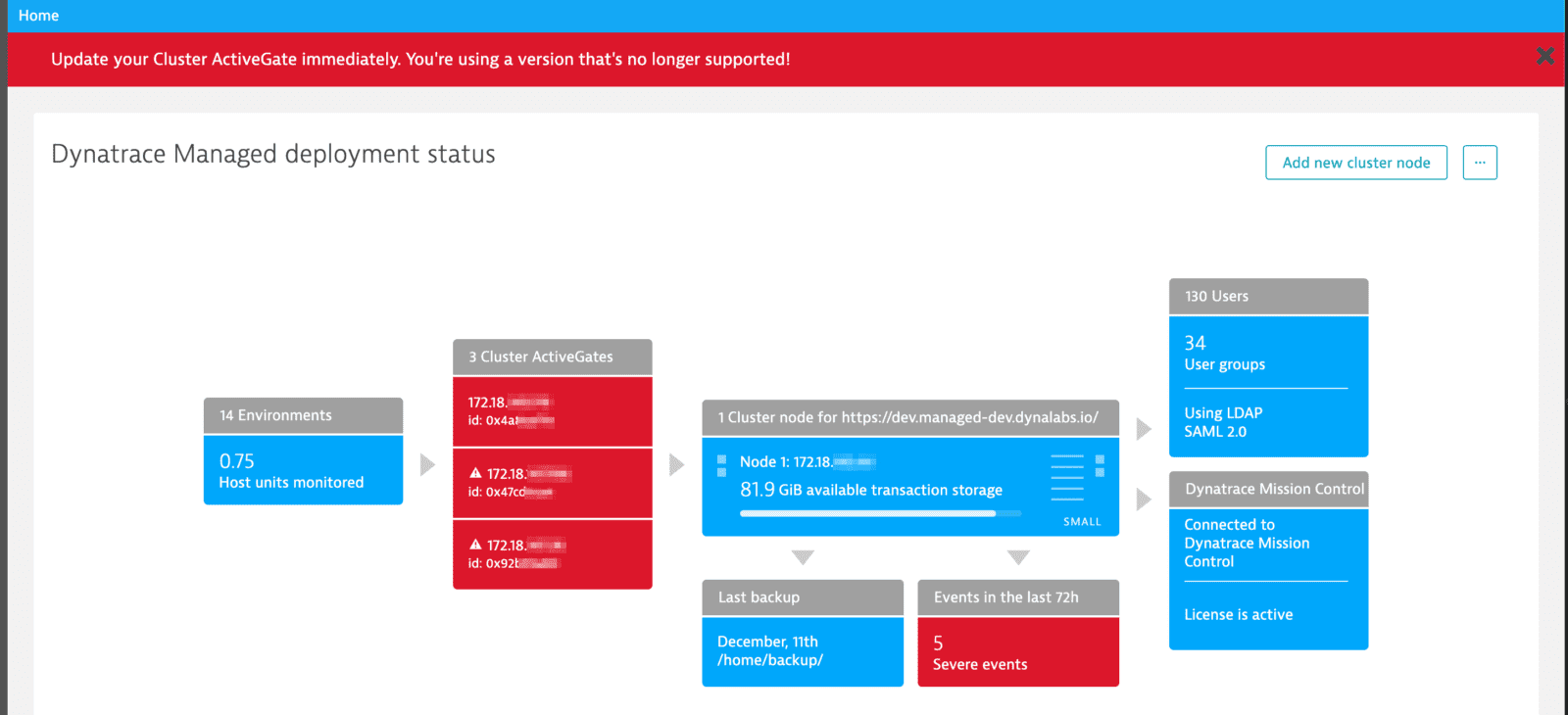
To update a Cluster ActiveGate, download the installer from Cluster Management Console and run the installation. For more information, see How to install a Cluster ActiveGate.
What's next?
In upcoming releases we'll enable a single-click update option for Cluster ActiveGate and automatic updates, to save you time and effort. Read Environment ActiveGates can now be updated with a single click on our blog to learn about this feature, which is already available for Environment ActiveGates.
Other changes
- Managed JVM-based services were updated with
-Dfile.encoding=UTF-8 -Dsun.jnu.encoding=UTF-8arguments during startup to better support logging messages. - Insufficient disk space cluster event message was updated. Every time it is triggered, it sends an e-mail notification to cluster administrators.
- For large LDAP deployments, the configuration test was optimized to provide feedback in a reasonably short time.
- Upgrade time of a single-node cluster deployment was improved.
Resolved issues
Dynatrace Managed General Availability (Build .182)
The Dynatrace Managed .182 GA release contains 7 resolved issues.
| Component | Resolved issues |
|---|---|
| Cluster | 1 |
| ON-PREM | 3 |
| ON-PREM Console | 2 |
| Installer and Upgrade | 1 |
Cluster
- Fixed: user preference for session replay toggle on environment level were not preserved. (APM-198022)
ON-PREM
- "Login failed" event is not generated for log-in failures. (APM-202443)
- User accounts can now be sorted by "Assigned groups". (APM-202681)
- Expired trial environments will now be correctly unblocked when upgrading them to standard environments. (APM-206775)
ON-PREM Console
- Cluster version is now correctly checked during upgrade - necessary for enabling/disabling Log Monitoring free tier. (APM-202729)
- Link from the invitation email should always point to latest GA version, not to the one from email generation time. (APM-204249)
Installer and Upgrade
- "/opt/dynatrace-managed/tmp-bin" is not cleaned anymore if any Dynatrace process using this directory is not about to be restarted during upgrade. (APM-208937)
Dynatrace SaaS General Availability (Build .181)
The Dynatrace SaaS .181 GA release contains 10 resolved issues.
RUM
- Don't consider the RUM default application in application detection for browser monitors. (APM-203087)
- Session replay and rage detection settings are no longer removed with configuration updates via Web Application Configuration rest API. (APM-204148)
- Corrected link to Android instrumentation documentation. (APM-207338)
Cluster
- Fix inconsistencies in count value units. (APM-202244)
- On Azure dashboard - unhealthy services were not marked red on a list of app services and functions. (APM-202734)
- There might have been exception screen displayed in rare cases for .net process. (APM-203288)
- Fix problem with correct identification of PaaS host. (APM-204374)
- Fix scaling problem with plugin-origin charts that contain series based on the same timeseries. (APM-204486)
- DB Insights, most time consuming Oracle statements - per SQL Query graphs would not match the totals displayed for this query in the table row. Graph data would be trimmed to match the UI timeframe. While the table data would match an expanded timeframe covered by the metric store. So the graphs would display less data than was summarized in a table row. The timeframe expansion performed by the metric store is a result of lowering data granularity. Eg if 1-hour granularity is available for a given timeframe and the requested timeframe would not match 1-hour slot boundries exactly, the timeframe would be implicitly expanded by the metric store to cover all the partially matching timeslots. So requesting a 1 hour 30 minute timeframe where 1 hour granularity is available 2 hours' data would be returned. (APM-196732)
Core UI
- Environments filter does not find all matching entries. (APM-202584)
Dynatrace SaaS General Availability (Build .182)
The Dynatrace SaaS .182 GA release contains 9 resolved issues.
| Component | Resolved issues |
|---|---|
| Cluster | 5 |
| Core UI | 2 |
| Log Analytics | 1 |
| RUM | 1 |
Cluster
- For HTTP monitors assigned to management zone save button was disabled. (APM-205029)
- Problem occurred while viewing HTTP monitor data, and searching for a different one (in global search). After clicking to see different monitor data, page was not refreshed. (APM-205033)
- Network overview - Fix misleading message about applied filters. (APM-204460)
- Fixed problem with accessing agents deployment status with limited access rights. (APM-206189)
- Fix problem with no plugin metrics visible for host plugin with only keyCharts defined (and no keyMetrics nor charts). (APM-206387)
Core UI
- Fixed Session Details page request not triggered when changing a management zone. (APM-203030)
- Fixed shifting by an additional minute when switching the global time frame with arrows. (APM-206604)
Log Analytics
- Improved suggestion panels overlay behaviour in Log Viewer. (APM-204986)
RUM
- Fixes correlation of user action timings when connected actions are sent with more than one beacon signal from the JavaScript Agent. (APM-205419)