F5 BIG-IP extension Extension Updated on Jan 28, 2026 Gain insights into the performance of your F5 BIG-IP LTM and DNS solutions.
Get started Overview Use the F5 BIG-IP extension with SNMP to collect data remotely.
Data is collected from your F5 devices every minute and continuously analyzed by the Dynatrace platform.
The insights provided go beyond simple charting capabilities cover both the Local Traffic Manager (LTM) and DNS (formerly Global Traffic Manager) modules of the BIG-IP platform.
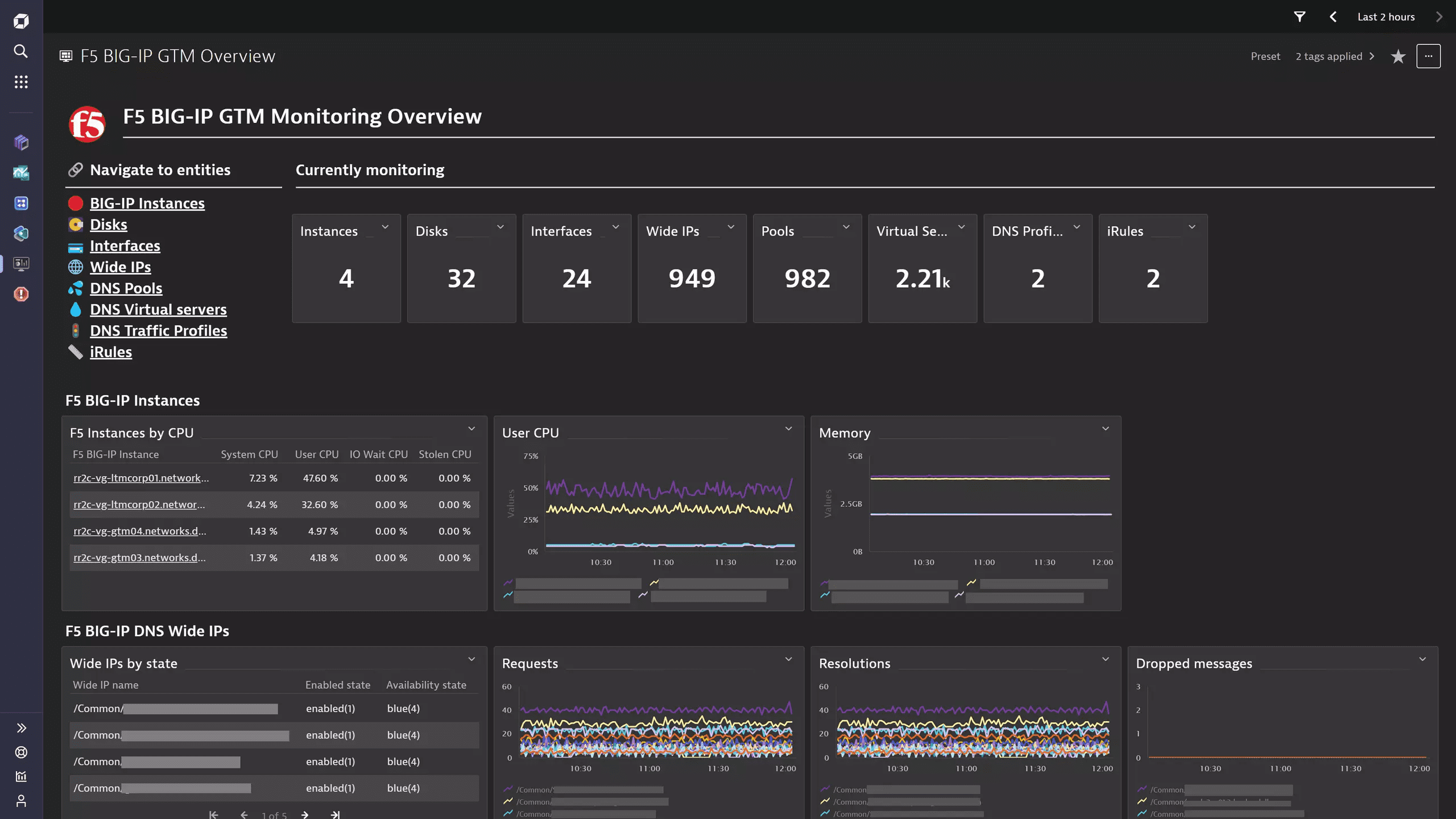
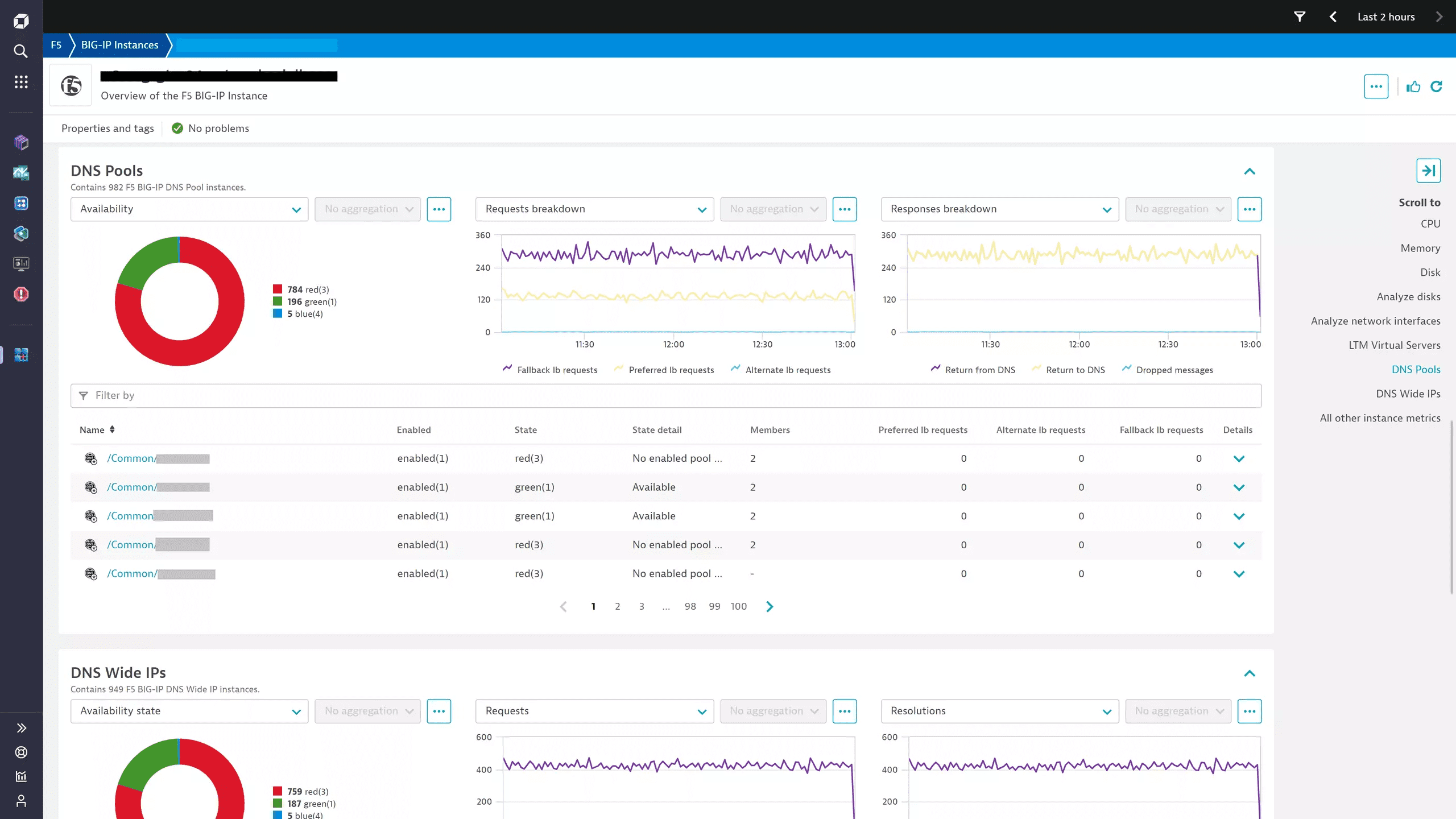
The unified analysis pages offer insight into the health and performance of the platform, while the Dynatrace analytics engine baselines and alerts on the most important indicators. The topology-first approach allows Dynatrace Intelligence to investigate and correlate detected problems between components and identify root causes.
This page is intended for users who want to:
Monitor the health state and performance of their F5 BIG-IP devices Look for analysis support for Ops, IT, and network admins. This enables you to:
Monitor infrastructure with a comprehensive dashboard Detect traffic anomalies and set up alerting for them Take pre-emptive measures to avoid service degradations Use cases Monitor F5 infrastructure and resource utilization Understand the health and performance of Local Traffic Manager and DNS Enable alerting on detected anomalies Capture BIG-IP notifications by integrating with the SNMP Traps extension. Requirements Activate the extension in your environment web-UI using the in-product Hub, provide the necessary device configuration, and you’re all set.
Read more in our SNMP extension documentation .
Compatibility Requirements F5 BIG-IP devices using SNMP v2c and v3 Details The extension package contains:
SNMP data source configuration for metric ingestion Topology and relationship definitions for physical (BIG-IP instance, disks, network interfaces) and logical (LTM & DNS virtual servers, pools, pool members, etc.) components of the BIG-IP platform. Dashboards offering LTM & DNS monitoring overviews and a high level status overview Alerts covering component availability and resource utilization Unified Analysis pages for each entity This extension is built on top of the new Extension 2.0 Framework .
More information can be found on the Dynatrace Product News Blog .
Licensing and costs Calculate license consumption This extension runs all SNMP queries every minute. Once data is produced, this is ingested as metric datapoints and subject to license consumption. Whether you are on a Classic or DPS license model, the measurement unit for metric ingestion is based on metric datapoints.
To estimate the amount of metric datapoints produced by your extension configuration, use the following list which gives you a number of metrics per feature set and a multiplier value depending on which entity the metric is split by. Add all of these up and you will have the number of datapoints produced every minute .
default: 3 x F5 Devices chassis-components: 2 x Fans + 1 x Power supplies + 1 x F5 Devices device-packet-stats: 10 x F5 Devices device-entity-counts: 3 x F5 Devices device-connection-stats: 10 x F5 Devices instance-sync: 1 x F5 Devices instance-memory-basic: 2 x F5 Devices instance-cpu-basic: 10 x F5 Devices instance-memory-advanced: 5 x F5 Devices apm-licenses: 2 x F5 Devices disk: 3 x Disks interface: 12 x Interfaces rule: 3 x LTM iRules gtm-irule: 3 x DNS iRules profile-http: 6 x HTTP profiles profile-clientssl: 14 x Client SSL profiles profile-server-ssl: 9 x Server SSL profiles profile-serverssl-handshakes-basic: 2 x Server SSL profiles profile-serverssl-handshakes-advanced: 2 x Server SSL profiles gtm-dns-profile-state: 1 x DNS profiles gtm-dns-profile-metrics: 10 x DNS profiles virtualserver-connectivity-basic: 4 x LTM Virtual servers virtualserver-syn-cookies: 2 x LTM Virtual servers virtualserver-advanced: 9 x LTM Virtual servers virtualserver-basic: 1 x LTM Virtual servers virtualserver-connectivity-advanced: 3 x LTM Virtual servers pool-basic: 3 x LTM Pools pool-connectivity: 4 x LTM Pools pool-advanced: 4 x LTM Pools node-basic: 2 x LTM Pool members node-advanced: 4 x LTM Pool members node-connectivity: 3 x LTM Pool members gtm-dnssec: 3 x F5 Devices gtm-virtual-server-state: 1 x DNS Virtual servers gtm-virtual-server-metrics-traffic: 5 x DNS Virtual servers gtm-virtual-server-metrics-resources: 2 x DNS Virtual servers gtm-virtual-server-metrics-lb: 3 x DNS Virtual servers gtm-wide-ip-state: 2 x DNS Wide IPs gtm-wide-ip-metrics: 10 x DNS Wide IPs gtm-pool-state: 1 x DNS Pools gtm-pool-metrics: 6 x DNS Pools gtm-pool-member-state: 1 x DNS Pool members For example, for a monitoring configuration where all feature sets are enabled, containing 1 F5 BIG-IP Device which has 1 Fan, 1 Power supply, 1 Disk, 1 Interface, 1 LTM iRule, 1 GTM iRule, 1 HTTP profile, 1 Client SSL profile, 1 Server SSL profile, 1 DNS profile, 1 LTM Virtual server, 1 LTM Pool, 1 LTM Pool member, 1 DNS Wide IP, 1 DNS Virtual server, 1 DNS Pool, 1 DNS Pool member, the extension produces 188 metric datapoints per minute .
By extrapolation, it will ingest:
188 x 60 = 11,280 metric datapoints per hour188 x 60 x 24 = 270,720 metric datapoints per day188 x 60 x 24 x 365 = 98,812,800 metric datapoints per yearTips for avoiding license overconsumption: LTM and DNS modules are rarely configured both on the same device. You should check in advance which applies to your device and only enable those feature sets. Make use of the rich filtering configuration to only monitor those entities relevant to you, not the entire system. Feature sets When activating your extension using a monitoring configuration, you can limit monitoring to one of the feature sets. To work properly, the extension has to collect at least one metric after the activation.
In highly segmented networks, feature sets can reflect the segments of your environment. Then, when you create a monitoring configuration, you can select a feature set and a corresponding ActiveGate group that can connect to this particular segment.
All metrics that aren't categorized into any feature set are considered to be the default and are always reported.
A metric inherits the feature set of a subgroup, which in turn inherits the feature set of a group. Also, the feature set defined on the metric level overrides the feature set defined on the subgroup level, which in turn overrides the feature set defined on the group level.
virtualserver-syn-cookies Accepted syn cookies com.dynatrace.extension.f5.bigip.virtualserver.stat.wl.syncookie.accepts.count The number of whitelist syn cookies received that were accepted. Rejected syn cookies com.dynatrace.extension.f5.bigip.virtualserver.stat.wl.syncookie.rejects.count The number of whitelist syn cookies received that were rejected.
gtm-irule Failures com.dynatrace.extension.f5.bigip.rule.event.stat.failures.count The number of failures for executing the specified rule. Aborts com.dynatrace.extension.f5.bigip.rule.event.stat.aborts.count The number of aborts when executing the specified rule. Executions com.dynatrace.extension.f5.bigip.rule.event.stat.total.executions.count The total number of event executions for the specified rule.
virtualserver-basic Virtual server state com.dynatrace.extension.f5.bigip.virtualserver.state General state metric for the server. Value is always 1, but dimensions carry all details of a virtual server.
gtm-virtual-server-metrics-resources CPU Usage com.dynatrace.extension.f5.bigip.gtm.virtualserver.cpu_usage_count The CPU usage in percentage for the specified virtual server. Memory available com.dynatrace.extension.f5.bigip.gtm.virtualserver.memory_available_count The memory available in bytes for the specified virtual server.
profile-serverssl-handshakes-basic Secure handshakes com.dynatrace.extension.f5.bigip.profile.server.ssl.stat.secure.handshakes.count The number of handshakes, including mid-stream re-negotiations, performed with peers supporting SSL secure renegotiation. Handshake failures com.dynatrace.extension.f5.bigip.profile.server.ssl.stat.handshake.failures.count The total number of handshake failures.
profile-serverssl Common connections com.dynatrace.extension.f5.bigip.profile.server.ssl.stat.tot.compat.conns.count The total number of concurrent compat connections with established SSL sessions being maintained by the filter. Native connections com.dynatrace.extension.f5.bigip.profile.server.ssl.stat.tot.native.conns.count The total number of concurrent native connections with established SSL sessions being maintained by the filter. Fatal alerts com.dynatrace.extension.f5.bigip.profile.server.ssl.stat.fatal.alerts.count The total number of the fatal alerts. DTLSv1 connections com.dynatrace.extension.f5.bigip.profile.server.ssl.stat.dtlsv1.count The total connections for SSL DTLS protocol version 1. DTLSv2 connections com.dynatrace.extension.f5.bigip.profile.server.ssl.stat.sslv2.count The total connections for SSL protocol version 2. SSLv3 connections com.dynatrace.extension.f5.bigip.profile.server.ssl.stat.sslv3.count The total connections for SSL protocol version 3. TLSv1.1 connections.count com.dynatrace.extension.f5.bigip.profile.server.ssl.stat.tlsv11.count The total connections for SSL TLS protocol version 1.1. TLSv1.2 connections com.dynatrace.extension.f5.bigip.profile.server.ssl.stat.tlsv12.count The total connections for SSL TLS protocol version 1.2. TLSv1 connections com.dynatrace.extension.f5.bigip.profile.server.ssl.stat.tlsv1.count The total connections for SSL TLS protocol version 1.
gtm-dnssec Signature failures com.dynatrace.extension.f5.bigip.gtm.dnssec.sig_failures_count Total number of general signature failures. RRSET failures com.dynatrace.extension.f5.bigip.gtm.dnssec.rrset_failures_count Total number of failures due to an RRSET failing to be signed. DNSKEY queries com.dynatrace.extension.f5.bigip.gtm.dnssec.dnskey_queries_count Total number of queries for DNSKEY type.
rule Failures com.dynatrace.extension.f5.bigip.rule.event.stat.failures.count The number of failures for executing the specified rule. Aborts com.dynatrace.extension.f5.bigip.rule.event.stat.aborts.count The number of aborts when executing the specified rule. Executions com.dynatrace.extension.f5.bigip.rule.event.stat.total.executions.count The total number of event executions for the specified rule.
System — com.dynatrace.extension.f5.bigip.sys.uptime —
instance-memory-basic Total memory com.dynatrace.extension.f5.bigip.sys.host.memory.total The total host memory in bytes (not including TMM). This is for a single host system. Used memory com.dynatrace.extension.f5.bigip.sys.host.memory.used The host memory in bytes currently in use (not including TMM). This is for a single host system.
gtm-wide-ip-state Wide IP state com.dynatrace.extension.f5.bigip.gtm.wip.state State metric which captures the metadata details of an F5 DNS (GTM) Wide IP. The value is always 1. Wide IP to Pool link com.dynatrace.extension.f5.bigip.gtm.wip.pool_link Relational metric linking F5 DNS (GTM) Pools to a Wide IP
device-entity-counts LTM nodes com.dynatrace.extension.f5.bigip.ltm.nodes The number of ltmNodeAddr entries in the table. LTM pools com.dynatrace.extension.f5.bigip.ltm.pools The number of ltmPool entries in the table. LTM virtual servers com.dynatrace.extension.f5.bigip.ltm.virtualservers The number of ltmVirtualServ entries in the table.
f5-interface Status com.dynatrace.extension.f5.bigip.sys.interface.status The current state of the specified interface. Bytes received com.dynatrace.extension.f5.bigip.sys.interface.stat.bytes.in.count The number of bytes received on the specified interface. Bytes transmitted com.dynatrace.extension.f5.bigip.sys.interface.stat.bytes.out.count The number of bytes transmitted out of the specified interface. Packets received com.dynatrace.extension.f5.bigip.sys.interface.stat.pkts.in.count The number of packets received on this interface. Packets transmitted com.dynatrace.extension.f5.bigip.sys.interface.stat.pkts.out.count The number of packets transmitted out of the specified interface. Dropped incoming packets com.dynatrace.extension.f5.bigip.sys.interface.stat.drops.in.count The number of packets dropped on ingress for various reasons on the specified interface. Dropped outgoing packets com.dynatrace.extension.f5.bigip.sys.interface.stat.drops.out.count The number of packets aged out or with excessive transmission delays due to multiple deferrals on the specified interface. Incoming errors com.dynatrace.extension.f5.bigip.sys.interface.stat.errors.in.count The number of received packets that are either undersized, oversized, or have FCS errors by the specified interface. Outgoing errors com.dynatrace.extension.f5.bigip.sys.interface.stat.errors.out.count The number of excessive collisions, incremented for each frame that experienced 16 collisions during transmission and was aborted on the specified interface.
gtm-wide-ip-metrics Requests com.dynatrace.extension.f5.bigip.gtm.wip.requests_count The number of total requests for the specified wide IP. Resolutions com.dynatrace.extension.f5.bigip.gtm.wip.resolutions_count The number of total resolutions for the specified wide IP. Persisted requests com.dynatrace.extension.f5.bigip.gtm.wip.persisted_requests_count The number of persisted requests for the specified wide IP. Preferred lb requests com.dynatrace.extension.f5.bigip.gtm.wip.lb_preferred_count The number of times which the preferred load balance method is used for the specified wide IP. Fallback lb requests com.dynatrace.extension.f5.bigip.gtm.wip.lb_fallback_count The number of times which the fallback load balance method is used for the specified wide IP. Alternate lb requests com.dynatrace.extension.f5.bigip.gtm.wip.lb_alternate_count The number of times which the alternate load balance method is used for the specified wide IP. Dropped messages com.dynatrace.extension.f5.bigip.gtm.wip.dropped_count The number of dropped DNS messages for the specified wide IP. Return to DNS com.dynatrace.extension.f5.bigip.gtm.wip.return_to_dns_count The number of times which a resolve was returned to DNS (for resolution) for the specified wide IP. Return from DNS com.dynatrace.extension.f5.bigip.gtm.wip.return_from_dns_count The number of times which a resolve was returned from DNS for the specified wide IP. CNAME resolutions com.dynatrace.extension.f5.bigip.gtm.wip.cname_resolutions_count The number of times which a query is resolved by the CNAME of pools associated with the specified Wide IP.
pool-connectivity Requests com.dynatrace.extension.f5.bigip.pool.stat.tot.requests.count The total number of requests to the specified pool. Current connections com.dynatrace.extension.f5.bigip.pool.stat.server.current_conns The current number of connections from server-side to the specified pool. Queued connections com.dynatrace.extension.f5.bigip.pool.stat.server.queued_conns The number of connections currently in queue Current sessions com.dynatrace.extension.f5.bigip.pool.stat.cur.sessions The current number of sessions to the specified pool.
gtm-virtual-server-metrics-traffic Bits received com.dynatrace.extension.f5.bigip.gtm.virtualserver.bits_persec_in_count The number of bits per second received by the specified virtual server. Bits sent com.dynatrace.extension.f5.bigip.gtm.virtualserver.bits_persec_out_count The number of bits per second sent by the specified virtual server. Packets received com.dynatrace.extension.f5.bigip.gtm.virtualserver.pkts_persec_in_count The number of packets per second received by the specified virtual server. Packets sent com.dynatrace.extension.f5.bigip.gtm.virtualserver.pkts_persec_out_count The number of packets per second received by the specified virtual server. Connections com.dynatrace.extension.f5.bigip.gtm.virtualserver.connections_count The number of total connections to the specified virtual server.
virtualserver-connectivity-basic Connection limit com.dynatrace.extension.f5.bigip.virtualserver.conn_limit The maximum number of connections the specified virtual server is allowed to have open at one time Requests com.dynatrace.extension.f5.bigip.virtualserver.stat.tot.requests.count The total number of requests going through the specified virtual server. Max connections com.dynatrace.extension.f5.bigip.virtualserver.stat.client.max_conns The maximum number of connections from client-side to the specified virtual server. This includes queued connections. Current connections com.dynatrace.extension.f5.bigip.virtualserver.stat.client.current_conns The current connections from client-side to the specified virtual server.
apm-session APM total system sessions com.dynatrace.extension.f5.bigip.apm.session.system_total The total sessions created in the system. apmAccessStatTotalSessions APM active system sessions com.dynatrace.extension.f5.bigip.apm.session.system_active.count The total active user sessions in the system. apmAccessStatCurrentActiveSessions
gtm-dns-profile-state Profile state com.dynatrace.extension.f5.bigip.gtm.profile.state A state metric containing the details of a DNS Profile. The value is always 1, use the dimensions to understand the details.
node-basic Monitor status com.dynatrace.extension.f5.bigip.pool_member.monitor.status The hierarchical load balance state for the specified node address, including parent status. Value is always 1. Status dimension takes values: unchecked(0), checking(1), inband(2), up(3), addr-down(18), down(19), forced-down(20), maint(21), irule-down(22), inband-down(23), down-manual-resume(24) Pool Member state com.dynatrace.extension.f5.bigip.pool_member.state General state metric for the pool_member. Value is always 1, but dimensions 'Enabled state' and 'Availability state' define the state. The availability state takes the following values: 0 (none/error); 1 (green/available in some capacity); 2 (yellow/not currently available); 3 (red/not available); 4 (blue/availability is unknown); 5 (gray/unlicensed). Enabled state takes values 0 (none), 1 (enabled), 2 (disabled), 3 (disabled by parent).
instance-cpu-basic Idle CPU com.dynatrace.extension.f5.bigip.sys.global.host.cpu.idle1m The average time spent by the specified processor doing nothing for the system in the last one minute. IO Wait CPU com.dynatrace.extension.f5.bigip.sys.global.host.cpu.iowait1m The average time spent by the specified processor waiting for external I/O to complete for the system in the last one minute. IRQ CPU com.dynatrace.extension.f5.bigip.sys.global.host.cpu.irq1m The average time spent by the specified processor servicing hardware interrupts for the system in the last one minute. Soft IRQ CPU com.dynatrace.extension.f5.bigip.sys.global.host.cpu.softirq1min The average time spent by the specified processor servicing soft interrupts for the system in the last one minute. Stolen CPU com.dynatrace.extension.f5.bigip.sys.global.host.cpu.stolen1m The average time 'stolen' from the system in the last one minute. System CPU com.dynatrace.extension.f5.bigip.sys.global.host.cpu.system1m The average time spent by the specified processor servicing system calls for the system in the last one minute. User CPU com.dynatrace.extension.f5.bigip.sys.global.host.cpu.user1m The average time spent by the specified processor in user context for the system in the last one minute.
profile-clientssl Common connections com.dynatrace.extension.f5.bigip.profile.client.ssl.stat.tot.compat.conns.count The total number of concurrent compat connections with established SSL sessions being maintained by the filter. Native connections com.dynatrace.extension.f5.bigip.profile.client.ssl.stat.tot.native.conns.count The total number of concurrent native connections with established SSL sessions being maintained by the filter. Fatal alerts com.dynatrace.extension.f5.bigip.profile.client.ssl.stat.fatal.alerts.count The total number of the fatal alerts. Secure handshakes com.dynatrace.extension.f5.bigip.profile.client.ssl.stat.secure.handshakes.count The number of handshakes, including mid-stream re-negotiations, performed with peers supporting SSL secure renegotiation. Handshake failures com.dynatrace.extension.f5.bigip.profile.client.ssl.stat.handshake.failures.count The total number of handshake failures. Insecure handshakes accepted com.dynatrace.extension.f5.bigip.profile.client.ssl.stat.insecure.handshake.accepts.count The number of handshakes, including mid-stream re-negotiations, performed with peers not supporting SSL secure renegotiation. Insecure handshakes rejected com.dynatrace.extension.f5.bigip.profile.client.ssl.stat.insecure.handshake.rejects.count The number of rejected initial handshakes with peers not supporting SSL secure renegotiation. Insecure renegotiations rejected com.dynatrace.extension.f5.bigip.profile.client.ssl.stat.insecure.renegotiation.rejects.count The number of rejected renegotiation attempts by peers not supporting SSL secure renegotiation. DTLSv1 connections com.dynatrace.extension.f5.bigip.profile.client.ssl.stat.dtlsv1.count The total connections for SSL DTLS protocol version 1.0. SSLv2 connections com.dynatrace.extension.f5.bigip.profile.client.ssl.stat.sslv2.count The total connections for SSL protocol version 2. SSLv3 connections com.dynatrace.extension.f5.bigip.profile.client.ssl.stat.sslv3.count The total connections for SSL protocol version 3. TLSv1 connections com.dynatrace.extension.f5.bigip.profile.client.ssl.stat.tlsv1.count The total connections for SSL TLS protocol version 1. TLSv1.1 connections com.dynatrace.extension.f5.bigip.profile.client.ssl.stat.tlsv11.count The total connections for SSL TLS protocol version 1.1. TLSv1.2 connections com.dynatrace.extension.f5.bigip.profile.client.ssl.stat.tlsv12.count The total connections for SSL TLS protocol version 1.2.
f5-host-system-usage System Users com.dynatrace.extension.f5.bigip.sys.host.num_users The number of user sessions for which this host is storing state information. hrSystemNumUsers System Processes com.dynatrace.extension.f5.bigip.sys.host.num_processes The number of process contexts currently loaded or running on this system. hrSystemProcesses System Max Processes com.dynatrace.extension.f5.bigip.sys.host.max_processes The maximum number of process contexts this system can support. hrSystemMaxProcesses Load Average 1min com.dynatrace.extension.f5.bigip.sys.host.load_average The 1 minute load average. laLoad
gtm-pool-state DNS Pool state com.dynatrace.extension.f5.bigip.gtm.pool.state State metric which captures details of DNS (GTM) Pools. Value is always 1.
apm-profiles APM total access profile sessions com.dynatrace.extension.f5.bigip.apm.profile.total_sessions.count The total user sessions in the specified access profile. apmPaStatTotalSessions APM active access profile sessions com.dynatrace.extension.f5.bigip.apm.profile.active_sessions.count The total active user sessions in the specified access profile. apmPaStatCurrentActiveSessions
gtm-pool-member-state Pool member state com.dynatrace.extension.f5.bigip.gtm.pool_member.state State metric which captures details of F5 DNS (GTM) Pool Members. Value is always 1.
physical-sensors Physical Sensor Value com.dynatrace.extension.f5.bigip.sensor.value The most recent measurement obtained by the agent for this sensor. entPhySensorValue
node-connectivity Requests com.dynatrace.extension.f5.bigip.pool_member.stat.tot.requests.count The total number of requests going through the specified pool member. Current connections com.dynatrace.extension.f5.bigip.pool_member.stat.server.current_conns The current number of connections from server-side to the specified pool member. Queued connections com.dynatrace.extension.f5.bigip.pool_member.stat.server.queued_conns The number of connections currently in queue.
default — com.dynatrace.extension.network_device.sysuptime — — com.dynatrace.extension.network_device.if.status — — com.dynatrace.extension.network_device.cpu_usage — — com.dynatrace.extension.network_device.memory_used — — com.dynatrace.extension.network_device.memory_total —
Advanced interfaces — com.dynatrace.extension.network_device.if.in.multicast_pkts.count — — com.dynatrace.extension.network_device.if.out.multicast_pkts.count — — com.dynatrace.extension.network_device.if.in.broadcast_pkts.count — — com.dynatrace.extension.network_device.if.out.broadcast_pkts.count — — com.dynatrace.extension.network_device.if.in.ucast_pkts.count — — com.dynatrace.extension.network_device.if.out.ucast_pkts.count —
profile-serverssl-handshakes-advanced Insecure handshakes accepted com.dynatrace.extension.f5.bigip.profile.server.ssl.stat.insecure.handshake.accepts.count The number of handshakes, including mid-stream re-negotiations, performed with peers not supporting SSL secure renegotiation. Insecure handshakes rejected com.dynatrace.extension.f5.bigip.profile.server.ssl.stat.insecure.handshake.rejects.count The number of rejected initial handshakes with peers not supporting SSL secure renegotiation. Insecure renegotiations rejected com.dynatrace.extension.f5.bigip.profile.server.ssl.stat.insecure.renegotiation.rejects.count The number of rejected renegotiation attempts by peers not supporting SSL secure renegotiation.
virtualserver-connectivity-advanced Ephemeral connections com.dynatrace.extension.f5.bigip.virtualserver.stat.ephemeral.tot.conns.count The total ephemeral connections to the specified virtual server. Slow connections killed com.dynatrace.extension.f5.bigip.virtualserver.stat.client.slow.killed.count The number of slow client-side connections that have been killed on the specified virtual server. Evicted connections com.dynatrace.extension.f5.bigip.virtualserver.stat.client.evicted.conns.count The number of client-side connections that have been evicted on the specified virtual server.
instance-memory-advanced Total swap com.dynatrace.extension.f5.bigip.mem.total.swap The total amount of swap space configured for this host. Available swap com.dynatrace.extension.f5.bigip.mem.avail.swap The amount of swap space currently unused or available. Shared memory com.dynatrace.extension.f5.bigip.mem.shared The total amount of real or virtual memory currently allocated for use as shared memory. This object will not be implemented on hosts where the underlying operating system does not explicitly identify memory as specifically reserved for this purpose. Cached memory com.dynatrace.extension.f5.bigip.mem.cached The total amount of real or virtual memory currently allocated for use as cached memory. This object will not be implemented on hosts where the underlying operating system does not explicitly identify memory as specifically reserved for this purpose. Buffer memory com.dynatrace.extension.f5.bigip.mem.buffer The total amount of real or virtual memory currently allocated for use as memory buffers. This object will not be implemented on hosts where the underlying operating system does not explicitly identify memory as specifically reserved for this purpose. TMM memory total com.dynatrace.extension.f5.bigip.sys.tmm.memory.total The total memory available to TMM (Traffic Management Microkernel). TMM memory used com.dynatrace.extension.f5.bigip.sys.tmm.memory.used The memory currently in use by TMM (Traffic Management Microkernel). Other TMOS memory total com.dynatrace.extension.f5.bigip.sys.tmos.other.memory.total The total memory available to other TMOS processes (excluding TMM). Other TMOS memory used com.dynatrace.extension.f5.bigip.sys.tmos.other.memory.used The memory currently in use by other TMOS processes (excluding TMM).
node-advanced Bytes received com.dynatrace.extension.f5.bigip.pool_member.stat.server.bytes.in.count The number of bytes received by the specified pool member from server-side. Bytes transmitted com.dynatrace.extension.f5.bigip.pool_member.stat.server.bytes.out.count The number of bytes sent to server-side from the specified pool member. Packets received com.dynatrace.extension.f5.bigip.pool_member.stat.server.pkts.in.count The number of packets received by the specified pool member from server-side. Packets transmitted com.dynatrace.extension.f5.bigip.pool_member.stat.server.pkts.out.count The number of packets sent to server-side from the specified pool member.
pool-basic Members com.dynatrace.extension.f5.bigip.pool.member.cnt The total number of members in the specified pool. Active members com.dynatrace.extension.f5.bigip.pool.active.member.cnt The number of the current active members in the specified pool. Pool state com.dynatrace.extension.f5.bigip.pool.state General state metric for the pool. Value is always 1, but dimensions 'Enabled state' and 'Availability state' define the state. The availability state takes the following values: 0 (none/error); 1 (green/available in some capacity); 2 (yellow/not currently available); 3 (red/not available); 4 (blue/availability is unknown); 5 (gray/unlicensed). Enabled state takes values 0 (none), 1 (enabled), 2 (disabled), 3 (disabled by parent).
gtm-virtual-server-state Virtual server state com.dynatrace.extension.f5.bigip.gtm.virtualserver.state State metric describing the details of a DNS virtual server. The value is always 1, use the dimensions to understand the details.
Interfaces — com.dynatrace.extension.network_device.if.bytes_in.count — — com.dynatrace.extension.network_device.if.bytes_out.count — — com.dynatrace.extension.network_device.if.in.errors.count — — com.dynatrace.extension.network_device.if.in.discards.count — — com.dynatrace.extension.network_device.if.out.errors.count — — com.dynatrace.extension.network_device.if.out.discards.count — — com.dynatrace.extension.network_device.if.lastchange —
virtualserver-advanced CPU Usage com.dynatrace.extension.f5.bigip.virtualserver.stat.vs.usage.ratio1m The percentage of time Virtual Server was busy over the last 1 minute. Bytes received com.dynatrace.extension.f5.bigip.virtualserver.stat.client.bytes.in.count The number of bytes received by the specified virtual server from client-side. Ephemeral bytes received com.dynatrace.extension.f5.bigip.virtualserver.stat.ephemeral.bytes.in.count The number of bytes received ephemeral by the specified virtual server. Bytes transmitted com.dynatrace.extension.f5.bigip.virtualserver.stat.client.bytes.out.count The number of bytes sent to client-side from the specified virtual server. Ephemeral bytes transmitted com.dynatrace.extension.f5.bigip.virtualserver.stat.ephemeral.bytes.out.count The number of bytes transmitted ephemeral from the specified virtual server. Packets received com.dynatrace.extension.f5.bigip.virtualserver.stat.client.pkts.in.count The number of packets received by the specified virtual server from client-side. Ephemeral packets received com.dynatrace.extension.f5.bigip.virtualserver.stat.ephemeral.pkts.in.count The number of packets received ephemeral by the specified virtual server. Packets transmitted com.dynatrace.extension.f5.bigip.virtualserver.stat.client.pkts.out.count The number of packets sent to client-side from the specified virtual server. Ephemeral packets transmitted com.dynatrace.extension.f5.bigip.virtualserver.stat.ephemeral.pkts.out.count The number of packets transmitted ephemeral from the specified virtual server.
gtm-pool-metrics Preferred lb requests com.dynatrace.extension.f5.bigip.gtm.pool.lb_preferred_count The number of times which the preferred load balance method is used for the specified pool. Alternate lb requests com.dynatrace.extension.f5.bigip.gtm.pool.lb_alternate_count The number of times which the alternate load balance method is used for the specified pool. Fallback lb requests com.dynatrace.extension.f5.bigip.gtm.pool.lb_fallback_count The number of times which the fallback load balance method is used for the specified pool. Dropped messages com.dynatrace.extension.f5.bigip.gtm.pool.dropped_count The number of dropped DNS messages for the specified pool. Return to DNS com.dynatrace.extension.f5.bigip.gtm.pool.return_to_dns_count The number of times which a resolve was returned to DNS (for resolution) for the specified pool. Return from DNS com.dynatrace.extension.f5.bigip.gtm.pool.return_from_dns_count The number of times which a resolve was returned from DNS for the specified pool.
chassis-components — com.dynatrace.extension.f5.bigip.chassis.fan.state — Fan speed com.dynatrace.extension.f5.bigip.chassis.fan.speed The actual speed of the indexed chassis fan on the system. This is only supported for the platform where the actual fan speed data is available.'0' means fan speed is unavailable while the associated chassis status is good. — com.dynatrace.extension.f5.bigip.chassis.ps.state — Chassis temperature com.dynatrace.extension.f5.bigip.chassis.temperature The chassis temperature (in Celsius) of the indexed sensor on the system. This is only supported for the platform where the sensor data is available.
profile-http GET Requests com.dynatrace.extension.f5.bigip.profile.http.stat.get.reqs.count The total number of HTTP get requests. POST Requests com.dynatrace.extension.f5.bigip.profile.http.stat.post.reqs.count The total number of HTTP post requests. 2xx Responses com.dynatrace.extension.f5.bigip.profile.http.stat.resp2xx.cnt.count The number of server-side responses in range of 200 to 206 (successful responses) 3xx Responses com.dynatrace.extension.f5.bigip.profile.http.stat.resp3xx.cnt.count The number of server-side responses in range of 300 to 307 (redirection responses). 4xx Responses com.dynatrace.extension.f5.bigip.profile.http.stat.resp4xx.cnt.count The number of server-side responses in range of 400 to 417 (client errors). 5xx Responses com.dynatrace.extension.f5.bigip.profile.http.stat.resp5xx.cnt.count The number of server-side responses in range of 500 to 505 (server errors).
gtm-virtual-server-metrics-lb Preferred lb requests com.dynatrace.extension.f5.bigip.gtm.pool_member.lb_preferred_count The number of times which the preferred load balance method is used for the specified pool member. Alternate lb requests com.dynatrace.extension.f5.bigip.gtm.pool_member.lb_alternate_count The number of times which the preferred load balance method is used for the specified pool member. Fallback lb requests com.dynatrace.extension.f5.bigip.gtm.pool_member.lb_fallback_count The number of times which the fallback load balance method is used for the specified pool member.
gtm-dns-profile-metrics DNS queries com.dynatrace.extension.f5.bigip.gtm.profile.queries_count The total number of DNS queries. DNS responses com.dynatrace.extension.f5.bigip.gtm.profile.responses_count The total number of DNS responses. Cache requests com.dynatrace.extension.f5.bigip.gtm.profile.to_cache_count The number of requests sent to the DNS cache. DNS requests com.dynatrace.extension.f5.bigip.gtm.profile.to_dns_count The number of requests sent to backend DNS. Dropped messages com.dynatrace.extension.f5.bigip.gtm.profile.drops_count The number of packets dropped (not sent to GTM, DNS-Express, DNSSEC, DNS64, or Backend DNS (e.g. BIND)). NOERROR responses com.dynatrace.extension.f5.bigip.gtm.profile.resp_noerror_count The number of NOERROR responses sent. NXDOMAIN responses com.dynatrace.extension.f5.bigip.gtm.profile.resp_nxdomain_count The number of responses whose return code is NXDOMAIN. SERVFAIL responses com.dynatrace.extension.f5.bigip.gtm.profile.resp_servfail_count The number of responses whose return code is SERVFAIL. REFUSED responses com.dynatrace.extension.f5.bigip.gtm.profile.resp_refused_count The number of responses whose return code is REFUSED. Malicious packets com.dynatrace.extension.f5.bigip.gtm.profile.malicious_count The number of malicious packets received.
disk Block size com.dynatrace.extension.f5.bigip.sys.host.disk.block.size The number of bytes in the specified partition. Total blocks com.dynatrace.extension.f5.bigip.sys.host.disk.total.blocks The number of total blocks in the specified partition. Free blocks com.dynatrace.extension.f5.bigip.sys.host.disk.free.blocks The number of free blocks in the specified partition.
instance-cpu-advanced Data Plane CPU com.dynatrace.extension.f5.bigip.sys.data.cpu1min The average CPU usage of the data plane in the last one minute. Control Plane CPU com.dynatrace.extension.f5.bigip.sys.control.cpu1min The average CPU usage of the control plane in the last one minute. Analysis Plane CPU com.dynatrace.extension.f5.bigip.sys.analysis.cpu1min The average CPU usage of the analysis plane in the last one minute.
pool-advanced Bytes received com.dynatrace.extension.f5.bigip.pool.stat.server.bytes.in.count The number of bytes received by the specified pool from server-side. Bytes transmitted com.dynatrace.extension.f5.bigip.pool.stat.server.bytes.out.count The number of bytes sent to server-side from the specified pool. Packets received com.dynatrace.extension.f5.bigip.pool.stat.server.pkts.in.count The number of packets received by the specified pool from server-side. Packets transmitted com.dynatrace.extension.f5.bigip.pool.stat.server.pkts.out.count The number of packets sent to server-side from the specified pool.
device-packet-stats Dropped packets com.dynatrace.extension.f5.bigip.sys.droppedPacketRate The total dropped packets. Packet errors in com.dynatrace.extension.f5.bigip.sys.inErrorRate The total incoming packet errors for the system. Dropped packets (license) com.dynatrace.extension.f5.bigip.sys.licenseDeny The packets which were dropped due to exceeding licensing limitations. Dropped packets (no handler) com.dynatrace.extension.f5.bigip.sys.noHandlerDeny The incoming packets that could not be processed by aa virtual server NAT or SNAT. Packet errors out com.dynatrace.extension.f5.bigip.sys.outErrorRate The total outgoing packet errors for the system. Dropped packets (no connection) com.dynatrace.extension.f5.bigip.sys.virtServerNonSynDeny The packets that are not connection requests and are destined for a virtual server that has no connection for the client address. Client packets in com.dynatrace.extension.f5.bigip.sys.clientPacketsIn The number of packets received by the system from client-side. Client packets out com.dynatrace.extension.f5.bigip.sys.clientPacketsOut The number of packets sent to client-side from the system. Server packets in com.dynatrace.extension.f5.bigip.sys.serverPacketsIn The number of packets received by the system from server-side. Server packets out com.dynatrace.extension.f5.bigip.sys.serverPacketsOut The number of packets sent to server-side from the system.
apm-licenses APM current connections com.dynatrace.extension.f5.bigip.apm.current_conns The total current SSL/VPN connections in the system APM connectivity licenses com.dynatrace.extension.f5.bigip.apm.total_licenses The total connectivity session licenses in the system
device-connection-stats Client bytes in com.dynatrace.extension.f5.bigip.sys.clientBytesIn The number of bytes received by the system from client-side. Client bytes out com.dynatrace.extension.f5.bigip.sys.clientBytesOut The number of bytes sent to client-side from the system. Server bytes in com.dynatrace.extension.f5.bigip.sys.serverBytesIn The number of bytes received by the system from server-side. Server bytes out com.dynatrace.extension.f5.bigip.sys.serverBytesOut The number of bytes sent to server-side from the system. Client current connections com.dynatrace.extension.f5.bigip.sys.clientCurConns The current connections from client-side to the system. Client max connections com.dynatrace.extension.f5.bigip.sys.clientMaxConns The maximum connections from client-side to the system. Server current connections com.dynatrace.extension.f5.bigip.sys.serverCurConns The current connections from server-side to the system. Server max connections com.dynatrace.extension.f5.bigip.sys.serverMaxConns The maximum connections from server-side to the system. Pva client current connections com.dynatrace.extension.f5.bigip.sys.hwClientCurConns The current hardware accelerated connections from client-side to the system. Pva client max connections com.dynatrace.extension.f5.bigip.sys.hwClientMaxConns The maximum hardware accelerated connections from client-side to the system.
instance-sync Failover and Sync status com.dynatrace.extension.f5.bigip.sys.cm.state The failover and config synchronization status of the device. Failover states can be: (0)unknown - the failover status of the device is unknown; (1)offline - the device is offline; (2)forcedOffline - the device is forced offline; (3)standby - the device is standby; (4)active - the device is active. Synchronization status can be: unknown(0), syncing(1), needManualSync(2), inSync(3), syncFailed(4), syncDisconnected(5), standalone(6), awaitingInitialSync(7), incompatibleVersion(8), partialSync(9)
Troubleshooting To troubleshoot this extension, use the guide(s) in the Dynatrace Community .