Calculate your consumption of Automation Workflow (DPS)
- Latest Dynatrace
- Overview
- 6-min read
This page describes how the Automation DPS capability is consumed and billed. For an overview of the capability, including its main features, see Automation.
How consumption is calculated: workflow hours
The unit of measure for automation workflow consumption is workflow hours. Workflow hours are the number of hours that a workflow has existed in your environment, measured since the point of its creation.
- Standard workflows consume workflow hours.
- Simple workflows do not directly consume workflow hours, however they can trigger consumption of other billable Dynatrace capabilities.
- Draft-only workflows do not directly consume workflow hours, however they can trigger consumption of other billable Dynatrace capabilities.
While simple and draft-only workflows themselves do not incur direct costs, their execution can trigger the use of billable Dynatrace capabilities. For example:
- Sending a message to Slack may result in Standard Function Calls.
- Running a DQL query within the workflow may incur additional query data usage.
Consumption of additional capabilities is billed according to your rate card.
How consumption is calculated for standard workflows
Standard workflows are billed based on the number and lifespan of standard automation workflows configured in your Dynatrace environment.
How consumption is calculated for simple workflows
There are no direct costs for Simple workflows, and as such they are a cost-effective way to begin automating basic tasks, such as sending notifications for detected problems.
You have configured a simple workflow to notify you (via Slack or e-mail) of each new problem created. Each month, 1000 new problems are created.
- Total cost for simple workflow: $0.
- Total cost for 1000 notifications per month: $1/month (billed as Standard Function Calls, according to the non-discounted rate card price).
How consumption is calculated for draft workflows
If you are drafting a standard workflow, you will do so when that workflow is in draft mode. A workflow in draft mode can only be run via Workflows using the Run button.
A workflow in draft mode doesn't directly consume workflow hours, but, like Simple workflows, its execution can trigger billable consumption of other capabilities.
Standard Function Calls
Each workflow execution triggers Standard Function Calls that execute tasks—each execution is an invocation. Each invocation results in additional monitoring consumption for your Dynatrace account. For full details, see Standard Function Calls.
To control the number of function invocations in your workflows, you can configure when tasks are triggered based on event subscriptions.
Track your consumption and costs
This section describes the different Dynatrace tools that you can use to track consumption and costs.
Track your consumption with DQL queries
You can use DQL to filter for events, for example with event.type == "Automation Workflow", to find relevant workflow consumption, as shown in the examples below.
The following DQL query provides an overview of total Automation Workflow usage in workflow hours:
fetch dt.system.events, scanLimitGBytes: -1| filter event.kind == "BILLING_USAGE_EVENT"| filter event.type == "Automation Workflow"| summarize takeAny(event.id), by:{timestamp=bin(timestamp, 1d),event.id}| summarize WorkflowHours=count(), by:{timestamp}| sort timestamp ASC
The resulting records contain the daily sum of usage in workflow hours.
Here is an example calculation showing the total usage of an Automation workflow.
Step 1 – Automation workflow
Let's assume a simple automation workflow example with an event that triggers one of two possible tasks. Based on the success or failure of the first task, a second task is executed. The workflow exists for a period of 14 days, during which time it has been inactive and active.
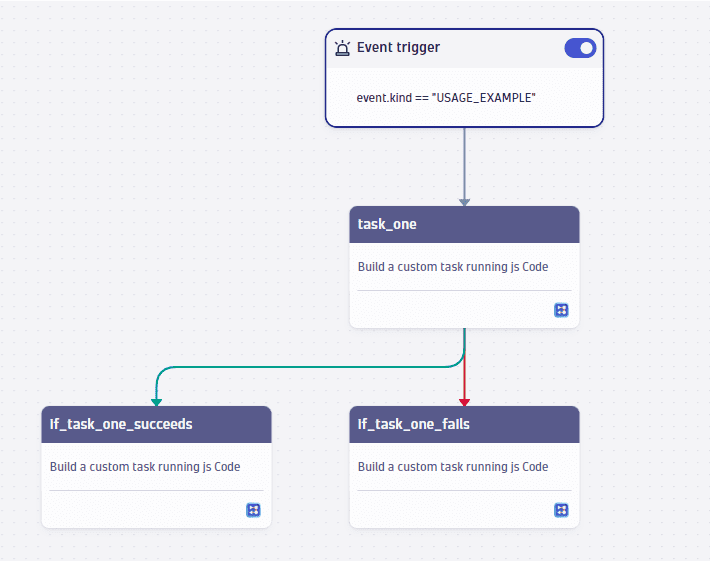
The workflow hours consumed for this scenario are calculated as follows:
24 hours × 14 days = 336 workflow hours
Step 2 – Standard Function Calls
Let's assume that within those 14 days, the workflow is triggered nine times. Each executed task (highlighted green in the graphic below) consumes one Standard Function Call.
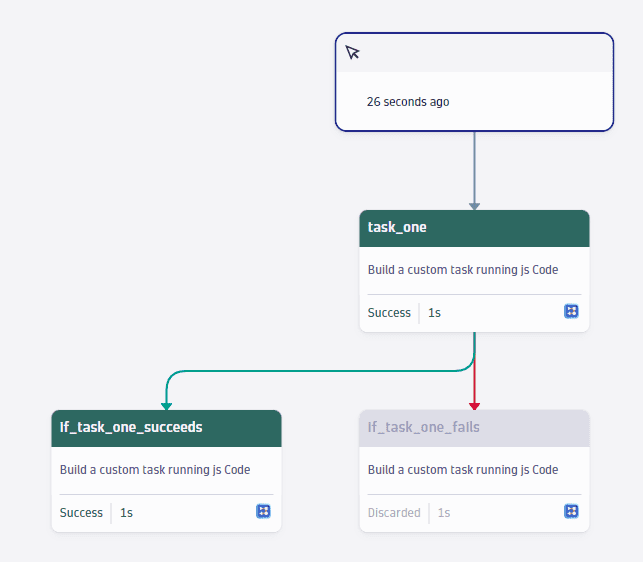
Standard Function Calls consumption is calculated by multiplying the total number of task executions by the number of minutes each Standard Function Call takes to complete each task.
9 (workflow executions) × 2 (executed tasks) × 1 (minutes per Standard Function Call) = 18 invocations
Step 3 – Total usage
The above automation workflow has consumed 336 workflow hours and 18 Standard Function Calls.
Track your consumption and costs in Account Management
You can also track your usage in Account Management. Go to Account Management > Subscription > Overview > Cost and usage details > Usage summary and select Capability: Automation Workflow.
Track your consumption and costs via API
You can query this information via the Environment API - Metrics API v2.